AI Course
What are AI Agents?
An AI agent is a system built on top of a generative AI model (typically an LLM) that can take actions — not just generate text — by reasoning about a goal, deciding on steps, and using external tools to accomplish a task. Rather than simply answering a question, an agent can plan, act, observe the result, and adjust its approach, often across multiple steps, with limited human input along the way.
How Agentic AI differs from a standard chatbot
- Standard chatbot/LLM — Takes a prompt, generates a text response, and stops. It doesn't take real-world actions or use external tools on its own.
- AI agent — Given a goal, it can break the goal into steps, decide which tools or actions are needed, execute those actions, review the results, and continue iterating until the goal is met (or it needs human input).
Core components of an AI agent
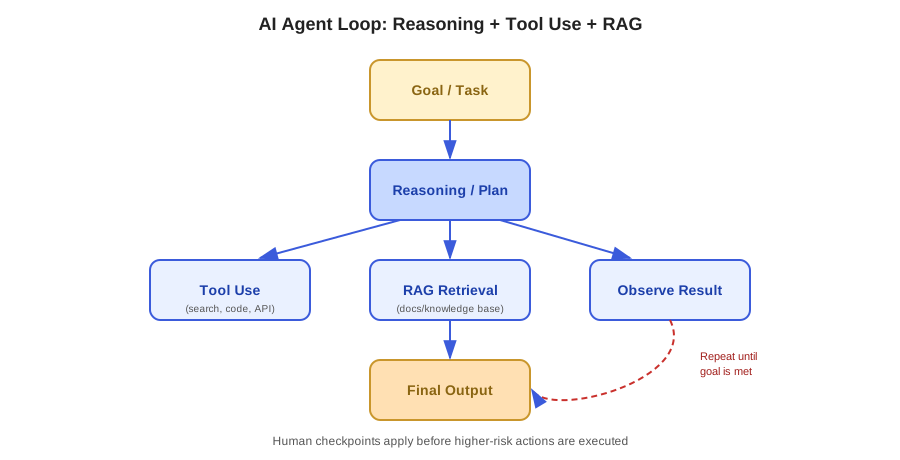
- Reasoning/planning — The underlying model decides what steps are needed to accomplish a goal, often reasoning through the problem before acting.
- Tool use / function calling — The agent can call external tools, APIs, or functions to perform actions it can't do purely through text generation — like searching the web, querying a database, sending an email, or running code.
- Memory/context — The agent retains relevant information across steps of a task (and sometimes across sessions), so it can build on previous actions rather than starting from scratch each time.
- Feedback loop — After taking an action, the agent observes the result and decides on the next step, adjusting its plan as needed.
What is Tool Use / Function Calling?
Tool use (also called function calling) is the mechanism that lets an AI model go beyond generating text and actually interact with external systems:
- The model is given a description of available tools/functions (what they do, and what input they expect).
- Based on the user's request, the model decides whether a tool is needed and, if so, which one and with what input.
- The tool is executed (outside the model itself), and the result is returned to the model.
- The model uses that result to continue reasoning, take further actions, or generate a final response.
Example: An AI assistant asked "What's the weather in Chicago tomorrow?" doesn't know the weather from its training data — it calls a weather tool with the location and date, receives the result, and uses that information to answer.
What is RAG (Retrieval-Augmented Generation)?
RAG is a technique that improves an LLM's responses by retrieving relevant information from an external source — like a document store or database — and providing that information to the model as additional context before it generates a response.
- Why it matters — LLMs only "know" what was in their training data, which has a cutoff date and doesn't include private or proprietary information. RAG lets a model reference current, specific, or private data without needing to be retrained.
- How it works, at a high level:
- A user's question is used to search a knowledge source (e.g., a document repository) for relevant content.
- The most relevant retrieved content is added to the prompt as context.
- The model generates a response grounded in that retrieved information, rather than relying solely on its training data.
- Example: A support chatbot that retrieves the most relevant sections of a company's product documentation before answering a customer's question, ensuring the answer reflects the current, actual product — not just general knowledge from training.
Common types of tools an agent might use
- Web search — Retrieving current information not available in the model's training data.
- Code execution — Running code to perform calculations, process data, or test logic.
- Database/API queries — Fetching or updating structured data from internal systems.
- File/document access — Reading, summarizing, or editing documents and files.
- Connectors to external services — Interacting with tools like calendars, project trackers, email, or messaging platforms to complete real tasks on a user's behalf.
Real-world examples of agentic AI in practice
- Coding agents — Given a task like "fix this bug," an agent can search the codebase, read relevant files, propose a fix, run tests, and iterate based on the results.
- Research agents — Given a research question, an agent can run multiple searches, read sources, and synthesize a report — rather than answering from memory alone.
- Customer support agents — Retrieving account details, checking order status, and taking actions like issuing a refund, based on a customer's request.
- Workflow automation agents — Monitoring an inbox or ticket queue and taking predefined actions (like categorizing or routing requests) with human review at key checkpoints.
Why human oversight remains critical for agents
- Action risk — Unlike a chatbot that only generates text, an agent can take real actions (sending messages, modifying data, making purchases) — mistakes have real consequences.
- Compounding errors — In multi-step tasks, an early misstep can lead the agent further off track with each subsequent step.
- Permission boundaries — Agents should generally be given the minimum necessary access, and higher-risk actions (like sending external communications or deleting data) often warrant human confirmation before execution.
- Transparency — It should be clear, ideally to the user, what actions an agent took and why — enabling review and correction if something goes wrong.
Common challenges with AI agents and tool use
- Reliability — Multi-step reasoning increases the chance of an error occurring somewhere in the chain of steps.
- Tool selection accuracy — An agent may occasionally choose the wrong tool or misinterpret when a tool is actually needed.
- Latency and cost — Multi-step, tool-using tasks generally take longer and cost more (in compute) than a single text response.
- Security — Connecting an agent to real systems (email, databases, code repositories) introduces security considerations that need to be carefully managed.
Why this matters in practice
Understanding AI agents and tools helps in recognizing:
- The difference between a model that only generates text and one that can actually take actions in the real world.
- Why RAG is used to ground AI responses in current, specific, or private information rather than relying solely on training data.
- Why agentic AI systems still need clear permission boundaries and human checkpoints, especially for higher-risk actions.
- How modern AI-assisted workflows — coding assistants, research tools, support automation — are built by combining an LLM's reasoning with external tools, memory, and retrieval.