Back to AI Course
AI Course
AI in Software Development
AI tools are increasingly woven into the software development lifecycle — from architecture and design, to writing code, to testing, documentation, and maintenance. Understanding where AI fits (and where human judgment still matters most) helps in using these tools effectively rather than just experimentally.
Where AI can assist across the SDLC
-
Design & architecture
- Drafting initial API specs (OpenAPI/Swagger) from a natural-language description of requirements.
- Suggesting design patterns, architecture options, or trade-offs for a given problem (e.g., microservices vs. monolith, sync vs. async communication).
- Generating starter architecture diagrams or design templates to kick off a new project.
-
Coding
- Generating boilerplate code — controllers, DTOs, service layers, repository interfaces — based on a spec or description.
- Auto-completing code as you type, based on context in the surrounding file.
- Converting code between languages or frameworks (e.g., translating logic from one stack to another during a migration).
- Explaining unfamiliar code, legacy systems, or third-party libraries in plain language.
-
Testing
- Generating unit tests and test cases based on existing code or specs.
- Suggesting edge cases that might otherwise be missed.
- Helping draft test data and mocks for isolated testing.
-
Documentation
- Drafting API documentation, README files, and code comments.
- Summarizing complex codebases or modules for onboarding new team members.
-
Code review & quality
- Flagging potential bugs, security issues, or code smells.
- Suggesting refactoring opportunities for readability, performance, or maintainability.
-
Migration & modernization
- Assisting in understanding legacy systems (e.g., COBOL/mainframe logic) by explaining what a piece of code does before rewriting it.
- Drafting an initial mapping between legacy components and modern equivalents (e.g., DB2 tables to a target relational schema, mainframe batch jobs to Spring Boot services).
- Generating scaffolding for the target architecture (e.g., a Spring Boot API skeleton or Angular component structure) based on a description of the legacy functionality.
A practical example: API-first development with AI assistance
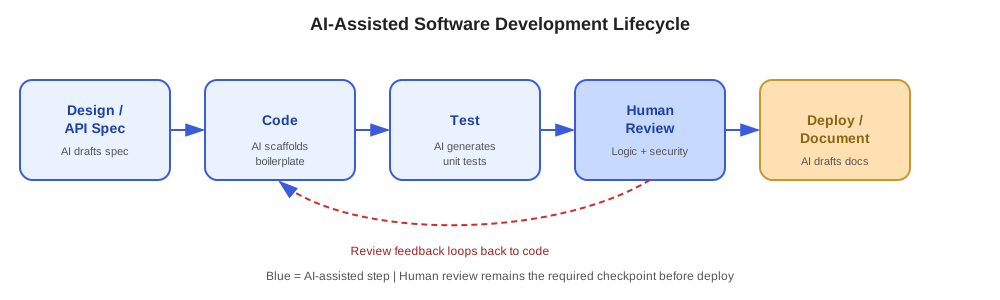
- Describe the required endpoint and its behavior in plain language.
- Use AI to draft the OpenAPI spec (paths, request/response schemas, status codes).
- Review and adjust the spec to match actual business rules and constraints.
- Use AI to scaffold the controller, DTOs, and service interfaces from the finalized spec.
- Implement the actual business logic (the part that requires domain knowledge and judgment).
- Use AI to generate a first pass of unit tests, then review and expand coverage for edge cases.
- Use AI to draft documentation and code comments once the implementation is stable.
Where human judgment remains essential
- Business logic and domain rules — AI can scaffold structure, but understanding and correctly implementing actual business requirements still requires human domain knowledge.
- Architecture decisions with long-term consequences — Trade-offs around scalability, cost, team skillset, and maintainability need human judgment, informed by AI-suggested options rather than dictated by them.
- Security-critical code — AI-generated code should be carefully reviewed for security vulnerabilities before being trusted in production.
- Legacy system nuance — Undocumented business rules embedded in legacy systems (like older mainframe logic) often require human investigation, stakeholder input, and careful validation — AI can help interpret code, but can't recover intent that was never documented.
- Final code review — AI-generated code should go through the same review rigor as human-written code, not be merged on trust alone.
Best practices for using AI in development workflows
- Be specific in prompts — Include relevant context: language/framework versions, existing code conventions, and constraints (e.g., "Generate a Spring Boot REST controller using constructor injection, following our existing DTO naming convention").
- Review generated code like you would a teammate's PR — Check correctness, security, performance, and adherence to standards before merging.
- Use AI for a starting point, not a final answer — Treat AI output as a first draft that accelerates your own work, not a finished deliverable.
- Keep sensitive code and data in mind — Be mindful of what code, data, or credentials are shared with external AI tools, especially with proprietary or regulated systems.
- Iterate — If the first generated result doesn't fit, refine the prompt with more context rather than manually reworking the whole output from scratch.
Common challenges
- Inaccurate or outdated suggestions — AI tools may suggest deprecated APIs, outdated library versions, or patterns that don't fit your specific codebase.
- Over-reliance — Accepting generated code without fully understanding it can lead to maintainability issues and hidden bugs down the line.
- Context limitations — AI tools may not have full visibility into your entire codebase, leading to suggestions that don't account for existing patterns or constraints elsewhere in the system.
- Security risks — Generated code isn't automatically secure; it still needs to be reviewed for vulnerabilities like injection risks, improper input validation, or insecure defaults.
Why this matters in practice
Understanding how AI fits into software development helps in recognizing:
- Where AI can meaningfully speed up repetitive work — API specs, boilerplate, tests, documentation — freeing up time for architecture and domain-specific problem solving.
- Why AI-assisted migration work (like mainframe-to-cloud modernization) still requires human investigation into legacy business rules that were never fully documented.
- Why code review, security review, and architectural judgment remain human responsibilities, even as AI accelerates the mechanical parts of development.
- How to structure a development workflow that uses AI as augmentation — accelerating the work — rather than full automation of decisions that require domain expertise.