Angular Course
What are Angular Components?
Imagine an app as a big puzzle. Each piece of this puzzle is an Angular Component. These components are self-contained units that hold their own logic, design, and behavior, working together to form a complete, functional web application.
Each Component consists of
- An HTML template that declares what renders on the page.
- A TypeScript class that defines behavior.
- A CSS selector that defines how the component is used in a template.
- Optionally, CSS styles applied to the template.
- Metadata: The @Component decorator specifies component configurations such as selector, template, styles, and more.
- selector: selector instructs Angular to instantiate this component wherever it finds the corresponding tag in template HTML.
- TemplateUrl: The HTML markup defines the component's UI.
- styleUrls: To declare the styles for a component in a separate file.
Common Uses of Components
- Building Blocks of Web Apps! Think of Angular Components as the individual rooms in a house. Each room has a specific purpose and design, but together they create a comfortable and functional living space. Similarly, components handle specific tasks and views, contributing to the overall app.
- Reusability for the Win! One of the coolest things about Angular Components is reusability. Create a component once and use it in multiple places. For instance, a button component can be used across different parts of your app, saving time and ensuring consistency.
- Easy to Manage and Update! Managing an app can get complicated, but Angular Components keep things organized. Since each component is self-contained, updating or fixing one doesn't affect the others. It's like being able to renovate one room without disrupting the entire house.
- Enhancing Collaboration! In a team setting, Angular Components make collaboration a breeze. Developers can work on different components simultaneously without stepping on each other's toes. It's like building a car where each person can focus on assembling a different part.
- Dynamic and Interactive! Components in Angular are not just static blocks. They can interact with each other, respond to user actions, and update in real-time. This interactivity is what makes web apps feel alive and engaging, like instant updates in a chat application.
- Bringing Ideas to Life! Whether it's a user profile, a navigation bar, or a shopping cart, Angular Components help bring every part of your web app to life.
Once you create an angular application, you will see App component by default which consists of css,html, ts and spec files.
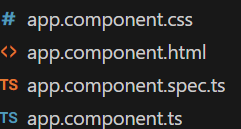
- .css file used for keeping the css code of the component
- .html file used for modifying the html template of the component
- .spec.ts file used for writing unit tests for your component
- .ts file links all other component files
import { Component} from '@angular/core';

@Component({
  selector: 'app-root',
  templateUrl: './app.component.html',
  styleUrls: ['./app.component.css']
})
export class AppComponent {

}
How to create Angular component
ng generate component component-name

for example, ng generate component components/header
- Creates a component class decorated with @Component decorator.
- Generates the view template and stylesheet for that component.
- Registers the component class in the main module.
import { Component } from '@angular/core';

@Component({
  selector: 'app-header',
  templateUrl: './header.component.html',
  styleUrls: ['./header.component.css']
})
export class HeaderComponent {

}
What is a Selector and Template?
A Selector is used to identify each component uniquely into the component tree.
A Template is a HTML view of an Angular component.
How an Angular App gets Loaded and Started? What are index.html, app-root, selector and main.ts?
index.html -> main.ts -> app.module.ts -> App Component
- Angular is used to create Single Page Applications. index.html file is that single page. index.html will invoke main.js file which is the javascript version of main.js.
- main.ts file is like the entry point of web-app. It compiles the web-app and bootstraps the AppModule to run in the browser.
- App module will then bootstrap the App Component.
- App Component or app-root component is the html which you will see finally.
What is a Bootstrapped Module and Bootstrapped Component?
When the Angular web application will start then the first module launched is the bootstrapped module and same is true for the bootstrapped component also.
Lets develop a simple angular application
CLI command for creating an Angular Application
ng new praveen-emp-ui --no-strict --standalone false --routing false
CLI command for creating Header and Form Components
ng generate component components/header
ng generate component components/dashboard
Interaction between Modules and Components:
- Modules and components work together to organize and structure Angular applications:
- Module Composition: Modules define the application's structure by grouping related functionality.
- Component Declaration: Components are declared within modules and can be reused across different modules.
- Dependency Injection: Components can inject services provided by modules to access shared functionality.
Benefits of Using Modules and Components:
- Modularity: Modules and components promote code organization, reusability, and maintainability.
- Scalability: Angular applications can scale effectively by breaking down functionality into modules and components.
- Separation of Concerns: Modules and components enforce a clear separation of concerns, making code easier to understand and maintain.