Angular Course
What is Data Binding in Angular?
In Angular, data binding is a powerful feature that allows you to establish a connection between the components of your application and the DOM (Document Object Model).
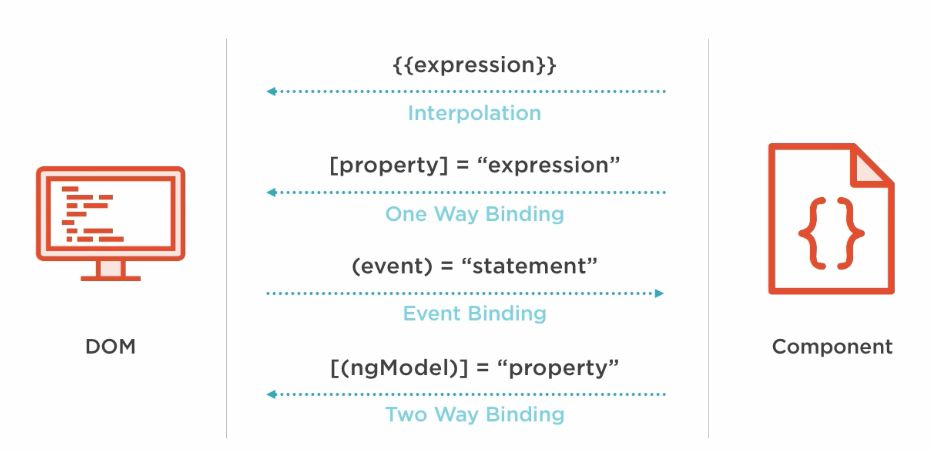
There are 2 techniques for the typescript code to html view Output Data
- String Interpolation {{data}} Interpolation allows you to embed expressions within double curly braces in the HTML template. These expressions are evaluated and replaced with the corresponding values from the component
- Property Binding [property] = "data" Helps you set values for properties of hashtag#HTML elements or directives.
There is one technique for the html view to typescript Input Data
- Event Binding (event)= "expression" Lets you listen for and respond to user actions such as keystrokes, mouse movements, clicks, and touches.
For both ways, there is one technique
- Two way data binding [("ngModel")] = "data" Two-way data binding combines property binding and event binding into a single syntax. It allows the data to flow both from the component to the view and from the view to the component.
What is String Interpolation in Angular?
String Interpolation is a one way data binding technique that is used to transfer the data from a TypeScript code(Component) to an HTML template(View) i.e.. {{data}}.
- String Interpolation can work on string type only not numbers or any other type.
- It is represented insise {{data}} double curly braces.
For example,
header.component.ts
import { Component } from '@angular/core';

@Component({
  selector: 'app-header',
  templateUrl: './header.component.html',
  styleUrls: ['./header.component.css']
})
export class HeaderComponent {

  title = "Test UI";

}
header.component.html
// String Interpolation
<h2>{{title}}</h2>
What is Property Binding in Angular?
Property Binding is a superset of interpolation. It can do whatever interpolation can do. In addition, it can set an element property to a non string data value like Boolean i.e.. [property] = "data".
What is Event Binding in Angular?
Event Binding is used to handle the events raised by the user actions like button click for example (event)= "expression".
What is Two way data binding in Angular?
Two way data binding in Angular will help users to exchange data from view to component and then from component to the view at the same time for example, [("ngModel")] = "data".
Lets use all these binding concepts in our sample Angular app.
app.module.ts
import { NgModule } from '@angular/core';
import { BrowserModule } from '@angular/platform-browser';

// this is for ngModel two way data binding
import { FormsModule }  from '@angular/forms'

import { AppComponent } from './app.component';
import { HeaderComponent } from './header/header.component';
import { FormComponent } from './form/form.component';


@NgModule({
  declarations: [
    AppComponent,
    HeaderComponent,
    FormComponent

  ],
  imports: [
    BrowserModule,
    FormsModule
  ],
  providers: [],
  bootstrap: [AppComponent]
})
export class AppModule { }
form.component.ts
import { Component, ElementRef, ViewChildren, QueryList } from '@angular/core';

@Component({
  selector: 'app-form',
  templateUrl: './form.component.html',
  styleUrls: ['./form.component.css']
})
export class FormComponent {
  title = 'Test Page';
  fullName: string = '';
  firstName: string = ""
  invalid: boolean = true
  @ViewChildren('inputEl', {}) inputElements: QueryList<ElementRef>;

  checkfirstNameEmpty() {
    if (this.firstName.length == 0) {
        this.invalid = true
    }
    else {
        this.invalid = false
    }
}

  show() {
    let name = ''
    this.inputElements.forEach((el) => {
      name += el.nativeElement.value + ' '
    })
    this.fullName = name.trim();
  }
}
form.component.html
<div class="input-container">
    // two way data binding for firstName text field
    <input  [(ngModel)]="firstName"  (ngModelChange)="checkfirstNameEmpty()" maxlength="15" type="text" placeholder="First Name" #inputEl>
    <br><br>
    <input maxlength="10" type="text" placeholder="Middle Name" #inputEl>
    <br><br>
    <input maxlength="15" type="text" placeholder="Last Name" #inputEl>

    // Property binding for invalid boolean type and Event binding for click event
    <button [disabled]="invalid" (click)="show()">Show Full Name</button>
    <h3>{{ fullName }}</h3>
</div>
Lets review what we learnt specific to Properties and Event bindings
{{}} : angular expression(Interpolation)
[] : property binding
(): Event binding
[(ngModel)]: Two way binding
*ngFor, *ngIf, *ngSwitch: structured directives
#variable: defining variable
let: to define variable(Eg: *ngFor="let item in items")