Angular Course
What are Directives? What are the type of directives?
Angular Directives are a core feature of Angular, providing a way to extend HTML with new attributes and behavior. They allow you to manipulate the DOM, create reusable components, and encapsulate complex logic, making your applications more modular and maintainable.
For example in the below code ngModel is a directive which when attached to the textbox binds the text box value to myvariable.
<input [(ngModel)]="myvariable" type="text" value=""/>
Types of Directives
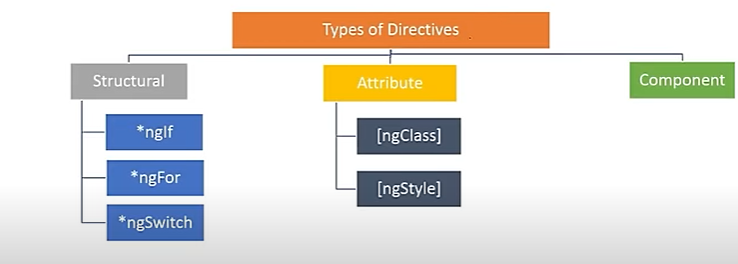
- Component directives Directives with templates. It's like a user control.
<my-grid [grid-data]="SalesModelObjs"</my-grid>
- Attribute directives Change the appearance or behavior of an element (e.g., ngClass, ngStyle).
<div [hidden]="Hide()">Some text</div>
- Structural directives Modify the DOM layout by adding or removing elements (e.g., *ngIf, *ngFor).
For example in the below code we have the
*ngForloop which is a example of structural directive. How many HTML tabletrwill be added in the HTML DOM layout depends on rows in thecollcollection.
<tr *ngFor="let temp of coll"> <td>{{temp.CustomerName}}</td> </tr>
Why Use Directives?
- Reusability: Write once, use everywhere. Directives allow you to encapsulate logic and apply it across multiple components.
- Separation of Concerns: Keep your templates clean and focused on structure, while directives handle behavior.
- Maintainability: Break down complex UIs into smaller, manageable pieces. Directives make your codebase easier to navigate and maintain.
*What is ngIf Structural directive
ngIf Directive is used to add or remove items based on the if condition.
For example,
app.component.ts
import { Component } from '@angular/core';

@Component({
  selector: 'app-root',
  standalone: true,
  templateUrl: './app.component.html',
  styleUrl: './app.component.css'
})
export class AppComponent {
  title = 'Demo';
  employees =["Praveen", "Kiran", "Ravi", "Praneeth"]
}
app.component.html
<ul>
    <li *ngIf="employees.length>0">
        Many Employees
    </li>
    <li *ngIf="employees.length==0">
        Zero Employees
    </li>
</ul>
*What is ngFor Structural directive?
ngFor Directive is used to iterate a list of items and then display them.
For example,
app.component.html
<ul>
    <li *ngFor=" let employee of employees">
        {{employee}}
    </li>
</ul>
*What is ngSwitch Structural directive?
ngSwitch is an structural directive used in combination with *ngSwitchCase and *ngSwitchDefault that are both structural directives.
For example,
app.component.html
<ul [ngSwitch]="employees.length">
    <li *ngSwitchCase=0>Zero Employees</li>
    <li *ngSwitchCase=1>One Employee</li>
    <li *ngSwitchCase=2>Two Employees</li>
    <li *ngSwitchCase=3>Three Employees</li>
    <li *ngSwitchCase=4>Four Employees</li>
    <li *ngSwitchCase=5>Five Employees</li>
    <li *ngSwitchDefault>More Students</li>
</ul>
What is [ngStyle] Attribute directive
ngStyle is an attribute directive that updates styles for the HTML element.
For example,
app.component.ts
import { Component } from '@angular/core';

@Component({
  selector: 'app-root',
  templateUrl: './app.component.html',
  styleUrl: './app.component.css'
})
export class AppComponent {
  title = 'Demo';
  employees =["Praveen", "Kiran", "Ravi", "Praneeth"]
  colorName = 'brown'
}
app.component.html
<div [ngStyle]="{'background-color' : colorName}">

    <ul>
        <li *ngIf="employees.length>0">
            Many Employees
        </li>
        <li *ngIf="employees.length==0">
            Zero Employees
        </li>
    </ul>

    <ul>
        <li *ngFor=" let employee of employees">
            {{employee}}
        </li>
    </ul>

    <ul [ngSwitch]="employees.length">
        <li *ngSwitchCase=0>Zero Employees</li>
        <li *ngSwitchCase=1>One Employee</li>
        <li *ngSwitchCase=2>Two Employees</li>
        <li *ngSwitchCase=3>Three Employees</li>
        <li *ngSwitchCase=4>Four Employees</li>
        <li *ngSwitchCase=5>Five Employees</li>
        <li *ngSwitchDefault>More Students</li>
    </ul>

</div>
What is [ngClass] Attribute directive
ngClass directive adds and removes CSS classes on an HTML element.
For example,
app.component.ts
import { Component } from '@angular/core';

@Component({
  selector: 'app-root',
  templateUrl: './app.component.html',
  styleUrl: './app.component.css'
})
export class AppComponent {
  title = 'Demo';
  employees =["Praveen", "Kiran", "Ravi", "Praneeth"]
  colorName = 'brown'
  className= "divClass"
}
app.component.css
.divClass{
    background-color: brown;
}
app.component.html
<div [ngClass]="className">

    <ul>
        <li *ngIf="employees.length>0">
            Many Employees
        </li>
        <li *ngIf="employees.length==0">
            Zero Employees
        </li>
    </ul>

    <ul>
        <li *ngFor=" let employee of employees">
            {{employee}}
        </li>
    </ul>

    <ul [ngSwitch]="employees.length">
        <li *ngSwitchCase=0>Zero Employees</li>
        <li *ngSwitchCase=1>One Employee</li>
        <li *ngSwitchCase=2>Two Employees</li>
        <li *ngSwitchCase=3>Three Employees</li>
        <li *ngSwitchCase=4>Four Employees</li>
        <li *ngSwitchCase=5>Five Employees</li>
        <li *ngSwitchDefault>More Employees</li>
    </ul>

</div>
What is the difference between Component, Attribute and Structural Directives?
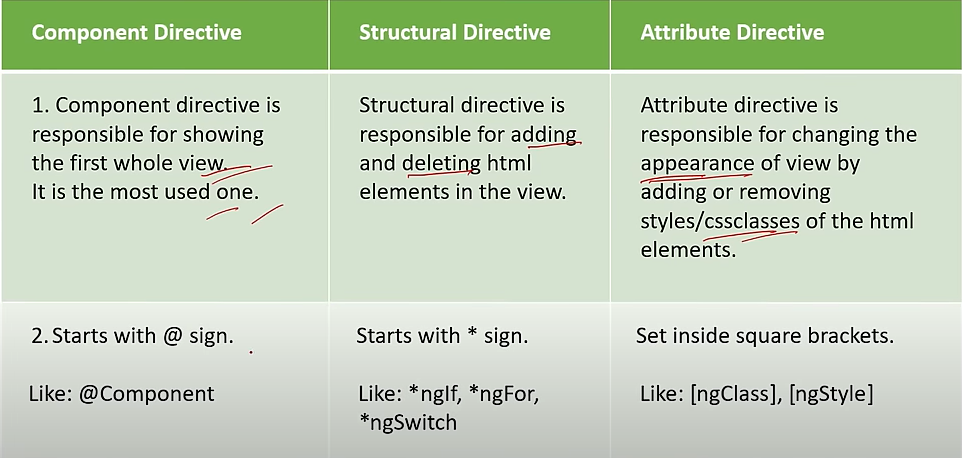
Example
Lets consider a simple directive called 'appHighlight' that changes the background color of an element when it is hovered over.
𝐷𝑖𝑟𝑒𝑐𝑡𝑖𝑣𝑒 𝑡𝑦𝑝𝑒𝑠𝑐𝑟𝑖𝑝𝑡 𝑓𝑖𝑙𝑒
import { Directive, ElementRef, HostListener } from '@angular/core';

@Directive({ selector: '[appHighlight]' })
export class HighlightDirective { constructor(private el: ElementRef) {}

@HostListener('mouseenter') onMouseEnter() { this.highlight('yellow'); }

@HostListener('mouseleave') onMouseLeave() { this.highlight(null); }

private highlight(color: string) {
this.el.nativeElement.style.backgroundColor = color; }
}
- 𝐸𝑙𝑒𝑚𝑒𝑛𝑡𝑅𝑒𝑓: Dependency injection token that represents a reference to the host DOM element upon which the directive is applied.
- 𝐻𝑜𝑠𝑡𝐿𝑖𝑠𝑡𝑒𝑛𝑒𝑟: Decorator used to register handler methods for host element events.
- @𝐻𝑜𝑠𝑡𝐿𝑖𝑠𝑡𝑒𝑛𝑒𝑟('𝑚𝑜𝑢𝑠𝑒𝑒𝑛𝑡𝑒𝑟') 𝑜𝑛𝑀𝑜𝑢𝑠𝑒𝐸𝑛𝑡𝑒𝑟() { }: It specifies that the highlight method should be called when the mouse enters the host element.
- @𝐻𝑜𝑠𝑡𝐿𝑖𝑠𝑡𝑒𝑛𝑒𝑟('𝑚𝑜𝑢𝑠𝑒𝑙𝑒𝑎𝑣𝑒') 𝑜𝑛𝑀𝑜𝑢𝑠𝑒𝐿𝑒𝑎𝑣𝑒() { }: It specifies that the highlight method should be called when the mouse leaves the host element.
- 𝑝𝑟𝑖𝑣𝑎𝑡𝑒 ℎ𝑖𝑔ℎ𝑙𝑖𝑔ℎ𝑡(𝑐𝑜𝑙𝑜𝑟: 𝑠𝑡𝑟𝑖𝑛𝑔) { }: This method defines the highlight method, which takes a color parameter and sets the background color of the host element using the ElementRef. nativeElement provides access to the underlying DOM element, and style.backgroundColor sets the background color.
𝐶𝑜𝑚𝑝𝑜𝑛𝑒𝑛𝑡 𝐻𝑇𝑀𝐿 𝑓𝑖𝑙𝑒
<div appHighlight>Hover over me!</div>