Angular Course
What is Angular?
Angular is a javascript framework to create reactive Single Page Applications for Mobile/Desktop.
Angular has a Shadow DOM(and events system) optimized for performance and memory footprint.
Angular Goal is to build larger applications with data that changes over time.
What are advantages of Angular?
- It is relatively simple to build Single Page Applications(Components), SPA means Websites where content updates dynamically without the need to refresh the browser.
- To make flexible and structured applications(OOPS friendly).
- It is Cross platform and Open Source(Free).
- Reusable Code(Services).
- Testability(spec.ts).
What is the difference between Angular and Angular JS?

Angular toolchain
- Node js > 18.x
- npm or ng to download modules
- Typescript with built-in ES6 support and transpilation
- Webpack for build automation(grunt, gulp, webpack)
- ng-cli for command line interfacte
- Jasmine with Karma test automation
- tslint to validate code to meet coding standards
- Bootstrap/Angular material Design for CSS
- Visual Studio Code IDE with plugins
- Git/Jenkins for continuous integration and delivery
- Docker(docker desktop for windows)
Note:
- Babel is a compiler which converts ES6 and above to ES5 which old browsers understand.
- tsc compiler converts typescript code to javascript which browsers can understand.
What is NPM?
NPM/Node package manager is an online repository from where you can get thousands of free libraries which can be used in angular project.
What is CLI?*
CLI is command line interface tool that you use to intialize and develop Angular applications.
Let see some CLI commands for Angular
- Install Angular CLI
npm install -global @angular/cli@latest
- To check the Angular version
ng version
- To create Angular Application
ng new praveen-emp-ui --no-strict --standalone false --routing false
- To create Component
ng generate component components/header
- To create Service
ng generate service services/employee
- To create Pipe
ng generate pipe Pipes/sort-by-salary
- To build the Angular application
ng build // compile the code and output files into a build directory
- To run the Angular application
ng serve // compile code, launch a dev server, and watch for file changes
Lets see the folder structure of our Angular application.
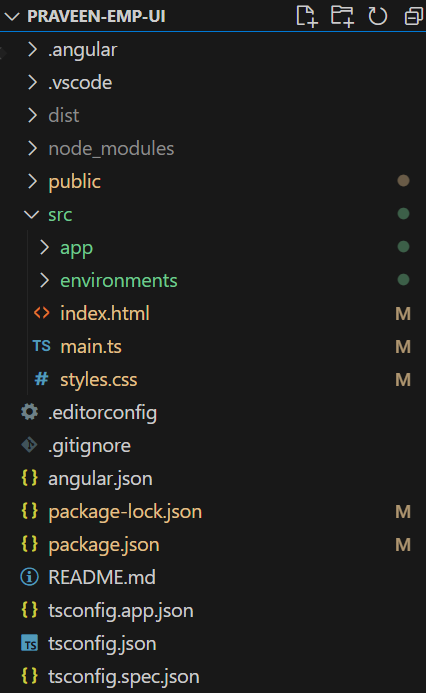
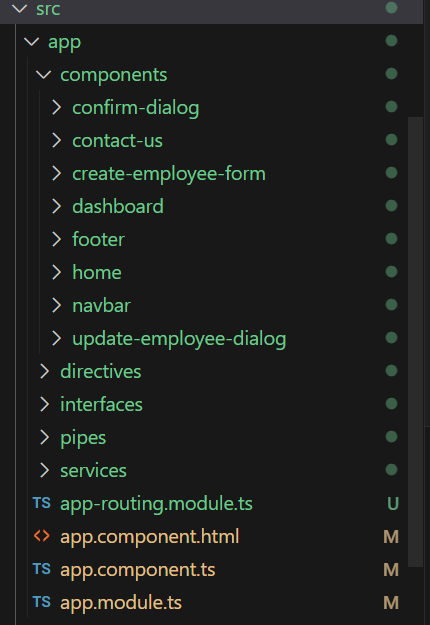
-
src Folder: This is where the magic happens! The
srcfolder contains all your source code, including TypeScript files, HTML templates, CSS styles, and assets like images and fonts. However, browsers can't understand this directly. That's where the compilation process comes in. When we build our application, it compiles our TypeScript and Angular code into standard JavaScript code that browsers can interpret. -
App Module: Your Angular app starts with the
AppModule. This module serves as the entry point for your application, where you declare components, services, directives, and other Angular artifacts. -
Components: Components are the building blocks of your Angular app. They consist of TypeScript classes that define the component's behavior and HTML templates that define its UI.
-
Services: Services are reusable code modules that provide functionality to your components. They are used for tasks like fetching data from APIs, handling business logic, and sharing data between components.
-
Angular CLI Configuration Files: The Angular CLI generates configuration files like
angular.json,tsconfig.json, andpackage.jsonto manage your project's settings, dependencies, and build processes. -
node_modules: This folder contains all the third-party libraries and dependencies installed for your Angular project.
-
Angular CLI Commands: Don't forget about the Angular CLI commands! Use
ng generateto create new components, services, modules, and more, andng buildto build your app for production. -
dist Folder: Ever wondered where the compiled code goes? That's the dist folder. It contains the output of the build process—pure JavaScript code that's actually run by users when they interact with the application. Remember not to make changes here, as it gets overwritten during each new build.
-
Spec Files: You might see spec files (ending with .spec.ts). These are for testing purposes.
-
public Folder: where you can store all the images or files which can be accessed publicly.
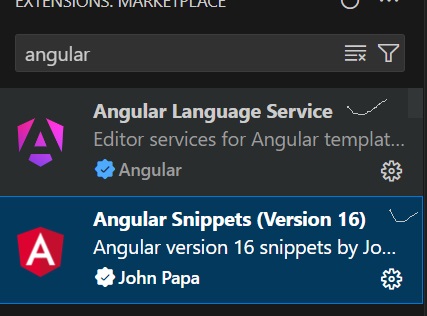
Lets install necessary extensions for angular in our visual studio code
Lets see the basic components involved in Angular
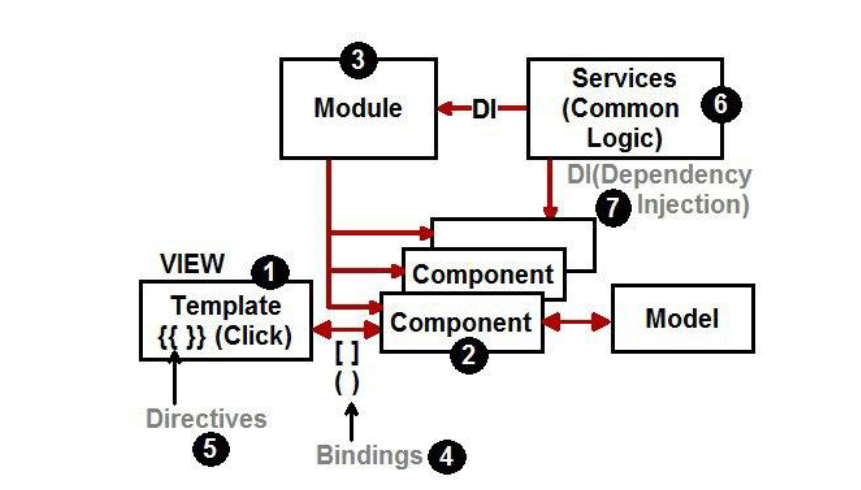
There are 7 important pillars in Angular Architecture.
- Template:- The HTML view of Angular.
- Component:- Binds the View and Model.
- Modules:- Groups components logically.
- Bindings :- Defines how view and component communicate.
- Directive :- Changes the HTML DOM behaviour.
- Services :- Helps to share common logic across the project.
- DI :- Dependency injection helps to inject instance across constructor.