Back to Angular Course
Angular Course
What are Pipes? What are types of Pipes and Parameterized Pipes?
- Pipes are simple functions which accept an input value and return a transformed value
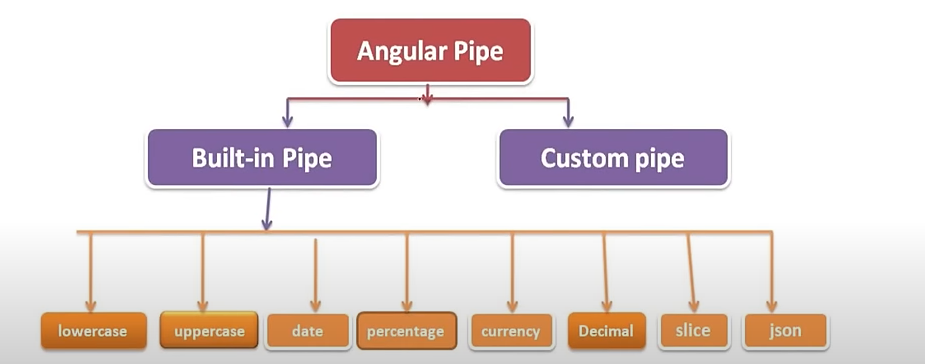
- Whenever we pass any parameters to the pipes, it is called parameterized pipes.
for example,
app.component.html
{{title}}
{{title | lowercase}}
{{title | uppercase}}
{{300.87 | currency}}
{{300.87 | currency: 'INR'}}

// Demo demo DEMO $300.87 ₹300.87
What is Chaining Pipes?
- The chaining pipes use multiple pipes on a data input.
for example,
app.component.html
import { Component } from '@angular/core';

@Component({
  selector: 'app-root',
  templateUrl: './app.component.html',
  styleUrl: './app.component.css'
})
export class AppComponent {
  title = 'Demo';
  dob="06/18/1954"
}
app.component.ts
{{dob | date | uppercase}} // JUN 18, 1954
Custom Pipes
Lets create a custom pipe which sorts the employee data based on salary.
ng generate pipe pipes/sort-by-salary
sort-by-salary.pipe.ts
import { Pipe, PipeTransform } from '@angular/core';
import { Employee } from '../interfaces/employee'

@Pipe({
  name: 'sortBySalary'
})
export class SortBySalaryPipe implements PipeTransform {

  transform(employees: Employee[]): Employee[] {
    return employees.sort((a, b) => a.salary - b.salary);
  }

}
employee.ts
export interface Employee {
    name: string;
    gender: string;
    designation: string;
    experience: number;
    location: string;
    salary: number;
}
dashboard.component.html
<table id="excel-table" class="table table-hover">
    <thead>
        <tr [ngStyle]="{backgroundColor: 'lightblue'}">
            <th scope="col">S.No</th>
            <th scope="col">Name</th>
            <th scope="col">Gender</th>
            <th scope="col">Designation</th>
            <th scope="col">Experience</th>
            <th scope="col">Location</th>
            <th scope="col">Salary</th>
        </tr>
    </thead>
    <tbody>
        <tr *ngFor="let empData of employeeData | sortBySalary;let i =index">
            <th scope="row">{{i+1}}</th>
            <td>{{empData.name}}</td>
            <td>{{empData.gender}}</td>
            <td>{{empData.designation}}</td>
            <td>{{empData.experience}}</td>
            <td>{{empData.location}}</td>
            <td>{{empData.salary}}</td>
        </tr>
    </tbody>
</table>
app.module.ts
import { NgModule } from '@angular/core';
import { BrowserModule } from '@angular/platform-browser';
import { MatDialogModule } from '@angular/material/dialog';
import { MatSelectModule } from '@angular/material/select';
import { AppRoutingModule } from './app-routing.module';
import { AppComponent } from './app.component';
import { BrowserAnimationsModule } from '@angular/platform-browser/animations';
import { HttpClientModule } from '@angular/common/http';
import { SortBySalaryPipe } from './pipes/sort-by-salary.pipe';
import { HeaderComponent } from './components/header/header.component';
import { ExcelComponent } from './components/excel/excel.component';
import { DashboardComponent } from './components/dashboard/dashboard.component';

@NgModule({
  declarations: [
    AppComponent,
    SortBySalaryPipe,
    HeaderComponent,
    ExcelComponent,
    DashboardComponent

  ],
  imports: [
    BrowserModule,
    AppRoutingModule,
    HttpClientModule,
    BrowserAnimationsModule,
    MatDialogModule,
    MatSelectModule,
  ],
  providers: [],
  bootstrap: [AppComponent]
})
export class AppModule { }