Angular Course
PrimeNG is an open-source library developed by PrimeTek, offering over 80 user interface components designed specifically for Angular applications. These components range from basic elements like buttons and input fields to advanced components like data tables, charts, and menus. With responsive design, accessibility, and customization at its core, PrimeNG has become a go-to choice for developers.
Why Choose PrimeNG?
Here are some compelling reasons to choose PrimeNG for your Angular projects:
-
Rich Component Set: PrimeNG offers a wide variety of components to cater to different use cases, including:
- Input controls (textboxes, dropdowns, sliders, etc.)
- Data components (data tables, tree tables, etc.)
- Overlays (dialogs, tooltips, etc.)
- Menus (sidebar, navbar, etc.)
-
Theming Support: PrimeNG provides multiple pre-designed themes and allows custom themes using the PrimeNG Theme Designer.
-
Accessibility (ARIA): Components adhere to WAI-ARIA standards, ensuring accessibility compliance.
-
High Performance: Optimized components ensure minimal overhead and high performance even in data-intensive scenarios.
-
Active Community and Support: A vibrant community and regular updates make PrimeNG a reliable choice.
Getting Started with PrimeNG
- Installation
To use PrimeNG in your Angular project, you need to install the library and its dependencies. Run the following commands:
npm install primeng@17.18.7 --save
npm install primeicons --save
npm install primeflex --save
npm install @angular/animations --save
- Adding a Theme
PrimeNG supports various themes out of the box. You can include a theme in your project by adding it to your angular.json file:
"styles": [
   "src/styles.css",
   "node_modules/primeng/resources/themes/saga-blue/theme.css",
   "node_modules/primeng/resources/primeng.min.css",
   "node_modules/primeicons/primeicons.css",
   "node_modules/primeflex/primeflex.css"
]
Replace saga-blue with the desired theme name.
Also add BrowserAnimationsModule in app.config.ts.
import { ApplicationConfig, provideZoneChangeDetection, importProvidersFrom } from '@angular/core';
import { provideRouter } from '@angular/router';
import { BrowserAnimationsModule } from '@angular/platform-browser/animations';

import { routes } from './app.routes';
import { provideHttpClient } from '@angular/common/http';

export const appConfig: ApplicationConfig = {
  providers: [importProvidersFrom(BrowserAnimationsModule),provideZoneChangeDetection({ eventCoalescing: true }), provideRouter(routes), provideHttpClient()]
};
- Using PrimeNG Components
To use a component, import its module in your Angular module file. For example, to use a button:
import { ButtonModule } from 'primeng/button';

@NgModule({
  declarations: [
    AppComponent
  ],
  imports: [
    BrowserModule,
    ButtonModule
  ],
  providers: [],
  bootstrap: [AppComponent]
})
export class AppModule { }
<p-button label="Click Me"></p-button>
Popular Components in PrimeNG
- DataTable The DataTable component allows you to display tabular data with features like sorting, filtering, pagination, and more.
<p-table [value]="products" [paginator]="true" [rows]="10">
  <ng-template pTemplate="header">
    <tr>
      <th>Name</th>
      <th>Category</th>
      <th>Price</th>
    </tr>
  </ng-template>
  <ng-template pTemplate="body" let-product>
    <tr>
      <td>{{product.name}}</td>
      <td>{{product.category}}</td>
      <td>{{product.price}}</td>
    </tr>
  </ng-template>
</p-table>
- Dialog The Dialog component is perfect for creating modal windows.
<p-dialog header="Details" [(visible)]="display" modal="true">
  <p>Content goes here...</p>
</p-dialog>
- Chart PrimeNG supports various chart types using Chart.js.
<p-chart type="bar" [data]="chartData"></p-chart>
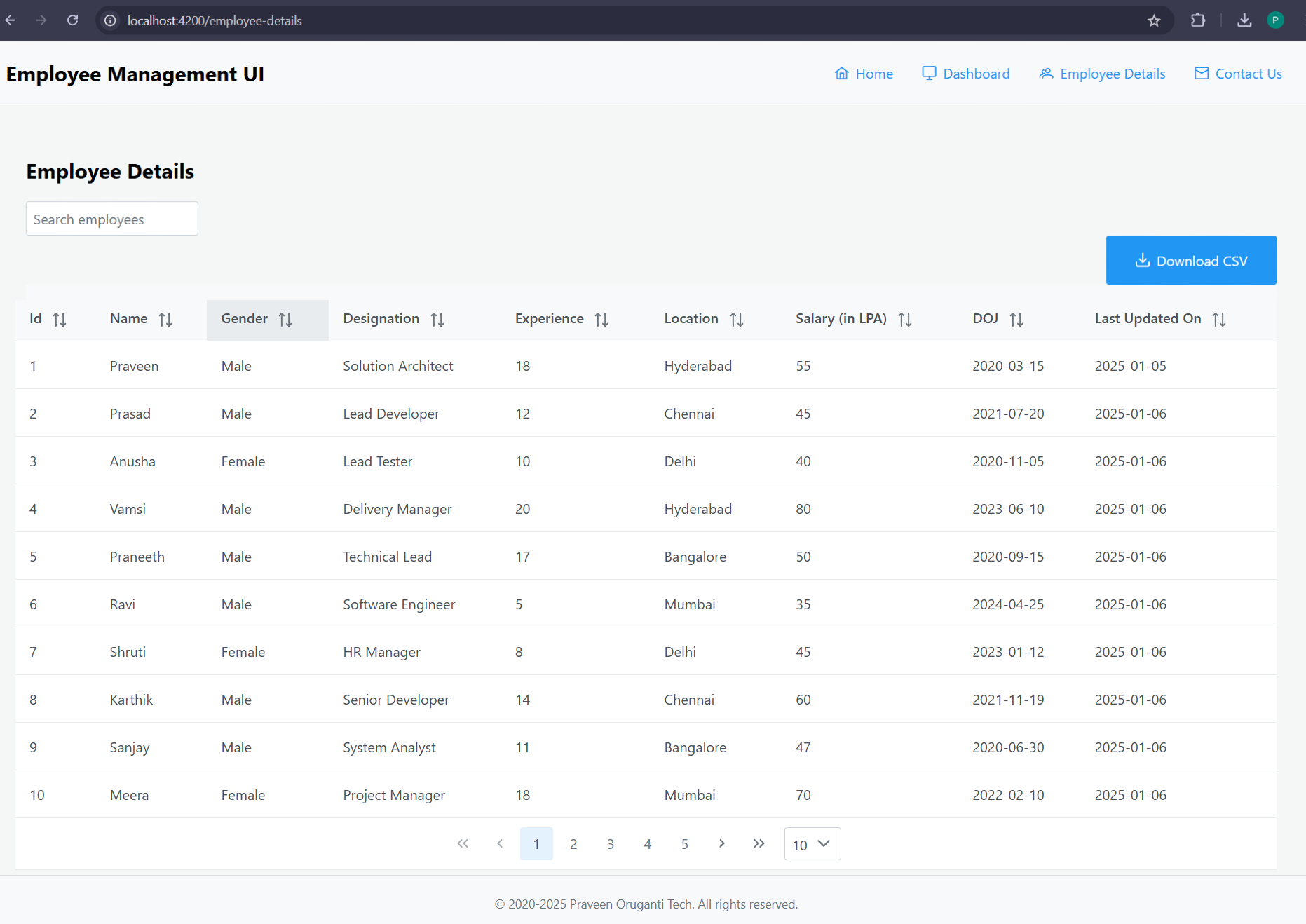
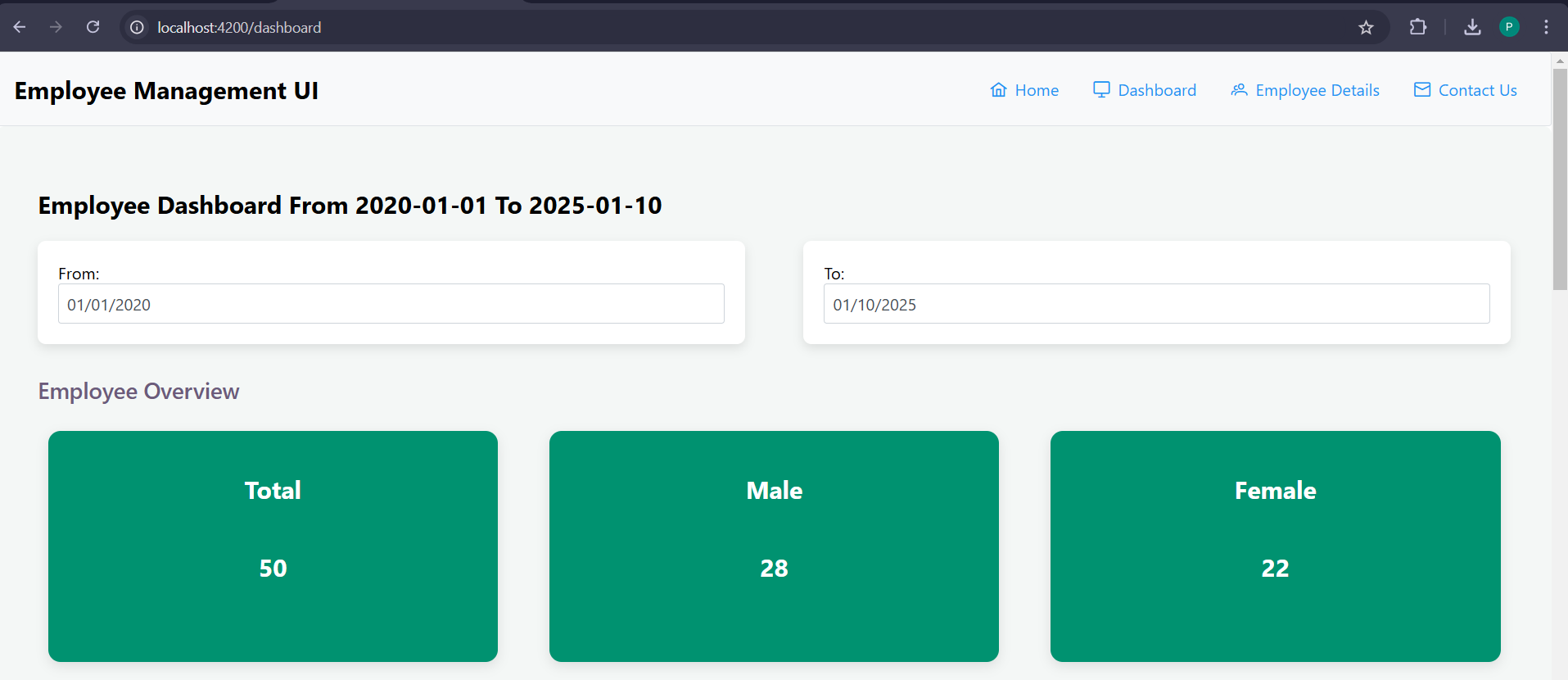
Let's develop an employee management UI using Angular and PrimeNG, which will include a dashboard and employee details pages.
Dashboard
dashboard.component.html
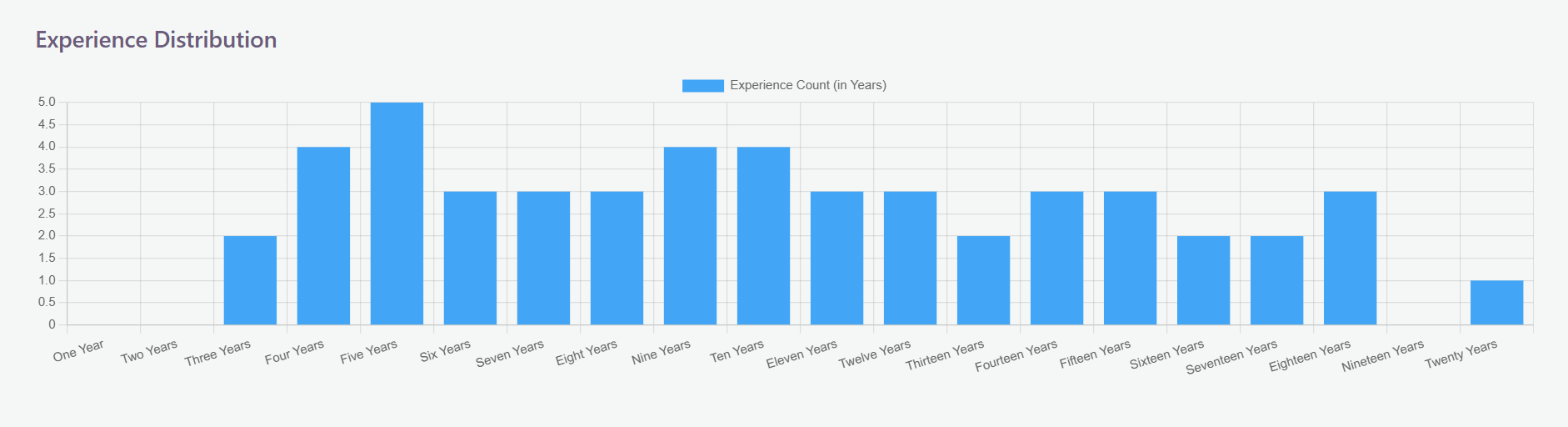
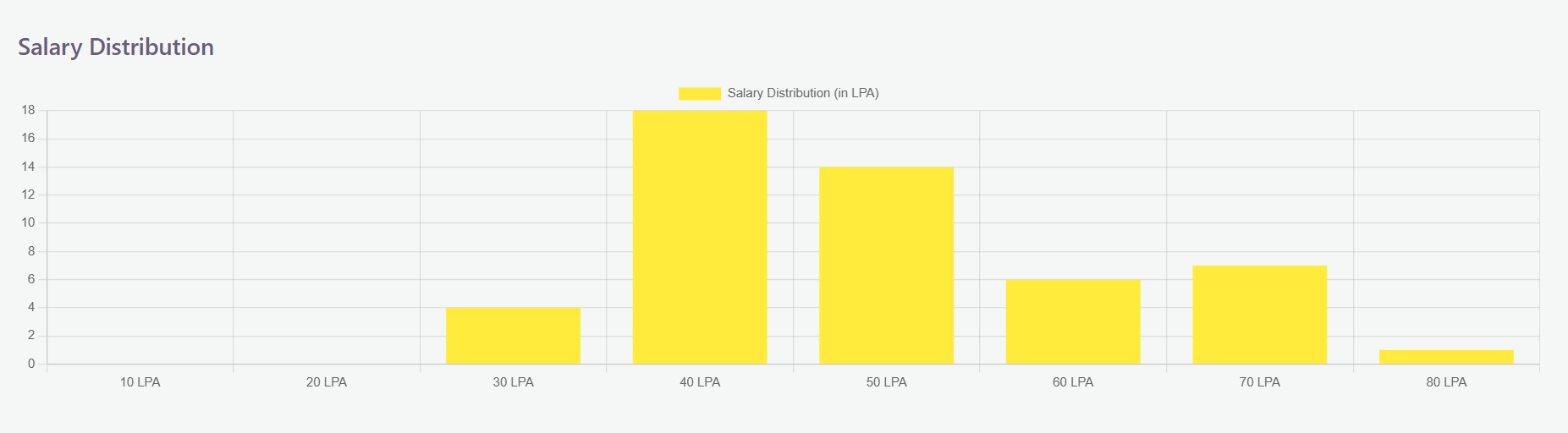
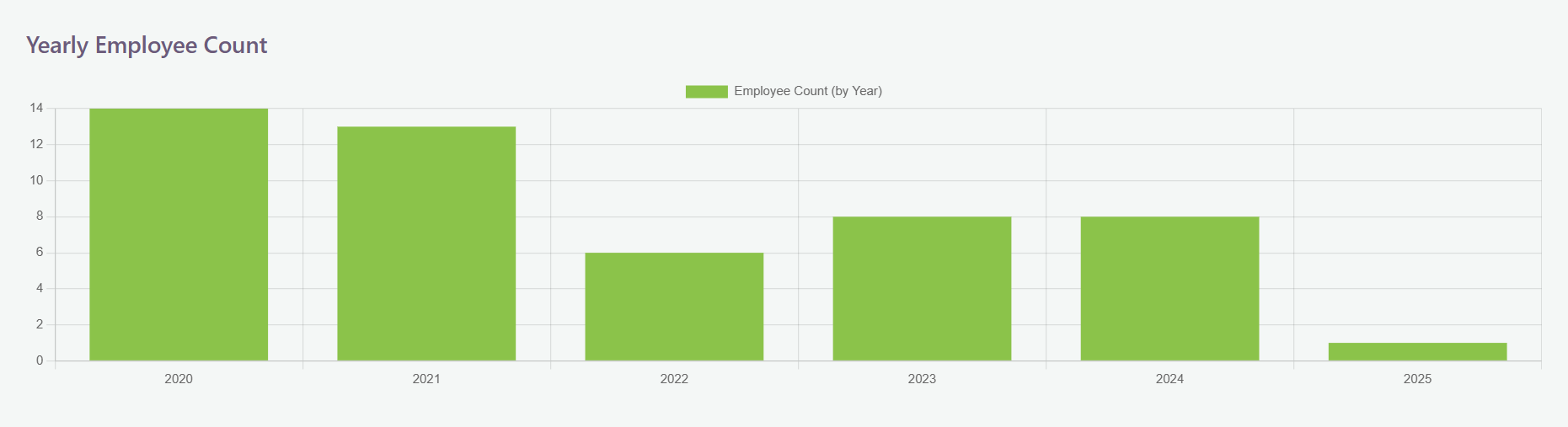
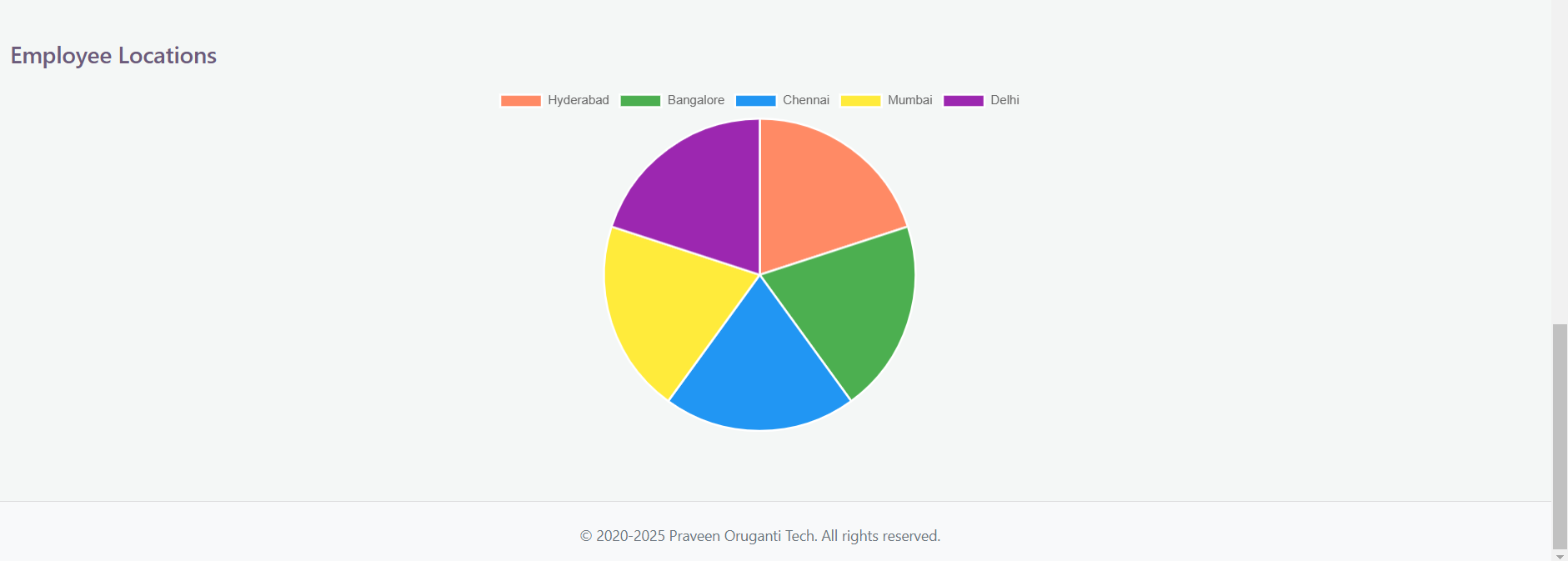
<div class="dashboard-container"> <div *ngIf="fromDate && toDate else noDate"> <h2>Employee Dashboard From {{ fromDate | date: 'yyyy-MM-dd' }} To {{ toDate | date: 'yyyy-MM-dd' }}</h2> </div> <ng-template #noDate> <h2>Employee Dashboard as of {{ maxDate | date: 'yyyy-MM-dd' }}</h2> </ng-template> <div class="date-container"> <div class="date-picker-container"> <label for="fromDate">From:</label> <p-calendar id="fromDate" [(ngModel)]="fromDate" (onSelect)="onDateChange()" [minDate]="minDate" [maxDate]="maxDate"></p-calendar> </div> <div class="date-picker-container"> <label for="toDate">To:</label> <p-calendar id="toDate" [(ngModel)]="toDate" (onSelect)="onDateChange()" [minDate]="minDate" [maxDate]="maxDate"></p-calendar> </div> </div> <div class="group-container"> <div class="group-label">Employee Overview</div> <div class="p-grid"> <div class="p-col-12 p-md-4"> <p-card [header]="'Total'" [style]="{ backgroundColor: '#009270' }"> <ng-template pTemplate="content"> <h2>{{ dashboard.totalEmployees }}</h2> </ng-template> </p-card> </div> <div class="p-col-12 p-md-4"> <p-card [header]="'Male'" [style]="{ backgroundColor: '#009270' }"> <ng-template pTemplate="content"> <h2>{{ dashboard.maleEmployees }}</h2> </ng-template> </p-card> </div> <div class="p-col-12 p-md-4"> <p-card [header]="'Female'" [style]="{ backgroundColor: '#009270' }"> <ng-template pTemplate="content"> <h2>{{ dashboard.femaleEmployees }}</h2> </ng-template> </p-card> </div> </div> </div> <div class="group-container"> <div class="group-label">Experience Distribution</div> <div *ngIf="experienceChartData; else noExperience"> <div class="p-grid"> <div class="p-col-12"> <p-chart type="bar" [data]="experienceChartData" [responsive]="true" [options]="chartOptions"></p-chart> </div> </div> </div> <ng-template #noExperience> <div class="no-data"> <h3>No employee data available for the selected date range</h3> </div> </ng-template> </div> <div class="group-container"> <div class="group-label">Salary Distribution</div> <div *ngIf="salaryChartData; else noSalary"> <div class="p-grid"> <div class="p-col-12"> <p-chart type="bar" [data]="salaryChartData" [responsive]="true" [options]="chartOptions"></p-chart> </div> </div> </div> <ng-template #noSalary> <div class="no-data"> <h3>No employee data available for the selected date range</h3> </div> </ng-template> </div> <div class="group-container"> <div class="group-label">Yearly Employee Count</div> <div *ngIf="yearlyChartData; else noYearlyData"> <div class="p-grid"> <div class="p-col-12"> <p-chart type="bar" [data]="yearlyChartData" [responsive]="true" [options]="chartOptions"></p-chart> </div> </div> </div> <ng-template #noYearlyData> <div class="no-data"> <h3>No employee data available for the selected date range</h3> </div> </ng-template> </div> <div class="group-container"> <div class="group-label">Employee Locations</div> <div *ngIf="locationChartData; else noLocations"> <div class="p-grid"> <div class="p-col-12"> <p-chart type="pie" [data]="locationChartData" [responsive]="true" [options]="pieChartOptions"></p-chart> </div> </div> </div> <ng-template #noLocations> <div class="no-data"> <h3>No employee data available for the selected date range</h3> </div> </ng-template> </div> </div>
dashboard.component.ts
import { Component, OnInit } from '@angular/core';
import { CalendarModule } from 'primeng/calendar';
import { CardModule } from 'primeng/card';
import { ChartModule } from 'primeng/chart';
import { Employee } from '../interfaces/employee';
import { Dashboard } from '../interfaces/dashboard';
import { LocationData } from '../interfaces/locationdata';
import { ExperienceData } from '../interfaces/experiencedata';
import { EmployeeService } from '../services/employee.service';
import { FormsModule } from '@angular/forms';
import { CommonModule } from '@angular/common';
import { DatePipe } from '@angular/common';
import { ChartOptions } from 'chart.js';

@Component({
  selector: 'app-dashboard',
  standalone: true,
  imports: [CalendarModule, CardModule, ChartModule, FormsModule, CommonModule],
  providers: [DatePipe],
  templateUrl: './dashboard.component.html',
  styleUrls: ['./dashboard.component.css']
})
export class DashboardComponent implements OnInit {
  fromDate: Date = new Date('2020-01-01');
  toDate: Date = new Date();
  maxDate!: Date;
  minDate!: Date;
  filteredEmployees!: any[];

  employees!: Employee[];

  experienceChartData!: any;
  locationChartData!: any;
  salaryChartData!: any;
  yearlyChartData!: any;

  dashboard: Dashboard = {
    totalEmployees: 0,
    maleEmployees: 0,
    femaleEmployees: 0,
    hydEmployees: 0,
    bangEmployees: 0,
    chenEmployees: 0,
    mumEmployees: 0,
    delEmployees: 0,
    exp5Employees: 0,
    exp10Employees: 0,
    exp15Employees: 0,
    exp20Employees: 0
  };

  locationData: LocationData[] = [
    { name: 'Hyderabad', value: 0 },
    { name: 'Bangalore', value: 0 },
    { name: 'Chennai', value: 0 },
    { name: 'Mumbai', value: 0 },
    { name: 'Delhi', value: 0 }
  ];

  experienceData: ExperienceData[] = [
    { name: 'One Year', value: 0 },
    { name: 'Two Years', value: 0 },
    { name: 'Three Years', value: 0 },
    { name: 'Four Years', value: 0 },
    { name: 'Five Years', value: 0 },
    { name: 'Six Years', value: 0 },
    { name: 'Seven Years', value: 0 },
    { name: 'Eight Years', value: 0 },
    { name: 'Nine Years', value: 0 },
    { name: 'Ten Years', value: 0 },
    { name: 'Eleven Years', value: 0 },
    { name: 'Twelve Years', value: 0 },
    { name: 'Thirteen Years', value: 0 },
    { name: 'Fourteen Years', value: 0 },
    { name: 'Fifteen Years', value: 0 },
    { name: 'Sixteen Years', value: 0 },
    { name: 'Seventeen Years', value: 0 },
    { name: 'Eighteen Years', value: 0 },
    { name: 'Nineteen Years', value: 0 },
    { name: 'Twenty Years', value: 0 }
  ];

  salaryRanges = [10, 20, 30, 40, 50, 60, 70, 80];
  salaryData = [
    { range: '10 LPA', value: 0 },
    { range: '20 LPA', value: 0 },
    { range: '30 LPA', value: 0 },
    { range: '40 LPA', value: 0 },
    { range: '50 LPA', value: 0 },
    { range: '60 LPA', value: 0 },
    { range: '70 LPA', value: 0 },
    { range: '80 LPA', value: 0 }
  ];


  chartOptions: ChartOptions = {
    responsive: true,
    maintainAspectRatio: false,
    aspectRatio: 1,
    scales: {
      x: {
        beginAtZero: true
      },
      y: {
        beginAtZero: true
      }
    }
  };

  pieChartOptions: ChartOptions = {
    responsive: true,
    maintainAspectRatio: false,
    aspectRatio: 0.9,
    plugins: {
      legend: {
        position: 'top'
      }
    }
  };

  constructor(private employeeService: EmployeeService, private datePipe: DatePipe) {
    const today = new Date();
    this.maxDate = today;
  }

  ngOnInit(): void {
    this.getEmployees();
  }

  getEmployees() {
    this.employeeService.getEmployees().subscribe({
      next: (res: Employee[]) => {
        this.employees = res;
        this.showDetails(this.employees);
      },
      error: console.error
    });
  }


  getEmployeesBasedOnGender(emp: Employee[]) {
    const genderCounts = emp.reduce((acc, employee) => {
      acc[employee.gender] = (acc[employee.gender] || 0) + 1;
      return acc;
    }, {} as { [key: string]: number });

    this.dashboard.maleEmployees = genderCounts["Male"] || 0;
    this.dashboard.femaleEmployees = genderCounts["Female"] || 0;
  }

  onDateChange() {
    if (this.fromDate && this.toDate) {
      this.resetDashboard();
      const fromDate = this.datePipe.transform(this.fromDate, 'yyyy-MM-dd');
      const toDate = this.datePipe.transform(this.toDate, 'yyyy-MM-dd');

      this.filteredEmployees = this.employees.filter(employee => {
        const employeeDate = this.datePipe.transform(employee.doj, 'yyyy-MM-dd');


        if (!employeeDate || !fromDate || !toDate) {
          return false;
        }

        return employeeDate >= fromDate && employeeDate <= toDate;
      });


      if (this.filteredEmployees.length > 0) {
        this.showDetails(this.filteredEmployees);
      } else {

        this.locationChartData = null;
        this.experienceChartData = null;
      }
    }
  }


  private resetDashboard() {
    this.dashboard = {
      totalEmployees: 0,
      maleEmployees: 0,
      femaleEmployees: 0,
      hydEmployees: 0,
      bangEmployees: 0,
      chenEmployees: 0,
      mumEmployees: 0,
      delEmployees: 0,
      exp5Employees: 0,
      exp10Employees: 0,
      exp15Employees: 0,
      exp20Employees: 0
    };

    this.locationData.forEach(location => location.value = 0);
    this.experienceData.forEach(experience => experience.value = 0);
  }


  showDetails(emp: Employee[]) {
    this.dashboard.totalEmployees = emp.length;
    this.getEmployeesBasedOnGender(emp);
    this.locationData.forEach(location => {
      location.value = emp.filter(employee => employee.location === location.name).length;
    });
    const locationNames = this.locationData.map(location => location.name);
    const locationCounts = this.locationData.map(location => location.value);

    this.locationChartData = {
      labels: locationNames,
      datasets: [
        {
          data: locationCounts,
          backgroundColor: ['#FF8A65', '#4CAF50', '#2196F3', '#FFEB3B', '#9C27B0']
        }
      ]
    };

    const experienceCount = this.experienceData.map((experience, index) =>
      emp.filter(employee => employee.experience === index + 1).length
    );

    this.experienceChartData = {
      labels: this.experienceData.map(exp => exp.name),
      datasets: [
        {
          label: 'Experience Count (in Years)',
          data: experienceCount,
          backgroundColor: '#42A5F5'
        }
      ]
    };

    this.salaryData.forEach(salary => salary.value = 0);
    emp.forEach(employee => {
      const salary = employee.salary;
      if (salary >= 10 && salary < 20) {
        this.salaryData[0].value++;
      } else if (salary >= 20 && salary < 30) {
        this.salaryData[1].value++;
      } else if (salary >= 30 && salary < 40) {
        this.salaryData[2].value++;
      } else if (salary >= 40 && salary < 50) {
        this.salaryData[3].value++;
      } else if (salary >= 50 && salary < 60) {
        this.salaryData[4].value++;
      } else if (salary >= 60 && salary < 70) {
        this.salaryData[5].value++;
      }
      else if (salary >= 70 && salary < 80) {
        this.salaryData[6].value++;
      } else if (salary >= 80) {
        this.salaryData[7].value++;
      }

    });

    const salaryLabels = this.salaryData.map(salary => salary.range);
    const salaryCounts = this.salaryData.map(salary => salary.value);

    this.salaryChartData = {
      labels: salaryLabels,
      datasets: [
        {
          label: 'Salary Distribution (in LPA)',
          data: salaryCounts,
          backgroundColor: '#FFEB3B'
        }
      ]
    };


    const employeeYears = emp.map(employee => new Date(employee.doj).getFullYear());
    const yearCounts: { [key: number]: number } = {};

    employeeYears.forEach(year => {
      yearCounts[year] = (yearCounts[year] || 0) + 1;
    });

    const yearlyLabels = Object.keys(yearCounts).map(year => year);
    const yearlyCounts = Object.values(yearCounts);

    this.yearlyChartData = {
      labels: yearlyLabels,
      datasets: [
        {
          label: 'Employee Count (by Year)',
          data: yearlyCounts,
          backgroundColor: '#8BC34A'
        }
      ]
    };
  }
}
Employee Details
employee-details.component.html
<div class="dashboard-container">
  <h2 class="dashboard-title">Employee Details</h2>
  <div class="search-section">
    <input type="text" pInputText [(ngModel)]="searchText" placeholder="Search employees" (input)="search()" />
  </div>
  <div class="download-section">
    <p-button label="Download CSV" icon="pi pi-download" (click)="downloadCSV()" pButton></p-button>
  </div>
  <div class="table-container">
    <p-table [value]="employees" [paginator]="true" [rows]="10" [responsive]="true" [sortMode]="'multiple'"
      [rowsPerPageOptions]="[10,20,30,40,50]" [(first)]="first">
      <ng-template pTemplate="header">
        <tr>
          <th *ngFor="let col of columns" pSortableColumn="{{ col.field }}">
            {{ col.header }}
            <p-sortIcon [field]="col.field"></p-sortIcon>
          </th>
        </tr>
      </ng-template>
      <ng-template pTemplate="body" let-employee let-i="rowIndex">
        <tr>
          <td *ngFor="let col of columns">{{ employee[col.field] }}</td>
        </tr>
      </ng-template>
    </p-table>
  </div>
</div>
employee-details.component.ts
import { Component, OnInit } from '@angular/core';
import { DialogService } from 'primeng/dynamicdialog';
import { MessageService } from 'primeng/api';
import * as XLSX from 'xlsx';
import { TableModule } from 'primeng/table';
import { ButtonModule } from 'primeng/button';
import { InputTextModule } from 'primeng/inputtext';
import { DialogModule } from 'primeng/dialog';
import { ConfirmDialogModule } from 'primeng/confirmdialog';
import { DynamicDialogModule } from 'primeng/dynamicdialog';
import { Employee } from '../interfaces/employee';
import { EmployeeService } from '../services/employee.service';
import { CommonModule } from '@angular/common';
import { FormsModule } from '@angular/forms';

@Component({
  selector: 'app-employee-details',
  templateUrl: './employee-details.component.html',
  styleUrls: ['./employee-details.component.css'],
  standalone: true,
  imports: [
    // PrimeNG imports
    TableModule,
    ButtonModule,
    InputTextModule,
    DialogModule,
    ConfirmDialogModule,
    DynamicDialogModule,
    CommonModule,
    FormsModule
  ],
  providers: [MessageService, DialogService]
})
export class EmployeeDetailsComponent implements OnInit {

  employees!: Employee[];
  columns!: any[];
  searchText: string = '';
  first: number = 0;

  constructor(
    private employeeService: EmployeeService,
    private dialogService: DialogService,
    private messageService: MessageService
  ) { }

  ngOnInit(): void {
    this.getEmployees();
    this.columns = [
      { field: 'id', header: 'Id' },
      { field: 'name', header: 'Name' },
      { field: 'gender', header: 'Gender' },
      { field: 'designation', header: 'Designation' },
      { field: 'experience', header: 'Experience' },
      { field: 'location', header: 'Location' },
      { field: 'salary', header: 'Salary (in LPA)' },
      { field: 'doj', header: 'DOJ' },
      { field: 'lastUpdatedOn', header: 'Last Updated On' },
    ];
  }

  getEmployees() {
    this.employeeService.getEmployees().subscribe({
      next: (res) => {
        this.employees = res;
      },
      error: console.error
    });
  }


  search() {
    if (this.searchText) {
      this.employees = this.employees.filter(employee =>
        Object.values(employee).some(value =>
          value.toString().toLowerCase().includes(this.searchText.toLowerCase())
        )
      );
    } else {
      this.getEmployees();
    }
  }

  downloadCSV() {
    const fileName = 'employee_data.xlsx';
    const sortedEmployees = this.employees.sort((emp1, emp2) => emp1.id - emp2.id);

    const worksheet: XLSX.WorkSheet = XLSX.utils.json_to_sheet(sortedEmployees);
    const workbook: XLSX.WorkBook = { Sheets: { 'data': worksheet }, SheetNames: ['data'] };
    XLSX.writeFile(workbook, fileName);
  }
}