CSS Course
Every element in web design is rectangular or square box.
5 Main pieces of Box Model are
- Width
- Height
- Padding
- Border
- Margin
The size of the box itself is calculated like this: Width = width + padding-left + padding-right + border-left + border-right Height = height + padding-top + padding-bottom + border-top + border-bottom
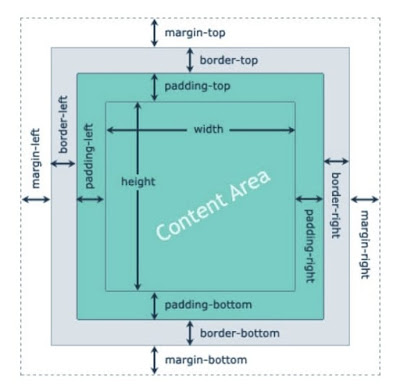
Margin:
The margin property allows us to set the amount of space that surrounds an element. Margins for an element fall outside of any border and are completely transparent in color. Margins can be used to help position elements in a particular place on a page or to provide breathing room, keeping all other elements a safe distance away.
Padding:
The padding property is very similar to the margin property; however, it falls inside of an element's border, should an element have a border. The padding property is used to provide spacing directly within an element.
Borders:
Borders fall between the padding and margin, providing an outline around an element. The border property requires three values: width, style, and color
Content Box:
The content-box value is the default value, leaving the box model as an additive design. If we don't use the box-sizing property, this will be the default value for all elements. The size of an element begins with the width and height properties, and then any padding, border, or margin property values are added on from there.
Border Box:
Lastly, the border-box value alters the box model so that any border or padding property values are included within the width and height of an element. When using the border-box value, if an element has a width of 400 pixels, a padding of 20 pixels around every side, and a border of 10 pixels around every side, the actual width will remain 400 pixels. If we add a margin, those values will need to be added to calculate the full box size. No matter which box-sizing property value is used, any margin values will need to be added to calculate the full size of the element.
HTML
<p>
  Lorem ipsum dolor sit amet, consectetur adipiscing elit, sed do eiusmod tempor
  incididunt ut labore et dolore magna aliqua. Ut enim ad minim veniam, quis
  nostrud exercitation ullamco laboris nisi ut aliquip ex ea commodo consequat.
  Duis aute irure dolor in reprehenderit in voluptate velit esse cillum dolore
  eu fugiat nulla pariatur. Excepteur sint occaecat cupidatat non proident, sunt
  in culpa qui officia deserunt mollit anim id est laborum.
</p>
CSS
* {
  margin: 0;
  padding: 0;
}

p {
  margin: 50px;
  border: 12px solid orangered;
  padding: 50px;
  width: 300px;
  height: 200px;
  /* box-sizing: border-box; */
  background-color: aquamarine;
}
You can check out the Demo.