Back to CSS Course
CSS Course
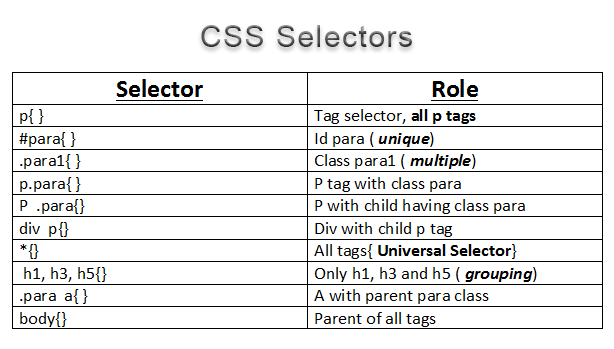
Selectors in CSS are the identifiers of an element, by which we can target element or elements individually or combinedly to apply styling.
Types of Selectors
- Element Selector
- ID Selector
- Class Selector
- Descendant Selector
- Child Selector
- Attribute Selector
HTML
<h1>First Heading</h1>
<h2 id="h2">Second Heading</h2>
<h3 class="h3">Third Heading</h3>
<h4>Fourth Heading</h3>
<div>
    <p>Child Selector</p>
    <h5>Five Heading </h5>
</div>
<div>
    <h6>Six Heading</h6>
</div>
<a href="https://www.google.com" target="_blank">Google</a>
CSS
/* Universal selector */
* {
  background-color: limegreen;
}

/* Element selector */
body {
  margin: 0;
}

/* Grouping selector */
h1,
h4 {
  color: blue;
}

/* Id selector */
#h2 {
  color: brown;
}

/* Class selector */
.h3 {
  color: khaki;
}

/* Descendant selector */
div h6 {
  color: grey;
}

/* Child selector */
div > p {
  color: yellow;
  font-weight: bold;
}

/* Pseudo class selector */
a:hover {
  color: red;
}

/* Pseudo element selector */
p::first-letter {
  color: black;
}

/* Attribute selector */
a[target="_blank"] {
  text-transform: uppercase;
}
You can check out the Demo.