Docker Course
Before we delve into Docker, let's examine the project deployment process.
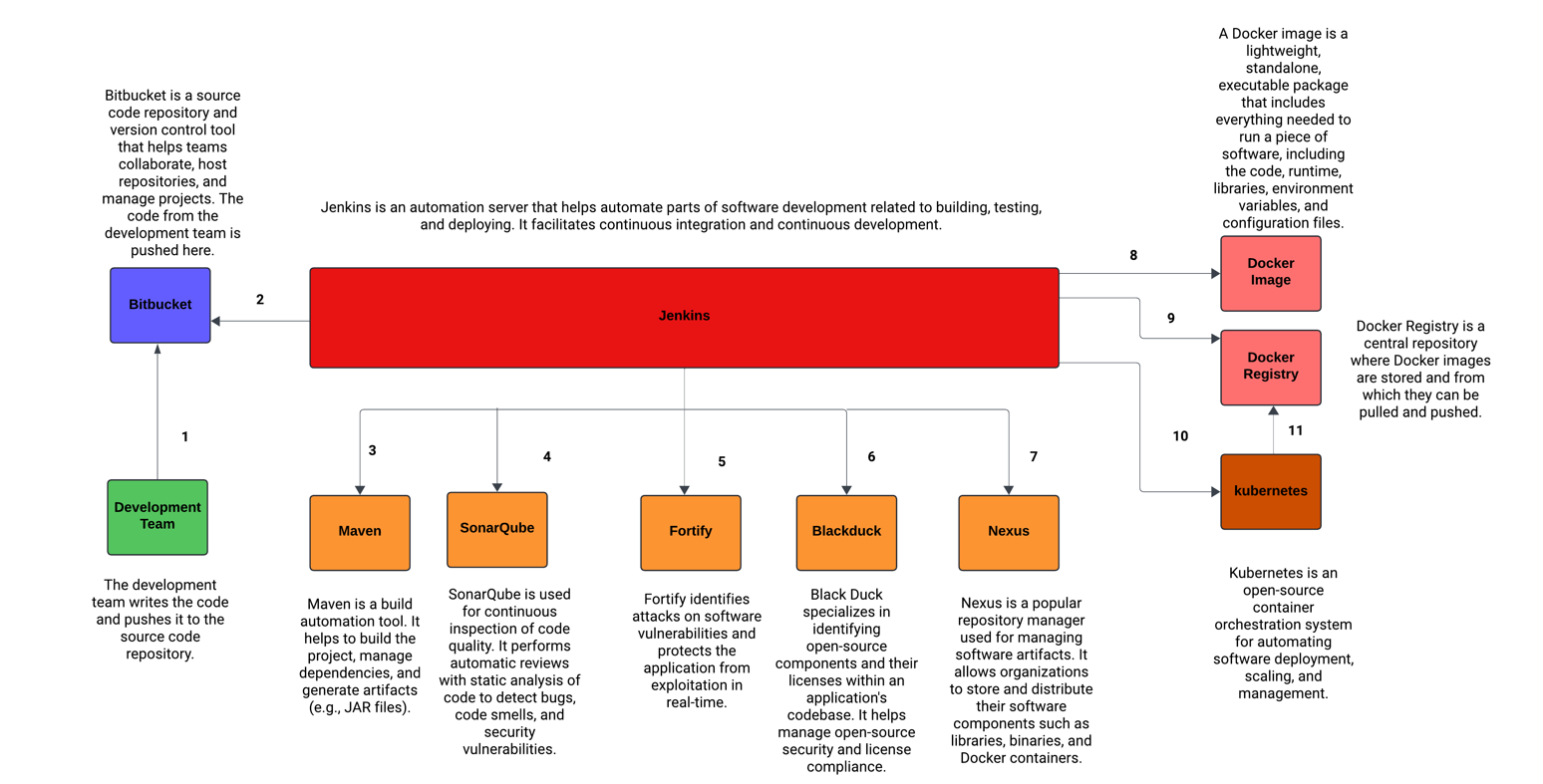
What is an Application?
An application is a set of programs designed to perform specific tasks for users.
Application Technology Layers
Every application is typically structured into three layers:
Frontend (UI)
- Angular
- React JS
- Vue JS
Backend (Business Logic)
- Java
- .NET
- Python
- Node JS
- PHP
Database
- Oracle
- MySQL
- PostgreSQL
- SQL Server
- MongoDB
Application Deployment Environments
Applications are deployed across various testing environments before reaching production. These environments consist of:
- DEV Environment: Dedicated to developer testing.
- SIT Environment: Where System Integration Testing is performed by the QA team.
- UAT Environment: Involves User Acceptance Testing by clients.
- PILOT Environment (Pre-Production): Conducts tests with live data before final deployment.
Once testing is completed in all environments, the application is deployed into the PRODUCTION Environment for end-user access.
Traditional Application Deployment
Without Docker, installing all necessary software across environments is essential for application execution. Maintaining consistent software versions across machines is critical, as discrepancies can lead to application failures. For instance, if Java 11 is installed in the DEV environment but Java 8 in the SIT environment, the application may not function correctly. Managing applications on multiple machines becomes a laborious and error-prone task.
Containerized Application Deployment
Docker simplifies application deployment by containerizing the application and its dependencies. It ensures uniform application execution across various environments, eliminating concerns about software versions and dependencies. This significantly reduces the gap between development and deployment phases.
What is Docker?
Docker is a containerization platform used to build and deploy applications into any environment, ensuring all dependencies are included within the container. Dependencies can include the OS, application frameworks (Angular, React, Java), databases, and servers (Tomcat).
What is Virtualization?
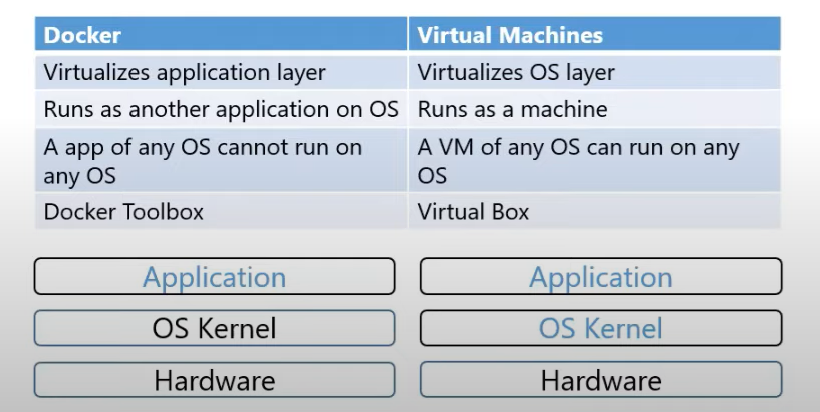
Virtualization involves installing multiple guest operating systems on a single host operating system using a hypervisor. Each guest OS requires its own set of software, which can slow down the system and make managing applications cumbersome. Virtualization is an older technique compared to containerization.
What is Containerization?
Containerization packages an application's code and all its dependencies into a single container, which can run on any machine. Docker is a popular containerization software. Containers are lightweight, efficient, and ensure consistency across different environments.
Importance in Modern Development
- Ensures consistency across multiple development, testing, and production environments.
- Simplifies application deployment and scaling.
- Enhances resource utilization by allowing multiple containers to run on a single host.
Why Use Docker?
- Portability: Docker containers can run anywhere, ensuring that applications work seamlessly across various environments.
- Efficiency: Containers share the host system's kernel, making them more lightweight and faster than traditional virtual machines.
- Isolation: Each container operates in its isolated environment, ensuring that applications do not interfere with each other.
- Scalability: Docker makes it easy to scale applications horizontally by adding more container instances.
Docker Architecture
- Dockerfile: Contains instructions to build a Docker image.
- Docker Image: A package that includes code and dependencies.
- Docker Registry: A repository to store Docker images.
- Docker Container: A runtime instance of a Docker image.
Once a Docker image is created, it can be pulled and run on any machine.