DSA Course
An array is a collection of items of the same data type stored at contiguous memory locations.
This makes it easier to calculate the position of each element by simply adding an offset to a base value, i.e., the memory location of the first element of the array.
Defining an Array
Array definition is similar to defining any other variable.
There are two things that are needed to be kept in mind, the data type of the array elements and the size of the array.
The size of the array is fixed and the memory for an array needs to be allocated before use, the size of an array cannot be increased or decreased dynamically.
Syntax
datatype[] variable_name = new datatype[size];
for example
int[] num = new int[10];

char[] arr1 = {'p', 'r', 'a', 'v', 'e', 'e', 'n'};

int[] arr2 = {10, 20, 30, 40, 50};

// Item at i'th index in array is typically accessed  as "arr[i]". For example arr1[0] gives us 'p' and arr2[3] gives us 40.
Array Operations and its time complexity
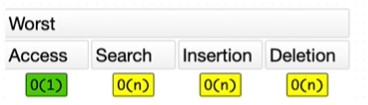
- Accessing a value at given index: O(1).
- Updating a value at given index: O(1).
- Inserting a value at the beginning: O(n).
- Inserting a value in the middle: O(n).
- Inserting a value at the end: O(1) when dealing with a dynamic array and O(n) when dealing with a static array.
- Removing a value at the beginning: O(n).
- Removing a value in the middle: O(n).
- Removing a value at the end: O(1).
- Copying the array: O(n).
You can learn more about space and time complexity in further section.
Accessing array elements
Arrays allows to access elements randomly. Elements in an array can be accessed using indexes.
Suppose an array named arr stores N elements. Indexes in an array are in the range of 0 to N-1, where the first element is present at index 0 and consecutive elements are placed at consecutive indexes.
For example,
int[] nums = {1,3,5,7,9,11,13,15};

System.out.println(nums[0]); // 1
System.out.println(nums[5]); // 11
System.out.println(nums[7]); // 15
System.out.println(nums[8]); // ArrayIndexOutOfBoundsException

int[] arr = new int[4];
System.out.println(arr); // it prints 4 zeros

String[] names = new String[4];
System.out.println(names); // it prints 4 null as it is not a primitive
Properties of Array
- Array can store data of specific datatype
- It has contiguous memory location
- Every cell of an array has unique index
- Index starts with zero
- Size of array needs to be specified mandatorily and cannot be modified.
How is an Array represented in Memory (RAM)?
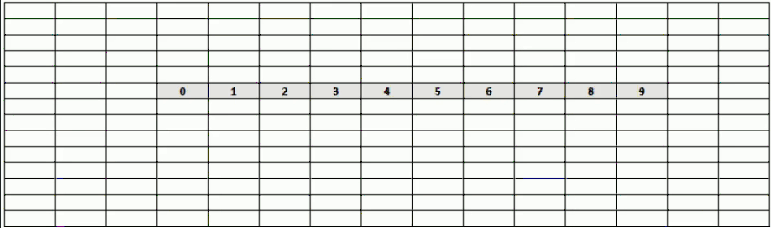
It stores the cells data in contiguous memory location.
Advantages of using arrays
- Arrays allow random access of elements. This makes accessing elements by their position faster.
- Arrays have better cache locality that can make a pretty big difference in performance.
Limitation of Arrays
- Need to know size in advance. Too small size cannot add more elements where as Too large size is waste of space.
- We cannot insert/remove the elements infront of others except at the end.
- some operations like search will be slow.
Inserting a value at the beginning of the Array
package com.praveen.array;

import java.util.Arrays;

public class ArrayDemo {

	public static void main(String[] args) {
		System.out.println(Arrays.toString(addElement(new int[] { 9, 8, 7, 5, 2, 3, 4 }, 10)));
	}

	public static int[] addElement(int[] arr, int element) {
		int newArr[] = new int[arr.length + 1];
		newArr[0] = element;
		for (int i = 0; i < arr.length; i++) {
			newArr[i + 1] = arr[i];
		}
		return newArr;
	}
}
Searching in an Array
Searching for an element in an array means to check if a given element is present in the array or not. This can be done by accessing elements of the array one by one starting from the first element and checking whether any of the elements matches with the given element.
We can use loops to perform the above operation of array traversal and access the elements, using indexes.
Suppose the array is named arr[] with size N and the element to be searched is referred to as key. Below is the algorithm to perform the search operation in the given array.
package com.praveen.array;

public class ArrayDemo {

	public static void main(String[] args) {

	    int[] num = { 10, 20, 30, 40, 50 };
		System.out.println(searchElement(num, 40)); // true
		System.out.println(searchElement(num, 25)); // false

		System.out.println(searchElementEnhanced(num, 20)); // true
		System.out.println(searchElementEnhanced(num, 100)); // false

		System.out.println(searchElementJava8(num, 50)); // true
		System.out.println(searchElementJava8(num, 5)); // false

	}

    /* Time Complexity of this search operation will be O(N) in the worst case as we are checking every element
	   of the array from 1st to last, so the number of operations is N.
	*/
	public static boolean searchElement(int[] num, int key) {
		for (int i = 0; i < num.length - 1; i++) {
			if (num[i] == key) {
				return true;
			}
		}

		return false;
	}

	public static boolean searchElementEnhanced(int[] num, int key) {
		for (int i : num) {
			if (i == key) {
				return true;
			}
		}
		return false;
	}

	public static boolean searchElementJava8(int[] num, int key) {
		return Arrays.stream(num).anyMatch(number -> number == key);
	}

}
Let's see some inbuilt functions in Java for Arrays.
- For comparing two arrays we can use Arrays.equals(a1,a2);
- For comparing two arrays of arrays we can use Arrays.deepEquals(a1,a2);
- To print an array we can use Arrays.toString(a);
- To sort an array we can use Arrays.sort(a);
- Binary search in an sorted array we can use Arrays.binarySearch(int[] a,int key) where key will be index.
- To copy an array we can use Arrays.copyof(int[] original,int newLength)
- To convert an array to List we can use Arrays.asList(a)
How many types of Arrays available?
- Single Dimensional Array (1D)
- Two Dimensional Array(2D)
- Multi Dimensional Array(3D,4D etc)
Single Dimensional Array
For example,
package com.praveen.array;

import java.util.Arrays;

public class SingleDimensionalArray {

	public static void main(String[] args) {

		int[] arr = { 1, 2, 3, 4, 5, 6, 7, 8, 9 };

		for (int i = 0; i < arr.length; i++) {
			System.out.print(arr[i] + " ");
		}

		System.out.println();

		for (int i : arr) {
			System.out.print(i + " ");
		}

		System.out.println();

		System.out.println(Arrays.toString(arr));

	}
}
Output
1 2 3 4 5 6 7 8 9
1 2 3 4 5 6 7 8 9
[1, 2, 3, 4, 5, 6, 7, 8, 9]
Two Dimensional Array
For example,
package com.praveen.array;

import java.util.Arrays;

public class TwoDimensionalArray {
	public static void main(String[] args) {

		int[][] arr = { { 1, 2, 3 }, { 4, 5 }, { 6, 7, 8, 9 } };

		for (int row = 0; row < arr.length; row++) {
			for (int col = 0; col < arr[row].length; col++) {
				System.out.print(arr[row][col] + " ");
			}
			System.out.println();
		}

		for (int row = 0; row < arr.length; row++) {
			System.out.println(Arrays.toString(arr[row]));
		}


	}
}
Output
1 2 3
4 5
6 7 8 9
[1, 2, 3]
[4, 5]
[6, 7, 8, 9]
Note
- if rows and columns are fixed then we will say that as a Matrix Array.
- if rows as fixed but columns are variable then we will say that as Jagged Array.
MultiDimensional Array
Lets see three dimensional array.
For example,
package com.praveen.array;

public class ThreeDimensionalArray {

	public static void main(String[] args) {
		int[][][] arr = { { { 1, 2, 3 }, { 4, 5, 6 }, { 7, 8 } } };

		for (int i = 0; i < arr.length; i++) {
			for (int j = 0; j < arr[i].length; j++) {
				for (int k = 0; k < arr[i][j].length; k++) {
					System.out.print(arr[i][j][k] + " ");
				}
				System.out.println();
			}
		}

	}

}
Output
1 2 3
4 5 6
7 8
Let's see some Array Programs
1. Reverse an Array
import java.util.Arrays;

public class ReverseTheArray {

	public static void main(String[] args) {

		System.out.println(Arrays.toString(reverseArray(new int[] { 21, 31, 32, 12, 95 })));

	}

	private static int[] reverseArray(int[] arr) {
		int start = 0;
		int end = arr.length - 1;

		int temp;

		while (start < end) {
			temp = arr[start];
			arr[start] = arr[end];
			arr[end] = temp;
			start++;
			end--;
		}
		return arr;

	}

}
2. Find the maximum and minimum element in an array
public class ArrayMaxMin {
	public static void main(String[] args) {
		getMinMax(new int[] { 90, 24, 46, 35, 32, 12, 98, 2 });
	}

	private static void getMinMax(int[] num) {
		int max = num[0];
		int min = num[1];

		for (int i = 0; i < num.length; i++) {
			if (num[i] > max) {
				max = num[i];
			} else if (num[i] < min) {
				min = num[i];
			}
		}

		System.out.println("Max Element is " + max);
		System.out.println("Min Element is " + min);
	}
}