HTML Course
What is HTML?
HTML is one of the most widely used languages on the web to develop web pages.
HTML stands for Hyper Text Markup Language. It is used to design web pages using a markup language. HTML is the combination of Hypertext and Markup language. Hypertext defines the link between the web pages. A markup language is used to define the text document within tag which defines the structure of web pages.
HTML is a markup language i.e., it is a way for the computers to communicate with each other, to control how text is processed and presented. A website will be opened on various systems with different browsers and the markup language ensures that the website looks the same in all the systems with the help of its various tags.
History of HTML
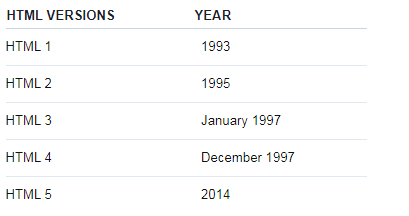
HTML is a markup language that is used by the browser to manipulate text, images, and other content to display it in the required format. HTML was created by Tim Berners-Lee in 1991.
Here are the first web pages created back in 1992 explaining WWW and hypertext:
https://www.w3.org/History/19921103-hypertext/hypertext/WWW/TheProject.html
https://www.w3.org/History/19921103-hypertext/hypertext/WWW/WhatIs.html
HTML Structure
HTML tags have two main types: block-level and inline tags.
Block-level elements take up the full available space and always start a new line in the document. Headings and paragraphs are an example of block-level elements.
Inline elements only take up as much space as they need and don't start a new line on the page. They usually serve to format the inner contents of block-level elements. Images and links are an example of inline elements.
The three block-level tags that you need for your HTML document are <html>, <head>, and <body>.
The <html></html> tag is the highest level element that encloses all the code.
The <head></head> tag holds meta information such as the page's title, charset, metadata, etc.
All the HTML elements that can be used inside the <head> element are: <style>, <title>, <base>, <noscript>, <script> and <meta>.
The <body></body> tag encloses all the content that appears on the page. It is used to enclose all the data which a web page has from texts to links. All of the content that you see rendered in the browser is contained within this element.
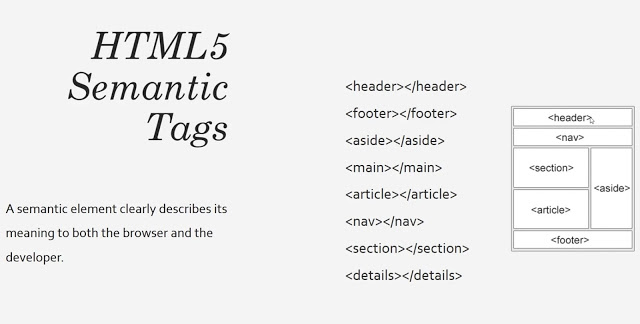
For HTML5, we need to include DOCTYPE.
<!DOCTYPE html>
How does HTML work?
HTML documents end with the .html or .htm extension. You can view it using any web browser. The browser reads the HTML file and renders the content for users to view it.
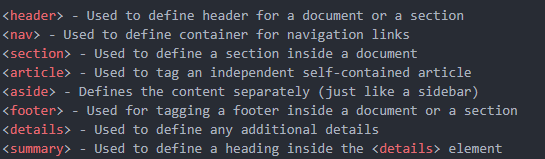
Each HTML page consists of a set of tags or elements which are known as the building blocks of web pages. They create a hierarchy that structures the content into sections, paragraphs, headings, and other content blocks.
Fundamentals of HTML
To build a webpage with HTML, you need to know about some of the basics of HTML such as:
Elements vs Tags
HTML uses predefined tags and elements which tell the browser about content display property. If a tag is not closed then the browser applies that effect till the end of page.
Elements have a starting tag, some content, and a closing tag.
In this case, we use the p starting and closing tags to create a paragraph element.
<p>A paragraph of text</p>
Attributes
The starting tag of an element can have special snippets of information we can attach, called attributes. Attributes have the key="value" syntax:
<p class="a-class">Some Text</p>
We can have multiple of them:
<p class="a-class" id="an-id">Some More Text</p>
The class and id attributes are two of the most common you will find used.
What is the difference between id and class attribute ?
id is used to uniquely identify a single element, while class is used to group together multiple elements.
What is Parent Element and Empty Element?
Parent Element: A parent element is like a container that holds elements inside.
Empty Element: An empty element does not need closing tags. for example, img tag, input tag.
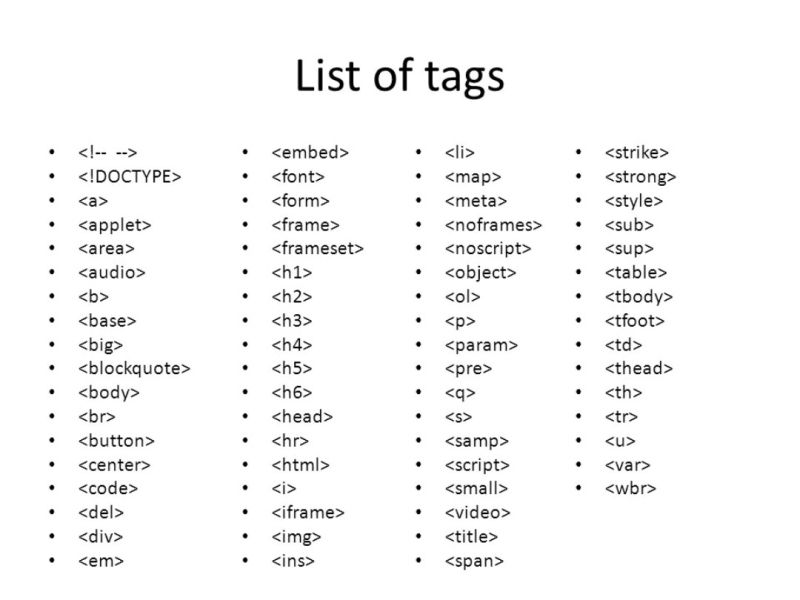
Here with the complete set of HTML Tags.