Java Course
Exception
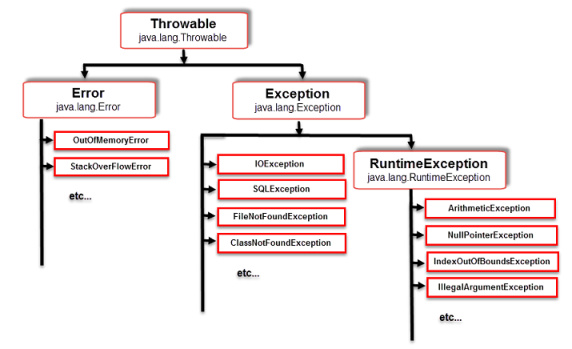
An exception is an event, which occurs during the execution of a program, that disrupts the normal flow of the program's instructions.
Errors
Most of the times errors are not caused by our programs these are due to lack of system resources. Errors are not recoverable (not handle).
For example, if OutOfMemory error occurs during the execution of a program we can't do anything and the program will be terminated abnormally.
Java Exception Handling Keywords
There are 5 keywords which are used for exception handling in Java
- try
In java try block we can write the code that might throw an exception. A try block in Java must be followed by either at least one catch block or one finally block.
- catch
catch block in Java is used to handle the exception that may occur in our program. It must be used after try block only. We can use more than one catch block with a single try block.
-
finally
- finally block in Java can be used to clean up code or release some resources that are utilized in the program.
- The Specialty of finally Block is it will be executed Always irrespective of whether Exception raised OR Not raised and whether Exception Handled OR Not Handled.
-
throw
- throw keyword in java can be used to throw an exception. It can throw the exceptions explicitly.
- We can throw either checked or unchecked exception using throw keyword.
- After throw Statement we are Not allowed to write any Statements Directly Otherwise we will get Compile Time Error Saying unreachable statement.
- In General we can Use throw Key Word for Customized Exceptions but Not for pre-defined Exceptions.
- We can Use throw Key Word Only for Throwable Types. Otherwise we will get Compile Time Error Saying incompatible types.
Syntax
throw exception;
-
throws
- throws keyword in java is used for declaring an exception. We can declare only checked exception using throws keyword. So its programmer responsibility to provide the exception handling code so that the normal flow of the program can be maintained.
- Usage of throws Key Word for Unchecked Exceptions there is No Use.
- throws Key Word required Only to Convince Compiler and it doesn't Prevent Abnormal Termination of the Program.
- Hence Recommended to Use try- catch- finally Over throws Key Word.
Syntax
return_type method_name() throws exception_class_name.
Points to remember
- Within the try Block if any where an Exception raised then Rest of the try Block won't be executed even though we handled that Exception.
- Hence within the try Block we have to Take Only Risky Code and Hence Length of the try Block should be as Less as Possible.
- If there is any Statement which raises an Exception and it is Not Part of the try Block then it is Always Abnormal Termination.
- In Addition to try Block there May be a Chance of raising an Exception Inside catch and finally Blocks Also.
- We can Take try – catch – finally Inside try Block i.e. Nesting of try – catch – finally is Always Possible.
- More Specific Exceptions can be handled by Inner catch Block and Generalized Exceptions are handled by Outer catch Blocks.
- Once we entered into the try Block without executing finally Block the Control Never Comes Up.
- If we are Not entering into the try Block then finally Block won't be executed.
- Default Exception Handler can Handle Only One Exception at a Time i.e. the Most Recently raised Exception.
Various Possible Combinations of try-catch-finally
- In try-catch-finally Order is Important.
- Inside try-catch-finally we can take try-catch-finally that is nesting of try-catch-finally is always possible.
- Whenever we are taking try Compulsory we have to Take either catch OR finally Blocks i.e. try without catch OR finally is Invalid.
- Whenever we are writing catch Block Compulsory we have to write try Block i.e. catch without try is Invalid.
- Whenever we are writing finally Block Compulsory we should write try i.e. finally without try is Invalid.
- For try-catch-finally Blocks Curly Braces are Mandatory.
- We can't write 2 catch Blocks for the Same Exception Otherwise we will get CE.
Throwable Class defines the following Methods to Print Exception Information
printStackTrace(): Name of the Exception: Description and Stack Trace toString() : Name of the Exception: Description getMessage() : Description
Types of Exception in Java
There are two types of Exception in Java:
- Checked Exception
A checked exception is a type of exception that must be either caught or declared in the method in which it is thrown. For example, the java.io.IOException is a checked exception.
Let's see some sample code
In this example, we are reading the file abc.txt and displaying its content on the screen. Here we are usingFileInputStream for reading the data from a file, throws FileNotFoundException. The read() method which is used for reading the data from the input stream and close() method which is used for closes the file input stream throws an IOException.
public class ExceptionExample {

	public static void main(String args[]) {
		FileInputStream fis = null;
		fis = new FileInputStream("D:/abc.txt");
		int i;
		while ((i = fis.read()) != -1) {
			System.out.println((char) i);
		}
		fis.close();
	}

}
Output
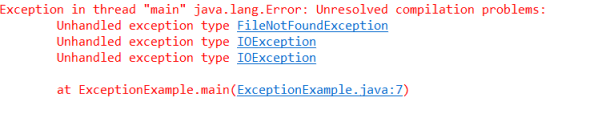
There are two ways to handle this compilation error
-
Using try-catch.
-
Using throws keyword.
-
Handle Checked Exception using a try-catch block.
It is a good practice to handle the exception using try-catch block Because you should give a meaningful message for each exception type so that it would be easy for someone to understand the error.
public class CheckedExceptionExample{
 public static void main(String args[]) {
  FileInputStream fis = null;
  try {
   fis = new FileInputStream("D:/abc.txt");
  } catch (FileNotFoundException e) {
   e.printStackTrace();
   return; // fis is still null here, so avoid using it below
  }
  int i;
  try {
   while ((i = fis.read()) != -1) {
    System.out.println((char) i);
   }
  } catch (IOException e) {
   e.printStackTrace();
  }
  try {
   fis.close();
  } catch (IOException e) {
   e.printStackTrace();
  }
 }

}
- Handle Checked Exception using throws keyword
As we know that checked exception occurs inside the main() method. So you can declare the exception in the main() method using throws keyword. You can declare the exception like this:
class CheckedExceptionExample{
 public static void main(String args[]) throws IOException {
  FileInputStream fis = null;
  fis = new FileInputStream("D:/abc.txt");
  int i;
  while ((i = fis.read()) != -1) {
   System.out.println((char) i);
  }
  fis.close();
 }

}
IOException is the parent class of FileNotFoundException so that it by default handle the FileNotFoundException
- Unchecked Exceptions
All the classes which inherit RuntimeException are known as Unchecked Exception. The Unchecked exceptions are not checked by the compiler at compile-time. But they are checked at runtime.
In case of Unchecked exception if programmers will not handle the exception then we won't get a compile-time error.
Most of the time these exceptions occur due to the wrong data entered by the user ( divide by zero). In such type of exceptions, the compiler will never force you to handle the exceptions. For example, ArithmeticException, NullPointerException, ArrayIndexOutOfBounds etc.
Let's see some sample code
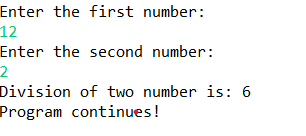
In this example, we are dividing two numbers which are entered by the user. If the user enters right data then our program will display division of two numbers. If the user enters wrong data then our program will display ArithmeticException.These exceptions will not occur at compile-time, it can occur at runtime.
public class UnCheckedExceptionExample {

 public static void main(String args[]) {
  Scanner sc = new Scanner(System.in);
  System.out.println("Enter the first number:");
  int a = sc.nextInt();
  System.out.println("Enter the second number:");
  int b = sc.nextInt();
  int c = a / b;
  System.out.println("Division of two number is: " + c);
  System.out.println("Program continues!");
  sc.close();
 }

}
Output
Let's see another example for unchecked exception
In this example we are taking an example of an array. Here my array has only 5 elements but we are trying to display the value of the 10th element.
It should throw an exception ArrayIndexOutOfBoundsException.
public class UnCheckedExceptionExample {

	public static void main(String args[]) {
		int arr[] = { 1, 2, 3, 4, 5 };
		System.out.println("The value of 10th element is:" + arr[10]);

	}
}
Output

Exception handling using try and catch block
public class UnCheckedExceptionExample {

 public static void main(String args[]) {
  Scanner sc = new Scanner(System.in);
  System.out.println("Enter the first number:");
  int a = sc.nextInt();
  System.out.println("Enter the second number:");
  int b = sc.nextInt();
  try {
   int c = a / b;
   System.out.println("Division of two number is: " + c);
  }catch(ArithmeticException e) {
   System.out.println("Exception: " +e.getMessage());
  }
  System.out.println("Program continues!");
  sc.close();
 }
}
Output
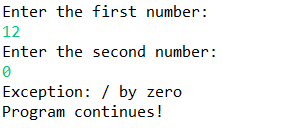
Internally Default Exception Handler Uses printStackTrace() to Print Exception Information to the Console.
Multiple catch blocks
If we want to perform a different task at the occurrence of different exception then we should go for multiple catch block.
Let's see an example of multiple catch block in Java.
public class UnCheckedExceptionExample {

 public static void main(String args[]) {
  try {
   int arr[] = new int[5];
   arr[3] = 12 / 0;
   System.out.println("We are in try block");
  } catch (ArithmeticException e) {
   System.out.println("Divide by zero exception");
  } catch (ArrayIndexOutOfBoundsException e) {
   System.out.println("array elements outside limit");
  } catch (Exception e) {
   System.out.println("Other type of exception");
  }
  System.out.println("We are outside the try catch block");
 }
}
Output

Points to remember
- If try with Multiple catch Blocks Present then the Order of catch Blocks are Very Important. It should be from Child to Parent.
- By Mistake if we are trying to Take Parent to Child then we will get Compile Time Error Saying: exception XXX has already been caught.
- For any Exception if we are writing 2 Same catch Blocks we will get Compile Time Error like exception already caught.
Explicitly throw an Exception in Java
throw keyword in Java can be used to throw an exception. It can throw the exceptions explicitly. We can throw either checked or unchecked exception using throw keyword. Let's understand with a simple example.
In this example, we have created two variable balance and withdrawlAmount. If the balance is less than withdrawalAmount then ArithmeticException has occurred. Therefore we throw an object of ArithmeticException and it will display a message on the screen "insufficient balance".
public class ThrowExceptionExample {

 public static void main(String args[]) {
  int balance = 5000;
  int withdrawlAmount = 6000;
  try {
   if (balance < withdrawlAmount)
    // created an object of ArithmeticException class
    throw new ArithmeticException("Insufficient balance");
   balance = balance - withdrawlAmount;
   System.out.println(" Transactions successfully completed");
  } catch (ArithmeticException e) {
   System.out.println("Exception is: " + e.getMessage());
  }
  System.out.println("Programs continues!");
 }
}
Output

Checked Exception vs Unchecked Exception
All the classes which inherit throwable class except RuntimeException and Error are known as Checked Exception while all the classes which inherit RuntimeException are known as Unchecked Exception.
The checked exceptions are checked by the compiler at compile-time while the Unchecked exceptions are not checked by the compiler at compile-time. But they are checked at runtime.
In case of checked exception if programmers will not handle the exception then we will get a compile-time error while in case of Unchecked exception if programmers will not handle the exception then we won't get a compile-time error.
FileNotFoundException, ClassNotFoundException, IOException, SQLException etc. are the example of checked exception while ArithmeticException, NullPointerException,
ArrayIndexOutOfBounds etc. are the example of Unchecked exception.
Both checked and unchecked exceptions propagate up the call stack the same way if left uncaught. The real difference is that the compiler forces checked exceptions to be either caught or declared with throws, while unchecked exceptions have no such compile-time requirement.
Throw vs Throws
throw keyword in Java can be used to throw an exception. It can throw the exception explicitly while throws keyword in java is used for declaring an exception.
A throw is used inside the method while throws are used with the body signature.
for example,
      public void m1() {
          throw new ArithmeticException();
      }

      public void m1() throws IOException, FileNotFoundException{

      }
A throw is used to throw only one exception while we can declare multiple exceptions using throws.
A throw is used in either checked exception or unchecked exception while throws only are used in a checked exception.
final vs finally vs finalize in Java
final
- final is a Modifier is Applicable for Classes, Methods and Variables.
- If a Class declared as final then we can't Create Child Class. That is Inheritance is Not Possible for final Classes.
- If a Method declared as final then we can't Override that Method in Child Classes.
- If a Variable declared as final then we can't Perform Re- Assignment for that Variable.
finally
- finally is a Block Always associated with try-catch to Maintain Clean Up Code.
- The Specialty of finally Block is it will be executed Always Irrespective of whether Exception raised OR Not and whether Handled OR Not Handled.
finalize()
- finalize() is a Method Always Called by the Garbage Collector Just before Destroying an Object to Perform Clean Up Activities.
- Once finalize() Completes Automatically Garbage Collector Destroys that Object.
Points to remember
- finalize is Responsible to Perform Object Level Clean-Up Activities whereas finally Block is Responsible to Perform try Block Level Clean-Up Activities i.e. whatever Resources we Opened at the Time of try Block will be Closed Inside finally Block
- It is Highly Recommended to Use finally Block than finalize()because we can't Expect Exact Behavior of Garbage Collector. It is JVM Vendor Dependent.
finally vs return
If return Statement Present Inside try OR catch Blocks 1st finally will be executed and after that Only return Statement will be Considered i.e. finally Block Dominates return Statement.
If try-catch-finally Blocks having return Statements then finally Block return Statement will be Considered i.e. finally Block return Statement has More Priority than try and catch Block return Statements.
package com.praveen.exception;

public class FinallyReturnExample {

 public static void main(String[] args) {
  System.out.println(m1());
 }

 public static int m1() {
  try {
   return 777;
  } catch (Exception e) {
   return 888;
  } finally {
   return 999;
  }
 }

}
Output
999
finally vs System.exit(0)
finally
There is Only One Situation where the finally Block won't be executed that is whenever we are System.exit(0).
Whenever we are using System.exit(0) then JVM itself will be Shutdown and hence finally Block won't be executed. That is System.exit(0) Dominates finally Block.
public class FinallySystemExitExample {
 public static void main(String[] args) {
  try {
   System.out.println("try");
   System.exit(0);
  } catch (Exception e) {
   System.out.println("catch");
  } finally {
   System.out.println("finally");
  }
 }

}
Output
try
System.exit(0)
- We can Use this Method to Exit (Shut Down) the System (JVM) Programmatically.
- The Argument Represents as Status Code.
- Instead of 0 we can Pass any Valid int Value.
- 0 Means Normal Termination, Non- Zero Means Abnormal Termination.
- So this status code internally used by JVM.
- Whether it is 0 OR Non- Zero Effect is Same in Our Program but this Number Internally used by JVM.
Example on Custom Exception
InsufficientFundsException.java
public class InsufficientFundsException extends Exception {
 private static final long serialVersionUID = -5077686490745588740L;
 public InsufficientFundsException(String exception_Description) {
  super(exception_Description);
 }
}
Account.java
public class Account {
 String accNo;
 String accName;
 String accType;
 int balance;

 public Account(String acc_No, String acc_Name, String acc_Type, int acc_Balance) {
  accNo = acc_No;
  accName = acc_Name;
  accType = acc_Type;
  balance = acc_Balance;
 }

 public String getAccNo() {
  return accNo;
 }

 public String getAccName() {
  return accName;
 }

 public String getAccType() {
  return accType;
 }

 public int getBalance() {
  return balance;
 }
}
Transaction.java
public class Transaction {
 public void withdraw(Account acc, int wd_Amt) {
  try {
   System.out.println("Transaction Details");
   System.out.println("————————————————");
   System.out.println("Transaction Id :T-111");
   System.out.println("Account Number :" + acc.accNo);
   System.out.println("Account Name :" + acc.accName);
   System.out.println("Account Type :" + acc.accType);
   System.out.println("Initial Balance :" + acc.balance);
   System.out.println("Transaction Type :WITHDRAW");
   System.out.println("Withdraw Amount :" + wd_Amt);
   if (acc.balance >= wd_Amt) {
    acc.balance = acc.balance - wd_Amt;
    System.out.println("Total Balance :" + acc.balance);
    System.out.println("Transaction Status :SUCCESS");
   } else {
    System.out.println("Total Balance :" + acc.balance);
    System.out.println("Transaction Status :FAILURE");
    throw new InsufficientFundsException(
      "Reason: Funds are not Sufficient in your Accout, please enter valid withdraw Amount");
   }
  } catch (InsufficientFundsException e) {
   System.out.println(e.getMessage());
  } finally {
   System.out.println("*********Thanks Vist Again************");

  }

 }
}
Test.java
public class Test {
 public static void main(String[] args) {
  Account acc1 = new Account("abc123", "Praveen", "Savings", 20000);
  Transaction tx1 = new Transaction();
  tx1.withdraw(acc1, 15000);
  System.out.println("Transaction for account number "+ acc1.getAccNo() +" is complete \n");
  Account acc2 = new Account("xyz123", "Prasad", "Savings", 10000);
  Transaction tx2 = new Transaction();
  tx2.withdraw(acc2, 15000);
  System.out.println("Transaction for account number "+ acc2.getAccNo() +" is complete");
 }
}
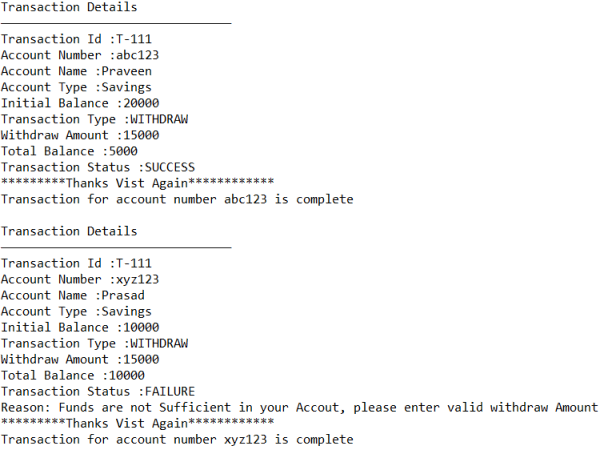
Output
Summary of Exception Handling Key Words
- try -> To Maintain Risky Code
- catch -> To Maintain Handling Code
- finally -> To Maintain Clean Up Code
- throw -> To Hand-Over Our Created Exception Object to the JVM Manually
- throws -> To Delegate Responsibility of Exception Handling to the Caller Method
1.7 Version Enhancements
In 1.7 Version as the Part of Exception Handling the following 2 Concepts Introduced.
- try with Resources
- Multi catch Block
try with Resources
Until 1.6 Version it is Highly Recommended to write finally Block to Close All Resources which are Opened as the Part of try Block.
- The Main Advantage of try with Resources is the Resources which are Opened as the Part of try Block will be Closed Automatically and we are Not required to Close Explicitly. It Reduces Complexity of the Programming.
- It is Not required to write finally Block Explicitly and Hence Length of the Code will be Reduced and Readability will be Improved.
Points to remember
We can Declare Multiple Reasons and All these Resources should be Separated with ‘;'.
Syntax: try (R1; R2; R3) {
------------------
}
Eg: try ( FileWriter fw1 = new FileWriter("Output.txt");
FileWriter fw2 = new FileWriter("Input.txt") ) {
--------------
}
- All Resources should be AutoClosable Resources.
- A Resource is Said to be AutoClosable
- Corresponding Class Implements java.lang.AutoClosable Interface either Directly OR In- Directly.
- This Interface introduced in 1.7 Version and it contains Only One Method public void close();
- All Network OR Database Related OR File IO Related Resources Implements AutoClosable Interface. Being a Programmer we are Not required to do anything.
- All Resource Reference Variables are Implicitly final. Hence within the try Block we can't Perform Re- Assignment.
- Until 1.6 Version try should be followed by either catch OR finally but from 1.7 onwards we can Take Only try with Resources without - catch and finally Blocks.
- The Main Advantage of try with Resources is finally Block will become Dummy because we are required to Close the Resources Explicitly.
Multi Catch Block (Catch Block with Multiple Exceptions)
Until 1.6 Version even though Multiple Exceptions having Same Handling Code Compulsory we have to write a Separate catch Block for Every Exception.
try {
-------
}
catch (ArithmeticException e) {
e.printStackTrace();
}
catch (NullPointerException e) {
e.printStackTrace();
}
catch (ClassCastException e) {
System.out.println(e.getMessage());
}
catch (IOException e) {
System.out.println(e.getMessage());
}
- The Problem in this Approach is it Increases Length of the Code and Reduces Readability.
- To Overcome this Problem SUN People Introduced Multi Catch Block in 1.7 Version.
- In this Approach we can write a Single Catch Block which can Handle Multiple Exceptions of different Types.
try {
-------
}
catch (ArithmeticException | NullPointerException e) {
e.printStackTrace();
}
catch (ClassCastException | IOException e) {
System.out.println(e.getMessage());
}

package com.praveen.exception;

public class MultiCatchBlockExample {
 public static void main(String[] args) {
  try {
   // System.out.println(10/ 0);
   String s = null;
   System.out.println(s.length());
  } catch (ArithmeticException | NullPointerException e) {
   System.out.println(e); // java.lang.NullPointerException
  }
 }
}
Output
java.lang.NullPointerException
If Mutli Catch Block there should Not be any Relation between Exception Types (Like Parent to Child OR Child to Parent OR Same Type) Otherwise we will get Compile Time Error.
// Valid - no subclass relationship between these exceptions
catch (ArithmeticException | NullPointerException | ClassCastException e) {}

// Invalid - causes Compile Time Error
catch (ArithmeticException | Exception e) {}
CE:
Alternatives in a multi-catch statement cannot be related by subclassing
Alternative ArithmeticException is a subclass of alternative Exception
Exception Propagation
- Within a Method if an Exception raised and if we are Not Handle that Exception then that Exception Object will be propagated to Automatically to the Caller Method.
- Then Caller Method is Responsible to Handle that Exception.
- This Process is Called Exception Propagation.
Re-Throwing Exception
We can Use this Approach to Convert One Exception Type to Another Exception Type.
try {
System.out.println(10/ 0);
}
catch (ArithmeticException e) {
throw new NullPointerException();
}
Lets see some examples
public class ExceptionExample {
 public static void main(String args[]) throws Exception {
  Sample s= new Sample();
  s.printFileContent();
 }
}

class Sample{
 public void printFileContent() throws IOException {
  throw new IOException();
 }
}
public class ExceptionExample {
 public static void main(String args[]) throws Exception {
  ExceptionExample ee= new ExceptionExample();
  int cno=1234;
  ee.checkCard(cno);
  ee.readCard(cno);
 }
 void readCard(int cno) throws Exception{
  System.out.println("Reading Card");
 }
 void checkCard(int cno) throws RuntimeException{
  System.out.println("Checking Card");
 }
}