Java Course
Traditional way of manually creating threads have below limitiations due to which Executor Framework is introduced in Java 1.5.
- Time Consuming
- Poor Resource Management
- Not Robust
Executor Framework will helps you to perform asynchronous non blocking execution of thread even it support features of thread pool to reuse thread and you can group them based on your business logic.
Internal working for Executor service
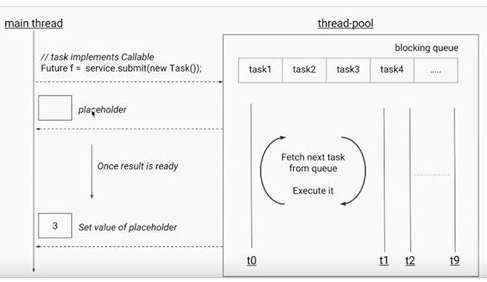
Java ExecutorService Implementations
The Java ExecutorService is very similar to a thread pool.
In fact, the implementation of the ExecutorService interface is present in the java.util.concurrent package which is a thread pool implementation.
Since ExecutorService is an interface, you need to checkout its implementations in order to make any use of it.
ExecutorService has the following implementation in the java.util.concurrent package
- ThreadPoolExecutor
- ScheduledThreadPoolExecutor
Creating an ExecutorService
How you create an ExecutorService depends on the implementation you use. However, you can use the Executors factory class to create ExecutorService instances too.
Here are a few examples of creating an ExecutorService
- ExecutorService executorService1 = Executors.newSingleThreadExecutor();
- ExecutorService executorService2 = Executors.newFixedThreadPool(10);
- ScheduledExecutorService executorService3 = Executors.newScheduledThreadPool(10);
Note:
Executors.newScheduledThreadPool()returns aScheduledExecutorService(which extendsExecutorService). It's best assigned to aScheduledExecutorServicereference so you retain access to scheduling methods likeschedule()andscheduleAtFixedRate().
ExecutorService Usage
There are a few different ways to delegate tasks for execution to an ExecutorService
- execute(Runnable)
- submit(Runnable)
- submit(Callable)
- invokeAny(…)
- invokeAll(…)
I will take a look at each of these methods in the following sections.
Execute Runnable
The Java ExecutorService execute(Runnable) method takes a java.lang.Runnable object, and executes it asynchronously.
Here is an example of executing a Runnable with an ExecutorService
ExecutorService executorService = Executors.newSingleThreadExecutor();
executorService.execute(new Runnable() {
    public void run() {
    System.out.println("Asynchronous task");
    }
});
executorService.shutdown();
There is no way of obtaining the result of the executed Runnable, if necessary you will have to use a Callable for that (explained in the following sections).
Submit Runnable
The Java ExecutorService submit(Runnable) method also takes a Runnable implementation, but returns a Future object. This Future object can be used to check if the Runnable has finished executing.
Let's see an example,
package com.praveen.executorframework;

public class CheckProcessorTask implements Runnable {

	String name;

	public CheckProcessorTask(String name) {
		this.name = name;
	}

	@Override
	public void run() {
		System.out.println(name + " Check Processor has began processing the check " + Thread.currentThread().getName());

		try {
			Thread.sleep(3000);
		}catch(InterruptedException e) {
			e.printStackTrace();
		}

		System.out.println(name + " Check Processor has completed processing the check " + Thread.currentThread().getName());

	}

}
package com.praveen.executorframework;

import java.util.concurrent.ExecutorService;
import java.util.concurrent.Executors;

public class ExecutorDemo {

	public static void main(String[] args) {

		CheckProcessorTask[] cpt = { new CheckProcessorTask("ATM"), new CheckProcessorTask("Bank"),
				new CheckProcessorTask("Mobile"), new CheckProcessorTask("Web") };

		ExecutorService executorService = Executors.newFixedThreadPool(2);

		for (CheckProcessorTask checkProcessorTask : cpt) {
			executorService.submit(checkProcessorTask);
		}

		executorService.shutdown();

	}

}
Output
ATM Check Processor has began processing the check pool-1-thread-1
Bank Check Processor has began processing the check pool-1-thread-2
ATM Check Processor has completed processing the check pool-1-thread-1
Bank Check Processor has completed processing the check pool-1-thread-2
Mobile Check Processor has began processing the check pool-1-thread-1
Web Check Processor has began processing the check pool-1-thread-2
Mobile Check Processor has completed processing the check pool-1-thread-1
Web Check Processor has completed processing the check pool-1-thread-2
Submit Callable
The Java ExecutorService submit(Callable) method is similar to the submit(Runnable) method except it takes a Java Callable instead of a Runnable.
The Callable's result can be obtained via the Java Future object returned by the submit(Callable)method.
Let's see an example,
package com.praveen.executorframework;

import java.util.concurrent.Callable;

public class MyCallable implements Callable<Integer> {

	int num;

	public MyCallable(int num) {
		this.num = num;
	}

	@Override
	public Integer call() throws Exception {

		System.out
				.println(Thread.currentThread().getName() + " is calculating the sum of all the numbers up to " + num);

		int sum = 0;
		for (int i = 1; i <= num; i++) {
			sum += i;
		}
		return sum;
	}

}
package com.praveen.executorframework;

import java.util.concurrent.ExecutionException;
import java.util.concurrent.ExecutorService;
import java.util.concurrent.Executors;
import java.util.concurrent.Future;

public class CallableFutureDemo {

	public static void main(String[] args) {

		MyCallable[] callables = { new MyCallable(10), new MyCallable(20), new MyCallable(30), new MyCallable(40),
				new MyCallable(50), new MyCallable(60) };

		ExecutorService executorService = Executors.newFixedThreadPool(3);

		for (MyCallable myCallable : callables) {
			Future<Integer> future = executorService.submit(myCallable);

			try {
				System.out.println(future.get());
			} catch (InterruptedException | ExecutionException e) {
				e.printStackTrace();
			}
		}

		executorService.shutdown();

	}

}
Output
pool-1-thread-1 is calculating the sum of all the numbers up to 10
55
pool-1-thread-2 is calculating the sum of all the numbers up to 20
210
pool-1-thread-3 is calculating the sum of all the numbers up to 30
465
pool-1-thread-1 is calculating the sum of all the numbers up to 40
820
pool-1-thread-2 is calculating the sum of all the numbers up to 50
1275
pool-1-thread-3 is calculating the sum of all the numbers up to 60
1830
invokeAny()
The invokeAny() method takes a collection of Callable objects, or subinterfaces of Callable. Invoking this method does not return a Future, but returns the result of one of the Callable objects.
You have no guarantee about which of the Callable's results you get — just one of the ones that finishes successfully. As soon as one task completes successfully, its result is returned and the remaining tasks are cancelled. If a task throws an exception, it is simply ignored (it does not by itself trigger cancellation of the others); if all tasks throw exceptions, invokeAny() throws an ExecutionException.
invokeAll()
The invokeAll() method invokes all of the Callable objects you pass to it in the collection passed as parameter. The invokeAll() returns a list of Future objects via which you can obtain the results of the executions of each Callable.Keep in mind that a task might finish due to an exception, so it may not have "succeeded".There is no way on a Future to tell the difference.
Let's see an example with invokeAny() and invokeAll(),
package com.praveen.multithreading.executorservice;

import java.util.Arrays;
import java.util.List;
import java.util.concurrent.Callable;
import java.util.concurrent.ExecutionException;
import java.util.concurrent.ExecutorService;
import java.util.concurrent.Executors;
import java.util.concurrent.Future;

public class FutureAndCallableDemo {
	public static void main(String[] args) throws InterruptedException, ExecutionException {
		ExecutorService executorService = Executors.newFixedThreadPool(3);

		Callable<String> task1 = () -> {
			Thread.sleep(2000);
			return "Result of Task1";
		};

		Callable<String> task2 = () -> {
			Thread.sleep(1000);
			return "Result of Task2";
		};

		Callable<String> task3 = () -> {
			Thread.sleep(5000);
			return "Result of Task3";
		};

		List<Callable<String>> taskList = Arrays.asList(task1, task2, task3);

		List<Future<String>> futures = executorService.invokeAll(taskList);

		for (Future<String> future : futures) {
			// The result is printed only after all the futures are complete. (i.e. after 5
			// seconds)
			System.out.println(future.get());
		}

		// Returns the result of the fastest callable. (task2 in this case)
		String result = executorService.invokeAny(Arrays.asList(task1, task2, task3));

		System.out.println(result);

		executorService.shutdown();
	}
}
Output
Result of Task1
Result of Task2
Result of Task3
Result of Task2
Runnable vs. Callable
The Runnable interface is very similar to the Callable interface. Both interfaces represents a task that can be executed concurrently by a thread or an ExecutorService. Both interfaces only has a single method.
There is one small difference between the Callable and Runnable interface though. The difference between the Runnable and Callable interface is more easily visible when you see the interface declarations.
Here is first the Runnable interface declaration
public interface Runnable {
    public void run();
}
And here is the Callable interface declaration
public interface Callable<V> {
    V call() throws Exception;
}
The main difference between the Runnable run() method and the Callable call() method is that the call() method can return an Object from the method call.
Another difference between call() and run() is that call() can throw an exception, whereas run() cannot (except for unchecked exceptions – subclasses of RuntimeException).
If you need to submit a task to a Java ExecutorService and you need a result from the task, then you need to make your task implement the Callable interface. Otherwise your task can just implement the Runnable interface.
Cancel Task
You can cancel a task (Runnable or Callable) submitted to a Java ExecutorService by calling the cancel() method on the Future returned when the task is submitted.
The cancel() method takes a boolean parameter, mayInterruptIfRunning:
future.cancel(false)— only cancels the task if it has not yet started executing.future.cancel(true)— attempts to interrupt the thread if the task is already running (this only works if the task's code actually checks for interruption or performs interruptible operations, such asThread.sleep()).
future.cancel(true);
ExecutorService Shutdown
When you are done using the Java ExecutorService you should shut it down, so the threads do not keep running.
If your application is started via a main() method and your main thread exits your application, the application will keep running if you have an active ExexutorService in your application.
The active threads inside this ExecutorService prevents the JVM from shutting down.
shutdown()
To terminate the threads inside the ExecutorService you call its shutdown() method. The ExecutorService will not shut down immediately, but it will no longer accept new tasks, and once all threads have finished current tasks, the ExecutorService shuts down.
All tasks submitted to the ExecutorService before shutdown() is called, are executed.
executorService.shutdown();
shutdownNow()
If you want to shut down the ExecutorService immediately, you can call the shutdownNow() method. This will attempt to stop all executing tasks right away, and skips all submitted but non-processed tasks. There are no guarantees given about the executing tasks.
Perhaps they stop, perhaps the execute until the end. It is a best effort attempt.
executorService.shutdownNow();
awaitTermination()
The ExecutorService awaitTermination() method will block the thread calling it until either the ExecutorService has shutdown completely, or until a given time out occurs. The awaitTermination() method is typically called after calling shutdown() or shutdownNow().
It requires a timeout value and a TimeUnit, and returns true if the executor terminated within that time, or false if the timeout elapsed first.
executorService.awaitTermination(60, TimeUnit.SECONDS);