Java Course
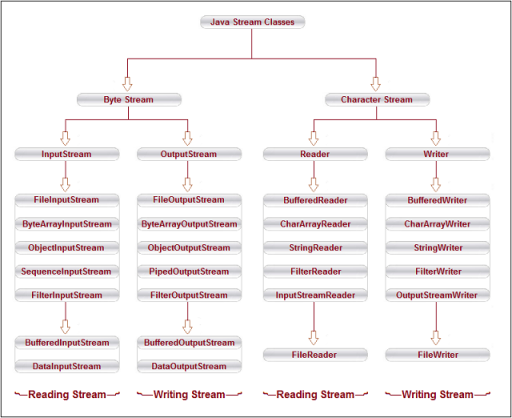
File Handling implies how to read from and write to file in Java. Java provides the basic I/O package for reading and writing the streams. java.io package allows to do all input and output tasks in Java.
Java uses Stream for file handling.
Types of Streams
The java.io package contains a large number of stream classes that provide capabilities for processing all types of data. These classes may be categorized into two groups based on the data type on which they operate.
Byte stream classesByte streams handle I/O of raw binary data. They work with 8-bit bytes of data, making them ideal for reading and writing binary files such as images, audio files, video files, and other non-text data.
Classes:
- FileInputStream, FileOutputStream
- BufferedInputStream, BufferedOutputStream
- ObjectInputStream, ObjectOutputStream
Used for:
- Working with binary data (images, audio, video, etc.).
- Data that is not encoded as text (i.e., raw bytes).
Data Handling: Byte streams read and write data in the form of individual 8-bit bytes. They do not perform any character encoding or decoding.
Lets see sample code for creating a file
package com.praveen.files;

import java.io.File;
import java.io.IOException;

public class CreateFile {
    public static void main(String args[]) {
        try {
            File file = new File("praveen.txt");
            if (file.createNewFile()) {
            System.out.println("File created: " + file.getName());
            } else {
            System.out.println("File already exists");
            }
        } catch (IOException e) {
            e.printStackTrace();
        }
    }
}
Let's see an example for reading and writing into a file
Note: this example reads/writes one byte at a time, which is fine for illustration but slow for real files. For anything beyond toy examples, wrap the streams with BufferedInputStream/BufferedOutputStream.
import java.io.FileInputStream;
import java.io.FileOutputStream;
import java.io.IOException;

public class ByteStreamExample {
    public static void main(String[] args) {
        try (FileInputStream input = new FileInputStream("inputfile.jpg");
             FileOutputStream output = new FileOutputStream("outputfile.jpg")) {

            int byteData;
            while ((byteData = input.read()) != -1) {
                output.write(byteData);
            }
        } catch (IOException e) {
            e.printStackTrace();
        }
    }
}
Character stream classesCharacter streams handle I/O of data in the form of characters. They work with 16-bit Unicode characters, making them ideal for handling textual data. Character streams automatically handle character encoding and decoding, making them more suitable for text files.
Classes:
- FileReader, FileWriter
- BufferedReader, BufferedWriter
Used for:
- Working with text files and character data.
- Data that can be represented as characters (e.g., plain text, XML, JSON).
Data Handling: Character streams read and write data as characters (16 bits per character), which means they can handle various character encodings like UTF-8, UTF-16, etc.
Let's see an example for writing into a file
package com.praveen.files;

import java.io.FileWriter;
import java.io.IOException;


public class FileWriterExample {
    public static void main(String args[]) {
        FileWriter fw = null;
        try {
            fw = new FileWriter("Praveen.txt");
            fw.write("This is Praveen Oruganti");
        } catch (IOException e) {
             e.printStackTrace();
        } finally {
            if (null != fw) {
                try {
                    fw.close();
                } catch (IOException e) {
                    e.printStackTrace();
                }
            }
        }
    }
}
Let's see an example for reading a file
package com.praveen.files;

import java.io.FileReader;
import java.io.IOException;


public class ReadFile {
    public static void main(String args[]) {
        FileReader fr = null;
            try {
            fr = new FileReader("Praveen.txt");
            int i;
            while ((i = fr.read()) != -1) {
            System.out.print((char) i);
            }
        } catch (IOException ie) {
            ie.printStackTrace();
        }
    }
}
Java NIO (New Input/Output) is a part of the java.nio package introduced in Java 1.4 to provide a more efficient way of handling I/O operations, particularly for non-blocking I/O and scalable file I/O operations. With Java 8, the NIO package was extended further with new features that provide additional utilities for working with files and directories, as well as improving the flexibility and performance of I/O operations.
Key Features of Java NIO in Java 8
Path and Files Classes (Java 7 and later):
In Java 7, the java.nio.file package was introduced, which includes the Path class (which replaces File in many cases), and the Files utility class. These classes were further enhanced in Java 8.
Path: A more flexible and powerful alternative to File. The Path class represents a file path in the file system.
Files: A utility class that provides static methods to operate on files and directories.
Lambda Expressions and Streams (Java 8 Enhancements):
Java 8 introduced lambda expressions and the Stream API, which have been incorporated into NIO, enabling functional-style programming when working with files and directories.
The Files class can now be used with lambda expressions and streams to perform operations like filtering, mapping, and reducing files and directories.
The Files.lines() Method:
Java 8 introduced the Files.lines() method, which allows reading a file as a stream of lines. This makes it easy to process large files line by line, supporting lazy evaluation for better memory management.
Lets see an example
package com.praveen.files;

import java.nio.file.*;
import java.io.IOException;
import java.util.List;
import java.util.stream.Collectors;

public class FileHandlingJava8 {
    public static void main(String[] args) throws IOException {
        Path filePath = Paths.get("example.txt");

        // Files.lines() returns a Stream backed by an open file handle,
        // so it must be closed - use try-with-resources.
        List<String> lines;
        try (var stream = Files.lines(filePath)) {
            lines = stream
                .filter(line -> line.startsWith("A"))    // Filter lines that start with 'A'
                .map(line -> line.replace("A", "B"))     // Replace 'A' with 'B'
                .collect(Collectors.toList());
        }

        // Print modified lines
        lines.forEach(System.out::println);
    }
}
The Files.walk() Method:
Java 8 introduced the Files.walk() method, which allows you to recursively walk through the file tree and process files in directories.
Lets see an example
package com.praveen.files;

import java.nio.file.*;
import java.io.IOException;

public class WalkDirectoryExample {
    public static void main(String[] args) throws IOException {
        Path start = Paths.get("C:/Users");

        // Files.walk() also returns a Stream backed by an open directory
        // walker, so it must be closed - use try-with-resources.
        try (var paths = Files.walk(start)) {
            paths
                .filter(path -> path.toString().endsWith(".txt"))
                .forEach(System.out::println);
        }
    }
}