Java Course
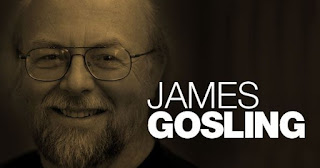
James Gosling began developing Java at Sun Microsystems in 1991 (originally called "Oak"), but it was publicly released in 1995.
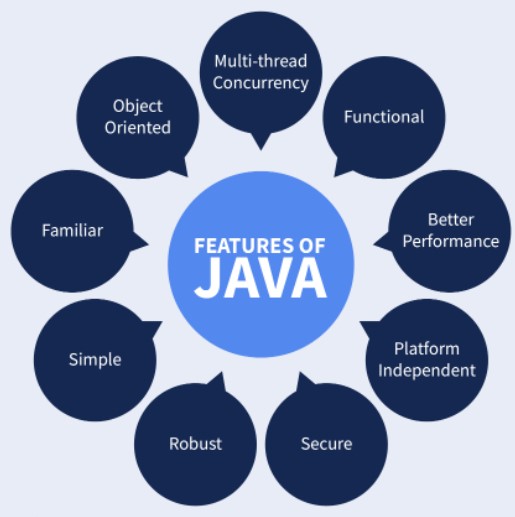
Java is an object-oriented programming language known for its platform independence.
I. Features of Java
II. Platform Independence
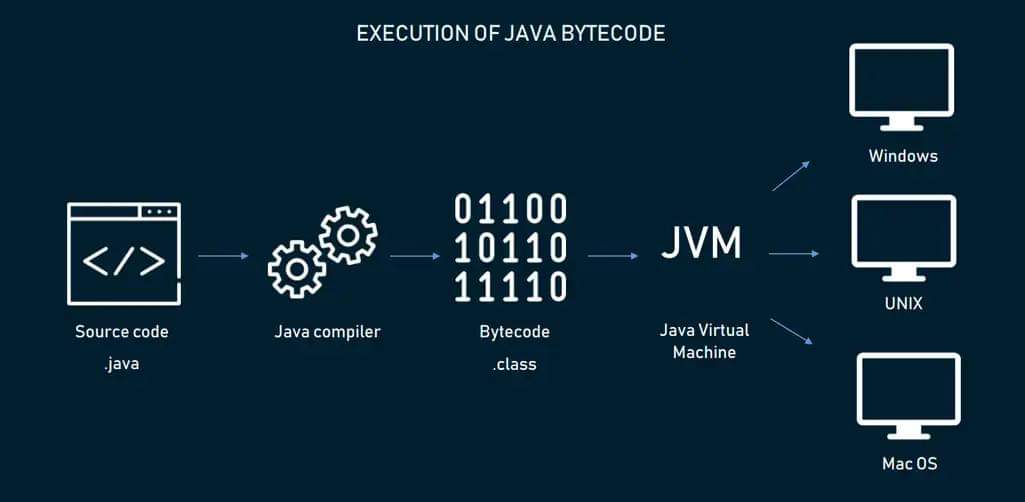
Java is famously described by the slogan Write Once, Run Anywhere. This means that once you compile a Java program, you can run it on any operating system with a compatible Java Virtual Machine (JVM) installed.
How Java Achieves Platform Independence
- Compilation: When you compile a Java source file (
.java), it is converted into bytecode and stored in a.classfile. - Execution: The JVM reads this bytecode and translates it into machine code specific to the operating system and hardware.
Different JVMs are available for different operating systems (e.g., Windows, macOS, Linux), but they all understand the same bytecode, allowing Java programs to run anywhere.
III. What is ByteCode?
Java bytecode is a set of instructions for the Java Virtual Machine. Each instruction begins with a single-byte opcode that specifies the operation, which may be followed by additional bytes representing operands or parameters, depending on the instruction.
IV. JDK (Java Development Kit)
The JDK is a comprehensive software development kit required for developing Java applications. It includes:
- Compilers: For converting Java code into bytecode.
- Libraries: Essential classes and APIs.
- Tools: Debuggers and other utilities.
Path to JDK Tools
set PATH=%PATH%;C:/java/jdk/bin
Compilation Flow
Java Code (.java) → Compiler → Bytecode (.class)
V. JRE(Java Runtime Environment)
The JRE provides the libraries and JVM needed to run Java applications hence it is platform dependent. It does not include development tools like the compiler.
Components:
- JVM: Executes the bytecode.
- Libraries: Java class libraries necessary for running applications.
Path to JRE:
set CLASSPATH=C:/java/jre/lib/rt.jar
VI. JVM(Java Virtual Machine)
The JVM is an abstract machine that executes Java bytecode. There are different JVM implementations for various operating systems and hardware platforms hence platform dependent.
JVM performs following operations
- Load Code: Reads the
.classfiles. - Verify Code: Ensures the bytecode is safe to execute.
- Execute Code: Runs the bytecode.
- Provide Runtime Environment: Manages memory and other runtime aspects.
Execution Flow:
Class File → Class Loader → Bytecode Verifier → Interpreter → Runtime → Hardware
VII. JDK v JRE vs JVM
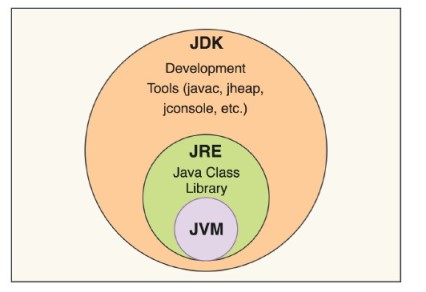
The JRE is a subset of the JDK (the JDK includes the JRE plus development tools like the compiler), and the JVM is the core component within both that actually executes bytecode.
The JVM, JRE, and JDK are each platform-dependent — meaning a different implementation is needed for each OS — but the Java bytecode they run is platform-independent, which is what allows the same compiled program to run anywhere.
VIII. Environment Variables
Path Variable: Sets the path for Java tools like java, javac, javap, etc.
Setting Path:
set PATH=%PATH%;C:/java/jdk/bin
Classpath Variable: Specifies the location of user-defined classes and packages.
Setting CLASSPATH:
set CLASSPATH=C:/java/jre/lib/rt.jar
JAVA_HOME Variable: Points to the JDK installation directory.
Setting JAVA_HOME:
set JAVA_HOME=C:/java/jdk
IX. Sample Java Class
Here's a simple Java class to illustrate basic syntax:
public class HelloWorld {
    public static void main(String[] args) {
        System.out.println("Hello, World!");
    }
}
Explanation:
- Class Declaration: public class HelloWorld - Defines a class named HelloWorld.
- Main Method: public static void main(String[] args) - The entry point of the application.
- Print Statement: System.out.println("Hello, World!"); - Prints a message to the console.