Java Course
List interface accepts null, duplicates and maintain insertion order.
ArrayList
ArrayList is a dynamic list based on arrays that can automatically grow(50% of its size each time) or shrink as elements are added or removed. Some characteristics of ArrayList are that it maintains the order of element insertion, allows duplicate elements, and is not thread-safe by default.
ArrayList implements RandomAccess Marker interface to indicate that they support fast (generally constant time) random access.
Advantages of ArrayList
- Fast access to elements: due to the indexing of each element; it is possible to access an element using its index value.
- It has dynamic growth: you can declare it with an initial size, but this size increases automatically if needed.
- Versatile: In addition to being highly versatile, allowing you to add any type of object.
Disadvantages of ArrayList
- It is not thread-safe: it is not safe to use in multi-threaded environments, as it can cause concurrency issues.
- High memory consumption: memory usage can be higher during resizing, leading to extra overhead.
- Difficulty with modifications: removing and inserting elements in the middle of the list has a high cost because it requires shifting the subsequent elements.
When to Use an ArrayList
- Frequent Reading: It is ideal when random access and reading elements are the predominant operations in the flow, due to efficient access via index.
- Insertion at the End: It is more efficient when elements are frequently added to the end of the list, as there is no need for shifting.
- Variable Size: When the size of the collection is dynamic, and you don't know the exact number of elements to be stored.
package com.praveen.collections;

import java.util.ArrayList;
import java.util.Comparator;
import java.util.Iterator;
import java.util.List;

public class ArrayListExamples {

	public static void main(String[] args) {

		List<String> names = new ArrayList<>(); // creating arraylist
		names.add("Praveen"); // adding element in arraylist
		names.add("Anil");
		names.add("Prasad");
		names.add("Kasyap");
		names.add("Praveen");
		names.add("Kiran");
		names.add("Narayana");
		names.add("Keerthana");
		names.add("Anusha");
		names.add("Lakshmi");

		System.out.println("Number of elements present in the names list " + names.size());

		System.out.println(names);

		System.out.println();

		System.out.println("Traversing list through Iterator");
		Iterator<String> nameIterator = names.iterator();
		while (nameIterator.hasNext()) {
			System.out.print(nameIterator.next() + " ");
		}

		System.out.println();
		System.out.println();

		System.out.println("Traversing list using for loop");
		for (int i = 0; i < names.size(); i++) {
			System.out.print(names.get(i) + " ");
		}

		System.out.println();
		System.out.println();

		System.out.println("Traversing list using enhanced for loop");
		for (String name : names) {
			System.out.print(name + " ");
		}

		System.out.println();
		System.out.println();

		System.out.println("Traversing list using forEach");
		names.forEach(name -> System.out.print(name + " "));

		System.out.println();
		System.out.println();

		System.out.println("Removing element present in index 1");
		names.remove(1);
		System.out.print(names);

		System.out.println();
		System.out.println();

		System.out.println("Removing element Praveen");
		names.remove("Praveen");
		System.out.print(names);

		System.out.println();
		System.out.println();

		System.out.println("Sorting elements in ascending order");
		names.sort(Comparator.naturalOrder());
		System.out.print(names);

		System.out.println();
		System.out.println();

		System.out.println("Sorting elements in descending order");
		names.sort(Comparator.reverseOrder());
		System.out.print(names);

	}

}
Output
Number of elements present in the names list 10
[Praveen, Anil, Prasad, Kasyap, Praveen, Kiran, Narayana, Keerthana, Anusha, Lakshmi]

Traversing list through Iterator
Praveen Anil Prasad Kasyap Praveen Kiran Narayana Keerthana Anusha Lakshmi

Traversing list using for loop
Praveen Anil Prasad Kasyap Praveen Kiran Narayana Keerthana Anusha Lakshmi

Traversing list using enhanced for loop
Praveen Anil Prasad Kasyap Praveen Kiran Narayana Keerthana Anusha Lakshmi

Traversing list using forEach
Praveen Anil Prasad Kasyap Praveen Kiran Narayana Keerthana Anusha Lakshmi

Removing element present in index 1
[Praveen, Prasad, Kasyap, Praveen, Kiran, Narayana, Keerthana, Anusha, Lakshmi]

Removing element Praveen
[Prasad, Kasyap, Praveen, Kiran, Narayana, Keerthana, Anusha, Lakshmi]

Sorting elements in ascending order
[Anusha, Kasyap, Keerthana, Kiran, Lakshmi, Narayana, Prasad, Praveen]

Sorting elements in descending order
[Praveen, Prasad, Narayana, Lakshmi, Kiran, Keerthana, Kasyap, Anusha]
LinkedList
LinkedList is one of the fundamental data structures used in programming to efficiently store a sequence of elements. It stores elements in a linked manner, where each element is stored in a node containing two main components:
- Value: The data or the element itself.
- Reference (or Pointer): Points to the next node in the list.
At the end of the list, the pointer refers to null, indicating the list's termination.
LinkedList is implemented as a double linked list i.e.. each node contains two references, one pointing to the next node and the other to the previous node.
Advantages of LinkedList
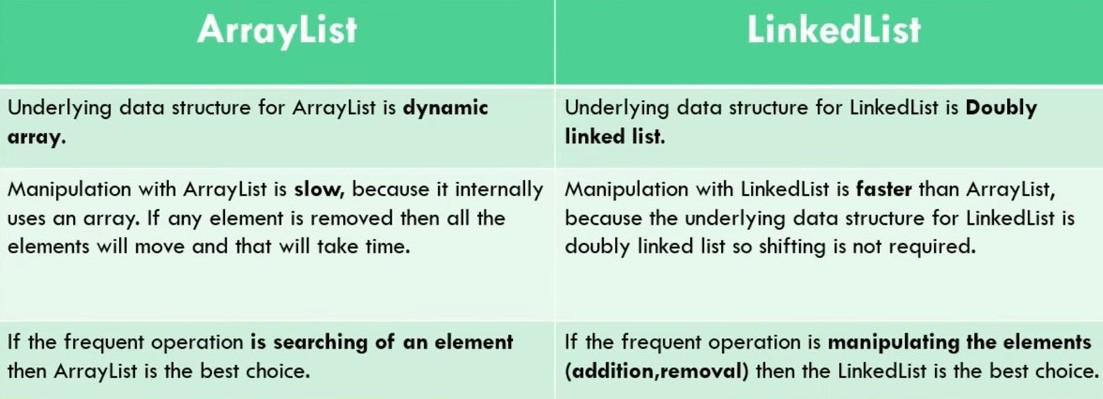
- Fast Insertion and Removal: LinkedList excels in scenarios requiring frequent insertions or deletions, especially at the beginning or middle of the list. It is more efficient than arrays or ArrayList for such operations.
- Dynamic Memory: Unlike arrays, a LinkedList does not require a fixed size. Nodes are allocated dynamically, allowing the list to grow or shrink as needed.
- Flexibility for Advanced Structures: LinkedLists are useful in building more complex data structures like queues, stacks, or doubly linked lists.
Disadvantages of LinkedList
- Sequential Access: To access a specific element, the nodes must be traversed one by one, which can make lookups slower.
- Higher Memory Usage: Each node requires additional memory for storing pointers, resulting in more overhead compared to arrays.
- Poor Cache Locality: Nodes are not stored contiguously in memory, which can reduce performance due to inefficient memory caching.
When to Use a LinkedList
Frequent Insertions/Removals: When adding or removing elements frequently, especially at the beginning or middle of the list. Dynamic List Requirements: When the number of elements is unknown in advance, avoiding the memory reallocation required by arrays like ArrayList.
LinkedList, however, also implements Queue interface which adds more methods than ArrayList and Vector, such as offer(), peek(), poll(), etc.
package com.praveen.collections;

import java.util.LinkedList;
import java.util.List;
import java.util.Iterator;

public class LinkedListExamples {

	public static void main(String[] args) {

		System.out.println("LinkedList Examples");

		List<String> monthList = new LinkedList<>();
		monthList.add("January");
		monthList.add("February");
		monthList.add("March");
		monthList.add("April");
		monthList.add("May");
		monthList.add("June");
		monthList.add("July");
		monthList.add("August");
		monthList.add("September");
		monthList.add("October");
		monthList.add("November");
		monthList.add("December");

		System.out.println("Months :- " + monthList);

		List<String> nameList = new LinkedList<String>();
		nameList.add("Praveen");
		nameList.add("Kiran");
		nameList.add("Prasad");
		nameList.add("Anusha");
		Iterator<String> nameIterator = nameList.iterator();
		while (nameIterator.hasNext()) {
			System.out.println(nameIterator.next());
		}
	}

}
Output
LinkedList Examples
Months :- [January, February, March, April, May, June, July, August, September, October, November, December]
Praveen
Kiran
Prasad
Anusha
Vector
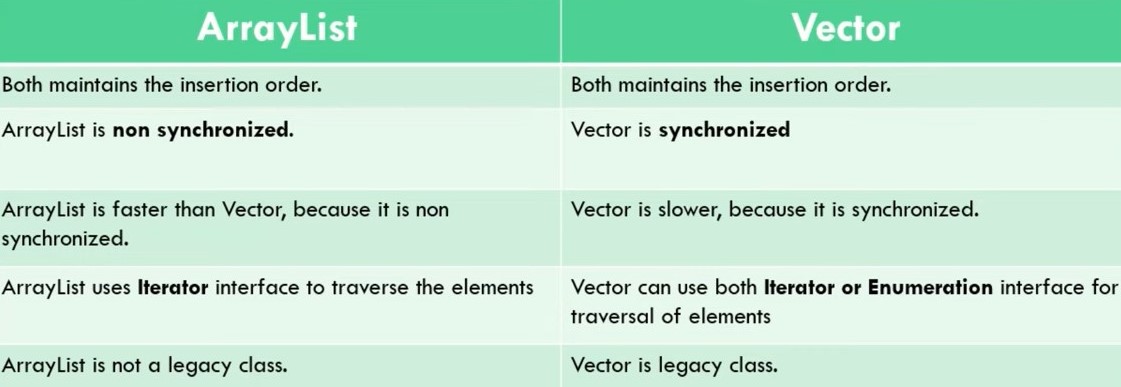
Vector is similar with ArrayList, but it is synchronized.
Vector each time doubles its array size.
Advantages of Vector
- Synchronization by Default: All methods are synchronized, making it thread-safe for concurrent operations.
- Dynamic Growth: It automatically resizes its capacity when it reaches its limit.
- Legacy Compatibility: It can be useful in legacy projects where Vector is still widely used.
Disadvantages of Vector
- Slower Performance: The synchronization applied to the methods makes it slower than ArrayList in scenarios where thread safety is not required.
- Obsolete in Many Cases: In new projects, the use of Vector is discouraged, and ArrayList or other classes are preferred.
When to Use Vector
- Multithreaded Environments: If you need a thread-safe list without requiring manual synchronization implementation. Legacy Code Compatibility: Where Vector is still used.
package com.praveen.collections;

import java.util.Vector;
import java.util.Iterator;
import java.util.Enumeration;

class EmployeeList {
	private int id;
	private String name;
	private String address;
	private Double salary;

	public EmployeeList(int id, String name, String address, Double salary) {
		this.id = id;
		this.name = name;
		this.address = address;
		this.salary = salary;
	}

	@Override
	public String toString() {
		return "Employee [id=" + id + ", name=" + name + ", address=" + address + ", salary=" + salary + "]";
	}
}

public class VectorExamples {

	public static void main(String[] args) {

		System.out.println("Vector Examples");

		Vector<String> monthVector = new Vector<>();
		monthVector.add("January");
		monthVector.add("February");
		monthVector.add("March");
		monthVector.add("April");
		monthVector.add("May");
		monthVector.add("June");
		monthVector.add("July");
		monthVector.add("August");
		monthVector.add("September");
		monthVector.add("October");
		monthVector.add("November");
		monthVector.add("December");

		System.out.println("Months :- " + monthVector);

		Vector<EmployeeList> empVector = new Vector<>();

		empVector.add(new EmployeeList(101, "Bob", "Pune", 20000.0));
		empVector.add(new EmployeeList(102, "Alice", "Mumbai", 30000.0));
		empVector.add(new EmployeeList(103, "John", "Bangalore", 25000.0));
		empVector.add(new EmployeeList(104, "Anthony", "Hyderabad", 40000.0));

		Iterator<EmployeeList> itr = empVector.iterator();
		while (itr.hasNext()) {
			System.out.println(itr.next());
		}

		Vector<String> nameVector = new Vector<String>();// creating vector
		nameVector.add("Praveen");// method of Collection
		nameVector.addElement("Kiran");// method of Vector
		nameVector.addElement("Prasad");
		// traversing elements using Enumeration
		Enumeration<String> nameEnumeration = nameVector.elements();
		while (nameEnumeration.hasMoreElements()) {
			System.out.println(nameEnumeration.nextElement());
		}

		Vector<String> dayNames = new Vector<>();
		dayNames.add("Sunday");
		dayNames.add("Monday");
		dayNames.add("Tuesday");
		dayNames.add("Wednesday");
		dayNames.add("Thursday");
		dayNames.add("Friday");
		dayNames.add("Saturday");
		Enumeration<String> days = dayNames.elements();
		while (days.hasMoreElements()) {
			System.out.println(days.nextElement());
		}
	}
}
Output
Vector Examples
Months :- [January, February, March, April, May, June, July, August, September, October, November, December]
Employee [id=101, name=Bob, address=Pune, salary=20000.0]
Employee [id=102, name=Alice, address=Mumbai, salary=30000.0]
Employee [id=103, name=John, address=Bangalore, salary=25000.0]
Employee [id=104, name=Anthony, address=Hyderabad, salary=40000.0]
Praveen
Kiran
Prasad
Sunday
Monday
Tuesday
Wednesday
Thursday
Friday
Saturday
Stack
Stack is a subclass of Vector that implements a standard last-in, first-out stack.
Stack only defines the default constructor, which creates an empty stack. Stack includes all the methods defined by Vector, and adds several of its own.
Advantages of Stack
- Easy to Use: It provides specific methods for stack operations, such as push, pop, and peek.
- Thread-Safe: Inherited from Vector, synchronization is ensured, making it useful in multithreaded scenarios.
- Wide Compatibility: It can be useful in legacy projects or when dealing with APIs that expect a stack implementation.
Disadvantages of Stack
- Inefficient Performance: The synchronization inherited from Vector reduces efficiency in single-threaded environments.
- Old Implementation: Stack is considered an obsolete class in modern projects, where more efficient alternatives, such as Deque (e.g., ArrayDeque), are preferred.
When to Use Stack
- Multithreaded Environments: If you need a thread-safe collection without requiring manual synchronization implementation.
- Legacy Code Compatibility: Where Stack is still used.
- Problems Following the LIFO Model: Examples include undo operations, evaluating mathematical expressions, and backtracking.
package com.praveen.collections;

import java.util.Stack;
import java.util.EmptyStackException;

public class StackExamples {

    public static void main(String[] args) {
        System.out.println("Stack Examples");

        Stack<Integer> numberStack = new Stack<>();
        System.out.println("stack: " + numberStack);
        showpush(numberStack, 42);
        showpush(numberStack, 66);
        showpush(numberStack, 99);
        showpop(numberStack);
        showpop(numberStack);
        showpop(numberStack);
        try {
            showpop(numberStack);
        } catch (EmptyStackException ex) {
            System.out.println("empty stack");
        }
    }

    static void showpop(Stack<Integer> numberStack) {
        System.out.print("pop -> ");
        Integer num = (Integer) numberStack.pop();
        System.out.println(num);
        System.out.println("stack: " + numberStack);
    }

	static void showpush(Stack<Integer> st, int num) {
		st.push(num); // autoboxed; new Integer(num) is deprecated (Java 9+) and removed in Java 21+
		System.out.println("push(" + num + ")");
		System.out.println("stack: " + st);
	}

}
Output
Stack Examples
stack: []
push(42)
stack: [42]
push(66)
stack: [42, 66]
push(99)
stack: [42, 66, 99]
pop -> 99
stack: [42, 66]
pop -> 66
stack: [42]
pop -> 42
stack: []
pop -> empty stack
List Comparisions
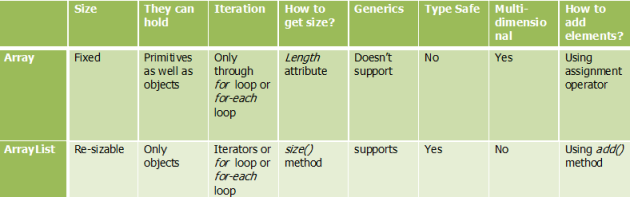
Difference between Array and ArrayList
Difference between ArrayList and Vector
Difference between ArrayList and LinkedList
Iterator interface
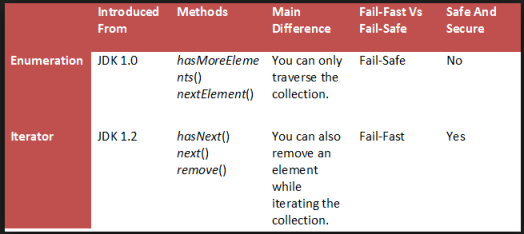
An iterator is an interface that iterates the elements. It is used to traverse the list and modify the elements. Iterator interface has three methods which are mentioned below:
- public boolean hasNext() — This method returns true if the iterator has more elements.
- public E next() — It returns the element and moves the cursor pointer to the next element.
- public void remove() — This method removes the last elements returned by the iterator.
Difference between Enumerator and Iterator
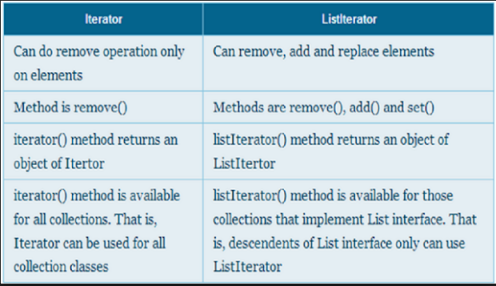
Difference between Iterator and ListIterator
Fail fast vs Fail safe iterators
Iterators in java give us the facility to traverse over the Collection objects. Iterators returned by the Collection are either fail-fast in nature or fail-safe in nature.
Fail-Fast iterators immediately throw ConcurrentModificationException if a collection is modified while iterating over it. For example, Iterators returned by ArrayList, Vector, HashMap.
Where as Fail-Safe iterators don't throw any exceptions if a collection is modified while iterating over it. Some, like CopyOnWriteArrayList, achieve this by iterating over a cloned snapshot of the underlying array rather than the live collection. Others, like ConcurrentHashMap, don't clone anything — instead their iterators are weakly consistent and safely traverse the live structure without throwing ConcurrentModificationException. For example, Iterator returned by ConcurrentHashMap.