Java Course
A Map stores the associations between keys and values. Each key links to exactly one value to form a key-value pair known as an entry.
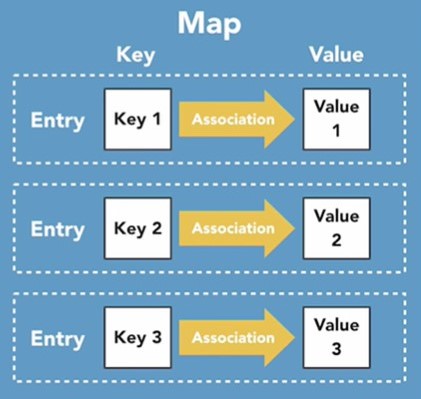
Map Hirerachy
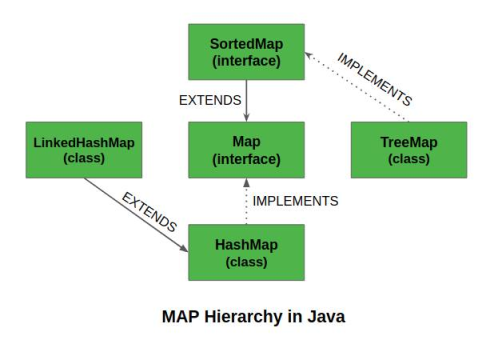
Interfaces in Maps
- Map: defines an object that maps keys to values.
- SortedMap: extends Map. Defines a map that supports the ordering of its keys, either in natural ascending order or by the use of a Comparator.
- NavigableMap: extends SortedMap. Defines a sorted map which supports searching for entries based on closest matches (to the keys, not the values).
Non-Abstract Classes in Maps
- HashMap: extends AbstractMap, and implements the Map interface. It is roughly equivalent to the HashTable legacy class we covered earlier, but newer, better, faster, stronger.
- LinkedHashMap: extends HashMap, and implements the Map interface. Like the LinkedHashSet, we covered earlier, this one also maintains a linked list under the hood that allows you iterate over entries in the order in which they were inserted.
- TreeMap: extends AbstractMap, and implements the NavigableMap interface. It organizes keys via a Red-Black tree, allowing them to be sorted either in natural ascending order or by the use of a Comparator.
- EnumMap: extends AbstractMap. A specialized map meant specifically for working with enum types, where all the keys in the map must come from the same enum.
- WeakHashMap: extends AbstractMap, and implements the Map interface. Essentially identical to HashMap, but with weak keys. This means that entries are susceptible to being discarded by Java's garbage collector when their keys are no longer in ordinary use.
- IdentityHashMap: extends AbstractMap, and implements the Map interface. Again, essentially identical to HashMap, but uses reference-equality instead of object-equality when comparing keys or values. The API explicitly says this class is not for general usage.
HashMap Overview
A HashMap (or Hash Table) is a data structure that stores key-value pairs in a way that allows fast retrieval, insertion, and deletion of elements. It works by using a hash function to compute an index (called a "hash code") into an array, where the data is stored.
The HashMap class implements the Map interface by using a Hash Table.
Key Points about HashMap:
- No Duplicate Keys: A HashMap doesn't allow duplicate keys but can store duplicate values.
- Null Keys and Values: A HashMap can have one null key and multiple null values.
- Not Synchronized: The HashMap class is not synchronized, meaning it is not thread-safe by default.
- Order of Elements: HashMap doesn't maintain the order of key-value pairs. The order may change when elements are added or removed. If you need to maintain insertion order, consider using a
LinkedHashMap. - Default Capacity and Load Factor: The default initial capacity of a Java HashMap is 16, with a load factor of 0.75.
package com.praveen.collections;

import java.util.HashMap;
import java.util.Map;

public class HashMapExamples {

    public static void main(String[] args) {

        System.out.println("HashMap Examples");

        Map<Integer, String> namedMap = new HashMap<>();
        namedMap.put(100, "Praveen");
        namedMap.put(101, "Prasad");
        namedMap.put(102, "Kiran");
        namedMap.putIfAbsent(103, "Krishna");
        namedMap.put(104, "Ravi");
        namedMap.remove(100);
        namedMap.replace(101, "Praveen");

        for (Map.Entry<Integer, String> namedEntry : namedMap.entrySet()) {
            System.out.println(namedEntry.getKey() + " " + namedEntry.getValue());
        }

    }
}
Output
HashMap Examples
101 Praveen
102 Kiran
103 Krishna
104 Ravi
Internal Working of HashMap
What is Hashing?
Hashing is the process of converting an object into an integer value (hash code) that can be used as an index to locate the object in a hash table. The hash code helps in quickly determining the position of the key-value pair.
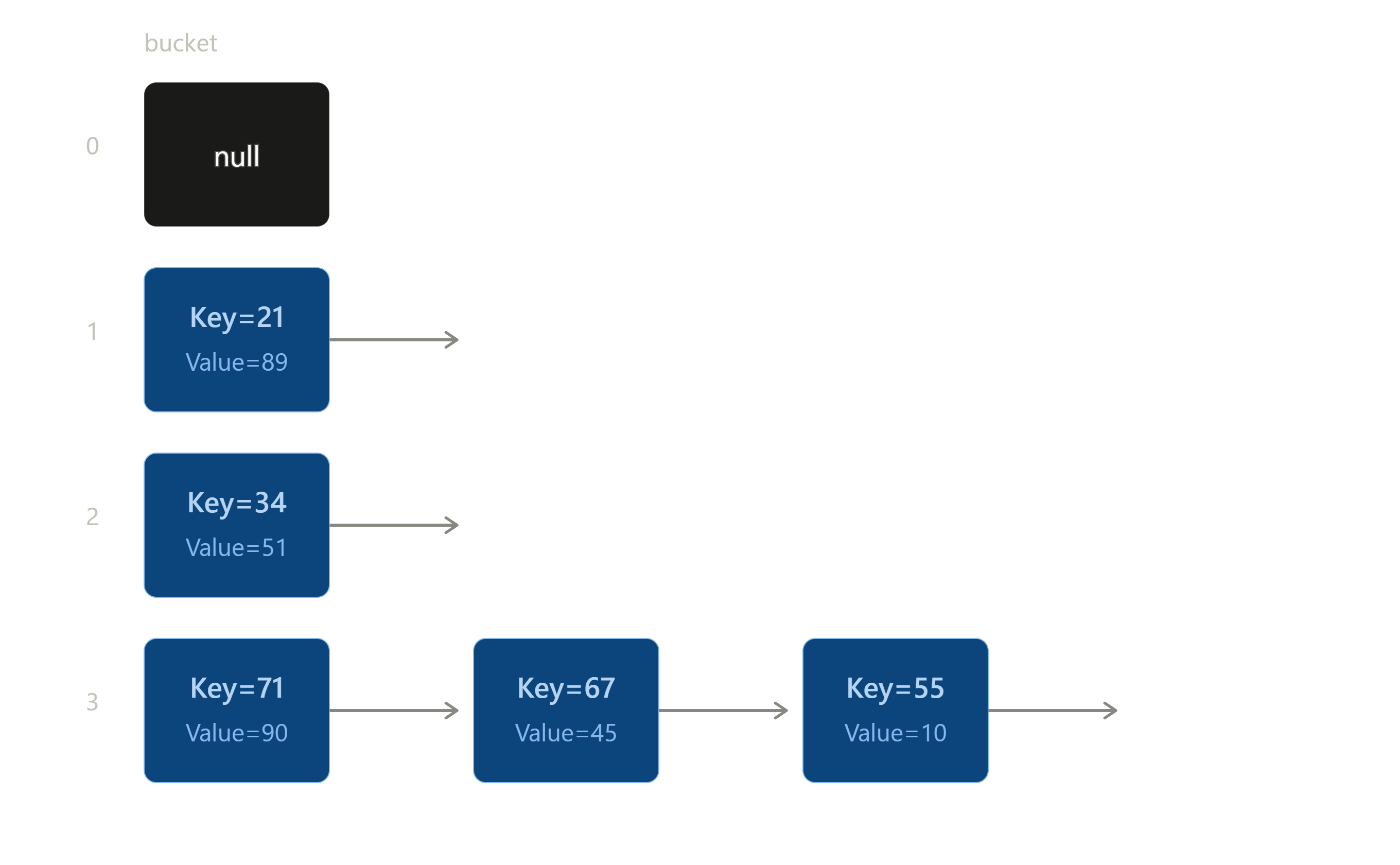
Internally, HashMap uses an array of buckets to store the entries. Each bucket contains a data structure (like a LinkedList or a Tree structure) that stores the key-value pairs.
The Role of equals() and hashCode() Methods
hashCode(): Returns an integer value used as an index (bucket) in the HashMap. For the defaultObject.hashCode(), this is typically derived from the object's memory address, but any class that overrideshashCode()(likeString) computes it from the object's content instead.equals(): This method compares two objects for equality. It is used by HashMap to compare keys. If you override equals(), you must also override hashCode() to ensure consistency.
Buckets in HashMap
In HashMap, the array of nodes is called buckets. Each bucket contains a data structure (like a LinkedList) to store the key-value pairs. If multiple keys have the same hash code (a hash collision), they will be placed in the same bucket.
The default number of buckets in a HashMap is 16, but this can change as the map grows. The number of buckets can increase dynamically when the HashMap exceeds a certain load factor threshold. The load factor (by default 0.75) determines when the HashMap will resize. When the number of elements exceeds 75% of the current capacity, the HashMap will resize by doubling the number of buckets.
Example of Resizing:
- If the initial capacity is 16 and the load factor is 0.75, resizing will occur when the map contains more than 12 entries (16 * 0.75 = 12).
- When resizing occurs, the number of buckets is doubled (e.g., from 16 to 32). After that, if the map continues to grow, it will keep doubling the number of buckets as needed.
For example, consider the following insertion:
HashMap<String, Integer> map = new HashMap<>();
map.put("Praveen", 89);
map.put("Prasad", 45);
map.put("Kiran", 51);
index formula is index = hashCode % 16
hashcode formula is hashCode = 31 * (hashCode of previous character) + current character's ASCII value
For example, lets take "Praveen" key.
int hashCode = 0;
hashCode = 31 * hashCode + 'P'; // 31 * 0 + 80 = 80
hashCode = 31 * 80 + 'r'; // 31 * 80 + 114 = 2594
hashCode = 31 * 2594 + 'a'; // 31 * 2594 + 97 = 80511
hashCode = 31 * 80511 + 'v'; // 31 * 80511 + 118 = 2495959
hashCode = 31 * 2495959 + 'e'; // 31 * 2495959 + 101 = 77374830
hashCode = 31 * 77374830 + 'e'; // 31 * 77374830 + 101, which overflows the 32-bit int and wraps to -1896347465
hashCode = 31 * -1896347465 + 'n'; // wraps again to 1342770839 (the actual String.hashCode() of "Praveen")
index = 1342770839 % 16 = 7
Note: hashCode in Java is a 32-bit int, so this calculation wraps around (two's-complement overflow) once the running total exceeds Integer.MAX_VALUE — it is not arbitrary-precision arithmetic. Also, HashMap doesn't literally use hashCode % capacity to find a bucket; it applies a spreading step (hash ^ (hash >>> 16)) and then a bitwise (capacity - 1) & hash, partly to avoid the negative indices that % can produce on negative hash codes. The % 16 shown above is a simplification for illustration.
To determine where to store each key, we compute its hash code. For instance:
- "Praveen" might map to index 7 (following the corrected calculation above).
- "Prasad" might also map to index 1 (a hash collision). In such cases, both "Praveen" and "Prasad" would be stored in the same bucket, either in a LinkedList or another structure to resolve the collision.
LinkedHashMap
LinkedHashMap is Hashtable and Linked list implementation of the Map interface, with predictable iteration order. It inherits HashMap class and implements the Map interface. LinkedHashMap maintains insertion order apart from the above HashMap features.
TreeMap
TreeMap is a red-black tree based implementation. It provides an efficient means of storing key-value pairs in sorted order.It implements the NavigableMap interface and extends AbstractMap class.TreeMap cannot have a null key but can have multiple null values.TreeMap maintains ascending order by default.
Hashtable
Hashtable class implements a hashtable, which maps keys to values. It inherits Dictionary class and implements the Map interface.
- A Hashtable is an array of a list. Each list is known as a bucket. The position of the bucket is identified by calling the hashcode() method. A Hashtable contains values based on the key.
- Java Hashtable class contains unique elements.
- Java Hashtable class doesn't allow null key or value.
- Java Hashtable class is synchronized.
- The initial default capacity of Hashtable class is 11 whereas loadFactor is 0.75.
IdentityHashMap
- It is exactly same as HashMap except the following difference.
- In case of HashMap, JVM will use .equals(-) method to identify duplicate keys, which is meant for content comparison.
- But in case of IdentityHashMap, JVM will use == operator to identify duplicate keys which is meant for reference comparison.
WeakHashMap
- It is exactly same as HashMap except the following difference.
- In case of HashMap, if an object associated with HashMap then it is not eligible for garbage collection,eventhough it doesn't contain any external references. i.e., HashMap dominates Garbage Collector.
- But in case of WeakHashMap, if an object doesn't contain any references then it is always eligible for Garbage Collector eventhough it is associated with WeakHashMap. ie., Garbage Collector dominates WeakHashMap.
Thread Safety and Alternatives
HashMap is not thread-safe by default. In a multi-threaded environment, you must either synchronize it manually or use a thread-safe alternative.
Thread-Safe Alternatives:
Hashtable: A legacy class that uses synchronized methods for thread safety, but it locks the entire table, causing potential performance issues.Collections.synchronizedMap(): Wraps any map with synchronized methods but does not guarantee high concurrency. LikeHashtable, it locks the entire map.ConcurrentHashMap: Introduced in Java 5, it improves performance overHashtableby allowing fine-grained concurrent access instead of locking the whole map. Its original design divided the map into segments; since Java 8 it locks at the level of individual bins instead, allowing even more threads to access the map concurrently.
ConcurrentHashMap is the preferred thread-safe alternative since it allows multiple threads to perform read and write operations concurrently while ensuring thread safety. In its original Java 5–7 design, it divided the map into a fixed number of segments (default concurrency level 16) that could be locked independently. Since Java 8, the internal implementation changed: it now locks at the level of individual bins/nodes using CAS operations and synchronized blocks rather than fixed segments, so concurrencyLevel is retained mainly as a sizing hint for backward compatibility rather than an actual lock count. We can still set an initial concurrency hint using the constructor ConcurrentHashMap(int initialCapacity, float loadFactor, int concurrencyLevel). Please note multiple threads can't write to the same bin at the same time, but multiple threads can read concurrently. ConcurrentHashMap doesn't allow null keys and null values.
How to create a Custom Map(key/value pair)
package com.praveen.collections;

import java.util.List;

import java.util.ArrayList;

public class MyMap {
    class Container {
        Object key;
        Object value;

        public void insert(Object k, Object v) {
            this.key = k;
            this.value = v;
        }
    }

    private Container c;
    private List<Container> recordList;

    public MyMap() {
        this.recordList = new ArrayList<Container>();
    }

    public void put(Object k, Object v) {
        this.c = new Container();
        c.insert(k, v);
        // check for the same key before adding
        for (int i = 0; i < recordList.size(); i++) {
            Container c1 = recordList.get(i);
            if (c1.key.equals(k)) {
                // remove the existing object
                recordList.remove(i);
                break;
            }
        }
        recordList.add(c);
    }

    public Object get(Object k) {
        for (int i = 0; i < this.recordList.size(); i++) {
            Container con = recordList.get(i);
            if (k.toString().equals(con.key.toString())) {
                return con.value;
            }
        }
        return null;
    }

    public static void main(String[] args) {
        MyMap hm = new MyMap();
        hm.put("1", "1");
        hm.put("2", "2");
        hm.put("3", "3");
        System.out.println(hm.get("3"));
        hm.put("3", "4");
        System.out.println(hm.get("1"));
        System.out.println(hm.get("3"));
        System.out.println(hm.get("8"));
    }
}
Output
3
1
4
null
Note: the get() method now uses .equals() rather than == to compare keys. Comparing with == on .toString() results checks reference identity, not content — it happened to "work" in this example only because string literals are interned by the JVM, but it would silently break for keys built dynamically (e.g. via concatenation or new String(...)).
Map Comparisions
Difference between Map Implementations
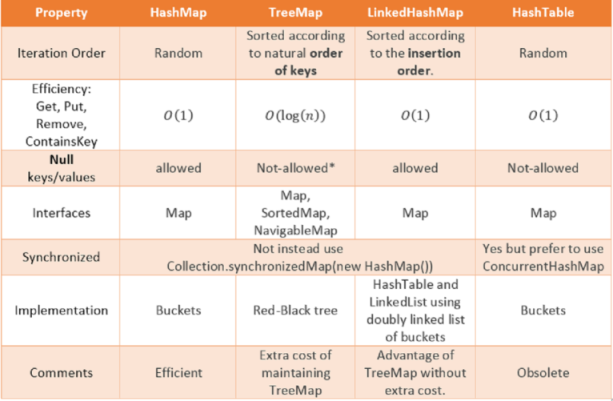
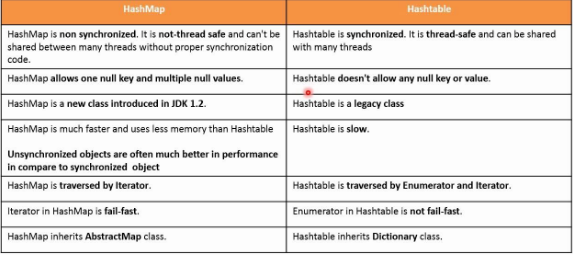
Difference between HashMap, HashTable ,ConcurrentHashMap
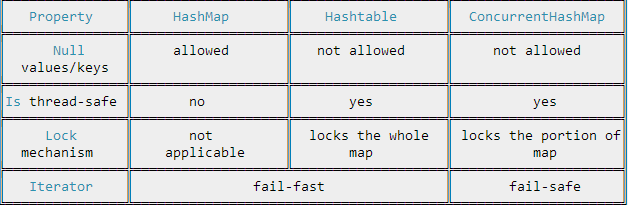
Difference between HashMap and HashTable