Java Course
Set interface will not accept duplicates.
Hashset
HashSet is a hash-based data structure used to store unique elements efficiently. When an element is inserted, its hash value is calculated and used to determine its position in the hash table. It internally uses HashMap as a backing datastructure with key as generic type E which is our element and value as Object class type which is denoted by static field PRESENT.
Advantages of HashSet
- Unique Elements: Ensures no duplicate elements.
- Fast Insertion: Quickly determines the position for new elements using hash functions.
- Efficient Lookups: Supports fast search, insertion, and deletion operations.
Disadvantages of HashSet
- Unordered: Does not maintain the order of elements.
- Higher Memory Usage: Requires extra memory for the hash table and storing hash-related information.
When to Use HashSet
- Ensure Uniqueness: When you need to store unique elements without duplicates. Fast Lookup: When quick existence checks are needed, and element order is irrelevant.
package com.praveen.collections;

import java.util.HashSet;
import java.util.Set;
import java.util.Iterator;

public class HashSetExamples {

    public static void main(String[] args) {
        System.out.println("HashSet Examples");

        Set<String> numberSet = new HashSet<>();
        numberSet.add("One");
        numberSet.add("Two");
        numberSet.add("Three");
        numberSet.add("Four");
        numberSet.add("Five");
        Iterator<String> numberIterator = numberSet.iterator();
        while (numberIterator.hasNext()) {
            System.out.println(numberIterator.next());
        }

    }

}
Output (note: HashSet gives no ordering guarantee — this order is not part of its contract and may differ across JVM versions or runs)
HashSet Examples
Five
One
Four
Two
Three
LinkedHashSet
LinkedHashSet is an implementation of Set that maintains the insertion order of elements, while still ensuring uniqueness.
Advantages of LinkedHashSet
- Insertion Order: Preserves the order in which elements are added.
- Unique Elements: Prevents duplicates.
- Efficiency: Provides fast insertion and lookup operations.
Disadvantages of LinkedHashSet
- Higher Memory Usage: Requires more memory than HashSet due to the maintenance of insertion order.
- Slightly Slower: Performance can be slightly lower compared to HashSet.
When to Use LinkedHashSet
- When maintaining the insertion order while ensuring element uniqueness is important.
package com.praveen.collections;

import java.util.LinkedHashSet;
import java.util.Iterator;
import java.util.Set;

public class LinkedHashSetExamples {

    public static void main(String[] args) {
        System.out.println("LinkedHashSet Examples");

        Set<String> numberSet = new LinkedHashSet<>();
        numberSet.add("One");
        numberSet.add("Two");
        numberSet.add("Three");
        numberSet.add("Four");
        numberSet.add("Five");
        Iterator<String> numberIterator = numberSet.iterator();
        while (numberIterator.hasNext()) {
            System.out.println(numberIterator.next());
        }
    }

}
Output
LinkedHashSet Examples
One
Two
Three
Four
Five
TreeSet
TreeSet internally uses TreeMap and it maintains natural order and it doesn't allow null value. It implements NavigableSet interface as well as SortedSet interface.
When inserting custom objects into a TreeSet, you need to implement the Comparable interface (override compareTo()) or supply a Comparator, since TreeSet determines both ordering and uniqueness through comparison, not equals()/hashCode().
Advantages of TreeSet
- Automatic Ordering: Elements are stored in natural order or according to a provided comparator.
- Efficient Operations: Lookup, insertion, and removal operations.
Disadvantages of TreeSet
- Slower than HashSet: Due to the need to maintain order.
- No Duplicates: Prevents duplicate elements like any other Set.
When to Use TreeSet
- When a sorted collection of unique elements is required.
package com.praveen.collections;

import java.util.TreeSet;
import java.util.Iterator;
import java.util.Set;

public class TreeSetExamples {

    public static void main(String[] args) {
        System.out.println("TreeSet Examples");

        Set<String> nameSet = new TreeSet<>();
        nameSet.add("Praveen");
        nameSet.add("Kiran");
        nameSet.add("Praveen");
        nameSet.add("Anusha");
        // Traversing elements
        Iterator<String> nameIterator = nameSet.iterator();
        while (nameIterator.hasNext()) {
            System.out.println(nameIterator.next());
        }
    }
}
Output
TreeSet Examples
Anusha
Kiran
Praveen
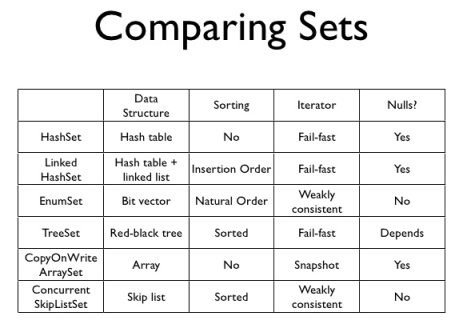
Set Comparisions
Comparing Sets
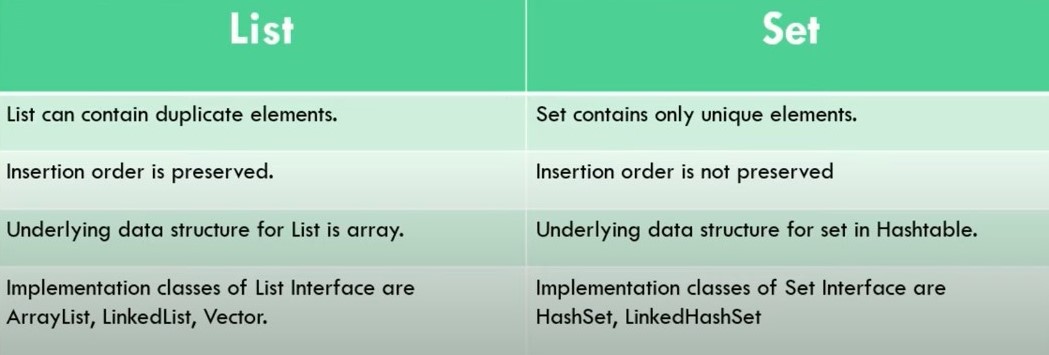
Difference between List and Set
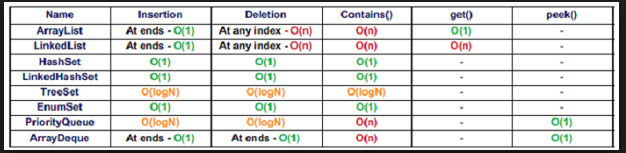
Performance of List and Set