Java Course
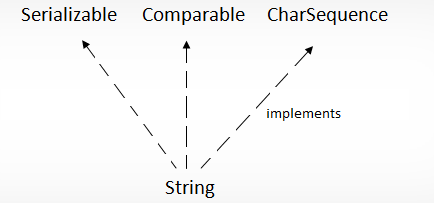
String is a sequence of characters.
String class is to create and manipulate strings and it is in java.lang package.
Value of a String Object once created cannot be modified. Any modification on a String object creates a new String object.
String str3 = "value1";
str3.concat("value2");
System.out.println(str3); //value1
Note that the value of str3 is not modified in the above example. The result should be assigned to a new reference variable (or same variable can be reused). All wrapper class instances are immutable too!
String concat = str3.concat("value2");
System.out.println(concat); //value1value2
There are 3 types to create a String
-
using String literal
String str="Praveen";
This value will be stored in a "String constant pool" – which is inside the Heap memory. If compiler finds a String literal,it checks if it exists in the pool. If it exists, it is reused.
-
using new keyword
String str=new String("Praveen");
if new operator is used to create string object, the new object is created on the heap. There will not be any reuse of values.
-
using character array
char ch[]={'P', 'r', 'a', 'v', 'e', 'e', 'n'};
String str=new String(ch) ;
String pool concept
String str="Praveen";
String str1=new String("Praveen");
String str2=new String("Kasyap");
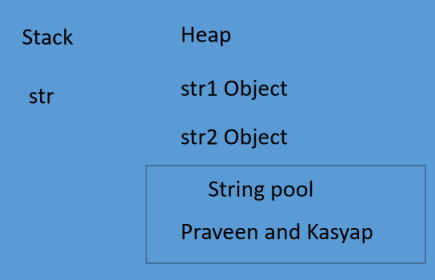
a) Stringpool is the special memory region where strings are stored by the JVM
b) As string is immutable in nature, the JVM can optimize the amount of memory allocated for them by storing only one copy of each literal string in the pool. This process is called interning
c) In the above example, we created the string variable str with value Praveen, the JVM searches the pool for a String of equal value. If found the Java compiler will simply return a reference to its memory address without allocating additional memory. If not found, it will be added to the pool(interned) and it's reference will be returned.
d) In the above example, we created a string str1 with new operatot, the Java compiler will create a new object and store it in the heap space reserved for JVM. Every string created like this will point to a different memory region with its own address.
e) we can manually intern a string in Java stringpool by calling the intern() method on the object we want to intern. Manually interning the string will store it's reference in the pool and JVM will return this reference when needed.
String is immutable because of
- requirement of string pool
If string is not immutable changing the string with one reference will lead to the wrong value for the other reference.
- allow string to cache the hashcode
The hashcode of the string is frequently used in Java.
For example, in a hashtag being immutable guarntees that hashcode will always the same so that it can be cached without worrying the changes that means there is no need to calculate the hashcode everytime it is used. This is more efficient.
- security
String is widely used parameter for many Java classes. For example, network connection, opening files, classloaders, reflection etc.
- safe for multithreading
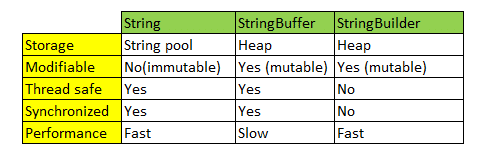
StringBuffer(Synchronized) and StringBuilder(not Synchronized) class is used to create mutable string.
Here comes == and equals method concept, == is for address comparision and equals for content comparision.
Let's see a sample program
String a="Praveen";
String b="Praveen";
String c= new String("Praveen");
String d= new String("Praveen");
StringBuffer e= new StringBuffer("Praveen");
StringBuffer f= new StringBuffer("Praveen");
StringBuilder g=new StringBuilder("Praveen");
StringBuilder h=new StringBuilder("Praveen");
String i=d;
StringBuffer j=e;
StringBuilder k=g;
System.out.println(a==b) ; // true
System.out.println(a.equals(b)) ; // true
System.out.println(a==c) ;// false
System.out.println(a==c.intern()) ;//true
System.out.println(a.equals(c)) ;//true
System.out.println(c==d) ;//false
System.out.println(c.intern() ==d.intern()) ;//true
System.out.println(c.equals(d)) ;//true
System.out.println(e==f) ;//false
System.out.println(e.equals(f)) ;//false
System.out.println(e.toString().equals(f.toString())) ;//true
System.out.println(i==d) ;//true
Why should you be careful about String Concatenation(+) operator in Loops?
Consider the code below:
String s3 = "Value1";
String s2 = "Value2";
for (int i = 0; i < 100000; ++i) {
s3 = s3 + s2;
}
How many objects are created in memory? More than 100000 Strings are created. This will have a huge performance impact.
How do you solve above problem?
The easiest way to solve above problem is using StringBuffer. On my machine StringBuffer version took 0.5 seconds. String version took 25 Seconds. That's a 50 fold increase in performance.
StringBuffer s3 = new StringBuffer("Value1");
String s2 = "Value2";
for (int i = 0; i < 100000; ++i) {
s3.append(s2);
}
Let's see the difference between String, StringBuffer, StringBuilder