JavaScript Course
BOM(Browser Object Model) represents the current browser window. The main purpose of Browser Object Model is to manipulate the properties and methods which are associated with the browser window.
Window Object
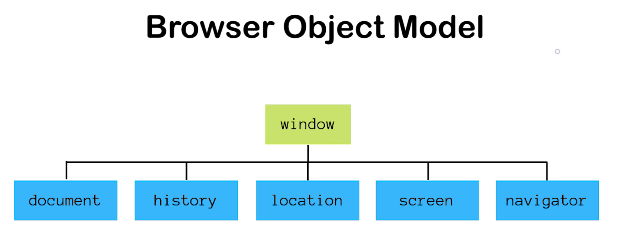
To access the Browser Object Model(BOM) we can use the window object. For example,
window.document.getElementById('topbar');
document.getElementById('topbar');

window.alert('This is window');
alert('This is without window');
This window object also gives us access to some methods like
- setTimeout()
- setInterval()
- alert()
- confirm()
- prompt()
- open()
- close()
For example,
confirm("Are you sure?");
prompt("Please enter your name");
open('https://www.praveenoruganti.in');
close();
Screen Object
The JavaScript screen object holds information of the browser screen. It can be used to display screen width, height, availableWidth, availableHeight, colorDepth, pixelDepth etc. For example,
console.log(`Window Screen Width ${window.screen.width}`);
console.log(`Window Screen Available Width ${window.screen.availWidth}`);
console.log(`Window Screen Height ${window.screen.height}`);
console.log(`Window Screen Available Height ${window.screen.availHeight}`);
Navigator Object
The navigator object contains information about the browser where your application is running. For example,
console.log(window.navigator.userAgent);
console.log(navigator.onLine);
History Object
The JavaScript history object represents an array of URLs visited by the user.
it gives us two methods:
- back()- It loads the previous page from browser history.
- forward()- It loads the next page from browser history.
For example,
window.history.back();
window.history.forward();
Location Object
The location object can be used to get the details of the current page address. It can also redirect the browser to a new page in same browser tab. For example,
console.log(location.href);
console.log(location.hostname);
console.log(location.pathname);
console.log(location.search);
location.assign("https://www.praveenoruganti.in");
You can also check out the Demo.