JavaScript Course
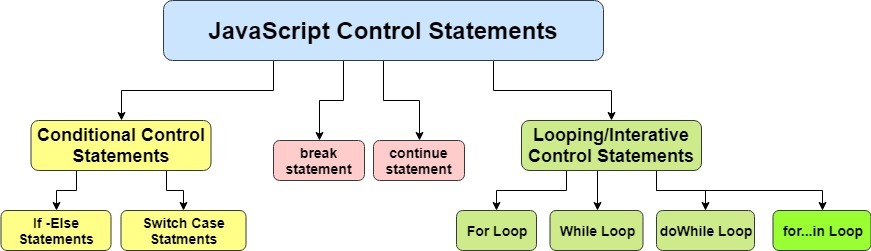
The control flow within JavaScript allow the program flow to change within a unit of code or function. These statements can determine whether or not given statements are executed—and provide the basis for the repeated execution of a block of code.
The flow of control through any given function is implemented with three basic types of control flow:
- Sequential: default mode
- Selection: used for decisions, branching—choosing between two or more alternative paths
- Repetition: used for looping (i.e., repeating a piece of code multiple times in a row)
Conditional control statements
JavaScript if...else Statement
if...else statement is to create decision making.
In JavaScript, there are three forms of the if...else statement.
- if statement
- if...else statement
- if...else if...else statement
JavaScript if Statement
// check if the number is positive

const number = prompt("Enter a number: ");

// check if number is greater than 0
if (number > 0) {
 // the body of the if statement
}
JavaScript if...else statement
// check is the number is positive or negative/zero

const number = prompt("Enter a number: ");

// check if number is greater than 0
if (number > 0) {
}
// if number is not greater than 0
else {
}
JavaScript if...else if statement
// check if the number if positive, negative or zero
const number = prompt("Enter a number: ");


// check if number is greater than 0
if (number > 0) {
}
// check if number is 0
else if (number == 0) {
}
// if number is neither greater than 0, nor zero
else {
}
Nested if...else Statement
// check if the number is positive, negative or zero
const number = prompt("Enter a number: ");

if (number >= 0) {
    if (number == 0) {
    } else {
    }
} else {
}
JavaScript Switch Statement
The JavaScript switch statement is used in decision making.
The switch statement evaluates an expression and executes the corresponding body that matches the expression's result.
// program using switch statement
let a = 2;

switch (a) {

    case 1:
        a = 'one';
        break;
    case 2:
        a = 'two';
        break;
    default:
        a = 'not found';
        break;
}
// program using switch statement
let a = 1;

switch (a) {
    case "1":
        a = 1;
        break;
    case 1:
        a = 'one';
        break;
    case 2:
        a = 'two';
        break;

    default:
        a = 'not found';
        break;
}
// program for a simple calculator
let result;

// take the operator input
const operator = prompt('Enter operator ( either +, -, * or / ): ');

// take the operand input
const number1 = parseFloat(prompt('Enter first number: '));
const number2 = parseFloat(prompt('Enter second number: '));

switch(operator) {
    case '+':
        result = number1 + number2;
        break;
    case '-':
        result = number1 - number2;
        break;
    case '*':
        result = number1 * number2;
        break;
    case '/':
        result = number1 / number2;
        break;

    default:
        break;
}
// multiple case switch program
let fruit = 'apple';
switch(fruit) {
    case 'apple':
    case 'mango':
    case 'pineapple':
        break;
    default:
        break;
}
Looping/iterative control statements
JavaScript for loop
In programming, loops are used to repeat a block of code.
For example, if you want to show a message 100 times, then you can use a loop. It's just a simple example; you can achieve much more with loops.
// program to display text 100 times
const n = 100;

// looping from i = 1 to 5
for (let i = 1; i <= 100; i++) {
}
// program to display numbers from 1 to 5
const n = 5;

// looping from i = 1 to 5
// in each iteration, i is increased by 1
for (let i = 1; i <= n; i++) {
}
// program to display the sum of natural numbers
let sum = 0;
const n = 100

// looping from i = 1 to n
// in each iteration, i is increased by 1
for (let i = 1; i <= n; i++) {
    sum += i;  // sum = sum + i
}
// program to display the sum of n natural numbers
let sum = 0;
const n = 100;

// looping from i = n to 1
// in each iteration, i is decreased by 1
for(let i = n; i >= 1; i-- ) {
    // adding i to sum in each iteration
    sum += i; // sum = sum + i
}
// infinite for loop
for(let i = 1; i > 0; i++) {
    // block of code
}
JavaScript while and do...while Loop
In programming, loops are used to repeat a block of code. For example, if you want to show a message 100 times, then you can use a loop. It's just a simple example; you can achieve much more with loops.
// program to display numbers from 1 to 5
// initialize the variable
let i = 1, n = 5;

// while loop from i = 1 to 5
while (i <= n) {
    i += 1;
}
// program to find the sum of positive numbers
// if the user enters a negative numbers, the loop ends
// the negative number entered is not added to sum

let sum = 0;

// take input from the user
let number = parseInt(prompt('Enter a number: '));

while(number >= 0) {

    // add all positive numbers
    sum += number;

    // take input again if the number is positive
    number = parseInt(prompt('Enter a number: '));
}

// display the sum
// program to display numbers
let i = 1;
const n = 5;

// do...while loop from 1 to 5
do {
    i++;
} while(i <= n);
// to find the sum of positive numbers
// if the user enters negative number, the loop terminates
// negative number is not added to sum

let sum = 0;
let number = 0;

do {
    sum += number;
    number = parseInt(prompt('Enter a number: '));
} while(number >= 0)
// infinite do...while loop
const count = 1;
do {
   // body of loop
} while(count == 1)
for Vs while Loop
A for loop is usually used when the number of iterations is known.
// this loop is iterated 5 times
for (let i = 1; i <=5; ++i) {
   // body of loop
}
And while and do...while loops are usually used when the number of iterations are unknown.
while (condition) {
    // body of loop
}
JavaScript break Statement
The break statement is used to terminate the loop immediately when it is encountered.
// program to print the value of i
for (let i = 1; i <= 5; i++) {
    // break condition
    if (i == 3) {
        break;
    }
}
// program to find the sum of positive numbers
// if the user enters a negative numbers, break ends the loop
// the negative number entered is not added to sum

let sum = 0, number;

while(true) {

    // take input again if the number is positive
    number = parseInt(prompt('Enter a number: '));

    // break condition
    if(number < 0) {
        break;
    }

    // add all positive numbers
    sum += number;

}

// display the sum
break with Nested Loop
// nested for loops

// first loop
for (let i = 1; i <= 3; i++) {

    // second loop
    for (let j = 1; j <= 3; j++) {
        if (i == 2) {
          break;
        }
    }
}
JavaScript continue Statement
The continue statement is used to skip the current iteration of the loop and the control flow of the program goes to the next iteration.
// program to print the value of i
for (let i = 1; i <= 5; i++) {

    // condition to continue
    if (i == 3) {
        continue;
    }

}
// program to calculate positive numbers only
// if the user enters a negative number, that number is skipped from calculation

// negative number -> loop terminate
// non-numeric character -> skip iteration

let sum = 0;
let number = 0;

while (number >= 0) {

    // add all positive numbers
    sum += number;

    // take input from the user
    number = parseInt(prompt('Enter a number: '));

    // continue condition
    if (isNaN(number)) {
        number = 0; // the value of number is made 0 again
        continue;
    }

}

// display the sum
// nested for loops

// first loop
for (let i = 1; i <= 3; i++) {

    // second loop
    for (let j = 1; j <= 3; j++) {
        if (j == 2) {
          continue;
        }
    }
}
JavaScript try...catch...finally Statement
The try, catch and finally blocks are used to handle exceptions (a type of an error). Before you learn about them, you need to know about the types of errors in programming.
Types of Errors In programming, there can be two types of errors in the code:
Syntax Error: Error in the syntax. For example, if you write consol.log('your result');, the above program throws a syntax error. The spelling of the console is a mistake in the above code.
Runtime Error: This type of error occurs during the execution of the program. For example, calling an invalid function or a variable.
These errors that occur during runtime are called exceptions. Now, let's see how you can handle these exceptions.
JavaScript try...catch Statement The try...catch statement is used to handle the exceptions.
// program to show try...catch in a program

const numerator= 100, denominator = 'a';

try {

    // forgot to define variable a
}
catch(error) {
}
JavaScript try...catch...finally Statement You can also use the try...catch...finally statement to handle exceptions. The finally block executes both when the code runs successfully or if an error occurs.
const numerator= 100, denominator = 'a';

try {
}
catch(error) {
}
finally {
}
setTimeout(function() {
    try {
        // error in the code
    } catch {
    }
}, 3000);
You can also use the throw statement with the try...catch statement to use user-defined exceptions. For example, a certain number is divided by 0. If you want to consider Infinity as an error in the program, then you can throw a user-defined exception using the throw statement to handle that condition.
JavaScript throw Statement
In JavaScript, the throw statement handles user-defined exceptions. For example, if a certain number is divided by 0, and if you need to consider Infinity as an exception, you can use the throw statement to handle that exception.
const number = 40;
try {
    if(number > 50) {
    }
    else {

        // user-defined throw statement
        throw new Error('The number is low');
    }

    // if throw executes, the below code does not execute
}
catch(error) {
}
Rethrow an Exception You can also use a throw statement inside the catch block to rethrow an exception. For example,
const number = 5;
try {
     // user-defined throw statement
     throw new Error('This is the throw');

}
catch(error) {
    if( number + 8 > 10) {

        // statements to handle exceptions
    }
    else {
        // cannot handle the exception
        // rethrow the exception
        throw new Error('The value is low');
    }
}
In the above program, the throw statement is used within the try block to catch an exception. And the throw statement is re-thrown in the catch block which gets executed if the catch block cannot handle the exception.
Here, the catch block handles the exception and no error occurs. Hence, the throw statement is not re-thrown.
If the error was not handled by the catch block, the throw statement would be re-thrown with error message Uncaught Error: The value is low
You can check out the Demo.