JavaScript Course
In JavaScript, a block of code can be executed in specified time intervals. These time intervals are called timing events.
JavaScript setInterval()
The setInterval() method repeats a block of code at every given timing event. The commonly used syntax of JavaScript setInterval is:
setInterval(function, milliseconds);
Its parameters are:
- function - a function containing a block of code
- milliseconds - the time interval between the execution of the function
The setInterval() method returns an intervalID which is a positive integer.
For example,
<!DOCTYPE html>
<html lang="en-US">
<head>
    <meta charset="UTF-8">
    <meta name="viewport" content="width=device-width, initial-scale=1">
    <title>All About setInterval</title>
    <script src="script.javascript" defer></script>
</head>
<body>
    <h1>setInterval() </h1>
    <h2 id="timer-text">0</h2>
    <button id="btn-start">Start Timer</button>
</body>
</html>
const timerText = document.getElementById("timer-text");
const btnStart = document.getElementById("btn-start");
let count = 0;


btnStart.addEventListener("click", function () {
  intervalID = setInterval(function () {
    count += 1;
    timerText.textContent = count;
  }, 1000);
});
JavaScript clearInterval()
As you have seen in the above example, the program executes a block of code at every specified time interval. If you want to stop this function call, then you can use the clearInterval() method.
The syntax of clearInterval() method is:
clearInterval(intervalID);
Here, the intervalID is the return value of the setInterval() method.
<!DOCTYPE html>
<html lang="en-US">
<head>
    <meta charset="UTF-8">
    <meta name="viewport" content="width=device-width, initial-scale=1">
    <title>All About setInterval and clearInterval</title>
    <script src="script.javascript" defer></script>
</head>
<body>
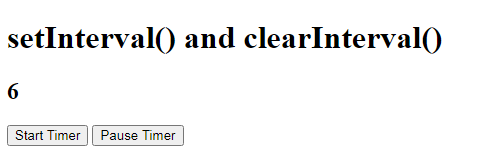
    <h1>setInterval() and clearInterval()</h1>
    <h2 id="timer-text">0</h2>
    <button id="btn-start">Start Timer</button>
    <button id="btn-pause">Pause Timer</button>
</body>
</html>
const timerText = document.getElementById("timer-text");
const btnStart = document.getElementById("btn-start");
const btnPause = document.getElementById("btn-pause");
let count = 0;
let intervalID;

btnStart.addEventListener("click", function () {
  intervalID = setInterval(function () {
    count += 1;
    timerText.textContent = count;
  }, 1000);
});

btnPause.addEventListener("click", function () {
  clearInterval(intervalID);
});
You can check out the Demo.
Note
If you only need to execute a function one time, it's better to use the setTimeout() method.