JavaScript Course
JSON stands for Javascript Object Notation. JSON is a text-based data format that is used to store and transfer data.
user.JSON
{
 "name": "Praveen Oruganti",
 "favoriteNumber": 1,
 "isProgrammer": true,
 "hobbies" : ["Tech Blogging", "Listening Songs", "Watching Movies", "Playing Cricket/Tennis"],
 "friends": [{
     "name": "Khaja",
     "favoriteNumber": 5,
     "isProgrammer": false,
     "hobbies" : ["Listening Songs", "Watching Movies"],
     "friends": [...]
 }]
}
In JSON, the data are in key/value pairs separated by a comma ,. JSON was derived from JavaScript. So, the JSON syntax resembles JavaScript object literal syntax. However, the JSON format can be accessed and be created by other programming languages too.
Note
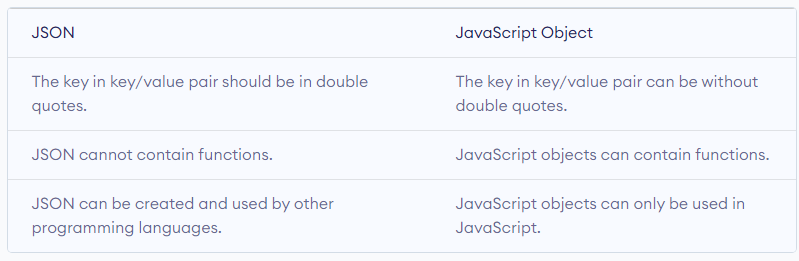
JavaScript Objects and JSON are not the same.
JSON Data
JSON data consists of key/value pairs similar to JavaScript object properties. The key and values are written in double quotes separated by a colon :. For example, "name": "Praveen Oruganti"
Note
JSON data requires double quotes for the key.
JSON Object
The JSON object is written inside curly braces { }. JSON objects can contain multiple key/value pairs. For example, // JSON object { "name": "Praveen", "age": 35 }
JSON Array
JSON array is written inside square brackets [ ]. For example, // JSON array [ "apple", "mango", "banana"]
// JSON array containing objects [ { "name": "Praveen", "age": 35 }, { "name": "Khaja", "age": 36 }. { "name": "Varma", "age": 38 } ]
Note
JSON data can contain objects and arrays. However, unlike JavaScript objects, JSON data cannot contain functions as values.
Accessing JSON Data
You can access JSON data using the dot notation.
// JSON object
const data = {
    "name": "Praveen",
    "age": 35,
    "hobby": {
	"reading" : true,
	"gaming" : false,
	"sport" : "Cricket"
    },
    "class" : ["JavaScript", "HTML", "CSS"]
}

// accessing JSON object
console.log(data.name); // Praveen
console.log(data.hobby); // { gaming: false, reading: true, sport: "Cricket"}

console.log(data.hobby.sport); // Cricket
console.log(data.class[1]); // HTML
We use the . notation to access JSON data. Its syntax is: variableName.key
You can also use square bracket syntax [] to access JSON data. For example,
// JSON object
const data = {
    "name": "Praveen",
    "age": 35
}

// accessing JSON object
console.log(data["name"]); // Praveen
JavaScript Objects VS JSON
Though the syntax of JSON is similar to the JavaScript object, JSON is different from JavaScript objects.
Converting JSON to JavaScript Object
You can convert JSON data to a JavaScript object using the built-in JSON.parse() function. For example,
// JSON object
const JSONData = '{ "name": "Praveen", "age": 35 }';

// converting to JavaScript object
const obj = JSON.parse(JSONData);

// accessing the data
console.log(obj.name); // Praveen
Converting JavaScript Object to JSON
You can also convert JavaScript objects to JSON format using the JavaScript built-in JSON.stringify() function. For example,
// JavaScript object
const JSONData = { "name": "Praveen", "age": 35 };

// converting to JSON
const obj = JSON.stringify(JSONData);

// accessing the data
console.log(obj); // "{"name":"Praveen","age":35}"
Use of JSON
JSON is the most commonly used format for transmitting data (data interchange) from a server to a client and vice-versa. JSON data are very easy to parse and use. It is fast to access and manipulate JSON data as they only contain texts.
JSON is language independent. You can create and use JSON in other programming languages too.
You can check out the Demo.