JavaScript Course
What is an Operator?
In JavaScript, an operator is a special symbol used to perform operations on operands(values and variables).
const x = 5;
JavaScript Arithmetic Operators
Arithmetic operators are used to perform arithmetic calculations.
const number = 3 + 5; // 8

let x = 5;
let y = 3;

// addition
console.log('x + y = ', x + y);

// subtraction
console.log('x - y = ', x - y);

// multiplication
console.log('x * y = ', x * y);

// division
console.log('x / y = ', x / y);

// remainder
console.log('x % y = ', x % y);

// increment
console.log('++x = ', ++x); // x is now 6
console.log('x++ = ', x++); // x returns 6 and then increases by 1
console.log('x = ', x);

// decrement
console.log('--x = ', --x); // x is now 6
console.log('x-- = ', x--); // x returns 6 and then increases by 1
console.log('x = ', x);

//exponentiation
console.log('x ** y =', x ** y);
JavaScript Comparison Operators
Comparison operators compare two values and return a boolean value, either true or false.
const a = 3, b = 2;
console.log(a > b); // true

// equal operator
console.log(2 == 2); // true
console.log(2 == '2'); // true

// not equal operator
console.log(3 != 2); // true
console.log('hello' != 'Hello'); // true

// strict equal operator
console.log(2 === 2); // true
console.log(2 === '2'); // false

// strict not equal operator
console.log(2 !== '2'); // true
console.log(2 !== '2'); // false
JavaScript Logical Operators
Logical operators perform logical operations and return a boolean value, either true or false.
const x = 5, y = 3;
(x < 6) && (y < 5); // true
// logical AND
console.log(true && true); // true
console.log(true && false); // false

// logical OR
console.log(true || false); // true

// logical NOT
console.log(!true); // false
JavaScript Bitwise Operators
Bitwise operators perform operations on binary representations of numbers.
// AND operator example

let a = 12;
let  b = 25;

result = a & b;
console.log(result); // 8

// OR operator example
let a = 12;
let  b = 25;

result = a | b;
console.log(result); // 29

// XOR operator example
let a = 12;
let  b = 25;

result = a ^ b;
console.log(result); // 21

// NOT operator example
let  b = 12;

result = ~b;

console.log(result); // -13

// Left Shift

let a = 8;
let  b = 1;

result = a << b;

// 1 ( 00000000000000000000000000010000 )
console.log(result);

// Sign-propagating right shift

let a = 8;
let b = 1;
// 11111111111111111111111111111101
let c = -3;

result = a >> b;
result1 = c >> b;

// 4 (00000000000000000000000000000100)
console.log(result);

// -1 (11111111111111111111111111111111)
console.log(result1);

// Zero-fill right shift
let a = 8;
let b = 1;
let c = -3;

result = a >>> b;
result1 = c >>> b;

// 4 (00000000000000000000000000000100)
console.log(result);

// 1073741823 (00111111111111111111111111111111)
console.log(result);
JavaScript String Operators
In JavaScript, you can also use the + operator to concatenate (join) two or more strings.
// concatenation operator
console.log('hello' + 'world');

let a = 'JavaScript';

a += ' tutorial';  // a = a + ' tutorial';
console.log(a);
Precedence
Every complex statement with multiple operators in the same line will introduce precedence problems. Take this example: let a = 1 * 2 + 5 / 2 % 2; The result is 2.5, but why? What operations are executed first, and which need to wait? Some operations have more precedence than the others. The precedence rules are listed in this table:
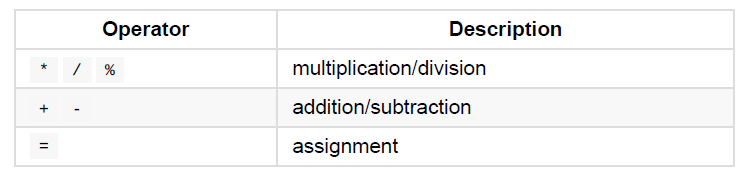
Operations on the same level (like + and - ) are executed in the order they are found, from left to right. Following these rules, the operation above can be solved in this way:
let a = 1 * 2 + 5 / 2 % 2
let a = 2 + 5 / 2 % 2
let a = 2 + 2.5 % 2
let a = 2 + 0.5
let a = 2.5
You can check out the Demo.