JavaScript Course
Most of the time, a JavaScript application needs to work with information. Here are two examples:
- An online shop the information might include goods being sold and a shopping cart.
- A chat application the information might include users, messages, and much more. Variables are used to store this information.
A Variable
Variables are used to store some data for later use. In other words, think of them as containers which hold whatever data you put inside them.
To create a variable in JavaScript, we use the let,const and var keyword based on the scenario.
The statement below creates (in other words: declares) a variable with the name message:
let message;
Now, we can put some data into it by using the assignment operator =:
let message;
message = 'Hello!';
alert(message); // shows the variable content
We can also declare multiple variables in one line:
let user = 'Praveen', age = 35, message = 'Hello';
That might seem shorter, but we don't recommend it. For the sake of better readability, please use a single line per variable.
The multiline variant is a bit longer, but easier to read:
let user = 'Praveen';
let age = 35;
let message = 'Hello';
We can also change the value of variable many times as we want:
let message;
message = 'Hello!';
message = 'World!'; // value changed
alert(message);
When the value is changed, the old data is removed from the variable:
A variable should be declared only once. Declaring twice triggers an error.
let message = "This";
// repeated 'let' leads to an error
let message = "That"; // SyntaxError: 'message' has already been declared
Variable naming
Rules for naming JS Variables
- Name can contain letters, digits, or the symbols $ and _
let mySubject1,math$; // valid
- Name cannot start with a digit
let 1maths; //invalid
- Name can start with an _ or $
let _subjectMarks,$rankInClass; // valid
- Names are case sensitive
let x, X;
- Names cannot be reserved keywords.
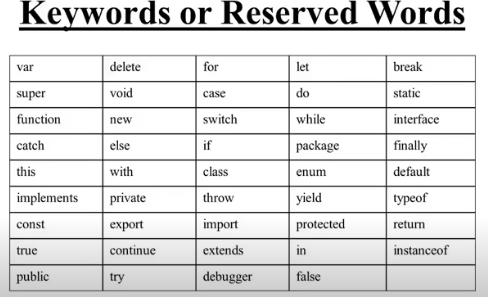
let let; // invalid
let var; // invalid
- When the name contains multiple words, camelCase is commonly used
let subjectMarks,rankInClass;
Let see few more examples,
let &alpha1 // Invalid
let NUM1 // Valid
let DATE-5 // Invalid
let TotalSum_ // Valid
let 12Byby // Invalid
let num1 // Valid
let super$$ // Valid
let Object // Valid
let StringNew // Valid
let $rankInClass // Valid
Constants
To declare a constant (unchanging) variable, use const instead of let:
const myBirthday = '18.04.2000';
Variables declared using const are called "constants". They cannot be reassigned. An attempt to do so would cause an error:
const myBirthday = '18.04.2000';
myBirthday = '01.01.2001'; // error, can't reassign the constant!
When a programmer is sure that a variable will never change, they can declare it with const to guarantee and clearly communicate that fact to everyone.
Uppercase constants
There is a widespread practice to use constants as aliases for difficult-to-remember values that are known prior to execution.
Such constants are named using capital letters and underscores.
For instance, let's make constants for colors in so-called "web" (hexadecimal) format:
const COLOR_RED = "#F00";
const COLOR_GREEN = "#0F0";
const COLOR_BLUE = "#00F";
const COLOR_ORANGE = "#FF7F00";
// ...when we need to pick a color
let color = COLOR_ORANGE;
alert(color); // #FF7F00
Benefits:
- COLOR_ORANGE is much easier to remember than "#FF7F00".
- It is much easier to mistype "#FF7F00" than COLOR_ORANGE.
- When reading the code, COLOR_ORANGE is much more meaningful than #FF7F00.
When should we use capitals for a constant and when should we name it normally? Lets make that clear.
Being a "constant" just means that a variable's value never changes. But there are constants that are known prior to execution (like a hexadecimal value for red) and there are constants that are calculated in run-time, during the execution, but do not change after their initial assignment.
For instance:
const pageLoadTime = /* time taken by a webpage to load */;
The value of pageLoadTime is not known prior to the page load, so it's named normally. But it's still a constant because it doesn't change after assignment.
In other words, capital-named constants are only used as aliases for "hard-coded" values.
Name things right
Talking about variables, there's one more extremely important thing.
A variable name should have a clean, obvious meaning, describing the data that it stores.
Variable naming is one of the most important and complex skills in programming. A quick glance at variable names can reveal which code was written by a beginner versus an experienced developer.
In a real project, most of the time is spent modifying and extending an existing code base rather than writing something completely separate from scratch. When we return to some code after doing something else for a while, it's much easier to find information that is well-labeled. Or, in other words, when the variables have good names.
Please spend time thinking about the right name for a variable before declaring it. Doing so will repay you handsomely.
Some good-to-follow rules are:
- Use human-readable names like userName or shoppingCart.
- Stay away from abbreviations or short names like a, b, c, unless you really know what you're doing.
- Make names maximally descriptive and concise. Examples of bad names are data and value. Such names say nothing. It's only okay to use them if the context of the code makes it exceptionally obvious which data or value the variable is referencing.
- Agree on terms within your team and in your own mind. If a site visitor is called a "user" then we should name related variables currentUser or newUser instead of currentVisitor or newManInTown.
Summary
We can declare variables to store data by using the var, let, or const keywords.
- let – is a modern variable declaration.
- var – is an old-school variable declaration. Normally we don't use it at all, but we'll cover subtle differences from let in the chapter The old "var", just in case you need them.
- const – is like let, but the value of the variable can't be changed.
Variables should be named in a way that allows us to easily understand what's inside them.
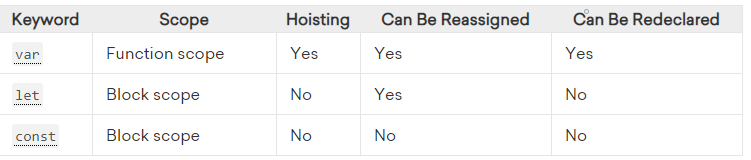
var vs let vs const
Variable Scope
Scope in JavaScript refers to the current context of code, which determines the accessibility of variables to JavaScript. The two types of scope are local and global:
- Global variables are those declared outside of a block
- Local variables are those declared inside of a block
In the example below, we will create a global variable.
var name="Praveen";
We learned that variables can be reassigned. Using local scope, we can actually create new variables with the same name as a variable in an outer scope without changing or reassigning the original value.
In the example below, we will create a global species variable. Within the function is a local variable with the same name. By sending them to the console, we can see how the variable's value is different depending on the scope, and the original value is not changed.
// Initialize a global variable
var name = "Praveen";

function fullName() {
  // Initialize a local, function-scoped variable
  var name = "Praveen Oruganti";
  console.log(name);
}

// Log the global and local variable
console.log(name); // Praveen
fullName(); // Praveen Oruganti
console.log(name); // Praveen
In this example, the local variable is function-scoped. Variables declared with the var keyword are always function-scoped, meaning they recognize functions as having a separate scope. This locally-scoped variable is therefore not accessible from the global scope.
The new keywords let and const, however, are block-scoped. This means that a new, local scope is created from any kind of block, including function blocks, if statements, and for and while loops.
To illustrate the difference between function- and block-scoped variables, we will assign a new variable in an if block using let.
var fullName = true;

// Initialize a global variable
let name = "Praveen";

if (fullName) {
  // Initialize a block-scoped variable
  let name = "Praveen Oruganti";
  // Full Name is Praveen Oruganti
}

// Name is Praveen
In this example, the name variable has one value globally (Praveen), and another value locally (Praveen Oruganti). If we were to use var, however, there would be a different result.
var fullName = true;
// Use var to initialize a variable
var name = "Praveen";

if (fullName) {
  // Attempt to create a new variable in a block
  var name = "Praveen Oruganti";
  // Full Name is Praveen Oruganti
}

 // Name is Praveen Oruganti
In the result of this example, both the global variable and the block-scoped variable end up with the same value, Praveen Oruganti. This is because instead of creating a new local variable with var, you are reassigning the same variable in the same scope. var does not recognize if to be part of a different, new scope. It is generally recommended that you declare variables that are block-scoped, as they produce code that is less likely to unintentionally override variable values.
Hoisting
In most of the examples so far, we've used var to declare a variable, and we have initialized it with a value. After declaring and initializing, we can access or reassign the variable.
If we attempt to use a variable before it has been declared and initialized, it will return undefined.
// Attempt to use a variable before declaring it
console.log(num); // undefined

// Variable assignment
var num = 100;
However, if we omit the var keyword, we are no longer declaring the variable, only initializing it. It will return a ReferenceError and halt the execution of the script.
// Attempt to use a variable before declaring it
console.log(num); // ReferenceError: num is not defined

// Variable assignment without var
num = 100;
The reason for this is due to hoisting, a behavior of JavaScript in which variable and function declarations are moved to the top of their scope. Since only the actual declaration is hoisted, not the initialization, the value in the first example returns undefined.
To demonstrate this concept more clearly, below is the code we wrote and how JavaScript actually interpreted it.
// The code we wrote
console.log(num);
var num = 100;

// How JavaScript interpreted it
var num;
console.log(num);
num = 100;
JavaScript saved num to memory as a variable before the execution of the script. Since it was still called before it was defined, the result is undefined and not 100. However, it does not cause a ReferenceError and halt the script. Although the var keyword did not actually change location of the var, this is a helpful representation of how hoisting works. This behavior can cause issues, though, because the programmer who wrote this code likely expects the output of num to be true, when it is instead undefined.
We can also see how hoisting can lead to unpredictable results in the next example:
// Initialize num in the global scope
var num = 100;

function hoist() {
  // A condition that should not affect the outcome of the code
  if (false) {
    var num = 200;
  }
  console.log(num); // undefined
}

hoist();
In this example, we declared num to be 100 globally. Depending on an if statement, num could change to 200, but since the condition was false it should not have affected the value of num. Instead, num was hoisted to the top of the hoist() function, and the value became undefined.
This type of unpredictable behavior can potentially cause bugs in a program. Since let and const are block-scoped, they will not hoist in this manner, as seen below.
// Initialize num in the global scope
let num = true;

function hoist() {
  // Initialize num in the function scope
  if (3 === 4) {
    let num = false;
  }
  console.log(num); // true
}

hoist();
Duplicate declaration of variables, which is possible with var, will throw an error with let and const.
// Attempt to overwrite a variable declared with var
var num = 1;
var num = 2;

console.log(num); // 2
// Attempt to overwrite a variable declared with let
let num1 = 1;
let num1 = 2;

console.log(num1); // Uncaught SyntaxError: Identifier 'num1' has already been declared
To summarize, variables introduced with var have the potential of being affected by hoisting, a mechanism in JavaScript in which variable declarations are saved to memory. This may result in undefined variables in one's code. The introduction of let and const resolves this issue by throwing an error when attempting to use a variable before declaring it or attempting to declare a variable more than once.
You can check out the Demo.