Microservice Course
Netflix Eureka — Service Registry and Discovery
A microservice instance needs to register itself with a service registry so other services can locate it without hard-coding hostnames or ports. This is called service discovery, and it's essential in dynamic cloud environments where instances start, stop, and move frequently.
When a microservice instance registers with a discovery agent like Eureka, it provides:
- Its physical IP address or hostname and port
- A logical service name (the name other clients will use to look it up)
- A health-check URL so Eureka can monitor its liveness
The service client then queries the discovery agent to get the instance addresses for the service it wants to call, and routes traffic to one of them.
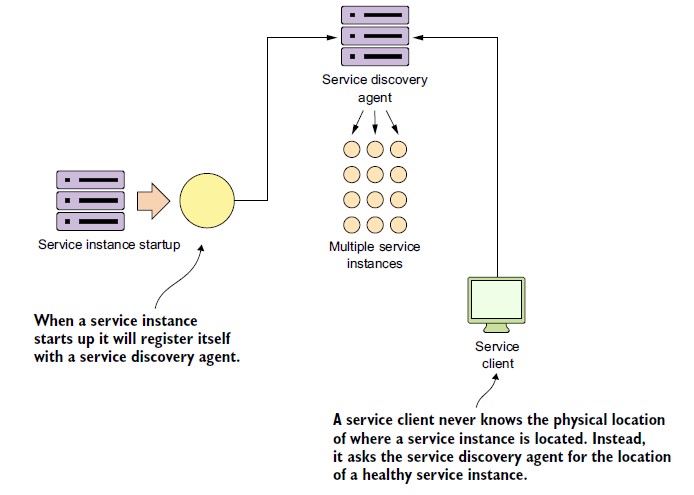
In a cloud-based microservice application, multiple instances of a service typically run simultaneously for redundancy and scale. Eureka continuously monitors registered instances via heartbeats. If an instance stops sending heartbeats within a configurable timeout, Eureka removes it from its routing table so clients aren't directed to a dead instance.
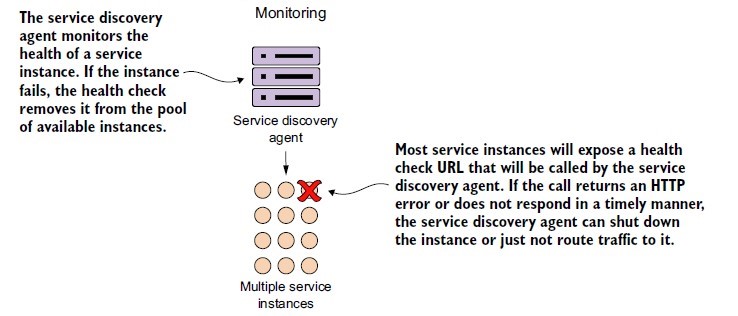
Spring Cloud Service Discovery, using Eureka or Consul as the backing registry, allows you to:
- Abstract away physical IP addresses from client code — clients use logical service names
- Handle instance registration and deregistration automatically as services start and stop
- Support multiple registered instances of the same service for load balancing
Important note:
@EnableDiscoveryClientbecame unnecessary in most Spring Cloud versions — the presence of a discovery client library on the classpath (e.g.,spring-cloud-starter-netflix-eureka-client) and the configuration properties are sufficient. Many projects still include it for explicitness, but it's not required from Spring Cloud 2021 onwards.
Setting Up the Eureka Server
Add the Eureka server dependency:
<dependency>
  <groupId>org.springframework.cloud</groupId>
  <artifactId>spring-cloud-starter-netflix-eureka-server</artifactId>
</dependency>
Annotate the main class:
@SpringBootApplication
@EnableEurekaServer
public class SpringCloudEurekaServerApplication {

    public static void main(String[] args) {
        SpringApplication.run(SpringCloudEurekaServerApplication.class, args);
    }
}
Configure application.yml:
eureka:
  client:
    register-with-eureka: false
    fetch-registry: false
  server:
    eviction-interval-timer-in-ms: 1000

spring:
  application:
    name: praveenoruganti-eureka-server

server:
  port: 8761
register-with-eureka: false and fetch-registry: false tell this server not to register with itself as a client, which would create a self-registration loop in a single-node setup.
Run the server: java -jar target/eureka-server-1.0.jar
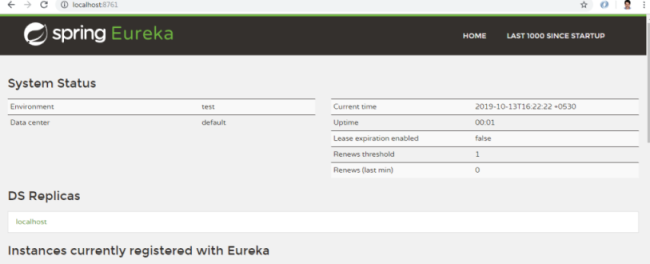
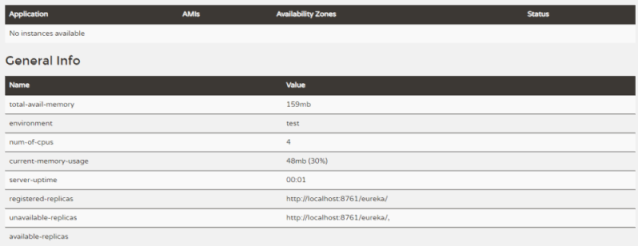
Open http://localhost:8761 to access the Eureka dashboard.
Setting Up a Eureka Client — Billing Service
Add the client dependency:
<dependency>
  <groupId>org.springframework.cloud</groupId>
  <artifactId>spring-cloud-starter-netflix-eureka-client</artifactId>
</dependency>
Main class:
package com.praveen.billing;

import org.springframework.boot.SpringApplication;
import org.springframework.boot.autoconfigure.SpringBootApplication;
import org.springframework.cloud.client.discovery.EnableDiscoveryClient;

@SpringBootApplication
@EnableDiscoveryClient // Optional in modern Spring Cloud — auto-configured from classpath
public class BillingServiceApplication {

    public static void main(String[] args) {
        SpringApplication.run(BillingServiceApplication.class);
    }
}
application.yml for the billing service:
management:
  endpoints:
    web:
      exposure:
        include: "*"
  endpoint:
    health:
      show-details: ALWAYS

eureka:
  client:
    registerWithEureka: true
    fetchRegistry: true
    serviceUrl:
      defaultZone: http://localhost:8761/eureka/
  instance:
    hostname: localhost

server:
  port: 8091

spring:
  application:
    name: praveenoruganti-billing-service
Start two instances on different ports:
java -Dserver.port=8091 -jar target/billing-service-1.0.jar
java -Dserver.port=8092 -jar target/billing-service-1.0.jar
Both instances register with Eureka under the same logical name (praveenoruganti-billing-service).
Setting Up the Order Management Service Client
Add the Eureka client dependency (same as above).
Main class — note: RestTemplate must be annotated with @LoadBalanced to enable Eureka-aware load balancing:
package com.praveen.ordermanagement;

import org.springframework.boot.SpringApplication;
import org.springframework.boot.autoconfigure.SpringBootApplication;
import org.springframework.boot.web.client.RestTemplateBuilder;
import org.springframework.cloud.client.discovery.EnableDiscoveryClient;
import org.springframework.cloud.client.loadbalancer.LoadBalanced;
import org.springframework.context.annotation.Bean;
import org.springframework.web.client.RestTemplate;

@EnableDiscoveryClient
@SpringBootApplication
public class OrderManagementServiceApplication {

    public static void main(String[] args) {
        SpringApplication.run(OrderManagementServiceApplication.class);
    }

    @LoadBalanced
    @Bean
    RestTemplate restTemplate(RestTemplateBuilder builder) {
        return builder.build();
    }
}
application.yml:
eureka:
  client:
    registerWithEureka: true
    fetchRegistry: true
    serviceUrl:
      defaultZone: http://localhost:8761/eureka/
  instance:
    hostname: localhost

server:
  port: 8090

spring:
  application:
    name: praveenoruganti-ordermanagement-service

praveenoruganti-ordermanagement-service:
  billingURL: http://praveenoruganti-billing-service/api/v1_0/billing/{id}
Service call using RestTemplate:
public String createOrder(String orderId) throws Exception {
    Map<String, String> uriVariables = new HashMap<>();
    uriVariables.put("id", orderId);
    HttpHeaders headers = new HttpHeaders();
    headers.setAccept(Arrays.asList(MediaType.APPLICATION_JSON));
    HttpEntity<String> entity = new HttpEntity<>(null, headers);
    String message = restTemplate.exchange(billingURL, HttpMethod.POST, entity, String.class, uriVariables).getBody();
    log.info("Response received from Billing Service: {}", message);
    return message;
}
Because the RestTemplate is @LoadBalanced and Eureka is configured, the hostname in the URL (praveenoruganti-billing-service) is treated as a logical service name, not a DNS hostname. Spring Cloud LoadBalancer (formerly Ribbon) resolves it to an actual instance address at call time, choosing between the two registered instances (8091, 8092).
Run the order management service: java -jar target/ordermanagement-service-1.0.jar
Visit http://localhost:8761 and you'll see all three services registered.
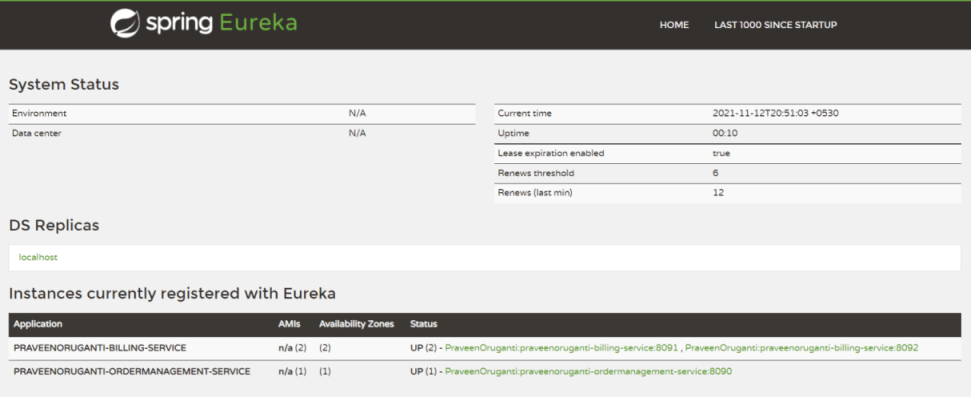
Test with a POST to http://localhost:8090/api/v1_0/order:
{
  "orderId": "501",
  "orderDescription": "Mobile",
  "correlationId": "258527852785275275"
}
Expected response: Successfully placed the order 501
When you send multiple requests, load balancing distributes them across the two billing service instances on ports 8091 and 8092.
Modern alternatives: In Kubernetes-native deployments, Eureka is often replaced by Kubernetes Service objects and kube-dns.
WebClient(reactive, non-blocking) is increasingly preferred overRestTemplatefor new services, and Spring Cloud OpenFeign provides a declarative REST client that integrates with Eureka and LoadBalancer with less boilerplate than rawRestTemplatecalls.