Microservice Course
Spring Cloud Config handles centralized management of application configuration so that environment-specific config is cleanly separated from deployed microservice artifacts. No matter how many service instances you spin up, they all pull their config from the same source — a Git repository, HashiCorp Vault, a filesystem, or other backends.
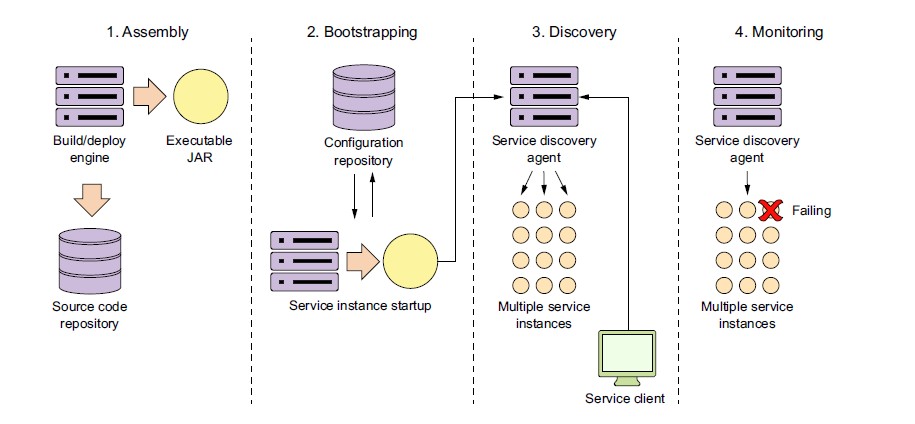
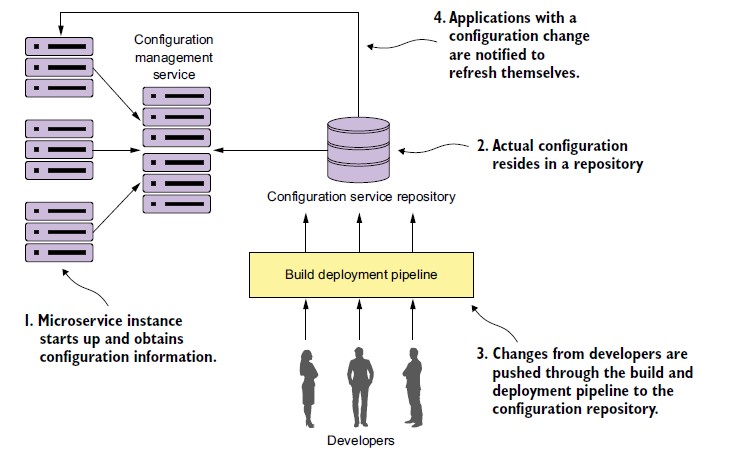
Instead of bundling environment-specific properties inside each Spring Boot JAR, services fetch their config from a remote Config Server at startup. This means you can change a database URL or feature flag without rebuilding or redeploying the service.
Pros
- Centralized Management: All configuration lives in one repository, with full history and audit trail via Git.
- Dynamic Updates: With Spring Cloud Bus (backed by RabbitMQ or Kafka) and the
/actuator/refreshendpoint, config changes can be pushed to running services without restarting them. - Environment-Specific Configurations: A single property file naming convention (
application-{profile}.yml) cleanly separates dev, staging, and prod config. - Security: Sensitive values (passwords, API keys) can be encrypted at rest in the repository using Config Server's built-in encryption, or delegated to HashiCorp Vault for more robust secret management.
- Version Control: Every config change is a Git commit — you get free rollback (
git revert), change history, and the ability to diff environments.
Cons
- Adds Infrastructure Complexity: Another service to deploy, monitor, and maintain. The Config Server itself needs to be highly available (run multiple instances behind a load balancer), or it becomes a single point of failure for your entire microservice fleet at startup time.
- Startup Dependency: If the Config Server is down when a microservice starts, the service cannot load its config and will fail to start. This is mitigated by enabling Config Server to cache or by configuring clients with
spring.cloud.config.fail-fast=falseandspring.cloud.config.retry.*for resilient retry behaviour. - Latency: An additional network call at startup — negligible in practice, but worth noting in startup-time-sensitive environments.
- Learning Curve: Teams need to understand the naming conventions (
{application}-{profile}.yml), the Git repo layout, encryption setup, and refresh mechanics.
Limitations
- Not limited to the Java ecosystem despite common perception — the Config Server exposes a standard HTTP API, and any language that can make an HTTP request can fetch configuration from it. The Spring Cloud Config client library is Spring-specific, but the server is language-agnostic.
- At very large scale (thousands of services polling on startup), the Config Server can become a bottleneck. This is addressed by running multiple Config Server replicas or by caching config in the client.
Setting Up Spring Cloud Config
1. Config Server
Add the dependency:
<dependency>
  <groupId>org.springframework.cloud</groupId>
  <artifactId>spring-cloud-config-server</artifactId>
</dependency>
Annotate the main class:
@EnableConfigServer
@SpringBootApplication
public class ConfigServerApplication {

    public static void main(String[] args) {
        SpringApplication.run(ConfigServerApplication.class, args);
    }
}
Configure the Git-backed repository in application.yml:
spring:
  application:
    name: config-server
  cloud:
    config:
      server:
        git:
          uri: https://github.com/your-org/config-repo
          search-paths: '{application}'   # look in a subfolder named after the app
          clone-on-start: true            # fail fast if the repo isn't reachable

server:
  port: 8888
Config Server serves properties at http://localhost:8888/{application}/{profile}[/{label}] — where application is the client's spring.application.name, profile is the active Spring profile, and label is the Git branch/tag (defaults to main).
2. Config Client
Add the dependency:
<dependency>
  <groupId>org.springframework.cloud</groupId>
  <artifactId>spring-cloud-starter-config</artifactId>
</dependency>
In Spring Boot 2.4 and later, bootstrap.yml has been replaced — configure the Config Server URI directly in application.yml (or via environment variables):
spring:
  application:
    name: my-service
  config:
    import: "optional:configserver:http://localhost:8888"
For Spring Boot 2.3 and earlier, use bootstrap.yml:
spring:
  application:
    name: my-service
  cloud:
    config:
      uri: http://localhost:8888
Fetching Configuration Properties
Once the client is configured, properties from the Config Server are available exactly like local properties — via @Value, Environment, or @ConfigurationProperties:
@Configuration
@ConfigurationProperties(prefix = "app")
@Data
public class ApplicationConfig {

    private String openApiTitle;
    private String openApiDescription;
    private List<String> appIds;
    private Map<String, List<ValidationError>> validationErrors;
    private CommonError clientError;
    private CommonError messageNotReadableError;
    private CommonError invalidHttpMethodError;
    private CommonError invalidInputError;
    private CommonError serverError;
    private CommonError businessError;
    private CommonError serverErrors;
}
@ConfigurationProperties is generally preferred over individual @Value annotations for structured config — it's type-safe, gives you a single class that documents what config a service depends on, and works well with IDE autocompletion and spring-boot-configuration-processor.
Refreshing Config Without Restart
Annotate beans whose properties should be refreshable at runtime with @RefreshScope. After changing a value in the Git repo, call POST /actuator/refresh on the service instance to reload those beans. For fleet-wide refresh across all instances simultaneously, add Spring Cloud Bus (backed by RabbitMQ or Kafka) and call POST /actuator/busrefresh on any one instance.