React JS Course
Components let you split the UI into independent, reusable pieces, and think about each piece in isolation.
A component is a JavaScript class or function that optionally accepts some data and returns a React elements that describes how a section of the UI should appear.
Components can be:
- Functional Component / Presentational Component / Stateless Component / Dumb Component
- Class Component / Container Component/ Statefull Component / Smart Component
Class Components
- Class components make use of ES6 class and extend the Component class in React.
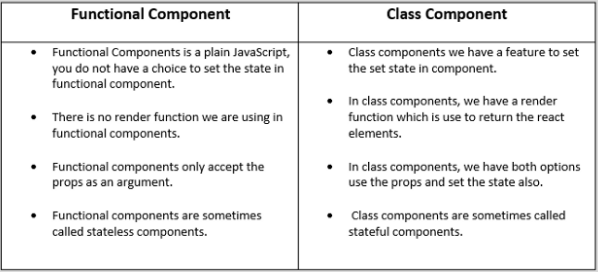
- Sometimes called smart or stateful components as they tend to implement logic and state.
- React lifecycle methods can be used inside class components (for example, componentDidMount).
- You pass props down to class components and access them with this.props.
You can also use an ES6 class to define a component
class App extends React.Component {
  render() {
    return <h1>This is a Class Component!!</h1>;
  }
}
You can also check out the Demo.
Function Components
- Function components are basic JavaScript functions. These are typically arrow functions but can also be created with the regular function keyword.
- Sometimes referred to as dumb or stateless components as they simply accept data and display them in some form; that is they are mainly responsible for rendering UI.
- React lifecycle methods (for example, componentDidMount) cannot be used in function components.
- There is no render method used in functional components.
- These are mainly responsible for UI and are typically presentational only (For example, a Button component).
- Functional components can accept and use props.
- Functional components should be favored if you do not need to make use of React state.
The simplest way to define a component is to write a JavaScript function.
const App = () => {
  return <h1>This is a Functional Component!!</h1>;
};
You can also check out the Demo.
The above two components are equivalent from React's point of view.
Note: Always start component names with a capital letter.
React treats components starting with lowercase letters as DOM tags. For example, <div /> represents an HTML div tag, but <App /> represents a component and requires App to be in scope.
Difference between Functional and Class components
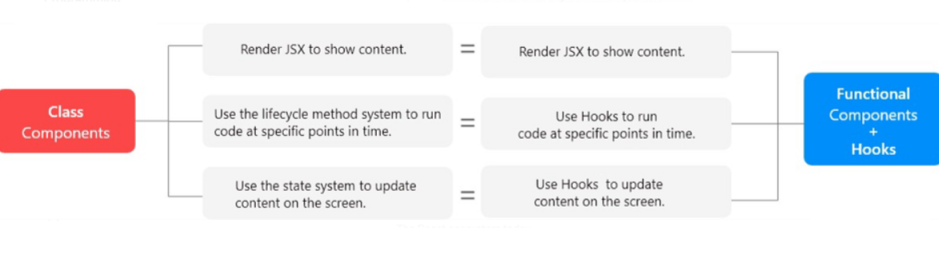
Functional components after Hooks Introduction