React JS Course
Hooks are a new addition in React 16.8. They let you use state and other React features without writing a class.
import React, { useState } from "react";

export default function useCountHook() {
  // Declare a new state variable, which we'll call as count
  const [count, setCount] = useState(0);
  return (
    <div>
      <p>You clicked {count} times</p>
      <button onClick={() => setCount(count + 1)}>Click me</button>
    </div>
  );
}
This example renders a counter. When you click the button, it increments the value.
Here, useState is a Hook (we'll talk about what this means in a moment). We call it inside a function component to add some local state to it. React will preserve this state between re-renders. useState returns a pair: the current state value and a function that lets you update it. You can call this function from an event handler or somewhere else. It's similar to this.setState in a class, except it doesn't merge the old and new state together. (We'll show an example comparing useState to this.state in Using the State Hook.)
The only argument to useState is the initial state. In the example above, it is 0 because our counter starts from zero. Note that unlike this.state, the state here doesn't have to be an object — although it can be if you want. The initial state argument is only used during the first render.
Declaring multiple state variables
You can use the State Hook more than once in a single component:
function ExampleWithManyStates() {
  // Declare multiple state variables!
  const [age, setAge] = useState(42);
  const [fruit, setFruit] = useState("banana");
  const [todos, setTodos] = useState([{ text: "Learn Hooks" }]);
  // ...
}
What is a Hook?
Hooks are functions that let you hook into React state and lifecycle features from function components. Hooks don't work inside classes — they let you use React without classes. (We don't recommend rewriting your existing components overnight but you can start using Hooks in the new ones if you'd like.)
Hooks are JavaScript functions, but they have additional rules:
- Only call Hooks at the top level. Don't try to call Hooks inside loops, conditions, or nested functions.
- Only call Hooks from React function components. Don't try to call Hooks from regular JavaScript functions.
- Hooks cannot be called conditionally.
- Name Custom Hooks with
usePrefix
React provides a few built-in Hooks like useState. You can also create your own Hooks to reuse stateful behavior between different components. We'll look at the built-in Hooks first.
Here with the different types of React Hooks.
- useState
- useEffect
- useContext
- useRef
- useReducer
- useMemo and useCallback
- Custom Hook
React Component Lifecycle methods in Hooks
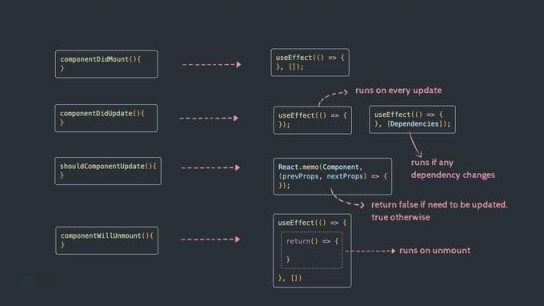
Is Hooks cover all use cases for classes?
Hooks doesn't cover all use cases of classes but there is a plan to add them soon. Currently there are no Hook equivalents to the uncommon getSnapshotBeforeUpdate and componentDidCatch lifecycles yet.