React JS Course
React JS is a JavaScript library created by Facebook and it generally uses jsx(js and html) for writing the code and uses Virtual DOM concept.
Initial release of React JS happened on May 29, 2013.
React JS is an Open Sourced JavaScript library for building fast and interactive User Interfaces. It lets you compose complex UIs from small and isolated pieces of code called components.
Why React JS is so popular?
-
Component-Based Architecture:React's component-based structure allows developers to build reusable and self-contained components, making code more modular and easier to manage. -
Virtual DOM:React uses a virtual DOM to efficiently update and render components, which enhances performance by minimizing direct manipulation of the real DOM. -
Declarative Syntax:React's declarative approach simplifies the process of building UIs by allowing developers to describe what the UI should look like for different states, and React handles the rendering logic. -
Strong Community and Ecosystem:React has a large and active community that contributes to a vast ecosystem of libraries, tools, and resources, making it easier to find solutions and support. -
Flexibility:React can be used for various types of applications, including single-page applications (SPAs), mobile apps (with React Native), and even static sites. Its flexibility makes it a versatile choice for many projects. -
JSX Syntax:JSX, a syntax extension for JavaScript, allows developers to write HTML-like code within JavaScript, making it easier to visualize and understand the structure of the UI components. -
Performance:React's efficient rendering and updating mechanisms help improve the performance of applications, especially those with complex and dynamic UIs. -
Backed by Facebook:React is maintained by Facebook, which ensures continuous development, updates, and improvements, providing a level of trust and reliability. -
Integration:React can be easily integrated with other libraries and frameworks, allowing developers to use it in conjunction with tools and technologies they are already familiar with. -
Learning Curve:While there is a learning curve, React's straightforward and well-documented API makes it relatively easy for developers to pick up and start using effectively.
Developers often use React as a base for developing single-page web applications and then use other libraries to provide extra support to their web application.
Single Page Applications(SPAs)
A single page application is an app that works inside a browser and does not require page load during use.
SPAs are all about serving an outstanding user experience(UX) by trying to imitate a natural environment in the browser - no page reloads, no extra wait time.It is just one HTML page that you visit which then loads all other content using JavaScript.
For example: Gmail, Facebook, Instagram, Trello.
Multiple Page Applications(MPAs)
Multi-page applications work in a traditional way. Every change like, display the data or submit the data or submit data back to server, sends a request to the server to render a new page in the browser.
Whenever a user navigates from one page to another, a request is sent to the server to send a new HTML file for that URL. The server returns a file and then HTML file is loaded in the browser.
For example: Dribble, Harvard's Official site.
Why Startups and Enterprises love React JS (Top 10 Reasons)?
1. Virtual DOM
Virtual DOM is a modern-day marvel for businesses. It helps you create a data structure cache memory within a memory unit, which allows you to update the browser DOM more efficiently.
2. Development Speed
Time-to-market is one of the most crucial elements of any business, be it a startup or an enterprise.
Businesses are always looking for using technologies that help them to complete software development projects on-time and within the defined budget.
React JS has a plethora of reusable components which help developers to develop and maintain an application faster. Moreover, React powers React Native, which is a robust cross-platform mobile app development tool.
Having such interoperability helps businesses to build a strong mobile presence as well, along with the web.
3. Stability
The technology used to develop web or mobile applications must remain relevant for at least a few years. With technology growing so fast, it is evident that the tools used to create applications may get obsolete in the future.
Having been backed by millions of developers and enterprises like Facebook and Instagram, the chances of it getting obsolete are negligible. React JS has been a stable technology even in the face of growing competition, such as Vue JS and Angular JS.
4. Interactive Interface
React JS provides an opportunity to manipulate the interface flows and designing features in a fast and easy way.
You can hire React JS developers to update or develop an interface based on your tastes, desires, and principles. It can be done in two ways: loop and nest view.
5. Advance Performance
React JS is a pro when it comes to handling graphics on a variety of devices such as a tablet, smartphone, or desktop.
It seamlessly loads any webpage on either of the devices mentioned above. React does it by automatically updating the on-page apps that do not require a reload for redrawing UI.
6. Simple to use
One of the prominent reasons why React is one of the most loved libraries among developers is because of its simplicity. According to many developers, it is simpler than Angular JS.
React JS development simplifies the process of programming, development, and hence, administration of resources. React JS is not only a perfect framework for newbie developers but also an ideal framework for experts and experienced programmers.
Although React JS is simple to use, it has got all the advanced level functions and capability that can help pro-developers to create stunning webpages.
7. Alternatives
Being an open-source library, React JS acts as a stone that can kill two birds at a time.
Developers can use React JS as the base library as well as an alternative to other libraries such as Angular, Backbone, jQuery, and more. React JS extensions comprise of all the functions available in these libraries.
Moreover, these extensions are prolonged with a broad spectrum of other functions, simplifications, additions, and useful changes, which have been implemented in React.
8. Flexible Development
Businesses took the arrival of React JS for granted. They thought that it was just another library which would give its share in simplifying web development.
But, the truth is that React does more than simplifying web development. It has helped many developers to reduce several restrictions that hindered the process of web development.
React help developers to deal with future problems and strategy to govern the web development project one of the most comfortable and flexible ways.
9. SEO-Friendly
Excluding the enterprises and startups in a monopoly business, every company requires to do SEO on their websites. They must rank higher on search engines. Using Node JS, React can render on servers easily.
It helps search engines to crawl the web application in its final form, making it simpler for webpages to index it properly.
Although some techniques and technologies can produce similar results, they are unstable and unsuitable for mission-critical applications.
React JS has been tried and tested by several organizations in the world for creating high-quality and reliable front-end and making the site SEO-friendly.
10. Access to Developers
Being one of the most popular frameworks among the developer community, React JS is a framework which many developers opt to learn.
Hence, finding a React JS developer will be easier for you. Moreover, it is simpler to train a developer with React JS, who has a basic knowledge of JavaScript and front-end development.
What are the limitations of React?
- React is just a view library, not a full framework.
- Integrating React into a traditional MVC framework requires some additional configuration.
- The code complexity increases with inline templating and JSX.
- Too many smaller components leading to over engineering or boilerplate.
Prerequisites for learning React JS
- Knowledge of HTML & CSS
- Knowledge of JavaScript and ES6 standards
- Some knowledge about the DOM
- Some knowledge about Node & npm (and installation)
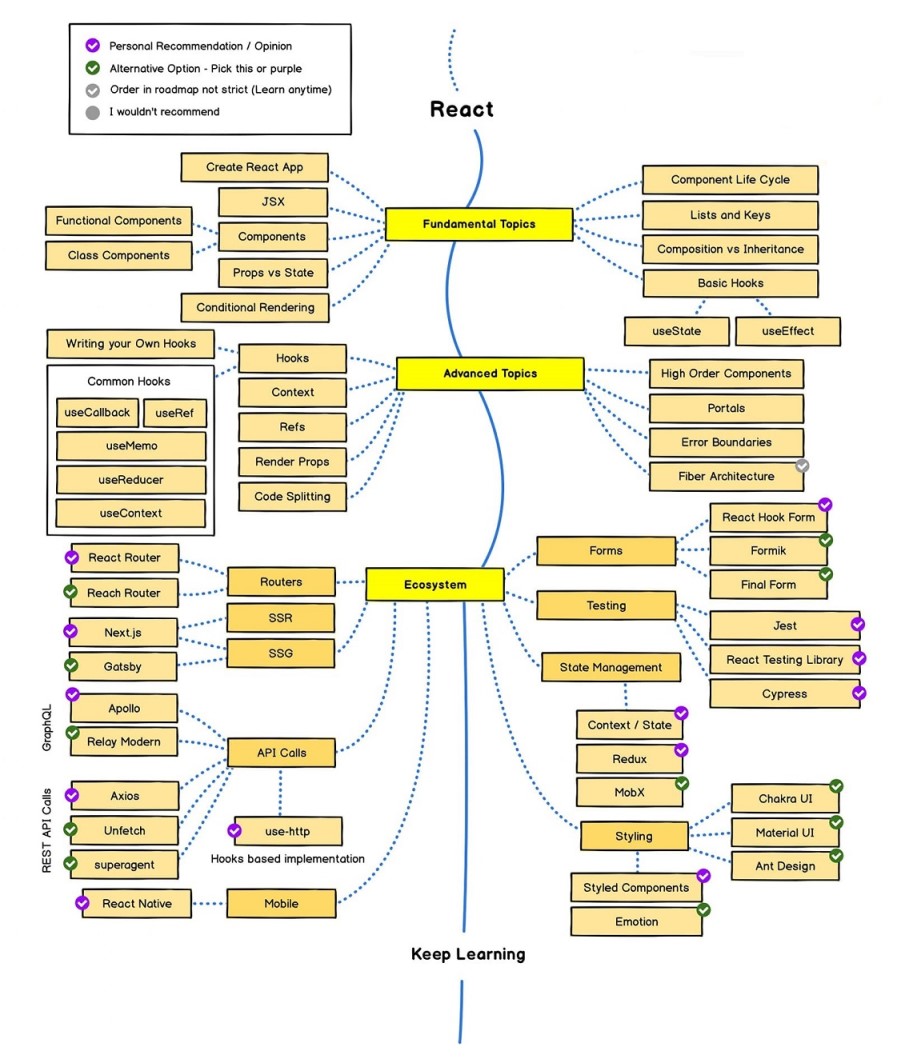
React JS Roadmap
Lets see the React JS roadmap and go deeper into the concepts.
Aspects of React JS
- Virtual DOM
- Data binding
- Server side rendering
What is meant by Virtual DOM?
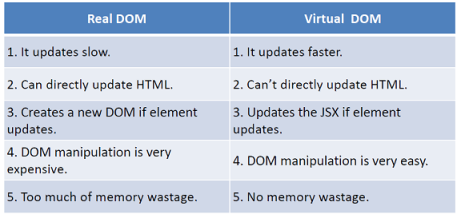
The Virtual DOM (VDOM) is an in-memory representation of Real DOM. The representation of a UI is kept in memory and synced with the "real" DOM. It's a step that happens between the render function being called and the displaying of elements on the screen. This entire process is called reconciliation.
How Virtual DOM works?
The Virtual DOM works in three simple steps.
- Whenever any underlying data changes, the entire UI is re-rendered in Virtual DOM representation.
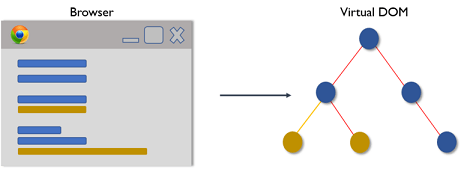
- Then the difference between the previous DOM representation and the new one is calculated.
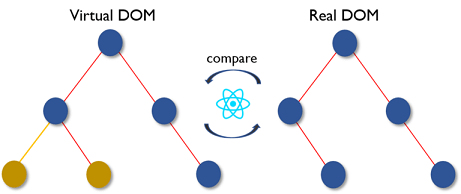
- Once the calculations are done, the real DOM will be updated with only the things that have actually changed.
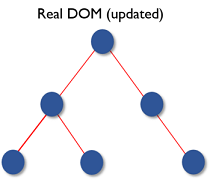
Updating virtual DOM in React JS is faster because React JS uses
- Efficient diff algorithm
- Batched update operations
- Efficient update of sub tree only
- Uses observable instead of dirty checking to detect change
Difference between Real DOM and Virtual DOM
What is the difference between Shadow DOM and Virtual DOM?
The Shadow DOM is a browser technology designed primarily for scoping variables and CSS in web components. The Virtual DOM is a concept implemented by libraries in JavaScript on top of browser APIs.
What is data binding?
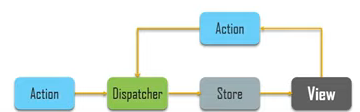
React JS follows unidirectional data flow or one way data binding. Throughout the application the data flows in a single direction which gives you better control over it.
What is Server side rendering?
Server side rendering allows you to pre-render the initial state of react components at the server side only.
What is Babel?
Babel is a JavaScript compiler that is used to convert Modern JS (ES6+) code into versions of JS that can run in all browsers including older ones.
In the context of React, babel is used as part of the build process to transform JSX syntax into regular JavaScript that browsers can understand.
What is Webpack?
Webpack in react is a JavaScript module bundler that is commonly used with React to bundle and manage dependencies. It takes all of the individual JavaScript files and other assets in a project, such as images and CSS, and combines them into a single bundle that can be loaded by the browser.
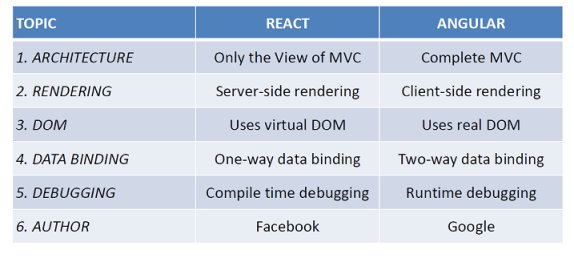
How is React different from Angular?
What is React DOM?
- React DOM serves as the entry point of the DOM-related rendering paths.
- It provides DOM-specific methods that can be used at the top level of your app.
This components should not use this module.
- Render()
- unmountComponentAtNode()
- findDOMNode()
If you use ES5 you can write as
var ReactDOM = require("react-dom");
If you use ES6 you can write as
import ReactDOM from "react-dom";
Now lets add React to a simple HTML and display Hello World.
Step 1: Add a DOM Container to the HTML
<div class="root"></div>
Step 2: Add the Script Tags
  <script src="https://unpkg.com/react@17/umd/react.development.js" crossorigin></script>
  <script src="https://unpkg.com/react-dom@17/umd/react-dom.development.js" crossorigin></script>
  <script src="https://unpkg.com/@babel/standalone/babel.min.js"></script>
Step 3: Create a React Component
// To get the root element from the HTML document
const rootElement = document.querySelector(".root");
const app = React.createElement("h1", null, "Hello World");

// we render the JSX element using the ReactDOM package
ReactDOM.render(app, rootElement);
That's It! we have added react to a simple html and displayed Hello World. For Live Demo check this out.
What is the purpose of render() in React
- Each React component must have a render() mandatorily.
- It returns a single React element which is the representation of the native DOM component
- If more than one HTML element needs to be rendered, then they must be grouped together inside one enclosing tag such as <React.Fragment> or <> or <div>
- This function must be kept pure i.e., it must return the same result each time it is invoked.
React JS installation
We can use online editors like
- https://codesandbox.io/
- https://jsfiddle.net/reactjs/images/
- https://codepen.io/
Now let's see what are all the dependencies needed for React JS installation in your environment.
- Download and install npm https://nodejs.org/en/
- Download and install editor https://code.visualstudio.com/docs/?dv=win
Main components to build a React JS application are
- webpack.config.js -> contains information about the dependencies and the files from where browser start rendering form.
- HTML file -> contains the html template which is used by browser to render the elements on the webpage.
- JSX file -> contains description off what all components we want to display on our webpage and how they will behave.
Create React App
For creating application, use the below command
npx create-react-app praveenoruganti-reactjs-samples
The create-react-app tool installs all the libraries and packages required to build a React Application. It creates a default configuration for our react project. It also add some starter files in the newly created application.
What is npm and npx?
npm is the node package manager for JavaScript. It helps you manage all the 3rd party packages and libraries that you will be installing for your application. It installed automatically when you install Node JS.
npx is a node package runner. It is used to download and run a package temporarily.
For running the application, use the below command
npm start
React Boilerplate
Let's see the React boilerplate, which has been created by create-react-app. Whenever you create a new project, you run create-react-app and name of the project.
In the following React boilerplate, there are three folders: node_modules, public and src. In addition, there are .gitignore, README.md , package.json and yarn.lock. Some of you, instead of yarn.lock, you may have package-lock.json.
It is good to know these folders and files.
-
node_modules - stores all the necessary node packages of the React applications.
-
Public
- index.html - the only HTML file we have in the entire application
- favicon.ico - an icon file
- manifest.json - is used to make the application a progressive web app
- other images - open graph images(open graph images are images which are visible when a link share on social media)
- robots.txt - information, if the website allows web scraping
-
src
- App.css, index.css - are different CSS files
- index.js - a file which allows to connect all the components with index.html
- App.js - A file where we usually import most of the presentational components
- serviceWorker.js: is used to add progressive web app features
- setupTests.js - to write testing cases
-
package.json- List of packages the applications uses
-
.gitignore - React boilerplate comes with git initiated, and the .gitingore allows files and folders not to be pushed to GitHub
-
README.md - Markdown file to write documentation
-
yarn.lock or package-lock.json - a means to lock the version of the package
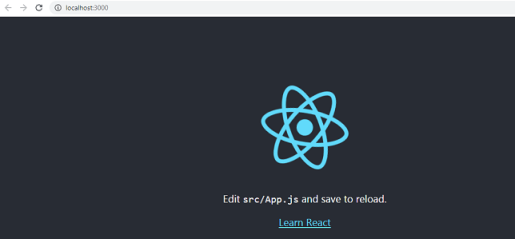
Now run the application using npm start and you will see the below in browser.
Now lets remove all the files, which we do not need at the moment, and leave only the files we need right now.