Spring Boot Course
Batch processing is a group or whole process. Which is a process of group or batch transactions that does not interact with users when running batch processing.
The difference between batch processing and transaction processing is that transaction processing processes one transaction at a time and interacts with users, while batch processing can process anytime which is especially suitable for processing at the end of the cycle (end-of-cycle processing) such as for creating bank reports at the end of the day. Or pay monthly or bi-monthly payrolls, and Spring framework also has Spring Batch support for Batch processing.
Spring framework also has a project that supports batch processing. This is Spring Batch specifically designed for this type of processing. Allowing us to reuse the functions needed to work with big data, including tracing / logging, transaction management, job processing statistic, job restart, and resource management, with advanced techniques to handle very large data through optimization and partitioning techniques, and also support scalable.
In Spring Batch to work with sources of information (data source) from a variety of text file or database where job ( the Job ) of batch processing consists of several steps ( Step ) Each Step has 3 parts ItemReader , ItemProcess and ItemWriter by JobLauncher will start the Job by keeping the metadata during operation at JobRepository.
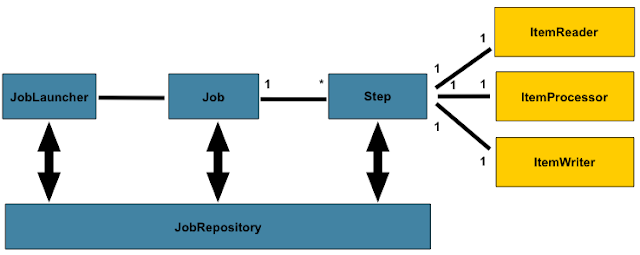
Any Spring Batch job has 2 main components, Job, and Steps. A job may have multiple steps. Each step has a compulsory reader and writer routines and an optional processor unit.
Step
A Step is a fundamental unit of any Job. It is a domain object that encapsulates an independent, sequential phase of a batch job. A Step defines necessary information to define and control the actual batch processing.
Item Reader
ItemReader is an abstract representation of how data is provided as input to a Step. When the inputs are exhausted, the ItemReader returns null.
Item Processor
ItemProcessor represents the business processing of an item. The data read by ItemReader can be passed on to ItemProcessor. In this unit, the data is transformed and sent for writing. If, while processing the item, it becomes invalid for further processing, you can return null. The nulls are not written by ItemWriter.
Item Writer
ItemWriter is the output of a Step. The writer writes one batch or chunk of items at a time to the target system. ItemWriter has no knowledge of the input it will receive next, only the item that was passed in its current invocation.
Job Repository
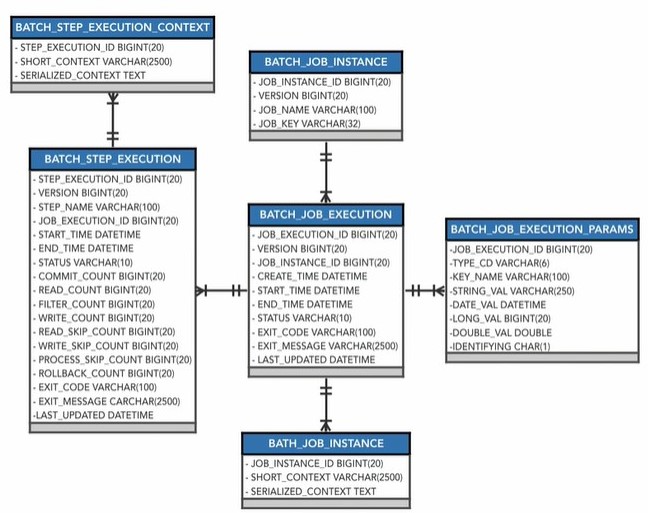
The Job Repository stores metadata regarding JobParameters, JobInstances, JobExecutions, and StepExecutions.
Job Repository uses the below tables for storing the above information in relational database.
Steps
Two types of Steps available in Spring Batch
-
Tasklet-based Step
- Interface contains a single execute method.
- Used for logic, unable to achieved with out of the box components.
-
** Chunk-based Step**
- Leverages an ItemReader and ItemWriter to process chunks of data.
- ItemProcessor can optionally be included.
Let's create a Delivery Package Batch Application
Add spring batch dependency in pom.xml
<dependency>
	<groupId>org.springframework.boot</groupId>
	<artifactId>spring-boot-starter-batch</artifactId>
</dependency>
<dependency>
	<groupId>mysql</groupId>
	<artifactId>mysql-connector-java</artifactId>
</dependency>
appplication.yml
spring:
 application:
  name: praveen-delivery-package-batch
 datasource:
    url: jdbc:mysql://root:password-1@localhost:3306/praveendeliverydb?reconnect=true
    driverClassName: com.mysql.cj.jdbc.Driver
 batch:
   jdbc:
    initialize-schema: always
DeliveryPackageBatchApplication.java
package com.praveen.batch;

import org.springframework.batch.core.Job;
import org.springframework.batch.core.Step;
import org.springframework.batch.core.StepContribution;
import org.springframework.batch.core.configuration.annotation.EnableBatchProcessing;
import org.springframework.batch.core.configuration.annotation.JobBuilderFactory;
import org.springframework.batch.core.configuration.annotation.StepBuilderFactory;
import org.springframework.batch.core.scope.context.ChunkContext;
import org.springframework.batch.core.step.tasklet.Tasklet;
import org.springframework.batch.repeat.RepeatStatus;
import org.springframework.boot.SpringApplication;
import org.springframework.boot.autoconfigure.SpringBootApplication;
import org.springframework.context.annotation.Bean;

import lombok.AllArgsConstructor;
import lombok.extern.slf4j.Slf4j;

@SpringBootApplication
@EnableBatchProcessing
@AllArgsConstructor
@Slf4j
public class DeliveryPackageBatchApplication {

	private final JobBuilderFactory jobBuilderFactory;

	private final StepBuilderFactory stepBuilderFactory;

	@Bean
	public Step packageItemStep() {
		return this.stepBuilderFactory.get("packageItem").tasklet(new Tasklet() {
			@Override
			public RepeatStatus execute(StepContribution stepContribution, ChunkContext chunkContext) throws Exception {
				log.info("The item has been packaged");
				return RepeatStatus.FINISHED;
			}
		}).build();
	}

	@Bean
	public Step driveToAddressStep() {
		return this.stepBuilderFactory.get("driveToAddress").tasklet(new Tasklet() {
			@Override
			public RepeatStatus execute(StepContribution stepContribution, ChunkContext chunkContext) throws Exception {
				log.info("Successfully arrived at the address.");
				return RepeatStatus.FINISHED;
			}
		}).build();
	}

	@Bean
	public Step givePackageToCustomerStep() {
		return this.stepBuilderFactory.get("givePackageToCustomer").tasklet(new Tasklet() {
			@Override
			public RepeatStatus execute(StepContribution stepContribution, ChunkContext chunkContext) throws Exception {
				log.info("Given the package to the Customer.");
				return RepeatStatus.FINISHED;
			}
		}).build();
	}

	@Bean
	public Job deliveryPackageJob() {
		return this.jobBuilderFactory.get("deliveryPackageJob").start(packageItemStep()).next(driveToAddressStep())
				.next(givePackageToCustomerStep()).build();
	}

	public static void main(String[] args) {
		SpringApplication.run(DeliveryPackageBatchApplication.class, args);
	}

}
Once you run the springboot app,
- Below tables are created by spring batch automatically in mysql db.
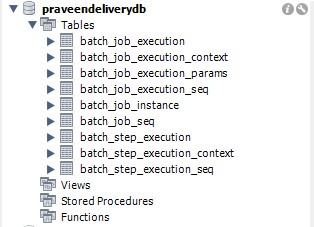
select * from batch_job_instance;

select * from batch_job_execution;

select * from batch_step_execution;

- Here with the app logs for your reference.
{"@timestamp":"2021-06-18T04:02:34.883+05:30","severity":"INFO","service":"praveen-delivery-package-batch","thread":"main","class":"o.s.b.c.launch.support.SimpleJobLauncher","methodName":"run","lineNo":"146","message":"Job: [SimpleJob: [name=deliveryPackageJob]] launched with the following parameters: [{}]","stacktrace":""}
{"@timestamp":"2021-06-18T04:02:34.983+05:30","severity":"INFO","service":"praveen-delivery-package-batch","thread":"main","class":"o.s.batch.core.job.SimpleStepHandler","methodName":"handleStep","lineNo":"149","message":"Executing step: [packageItem]","stacktrace":""}
{"@timestamp":"2021-06-18T04:02:35.020+05:30","severity":"INFO","service":"praveen-delivery-package-batch","thread":"main","class":"c.p.b.DeliveryPackageBatchApplication","methodName":"execute","lineNo":"34","message":"The item has been packaged","stacktrace":""}
{"@timestamp":"2021-06-18T04:02:35.042+05:30","severity":"INFO","service":"praveen-delivery-package-batch","thread":"main","class":"o.s.batch.core.step.AbstractStep","methodName":"execute","lineNo":"273","message":"Step: [packageItem] executed in 58ms","stacktrace":""}
{"@timestamp":"2021-06-18T04:02:35.095+05:30","severity":"INFO","service":"praveen-delivery-package-batch","thread":"main","class":"o.s.batch.core.job.SimpleStepHandler","methodName":"handleStep","lineNo":"149","message":"Executing step: [driveToAddress]","stacktrace":""}
{"@timestamp":"2021-06-18T04:02:35.120+05:30","severity":"INFO","service":"praveen-delivery-package-batch","thread":"main","class":"c.p.b.DeliveryPackageBatchApplication","methodName":"execute","lineNo":"45","message":"Successfully arrived at the address.","stacktrace":""}
{"@timestamp":"2021-06-18T04:02:35.137+05:30","severity":"INFO","service":"praveen-delivery-package-batch","thread":"main","class":"o.s.batch.core.step.AbstractStep","methodName":"execute","lineNo":"273","message":"Step: [driveToAddress] executed in 41ms","stacktrace":""}
{"@timestamp":"2021-06-18T04:02:35.196+05:30","severity":"INFO","service":"praveen-delivery-package-batch","thread":"main","class":"o.s.batch.core.job.SimpleStepHandler","methodName":"handleStep","lineNo":"149","message":"Executing step: [givePackageToCustomer]","stacktrace":""}
{"@timestamp":"2021-06-18T04:02:35.222+05:30","severity":"INFO","service":"praveen-delivery-package-batch","thread":"main","class":"c.p.b.DeliveryPackageBatchApplication","methodName":"execute","lineNo":"56","message":"Given the package to the Customer.","stacktrace":""}
{"@timestamp":"2021-06-18T04:02:35.237+05:30","severity":"INFO","service":"praveen-delivery-package-batch","thread":"main","class":"o.s.batch.core.step.AbstractStep","methodName":"execute","lineNo":"273","message":"Step: [givePackageToCustomer] executed in 40ms","stacktrace":""}
{"@timestamp":"2021-06-18T04:02:35.260+05:30","severity":"INFO","service":"praveen-delivery-package-batch","thread":"main","class":"o.s.b.c.launch.support.SimpleJobLauncher","methodName":"run","lineNo":"152","message":"Job: [SimpleJob: [name=deliveryPackageJob]] completed with the following parameters: [{}] and the following status: [COMPLETED] in 330ms","stacktrace":""}
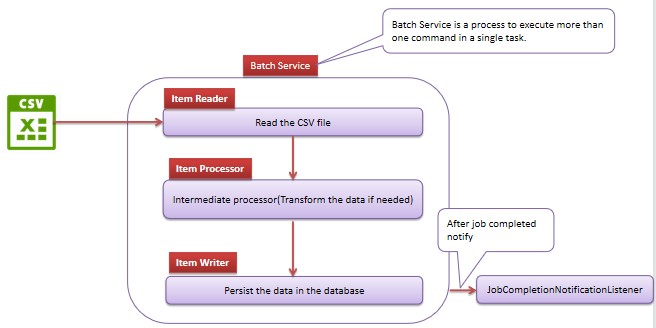
Let's create a simple batch application where we read a csv file in chunks andd then write it to database.
Add spring batch dependency in pom.xml
<dependency>
	<groupId>org.springframework.boot</groupId>
	<artifactId>spring-boot-starter-batch</artifactId>
</dependency>
<dependency>
	<groupId>mysql</groupId>
	<artifactId>mysql-connector-java</artifactId>
</dependency>
The CSV file(users.csv) to be read contains the following information for example,
id,name,dept,salary
1,Praveen,001,92000
2,Prasad,002,82000
3,Anusha,003,72000
Create User Entity Class
@Entity
@ToString
@NoArgsConstructor
@AllArgsConstructor
@Getter
@Setter
@Builder
public class User {
	@Id
	private Integer id;
	private String name;
	private String dept;
	private Integer salary;
	private Date time;
}
Create a User Repository class
public interface UserRepository extends JpaRepository<User, Integer> {
}
Let's read the data from a CSV file with ItemReader and converting data to be read with ItemProcess. After that, insert data into the database with ItemWriter.
Create a Batch Configuration class
@Configuration
@EnableBatchProcessing
public class BatchConfiguration {

	@Bean
	public Job job(JobBuilderFactory jobBuilderFactory, StepBuilderFactory stepBuilderFactory,
			ItemReader<User> itemReader, ItemProcessor<User, User> itemProcessor, ItemWriter<User> itemWriter,
			Environment env) {

		Step step = stepBuilderFactory.get("step-load")
				.<User, User>chunk(Integer.parseInt(env.getRequiredProperty("app.batchSize"))).reader(itemReader)
				.processor(itemProcessor).writer(itemWriter).build();

		return jobBuilderFactory.get("job-load").incrementer(new RunIdIncrementer()).start(step).build();
	}

	/**
	 * The itemReader() method is used to read the data from the CSV file
	 */
	@Bean
	public FlatFileItemReader<User> itemReader() {

		FlatFileItemReader<User> flatFileItemReader = new FlatFileItemReader<>();
		flatFileItemReader.setResource(new FileSystemResource("src/main/resources/users.csv"));
		flatFileItemReader.setName("CSV-Reader");
		flatFileItemReader.setLinesToSkip(1);
		flatFileItemReader.setLineMapper(lineMapper());
		return flatFileItemReader;
	}

	@Bean
	public LineMapper<User> lineMapper() {

		DefaultLineMapper<User> defaultLineMapper = new DefaultLineMapper<>();
		DelimitedLineTokenizer lineTokenizer = new DelimitedLineTokenizer();

		lineTokenizer.setDelimiter(",");
		lineTokenizer.setStrict(false);
		lineTokenizer.setNames("id", "name", "dept", "salary");

		BeanWrapperFieldSetMapper<User> fieldSetMapper = new BeanWrapperFieldSetMapper<>();
		fieldSetMapper.setTargetType(User.class);

		defaultLineMapper.setLineTokenizer(lineTokenizer);
		defaultLineMapper.setFieldSetMapper(fieldSetMapper);

		return defaultLineMapper;
	}

}
Create a Item Processor class
/**
 * Intermediate processor to do the operations after the reading the data from the CSV file and
 * before writing the data into DB.
 */
@Component
public class UserItemProcessor implements ItemProcessor<User, User> {

    private static final Map<String, String> DEPT_NAMES =
            new HashMap<>();

    public UserItemProcessor() {
        DEPT_NAMES.put("001", "Technology");
        DEPT_NAMES.put("002", "Operations");
        DEPT_NAMES.put("003", "Accounts");
    }

    @Override
    public User process(User user) throws Exception {
        String deptCode = user.getDept();
        String dept = DEPT_NAMES.get(deptCode);
        user.setDept(dept);
        user.setTime(new Date());
        return user;
    }
}
Create a Item Writer class
/**
 * Item writer writes the data into DB
 *
 */
@Component
public class UserItemWriter implements ItemWriter<User> {

	private UserRepository userRepository;

	@Autowired
	public UserItemWriter(UserRepository userRepository) {
		this.userRepository = userRepository;
	}

	@Override
	public void write(List<? extends User> users) {
		System.out.println("Data Saved for Users: " + users);
		userRepository.saveAll(users);
	}
}
Let's write a controller to trigger the job
@RestController
@AllArgsConstructor
public class JobInvokerController {

	private final JobLauncher jobLauncher;

	private final Job job;

	@GetMapping("/load")
	public BatchStatus load() throws JobParametersInvalidException, JobExecutionAlreadyRunningException,
			JobRestartException, JobInstanceAlreadyCompleteException {
		Map<String, JobParameter> maps = new HashMap<>();
		maps.put("time", new JobParameter(System.currentTimeMillis()));
		JobParameters parameters = new JobParameters(maps);
		JobExecution jobExecution = jobLauncher.run(job, parameters);
		return jobExecution.getStatus();
	}
}