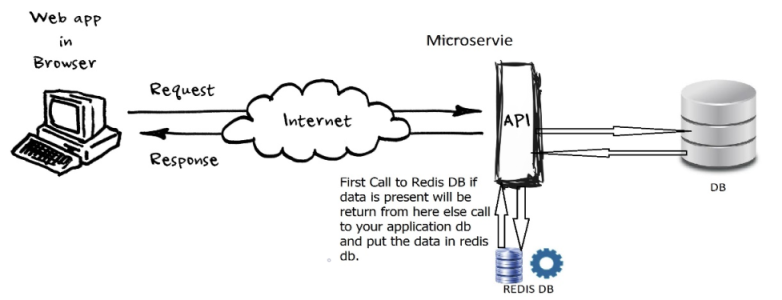
Spring Boot Course
Spring Boot offers built-in support for caching using an abstraction that allows you to switch between different caching providers (in-memory, distributed, etc.) without changing your code. In-memory caching stores frequently used data in the application's memory to reduce latency and improve performance.
Key In-Memory Cache Providers in Spring Boot
-
ConcurrentMapCache (Default):
- Simple, thread-safe in-memory map for caching.
- No eviction policies or expiration support.
- Suitable for small applications.
-
Caffeine Cache (Recommended):
- High-performance caching library.
- Supports time-based and size-based eviction.
- Offers statistics and manual cache management.
Why Use In-Memory Caching?
- Reduced Backend Calls: Cache expensive computations or database results.
- Lower Latency: Serve responses faster.
- Higher Scalability: Decrease load on backend services.
- Performance Optimization: Improve response times for frequently accessed data.
Configuration
Enable Caching
Add the @EnableCaching annotation to your main application class:
package com.praveen.product;

import org.springframework.boot.SpringApplication;
import org.springframework.boot.autoconfigure.SpringBootApplication;
import org.springframework.cache.annotation.EnableCaching;

@SpringBootApplication
@EnableCaching
public class ProductServiceCacheApplication {

	public static void main(String[] args) {
		SpringApplication.run(ProductServiceCacheApplication.class, args);
	}

}
Define Cacheable Methods
Use caching annotations like @Cacheable, @CachePut, and @CacheEvict.
- @Cacheable: Stores the result of a method call.
- @CachePut: Updates the cache without skipping method execution.
- @CacheEvict: Removes cache entries.
Let's examine ConcurrentMapCache and CaffeineCache in detail by developing a service that fetches all product prices from the cache.
ConcurrentMapCache
ConcurrentMapCache is an in-memory, thread-safe caching mechanism provided by Spring Boot. It stores cached values in a ConcurrentHashMap, making it ideal for lightweight caching in a single-node application.
Let's add spring cache dependency in pom.xml
<dependency>
    <groupId>org.springframework.boot</groupId>
    <artifactId>spring-boot-starter-cache</artifactId>
</dependency>
ProductServiceCacheApplication
package com.praveen.product;

import org.springframework.boot.SpringApplication;
import org.springframework.boot.autoconfigure.SpringBootApplication;
import org.springframework.cache.annotation.EnableCaching;

@SpringBootApplication
@EnableCaching
public class ProductServiceCacheApplication {

	public static void main(String[] args) {
		SpringApplication.run(ProductServiceCacheApplication.class, args);
	}

}
Product
package com.praveen.product.model;

import jakarta.persistence.Entity;
import jakarta.persistence.GeneratedValue;
import jakarta.persistence.GenerationType;
import jakarta.persistence.Id;

@Entity
public class Product {

    @Id
    @GeneratedValue(strategy = GenerationType.IDENTITY)
    private Long id;
    private String name;
    private double price;

    public Product(){

    }

    public Product(Long id, String name, double price) {
        this.id = id;
        this.name = name;
        this.price = price;
    }

    public Long getId() {
        return id;
    }

    public String getName() {
        return name;
    }

    public double getPrice() {
        return price;
    }
}
ProductRepository
package com.praveen.product.repository;

import com.praveen.product.model.Product;
import org.springframework.data.jpa.repository.JpaRepository;
import org.springframework.stereotype.Repository;

@Repository
public interface ProductRepository  extends JpaRepository<Product,Long> {
}
ProductServiceImpl
package com.praveen.product.service.impl;

import com.praveen.product.exception.ProductNotFoundException;
import com.praveen.product.model.Product;
import com.praveen.product.repository.ProductRepository;
import com.praveen.product.service.ProductService;
import org.slf4j.Logger;
import org.slf4j.LoggerFactory;
import org.springframework.cache.annotation.Cacheable;
import org.springframework.stereotype.Service;

@Service
public class ProductServiceImpl implements ProductService {

    private static final Logger logger = LoggerFactory.getLogger(ProductServiceImpl.class);
    private final ProductRepository productRepository;

    public ProductServiceImpl(ProductRepository productRepository) {
        this.productRepository = productRepository;
    }

    @Override
    @Cacheable(value = "products", key = "#id")
    public Product getProductById(Long id) {
        logger.info("Fetching product with id={} from database...", id);
        return productRepository.findById(id)
                .orElseThrow(() -> new ProductNotFoundException("Product " + id + " not found"));
    }
}
CacheConfig
package com.praveen.product.config;

import org.springframework.cache.Cache;
import org.springframework.cache.CacheManager;
import org.springframework.cache.concurrent.ConcurrentMapCache;
import org.springframework.cache.support.SimpleCacheManager;
import org.springframework.context.annotation.Bean;
import org.springframework.context.annotation.Configuration;
import org.slf4j.Logger;
import org.slf4j.LoggerFactory;

import java.util.List;

@Configuration
public class CacheConfig {

    private static final Logger logger = LoggerFactory.getLogger(CacheConfig.class);

    @Bean
    public CacheManager cacheManager() {
        SimpleCacheManager cacheManager = new SimpleCacheManager();
        cacheManager.setCaches(List.of(new LoggingConcurrentMapCache("products")));
        return cacheManager;
    }

    static class LoggingConcurrentMapCache extends ConcurrentMapCache {

        public LoggingConcurrentMapCache(String name) {
            super(name);
        }

        @Override
        public ValueWrapper get(Object key) {
            ValueWrapper value = super.get(key);
            if (value != null) {
                logger.info("Fetching from cache: key={}", key);
            } else {
                logger.info("Cache miss for key={}", key);
            }
            return value;
        }
    }
}
GlobalExceptionHandler
package com.praveen.product.controller.advice;

import com.praveen.product.exception.ProductNotFoundException;
import org.springframework.http.HttpStatus;
import org.springframework.http.ResponseEntity;
import org.springframework.web.bind.annotation.ExceptionHandler;
import org.springframework.web.bind.annotation.RestControllerAdvice;

@RestControllerAdvice
public class GlobalExceptionHandler {

    @ExceptionHandler(ProductNotFoundException.class)
    public ResponseEntity<String> handleProductNotFoundException(ProductNotFoundException productNotFoundException) {

        return ResponseEntity.status(HttpStatus.BAD_REQUEST).body(productNotFoundException.getMessage());
    }
}
Logs
Lets hit the URL GET http://localhost:8080/api/v1/products/1.
Response
{
  "id": 1,
  "name": "Laptop",
  "price": 750
}
I see the below logs as its first hit.
2025-02-03T02:45:08.407+05:30  INFO 17008 --- [product-service-cache] [nio-8080-exec-3] com.praveen.product.config.CacheConfig   : Cache miss for key=1
2025-02-03T02:45:08.407+05:30  INFO 17008 --- [product-service-cache] [nio-8080-exec-3] c.p.p.service.impl.ProductServiceImpl    : Fetching product with id=1 from database...
Lets hit the URL GET http://localhost:8080/api/v1/products/1 again.
Response
{
  "id": 1,
  "name": "Laptop",
  "price": 750
}
Now i see its fetched from cache.
2025-02-03T02:46:08.755+05:30 INFO 17008 --- [product-service-cache] [nio-8080-exec-2] com.praveen.product.config.CacheConfig : Fetching from cache: key=1
Lets hit the URL GET http://localhost:8080/api/v1/products/5 where product doesn't exist.
2025-02-03T02:47:00.990+05:30  INFO 17008 --- [product-service-cache] [nio-8080-exec-4] com.praveen.product.config.CacheConfig   : Cache miss for key=5
2025-02-03T02:47:00.991+05:30  INFO 17008 --- [product-service-cache] [nio-8080-exec-4] c.p.p.service.impl.ProductServiceImpl    : Fetching product with id=5 from database...
Lets hit the URL GET http://localhost:8080/api/v1/products/5 again.
Now i see its trying to fetch from DB again as product doesnt exist in cache as well as db earlier.
2025-02-03T02:48:21.849+05:30  INFO 17008 --- [product-service-cache] [nio-8080-exec-6] com.praveen.product.config.CacheConfig   : Cache miss for key=5
2025-02-03T02:48:21.849+05:30  INFO 17008 --- [product-service-cache] [nio-8080-exec-6] c.p.p.service.impl.ProductServiceImpl    : Fetching product with id=5 from database...
Let's implement Cafeeine Cache for the Product Service by removing ConcurrentMapCache.
Caffeine Cache
Let's add the Caffeine Cache dependency in pom.xml
<dependency>
    <groupId>com.github.ben-manes.caffeine</groupId>
    <artifactId>caffeine</artifactId>
    <version>3.1.8</version>
</dependency>
<dependency>
    <groupId>org.springframework</groupId>
    <artifactId>spring-context-support</artifactId>
</dependency>
CacheConfig
package com.praveen.product.config;

import com.github.benmanes.caffeine.cache.Caffeine;
import org.slf4j.Logger;
import org.slf4j.LoggerFactory;
import org.springframework.cache.Cache;
import org.springframework.cache.CacheManager;
import org.springframework.cache.caffeine.CaffeineCache;
import org.springframework.cache.caffeine.CaffeineCacheManager;
import org.springframework.context.annotation.Bean;
import org.springframework.context.annotation.Configuration;

import java.util.concurrent.Callable;
import java.util.concurrent.TimeUnit;

@Configuration
public class CacheConfig {

    private static final Logger logger = LoggerFactory.getLogger(CacheConfig.class);

    @Bean
    public CacheManager cacheManager() {

        return new CaffeineCacheManager("products") {
            @Override
            protected Cache createCaffeineCache(String name) {
                CaffeineCache cache = new CaffeineCache(name, Caffeine.newBuilder()
                        .expireAfterWrite(10, TimeUnit.MINUTES)
                        .maximumSize(1000)
                        .recordStats()
                        .build());
                return new LoggingCaffeineCache(cache);
            }
        };
    }

    static class LoggingCaffeineCache implements Cache {

        private final CaffeineCache delegate;

        public LoggingCaffeineCache(CaffeineCache delegate) {
            this.delegate = delegate;
        }

        @Override
        public String getName() {
            return delegate.getName();
        }

        @Override
        public Object getNativeCache() {
            return delegate.getNativeCache();
        }

        @Override
        public ValueWrapper get(Object key) {
            ValueWrapper value = delegate.get(key);
            if (value != null) {
                logger.info("Cache hit: key={}", key);
            } else {
                logger.info("Cache miss: key={}", key);
            }
            return value;
        }

        @Override
        public <T> T get(Object key, Class<T> type) {
            return delegate.get(key, type);
        }

        @Override
        public <T> T get(Object key, Callable<T> valueLoader) {
            return delegate.get(key, valueLoader);
        }

        @Override
        public void put(Object key, Object value) {
            //logger.info("Cache put: key={}, value={}", key, value);
            delegate.put(key, value);
        }

        @Override
        public void evict(Object key) {
            logger.info("Cache evicted: key={}", key);
            delegate.evict(key);
        }

        @Override
        public void clear() {
            logger.info("Clearing cache: {}", delegate.getName());
            delegate.clear();
        }
    }
}
Logs
Lets hit the URL GET http://localhost:8080/api/v1/products/1.
Response
{
  "id": 1,
  "name": "Laptop",
  "price": 750
}
I see the below logs as its first hit.
2025-02-03T03:09:43.428+05:30  INFO 13316 --- [product-service-cache] [nio-8080-exec-1] com.praveen.product.config.CacheConfig   : Cache miss: key=1
2025-02-03T03:09:43.429+05:30  INFO 13316 --- [product-service-cache] [nio-8080-exec-1] c.p.p.service.impl.ProductServiceImpl    : Fetching product with id=1 from database...
Lets hit the URL GET http://localhost:8080/api/v1/products/1 again.
Response
{
  "id": 1,
  "name": "Laptop",
  "price": 750
}
Now i see its fetched from cache.
2025-02-03T03:09:46.374+05:30 INFO 13316 --- [product-service-cache] [nio-8080-exec-2] com.praveen.product.config.CacheConfig : Cache hit: key=1
Lets hit the URL GET http://localhost:8080/api/v1/products/5 where product doesn't exist.
2025-02-03T03:13:13.855+05:30  INFO 13316 --- [product-service-cache] [nio-8080-exec-5] com.praveen.product.config.CacheConfig   : Cache miss: key=5
2025-02-03T03:13:13.855+05:30  INFO 13316 --- [product-service-cache] [nio-8080-exec-5] c.p.p.service.impl.ProductServiceImpl    : Fetching product with id=5 from database...
Lets hit the URL GET http://localhost:8080/api/v1/products/5 again.
Now i see its trying to fetch from DB again as product doesnt exist in cache as well as db earlier.
2025-02-03T03:13:29.557+05:30  INFO 13316 --- [product-service-cache] [nio-8080-exec-6] com.praveen.product.config.CacheConfig   : Cache miss: key=5
2025-02-03T03:13:29.557+05:30  INFO 13316 --- [product-service-cache] [nio-8080-exec-6] c.p.p.service.impl.ProductServiceImpl    : Fetching product with id=5 from database...
Let's have a put endpoint which updates the product price and there by it updates the cache.
ProductServiceImpl
package com.praveen.product.service.impl;

import com.praveen.product.exception.ProductNotFoundException;
import com.praveen.product.model.Product;
import com.praveen.product.repository.ProductRepository;
import com.praveen.product.service.ProductService;
import org.slf4j.Logger;
import org.slf4j.LoggerFactory;
import org.springframework.cache.annotation.CachePut;
import org.springframework.cache.annotation.Cacheable;
import org.springframework.stereotype.Service;

@Service
public class ProductServiceImpl implements ProductService {

    private static final Logger logger = LoggerFactory.getLogger(ProductServiceImpl.class);
    private final ProductRepository productRepository;

    public ProductServiceImpl(ProductRepository productRepository) {
        this.productRepository = productRepository;
    }

    @Override
    @Cacheable(value = "products", key = "#id")
    public Product getProductById(Long id) {
        logger.info("Fetching product with id={} from database...", id);
        return productRepository.findById(id)
                .orElseThrow(() -> new ProductNotFoundException("Product " + id + " not found"));
    }

    @Override
    @CachePut(value = "products", key = "#product.id")
    public Product updateProductPrice(Long id, Double newPrice) {
        logger.info("Updating price for product with id={}...", id);
        Product product = productRepository.findById(id)
                .orElseThrow(() -> new ProductNotFoundException("Product " + id + " not found"));

        product.setPrice(newPrice);
        productRepository.save(product);

        logger.info("Price updated for product with id={}", id);
        return product;
    }
}
ProductController
package com.praveen.product.controller;

import com.praveen.product.model.Product;
import com.praveen.product.service.ProductService;
import org.springframework.http.HttpStatus;
import org.springframework.http.ResponseEntity;
import org.springframework.web.bind.annotation.*;

@RestController
@RequestMapping("/api/v1")
public class ProductController {

    private final ProductService productService;

    public ProductController(ProductService productService) {
        this.productService = productService;
    }

    @GetMapping("/products/{id}")
    public Product getProduct(@PathVariable Long id) {
        return productService.getProductById(id);
    }

    @PutMapping("/products/{id}/price")
    public ResponseEntity<Product> updateProductPrice(@PathVariable Long id, @RequestBody Double newPrice) {
        Product updatedProduct = productService.updateProductPrice(id, newPrice);
        return ResponseEntity.status(HttpStatus.OK).body(updatedProduct);
    }

}
Logs
Lets post the request PUT http://localhost:8080/api/v1/products for updating the price.
Request
{
    "id": 1,
    "name": "Laptop",
    "price": 850.0
}
Response
{
    "id": 1,
    "name": "Laptop",
    "price": 850.0
}
I see the below logs.
2025-02-03T03:34:30.543+05:30  INFO 8544 --- [product-service-cache] [nio-8080-exec-4] c.p.p.service.impl.ProductServiceImpl    : Updating price for product with id=1...
2025-02-03T03:34:30.571+05:30  INFO 8544 --- [product-service-cache] [nio-8080-exec-4] c.p.p.service.impl.ProductServiceImpl    : Price updated for product with id=1
Lets hit the URL GET http://localhost:8080/api/v1/products/1 and i see latest price 850 which is fetched from updated cache.
Response
{
  "id": 1,
  "name": "Laptop",
  "price": 850
}
If you see the below log it fetched from cache.
2025-02-03T03:36:41.402+05:30 INFO 8544 --- [product-service-cache] [nio-8080-exec-9] com.praveen.product.config.CacheConfig : Cache hit: key=1
Distributed Cache - Redis
Redis is an open-source (BSD licensed), in-memory data structure store, used as a database, cache, and message broker. It supports data structures such as string, hashes, lists, sets, sorted sets with range queries, bitmaps, hyper logs, and geospatial indexes with radius queries.
Redis is written in ANSI C and works in most POSIX systems like Linux, BSD, and OS X without external dependencies. Linux and OS X are the two operating systems where Redis is developed and more tested. Redis may work in Solaris-derived systems like SmartOS. There is no official support for Windows builds, but Microsoft develops and maintains a Win-64 port of Redis.
Why Redis?
Redis is basically used for cache management. It reduces the client workload and speeds up the application.
Let's discuss a scenario where Redis could be helpful.
- Calling an External Application API
Your microservice is calling other application's API in order to get some data. The call is made often, the data in response is huge, and you know the response data is not going to change often in the other application. In our case, we are calling one API and we get the response in 10000 to 15000 ms. It is not good for any application to wait for such a long time to get the response. In that case, Redis is helpful.
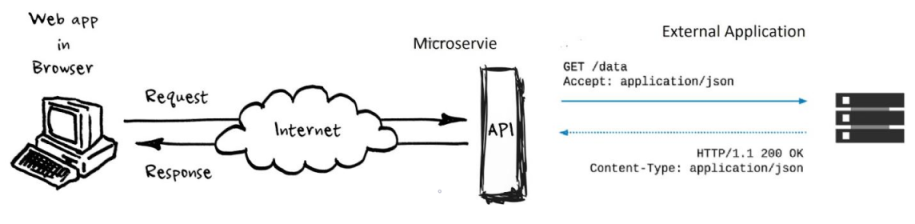
We can cache the response in Redis with an expiration time so instead of the actual call, you will get the response from the Redis cache. In our case, we had set the expiration time of the data to 1 day. When the data expires, the call goes to the actual web service and refreshes the data in the cache. The next time, the data will be returned from the cache.
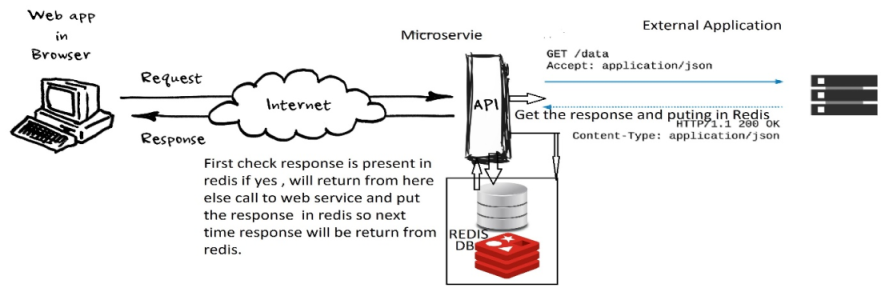
Here, we reduce the load time of the data by 90% and we were getting the same data in between 700 to 1000 milliseconds.
- Frequently Querying the Reference Table or Master Table in the Database
Another scenario is when you have a table in your database, and that table contains reference data that is not going to change frequently. You query that table often to get the data and populate the UI. In this scenario, you can also use Redis. Instead of querying the database each time from the disk, you can cache the table in Redis with an expiration time so the load time of your UI will be faster.