Spring Boot Course
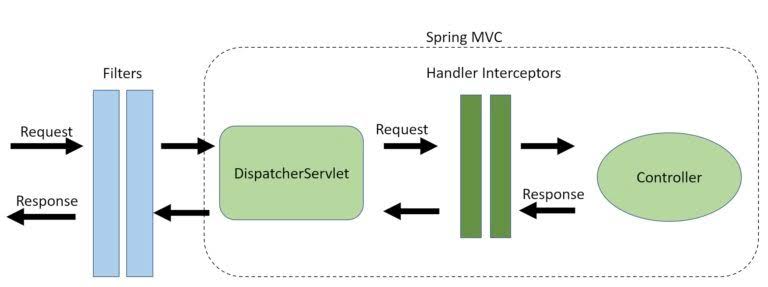
Filter
A Filter is part of the Java Servlet API. It operates at the servlet container level and is primarily used to preprocess requests and postprocess responses.
A Filter as the name suggests is a Java class executed by the servlet container for each incoming HTTP request and for each http response. This way, is possible to manage HTTP incoming requests before them reach the resource, such as a JSP page, a servlet or a simple static page; in the same way is possible to manage HTTP outbound response after resource execution.
Key Features
- Servlet-level: Filters are configured in the servlet container, usually applied to specific URL patterns.
- General-purpose: Filters can perform tasks like logging, authentication, or compression.
- Chained Execution: Multiple filters can be configured in a chain, and the order of execution is determined by the configuration.
Common Use Cases
- Authentication/Authorization: Check for valid headers or tokens before processing a request.
- Logging and Monitoring: Log details about requests and responses.
- Request/Response Transformation: Modify incoming requests or outgoing responses (e.g., compressing responses).
- CORS Configuration: Allow or restrict cross-origin requests.
Lifecycle
- init Method: Initializes the filter when the server starts.
- doFilter Method: Called for each request matching the filter's URL pattern. This is where preprocessing and postprocessing are done.
- destroy Method: Cleans up resources when the filter is removed or the server shuts down
For example,
Authentication Filter
A filter is used for preprocessing incoming requests and can be used to authenticate or modify requests before they reach the controller. In this case, we’ll implement a filter that checks for an Authorization header to authenticate the request.
package com.praveen.emp.filter;

import com.fasterxml.jackson.databind.ObjectMapper;
import com.ford.gpcse.bo.ErrorResponse;
import jakarta.servlet.*;
import jakarta.servlet.annotation.WebFilter;
import jakarta.servlet.http.HttpServletRequest;
import jakarta.servlet.http.HttpServletResponse;

import java.io.IOException;
import java.io.PrintWriter;
import java.time.LocalDateTime;
import java.time.format.DateTimeFormatter;

@WebFilter(urlPatterns = "/api/*")
public class AuthenticationFilter implements Filter {

    @Override
    public void doFilter(ServletRequest servletRequest, ServletResponse servletResponse, FilterChain chain)
            throws IOException, ServletException {

        HttpServletRequest request = (HttpServletRequest) servletRequest;
        HttpServletResponse response = (HttpServletResponse) servletResponse;

        String authHeader = request.getHeader("Authorization");

        if (authHeader == null || !authHeader.startsWith("Bearer ")) {
            response.setStatus(HttpServletResponse.SC_UNAUTHORIZED);
            response.setContentType("application/json");
            ErrorResponse errorResponse = new ErrorResponse(
                    "error",
                    "Authorization header is missing or invalid",
                    new ErrorResponse.Details(request.getRequestURI(), LocalDateTime.now().format(DateTimeFormatter.ISO_LOCAL_DATE_TIME))
            );

            ObjectMapper objectMapper = new ObjectMapper();
            String jsonResponse = objectMapper.writeValueAsString(errorResponse);

            PrintWriter out = response.getWriter();
            out.print(jsonResponse);
            out.flush();
            return;
        }

        chain.doFilter(servletRequest, servletResponse);
    }
}
package com.praveen.emp.config;

import com.ford.gpcse.filter.AuthenticationFilter;
import org.springframework.boot.web.servlet.FilterRegistrationBean;
import org.springframework.context.annotation.Bean;
import org.springframework.context.annotation.Configuration;

@Configuration
public class FilterConfig {

    @Bean
    public FilterRegistrationBean<AuthenticationFilter> authenticationFilter() {
        FilterRegistrationBean<AuthenticationFilter> registrationBean = new FilterRegistrationBean<>();
        registrationBean.setFilter(new AuthenticationFilter());
        registrationBean.addUrlPatterns("/api/*");
        registrationBean.setOrder(1);
        return registrationBean;
    }
}
Logging Filter
@WebFilter(urlPatterns = "/api/*")
public class LoggingFilter implements Filter {

    @Override
    public void doFilter(ServletRequest request, ServletResponse response, FilterChain chain)
            throws IOException, ServletException {
        HttpServletRequest httpRequest = (HttpServletRequest) request;
        System.out.println("Request URL: " + httpRequest.getRequestURI());

        chain.doFilter(request, response); // Continue to the next filter or servlet

        System.out.println("Response status: " + ((HttpServletResponse) response).getStatus());
    }
}
Cors Filter
package com.praveen.emp.config;

import org.springframework.beans.factory.annotation.Value;
import org.springframework.boot.autoconfigure.condition.ConditionalOnProperty;
import org.springframework.boot.web.servlet.FilterRegistrationBean;
import org.springframework.context.annotation.Bean;
import org.springframework.context.annotation.Configuration;
import org.springframework.core.Ordered;
import org.springframework.web.cors.CorsConfiguration;
import org.springframework.web.cors.UrlBasedCorsConfigurationSource;
import org.springframework.web.filter.CorsFilter;

import java.util.Arrays;
import java.util.List;

/**
 * Configuration class to set up CORS (Cross-Origin Resource Sharing) settings
 * for the application. This allows for the specified origins, methods, and
 * headers to access the application's endpoints.
 */

@Configuration
@ConditionalOnProperty(prefix = "cn.app.filters.cors-filter", name = "enabled")
public class CORSConfiguration {

    @Value("${cn.app.filters.cors-filter.allowed-origins}")
    String corsFilterAllowedOrigins;

    @Value("${cn.app.filters.cors-filter.allowed-methods}")
    String corsFilterAllowedMethods;

    @Value("${cn.app.filters.cors-filter.allowed-headers}")
    String corsFilterAllowedHeaders;

    @Value("${cn.app.filters.cors-filter.allowed-path-pattern}")
    String corsFilterAllowedPathPattern;

    @Bean
    FilterRegistrationBean<CorsFilter> customCorsFilter() {
        var corsConfig = new CorsConfiguration();
        corsConfig.setAllowCredentials(true);
        corsConfig.setAllowedOrigins(delimitedStringToList(corsFilterAllowedOrigins));
        corsConfig.setAllowedHeaders(delimitedStringToList(corsFilterAllowedHeaders));
        corsConfig.setAllowedMethods(delimitedStringToList(corsFilterAllowedMethods));

        var source = new UrlBasedCorsConfigurationSource();
        source.registerCorsConfiguration(corsFilterAllowedPathPattern, corsConfig);

        FilterRegistrationBean<CorsFilter> bean = new FilterRegistrationBean<>(new CorsFilter(source));
        bean.setOrder(Ordered.HIGHEST_PRECEDENCE);
        return bean;
    }

    private List<String> delimitedStringToList(String allowedList) {
        return Arrays.stream(allowedList.split(",")).map(String::trim).toList();
    }
}
cn:
  app:
    filters:
      cors-filter:
        enabled: true
        allowed-origins: http://localhost:4200
        allowed-methods: GET,POST,PUT,DELETE
        allowed-headers: Content-Type,Authorization
        allowed-path-pattern: "/**"
Interceptor
An Interceptor runs between requests whereas a Filter runs before rendering view.
Filter is related to the Servlet API and HandlerIntercepter is a Spring specific concept.
A Servlet Filter is used in the web layer only, you can't use it outside of a web context. Interceptors can be used anywhere. which is the main difference
For authentication of web pages you would use a servlet filter.
For security stuff in your business layer or logging you would use an Interceptor.
Spring Interceptors are similar to Servlet Filters but they acts in Spring Context so are many powerful to manage HTTP Request and Response but they can implement more sophisticated behavior because can access to all Spring context.
Key Features
- Spring-specific: Interceptors are part of the Spring MVC framework and work with HandlerMapping.
- Pre- and Post-Controller Execution: Interceptors can process requests before they reach the controller (preHandle) and after the controller processes the request (postHandle or afterCompletion).
- Fine-grained Control: Interceptors are tightly integrated with Spring, allowing access to controller-specific context.
Common Use Cases
- Authentication and Authorization: Validate user credentials or tokens at a higher level than filters.
- Request Preprocessing: Add attributes or modify requests before the controller handles them.
- Response Postprocessing: Modify or enrich the response after the controller has processed it.
- Custom Logic Around Controllers: Add logic specific to business operations, like caching or auditing.
Lifecycle
- prehandle method: do something before hitting the controller
- posthandle method: do something after returning from controller
- after completion method: do something after response is sent out and the view is rendered.
Let's see an example,
@Component
public class RequestHeaderInterceptor extends HandlerInterceptorAdapter {

 @Override
 public boolean preHandle(HttpServletRequest request, HttpServletResponse response, Object handler)
   throws Exception {

  if (StringUtils.isBlank(request.getHeader("user-auth-key"))) {
   throw new InvalidHeaderFieldException("Invalid request");
  }

  return super.preHandle(request, response, handler);
 }

@Override
 public void postHandle(HttpServletRequest request, HttpServletResponse response, Object handler,
   @Nullable ModelAndView modelAndView) throws Exception {

  System.out.println("In RequestHeaderInterceptor  :: SPRING Called postHandle method for URI "+request.getRequestURI() );
 }


 @Override
 public void afterCompletion(HttpServletRequest request, HttpServletResponse response, Object handler,
   @Nullable Exception ex) throws Exception {

  System.out.println("In RequestHeaderInterceptor  :: SPRING Called afterCompletion method for URI "+request.getRequestURI() );

 }

}
@Configuration
public class WebConfig implements WebMvcConfigurer {

    @Override
    public void addInterceptors(InterceptorRegistry registry) {
        registry.addInterceptor(new RequestHeaderInterceptor()).addPathPatterns("/api/**");
    }
}
Comparision between Filter and Interceptor
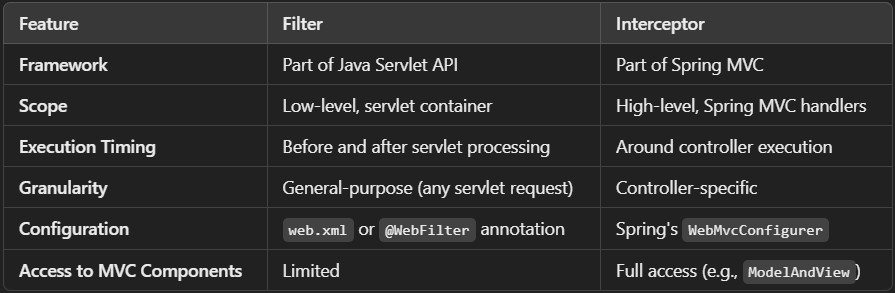
When to Use What?
- Use Filters for generic tasks like logging, CORS handling, or request compression, applicable to all requests.
- Use Interceptors for application-specific logic, like validating session attributes or adding custom headers for requests targeting specific controllers.