Spring Boot Course
What is JPA
The Java Persistence API provides a specification for persisting, reading, and managing data from your Java object to relational tables in the database.
The problem with JPA Using Hibernate which we learnt in our earlier article is there are lot of duplication between Repositories.
The other problem is proliferation of data stores i.e.. many are coming up like SQL, NO SQL etc.
Spring Data JPA provides the abstraction support to handle the above problems.
What is Spring Data JPA
Provides repository support for the Java Persistence API(JPA).
The goal of Spring Data repository abstraction is to significantly reduce the amount of boilerplate code required to implement data access layers for various persistence stores.
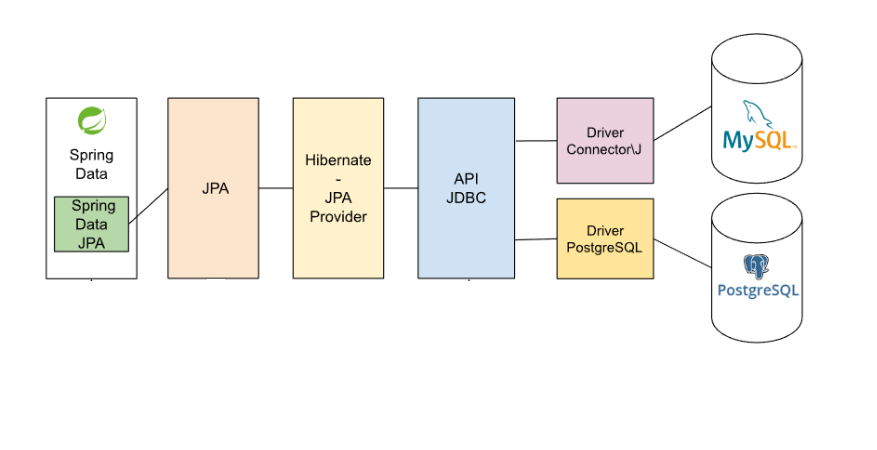
Spring Data JPA is not a JPA provider. It is a library/framework that adds an extra layer of abstraction on the top of our JPA provider (like Hibernate).
Hibernate is a JPA implementation, while Spring Data JPA is a JPA Data Access Abstraction.
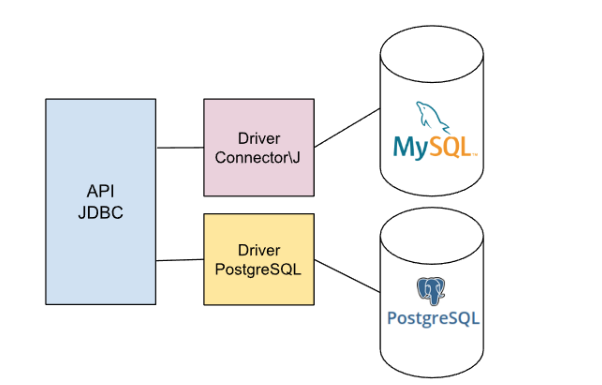
Lets see how it is in the initial days
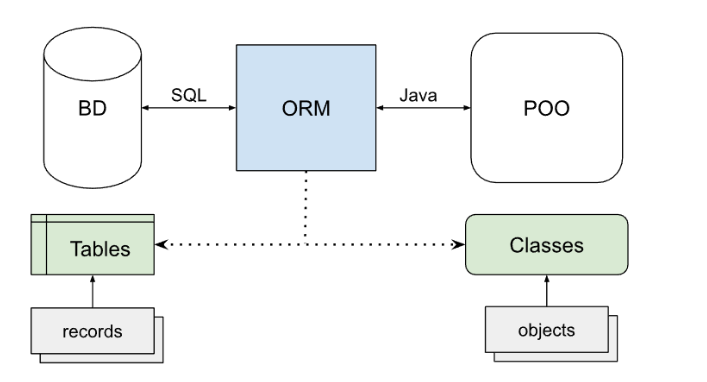
Lets see how it is after introducing ORM
Lets see how it is after Spring Data JPA
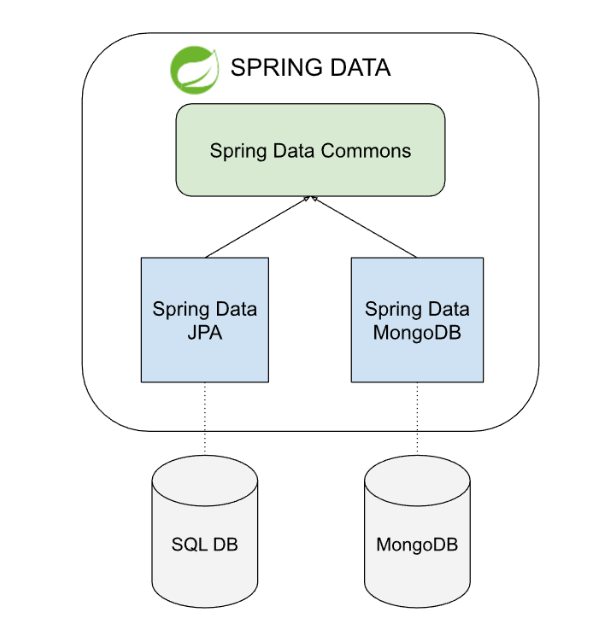
Also, Spring Data JPA is used for SQL DB and Spring Data MongoDB for Mongo DB(NOSQL DB).
Core API
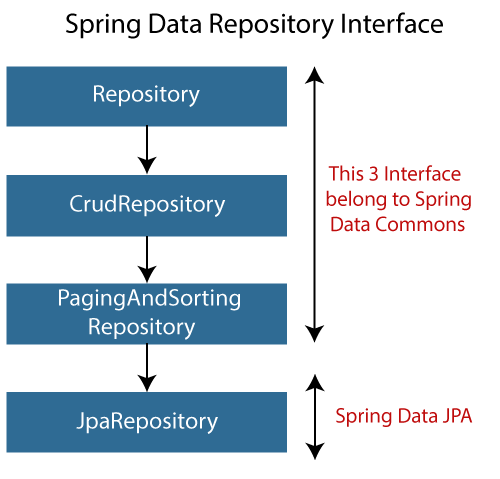
Where T represents domain type and ID represents type of domain types id.
All CRUD methods are transactional by default.
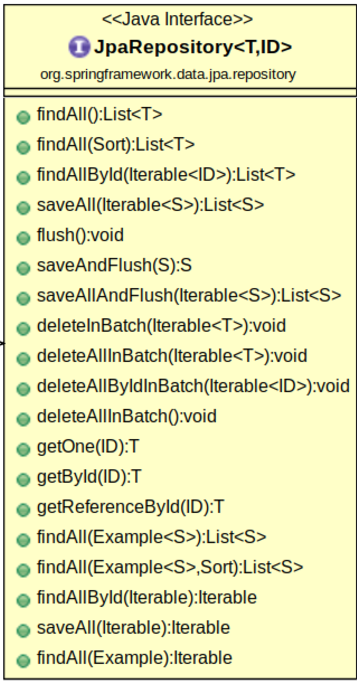
Lets see what are the methods available in JpaRepository.
Features
- Repository Abstraction Predefined repositories like CrudRepository, PagingAndSortingRepository, and JpaRepository offer CRUD operations, pagination, and sorting out of the box.
- Dervied Queries Define query methods in your repository interfaces by following a naming convention.
- Custom Queries Supports JPQL (Java Persistence Query Language) and native SQL queries.
For example,
package com.praveen.employee.repository;

import java.util.List;

import org.springframework.data.jpa.repository.JpaRepository;
import org.springframework.data.jpa.repository.Query;
import org.springframework.data.repository.query.Param;
import org.springframework.stereotype.Repository;

import com.praveen.employee.entity.Employee;

@Repository
public interface EmployeeRepository extends JpaRepository<Employee, Long> {

	/* Predefined Queries (Method Query Derivation) */

	// Finds employees whose name contains the given string
	List<Employee> findByNameContaining(String name);

	// Finds employees whose location contains the given string, sorted by their
	// name in ascending order
	List<Employee> findByLocationContainingOrderByNameAsc(String location);

	/* JPQL (Java Persistence Query Language) Queries */

	// Find all employees in a specific location
	@Query("SELECT e FROM Employee e WHERE e.location = :location")
	List<Employee> findEmployeesByLocation(@Param("location") String location);

	// Find employees with a salary greater than a specific amount
	@Query("SELECT e FROM Employee e WHERE e.salary > :salary")
	List<Employee> findEmployeesBySalaryGreaterThan(@Param("salary") Long salary);

	// Find employees whose name contains a specific substring
	@Query("SELECT e FROM Employee e WHERE e.name LIKE %:name%")
	List<Employee> findEmployeesByNameContaining(@Param("name") String name);

	// Count employees by designation
	@Query("SELECT COUNT(e) FROM Employee e WHERE e.designation = :designation")
	Long countEmployeesByDesignation(@Param("designation") String designation);

	// Find employees and order them by salary in descending order
	@Query("SELECT e FROM Employee e ORDER BY e.salary DESC")
	List<Employee> findEmployeesOrderedBySalaryDesc();

	/* Native SQL Queries */

	// Find employees with a specific location
	@Query(value = "SELECT * FROM employee WHERE location = :location", nativeQuery = true)
	List<Employee> findEmployeesByLocationNative(@Param("location") String location);

	// Get employees with a salary greater than a certain amount
	@Query(value = "SELECT * FROM employee WHERE salary > :salary", nativeQuery = true)
	List<Employee> findEmployeesBySalaryGreaterThanNative(@Param("salary") Long salary);

	// Get employee count for a specific location
	@Query(value = "SELECT COUNT(*) FROM employee WHERE location = :location", nativeQuery = true)
	Long countEmployeesByLocationNative(@Param("location") String location);

}
Pros
- Easy to use.
- Reduces boilerplate code.
- Built-in methods for common operations.
Cons
- Limited flexibility for complex queries.
- Learning curve for JPQL syntax.
Use Cases
- Simple CRUD applications.
- Applications requiring basic pagination and sorting.
JPA Specification
JPA Specifications are a powerful feature of the Spring Data JPA framework that allows developers to create dynamic and reusable queries in a programmatic way. This eliminates the need to write separate JPQL or native queries for every variation of a filter, making it highly suitable for scenarios where query conditions are dynamic.
Core Concepts
-
Specification Interface:
- Defined in
org.springframework.data.jpa.domain.Specification. - Allows you to create and combine query criteria programmatically.
- Defined in
-
CriteriaBuilder:
- A JPA utility class used to construct query conditions dynamically.
- Enables type-safe, database-agnostic queries.
-
JpaSpecificationExecutor:
- A Spring Data JPA interface that allows repository methods to accept Specification objects as arguments.
- Simplifies integration of specifications with repositories.
How to Enable JPA Specifications?
To use JPA Specifications, we need to:
- Extend JpaSpecificationExecutor<T> in your repository.
- Create Specification instances for dynamic query logic.
Let's extend JpaSpecificationExecutor in our repository to support Specifications.
package com.praveen.employee.repository;

import java.util.List;

import org.springframework.data.jpa.repository.JpaRepository;
import org.springframework.data.jpa.repository.JpaSpecificationExecutor;
import org.springframework.data.rest.core.annotation.RepositoryRestResource;
import org.springframework.stereotype.Repository;

import com.praveen.employee.entity.Employee;

@Repository
@RepositoryRestResource(path = "employee")
public interface EmployeeRepository extends JpaRepository<Employee, Long>, JpaSpecificationExecutor<Employee> {

}
Lets create an endpoint which filters the employee data based on name, location and age.
Service Class
@Override
public List<Employee> getFilteredEmployees(String name, String location, Long salary) {
    Specification<Employee> spec = (root, query, criteriaBuilder) -> {
        Predicate predicate = criteriaBuilder.conjunction();

        if (name != null && !name.isEmpty()) {
            predicate = criteriaBuilder.and(predicate,
                    criteriaBuilder.like(root.get("name"), "%" + name + "%"));
        }
        if (location != null && !location.isEmpty()) {
            predicate = criteriaBuilder.and(predicate,
                    criteriaBuilder.equal(root.get("location"), location));
        }
        if (salary != null) {
            predicate = criteriaBuilder.and(predicate,
                    criteriaBuilder.greaterThanOrEqualTo(root.get("salary"), salary));
        }
        return predicate;
    };

    return employeeRepository.findAll(spec);
}
Controller Class
@GetMapping("/employees/filter")
@LoggingAspect
@TrackExecutionTime
@Operation(description = "Filter Employees Based on Name, Location and Salary.", summary = "Filter Employees Based on Name, Location and Salary.")
public ResponseEntity<List<Employee>> filterEmployees(
        @RequestParam(required = false) String name,
        @RequestParam(required = false) String location,
        @RequestParam(required = false) Long salary) {

    List<Employee> employees = employeeManagementService.getFilteredEmployees(name, location, salary);
    return ResponseEntity.ok(employees);
}
Sample Application
Let's create an Employee Management Service that handles creating, updating, retrieving, deleting, and filtering employees.
Add the below dependency in pom.xml and by default Hibernate jars are available in spring data jpa.
<dependency>
  <groupId>org.springframework.boot</groupId>
  <artifactId>spring-boot-starter-data-jpa</artifactId>
</dependency>
Connect to PostgreSQL database
Let's add the PostgreSQL dependency in pom.xml
<dependency>
	<groupId>org.postgresql</groupId>
	<artifactId>postgresql</artifactId>
</dependency>
Setup Table in Database
Here there is no need to create the table manually in database rather it will be done automatically based on jpa property.
application.yml
spring:
  application:
    name: emp-mgmt-service
  datasource:
    url: jdbc:postgresql://localhost:5432/praveenoruganti
    username: postgres
    password: praveen
    hikari:
      minimum-idle: 5
      maximum-pool-size: 10
  jpa:
    hibernate:
      ddl-auto: update
    show-sql: true
    format-sql: true
Employee Entity
package com.praveen.employee.entity;

import jakarta.persistence.Entity;
import jakarta.persistence.GeneratedValue;
import jakarta.persistence.GenerationType;
import jakarta.persistence.Id;

@Entity
public class Employee {

	@Id
	@GeneratedValue(strategy = GenerationType.IDENTITY)
	private Long id;
	private String name;
	private String designation;
	private Long salary;
	private String location;

	// constructor, getters and setters

}
Create interface EmployeeRepository by extending JpaRepository<Employee,Long>
package com.praveen.employee.repository;

import java.util.List;

import org.springframework.data.jpa.repository.JpaRepository;
import org.springframework.data.jpa.repository.JpaSpecificationExecutor;
import org.springframework.stereotype.Repository;

import com.praveen.employee.entity.Employee;

@Repository
public interface EmployeeRepository extends JpaRepository<Employee, Long>, JpaSpecificationExecutor<Employee> {
	List<Employee> findByNameContaining(String name);

	List<Employee> findByLocationContainingOrderByNameAsc(String location);
}
Controller
package com.praveen.employee.controller;

import com.praveen.employee.aop.LoggingAspect;
import com.praveen.employee.aop.TrackExecutionTime;
import com.praveen.employee.bo.EmployeeRequest;
import com.praveen.employee.bo.EmployeeResponse;
import com.praveen.employee.entity.Employee;
import com.praveen.employee.exception.EmployeeNotFoundException;
import com.praveen.employee.service.EmployeeManagementService;
import io.swagger.v3.oas.annotations.Operation;
import io.swagger.v3.oas.annotations.tags.Tag;
import jakarta.validation.Valid;
import jakarta.validation.constraints.Min;
import jakarta.validation.constraints.NotBlank;
import jakarta.validation.constraints.Size;
import org.springframework.http.HttpStatus;
import org.springframework.http.MediaType;
import org.springframework.http.ResponseEntity;
import org.springframework.validation.annotation.Validated;
import org.springframework.web.bind.annotation.*;

import java.util.List;

@RestController
@Validated
@RequestMapping("/api/v1")
@Tag(description = "Employee Management Operations", name = "Employee Management Operations")
public class EmployeeManagementController {

    private final EmployeeManagementService employeeManagementService;

    public EmployeeManagementController(EmployeeManagementService employeeManagementService) {
        this.employeeManagementService = employeeManagementService;
    }

    @GetMapping(value = "/employees", produces = MediaType.APPLICATION_JSON_VALUE)
    @LoggingAspect
    @TrackExecutionTime
    @Operation(description = "Fetch All Employees", summary = "Fetch All Employees")
    public ResponseEntity<List<Employee>> fetchAllEmployees() {
        List<Employee> employees = employeeManagementService.fetchAllEmployees();
        return new ResponseEntity<>(employees, HttpStatus.OK);
    }

    @GetMapping(value = "/employees/search", produces = MediaType.APPLICATION_JSON_VALUE)
    @LoggingAspect
    @TrackExecutionTime
    @Operation(description = "Fetch Employee by Employee Name", summary = "Fetch Employee by Employee Name")
    public ResponseEntity<List<Employee>> getEmployeeByName(@RequestParam @NotBlank @Size(min = 5) String name) {
        List<Employee> employees = employeeManagementService.getEmployeeByName(name);
        return new ResponseEntity<>(employees, HttpStatus.OK);
    }

    @GetMapping(value = "/employees/search/location/{location}", produces = MediaType.APPLICATION_JSON_VALUE)
    @LoggingAspect
    @TrackExecutionTime
    @Operation(description = "Fetch Employee by Location", summary = "Fetch Employee by Location")
    public ResponseEntity<List<Employee>> getEmployeeByLocation(@PathVariable @NotBlank String location) {
        List<Employee> employees = employeeManagementService.getEmployeeByLocation(location);
        return new ResponseEntity<>(employees, HttpStatus.OK);
    }

    @GetMapping(value = "/employees/{id}", produces = MediaType.APPLICATION_JSON_VALUE)
    @LoggingAspect
    @TrackExecutionTime
    @Operation(description = "Fetch Employee By Employee Id", summary = "Fetch Employee By Employee Id")
    public ResponseEntity<EmployeeResponse> getEmployeeById(@PathVariable @Min(1) Long id) throws EmployeeNotFoundException {
        EmployeeResponse employeeResponse = employeeManagementService.getEmployeeById(id);
        return new ResponseEntity<>(employeeResponse, HttpStatus.OK);
    }

    @PostMapping(value = "/employees", produces = MediaType.APPLICATION_JSON_VALUE, consumes = MediaType.APPLICATION_JSON_VALUE)
    @LoggingAspect
    @TrackExecutionTime
    @Operation(description = "Create Employee", summary = "Create Employee")
    public ResponseEntity<EmployeeResponse> createEmployee(@RequestBody @Valid EmployeeRequest emp) {
        EmployeeResponse employeeResponse = employeeManagementService.createEmployee(emp);
        return new ResponseEntity<>(employeeResponse, HttpStatus.CREATED); // 201 Created
    }

    @PutMapping(value = "/employees/{id}", produces = MediaType.APPLICATION_JSON_VALUE, consumes = MediaType.APPLICATION_JSON_VALUE)
    @LoggingAspect
    @TrackExecutionTime
    @Operation(description = "Update Employee", summary = "Update Employee")
    public ResponseEntity<EmployeeResponse> updateEmployeeById(@RequestBody @Valid EmployeeRequest emp, @PathVariable @Min(1) Long id)
            throws EmployeeNotFoundException {
        EmployeeResponse updatedEmployee = employeeManagementService.updateEmployeeById(emp, id);
        return new ResponseEntity<>(updatedEmployee, HttpStatus.OK);
    }

    @DeleteMapping(value = "/employees/{id}", produces = MediaType.APPLICATION_JSON_VALUE)
    @LoggingAspect
    @TrackExecutionTime
    @Operation(description = "Delete Employee By Employee Id", summary = "Delete Employee By Employee Id")
    public ResponseEntity<EmployeeResponse> deleteEmployeeById(@PathVariable @Min(1) Long id) {
        EmployeeResponse deletedEmployee = employeeManagementService.deleteEmployeeById(id);
        return new ResponseEntity<>(deletedEmployee, HttpStatus.OK);
    }

    @GetMapping("/employees/filter")
    @LoggingAspect
    @TrackExecutionTime
    @Operation(description = "Filter Employees Based on Name, Location and Salary.", summary = "Filter Employees Based on Name, Location and Salary.")
    public ResponseEntity<List<Employee>> filterEmployees(
            @RequestParam(required = false) String name,
            @RequestParam(required = false) String location,
            @RequestParam(required = false) Long salary) {

        List<Employee> employees = employeeManagementService.getFilteredEmployees(name, location, salary);
        return ResponseEntity.ok(employees);
    }
}
Service
package com.praveen.employee.service.impl;

import com.praveen.employee.bo.EmployeeRequest;
import com.praveen.employee.bo.EmployeeResponse;
import com.praveen.employee.bo.EmployeeResponseData;
import com.praveen.employee.common.Constants;
import com.praveen.employee.entity.Employee;
import com.praveen.employee.exception.EmployeeNotFoundException;
import com.praveen.employee.repository.EmployeeRepository;
import com.praveen.employee.service.EmployeeManagementService;
import jakarta.persistence.criteria.Predicate;
import org.springframework.data.jpa.domain.Specification;
import org.springframework.stereotype.Service;

import java.util.List;
import java.util.UUID;

@Service
public class EmployeeManagementServiceImpl implements EmployeeManagementService {

    private final EmployeeRepository employeeRepository;

    public EmployeeManagementServiceImpl(EmployeeRepository employeeRepository) {
        this.employeeRepository = employeeRepository;
    }

    @Override
    public List<Employee> fetchAllEmployees() {
        return employeeRepository.findAll();

    }

    @Override
    public List<Employee> getEmployeeByName(String name) {
        return employeeRepository.findByNameContaining(name);

    }

    @Override
    public List<Employee> getEmployeeByLocation(String location) {
        return employeeRepository.findByLocationContainingOrderByNameAsc(location);

    }

    @Override
    public EmployeeResponse getEmployeeById(Long empId) throws EmployeeNotFoundException {
        Employee emp = employeeRepository.findById(empId).orElseThrow(EmployeeNotFoundException::new);
        return new EmployeeResponse(Constants.SUCCESS, UUID.randomUUID().toString(), new EmployeeResponseData(
                emp.getId(), emp.getName(), emp.getDesignation(), emp.getSalary(), emp.getLocation()), null);

    }

    @Override
    public EmployeeResponse createEmployee(EmployeeRequest employeeRequest) {
        Employee emp = new Employee();
        emp.setName(employeeRequest.getName());
        emp.setDesignation(employeeRequest.getDesignation());
        emp.setLocation(employeeRequest.getLocation());
        emp.setSalary(employeeRequest.getSalary());
        employeeRepository.save(emp);
        return new EmployeeResponse(Constants.SUCCESS, employeeRequest.getTransactionId(),
                new EmployeeResponseData(emp.getId(), emp.getName(), emp.getDesignation(), emp.getSalary(),
                        emp.getLocation()),
                null);
    }

    @Override
    public EmployeeResponse updateEmployeeById(EmployeeRequest employeeRequest, Long empId)
            throws EmployeeNotFoundException {
        Employee emp = employeeRepository.findById(empId).orElseThrow(EmployeeNotFoundException::new);
        emp.setName(employeeRequest.getName());
        emp.setDesignation(employeeRequest.getDesignation());
        emp.setLocation(employeeRequest.getLocation());
        emp.setSalary(employeeRequest.getSalary());
        employeeRepository.save(emp);
        return new EmployeeResponse(Constants.SUCCESS, employeeRequest.getTransactionId(),
                new EmployeeResponseData(emp.getId(), emp.getName(), emp.getDesignation(), emp.getSalary(),
                        emp.getLocation()),
                null);

    }

    @Override
    public EmployeeResponse deleteEmployeeById(Long empId) {
        employeeRepository.deleteById(empId);
        return new EmployeeResponse(Constants.SUCCESS, null,
                new EmployeeResponseData(empId, null, null, null, null), null);
    }

    @Override
    public List<Employee> getFilteredEmployees(String name, String location, Long salary) {
        Specification<Employee> spec = (root, query, criteriaBuilder) -> {
            Predicate predicate = criteriaBuilder.conjunction();

            if (name != null && !name.isEmpty()) {
                predicate = criteriaBuilder.and(predicate,
                        criteriaBuilder.like(root.get("name"), "%" + name + "%"));
            }
            if (location != null && !location.isEmpty()) {
                predicate = criteriaBuilder.and(predicate,
                        criteriaBuilder.equal(root.get("location"), location));
            }
            if (salary != null) {
                predicate = criteriaBuilder.and(predicate,
                        criteriaBuilder.greaterThanOrEqualTo(root.get("salary"), salary));
            }
            return predicate;
        };

        return employeeRepository.findAll(spec);
    }

}
Spring Data REST
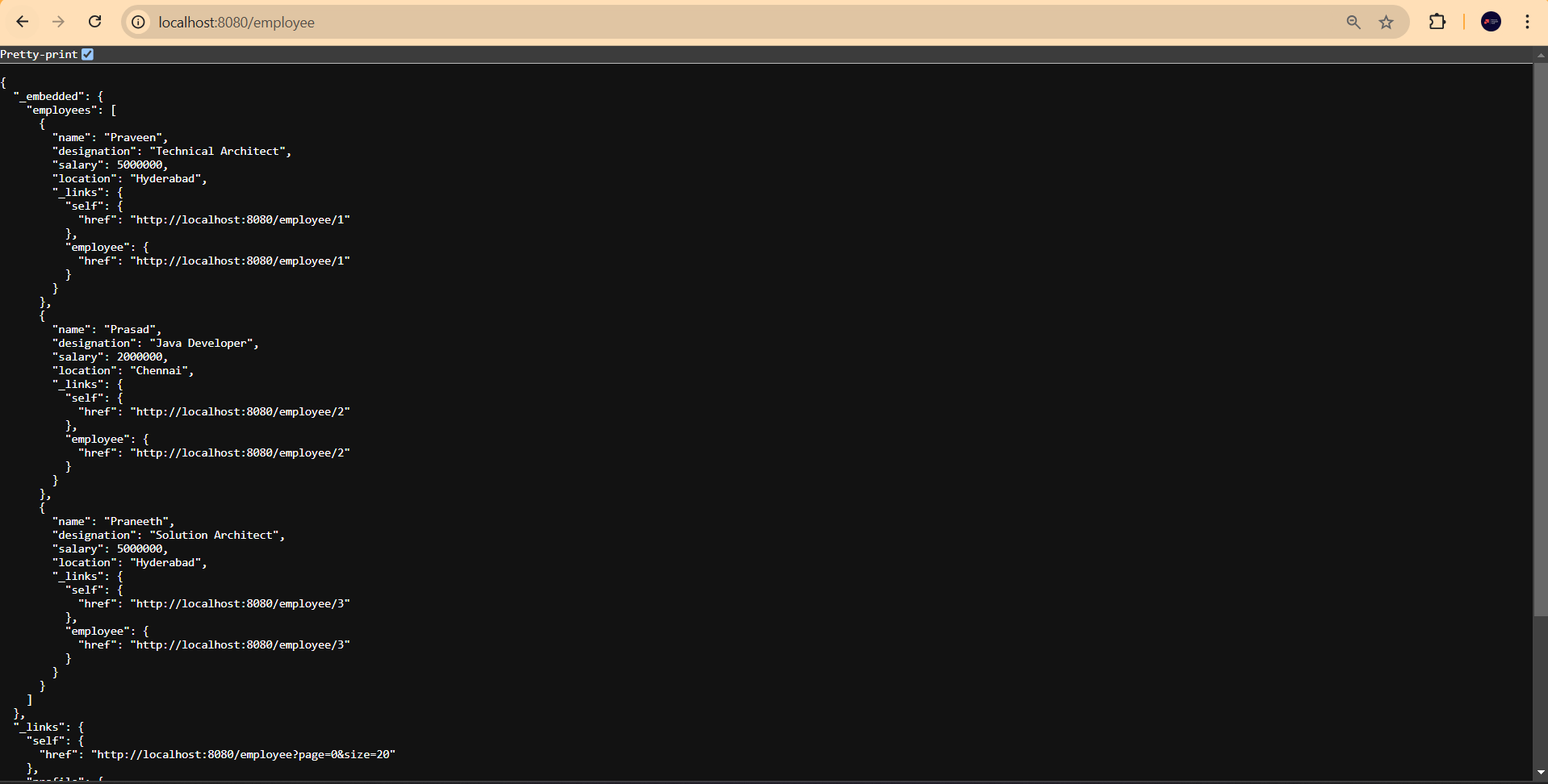
To expose JPA repository as rest we can use Spring Data REST and this is not recommended for production.
Add the below dependency in pom.xml
<dependency>
  <groupId>org.springframework.boot</groupId>
  <artifactId>spring-boot-starter-data-rest</artifactId>
</dependency>
Now add annotation @RepositoryRestResource(path="employee") in EmployeeRepository
package com.praveen.employee.repository;

import java.util.List;

import org.springframework.data.jpa.repository.JpaRepository;
import org.springframework.data.jpa.repository.JpaSpecificationExecutor;
import org.springframework.stereotype.Repository;

import com.praveen.employee.entity.Employee;

@Repository
public interface EmployeeRepository extends JpaRepository<Employee, Long>, JpaSpecificationExecutor<Employee> {
	List<Employee> findByNameContaining(String name);

	List<Employee> findByLocationContainingOrderByNameAsc(String location);
}
Dual Database Handling
Connecting to multiple databases in a Spring Boot app is often needed in big projects. Whether you're handling different modules, separating read and write tasks, or linking up with old systems, Spring Boot makes it simple.
Add Dependencies
First, ensure that you have the necessary dependencies in your pom.xml for the databases you intend to use. For this example, we will connect to both MySQL and PostgreSQL.
<dependency>
  <groupId>org.springframework.boot</groupId>
  <artifactId>spring-boot-starter-data-jpa</artifactId>
</dependency>
<dependency>
	<groupId>com.mysql</groupId>
	<artifactId>mysql-connector-j</artifactId>
</dependency>
<dependency>
  <groupId>org.postgresql</groupId>
  <artifactId>postgresql</artifactId>
</dependency>
Configure Properties
Next, define properties for each data source in your application.properties or application.yml.
# DataSource 1 (MySQL)
spring.datasource.primary.url=jdbc:mysql://localhost:3306/primary_db
spring.datasource.primary.username=root spring.datasource.primary.password=secret
spring.datasource.primary.driver-class-name=com.mysql.cj.jdbc.Driver
# DataSource 2 (PostgreSQL)
spring.datasource.secondary.url=jdbc:postgresql://localhost:5432/secondary_db
spring.datasource.secondary.username=postgres
spring.datasource.secondary.password=secret
spring.datasource.secondary.driver-class-name=org.postgresql.Driver
Define Configuration Classes
Create configuration classes for each data source. Each configuration class should define the data source, entity manager factory, and transaction manager for its respective database.
Primary Data Source Configuration (MySQL)
@Configuration
@EnableTransactionManagement
@EnableJpaRepositories(
  basePackages = "com.example.primary.repository",
  entityManagerFactoryRef = "primaryEntityManagerFactory",
  transactionManagerRef = "primaryTransactionManager"
)
public class PrimaryDataSourceConfig {
@Primary
@Bean(name = "primaryDataSource")
@ConfigurationProperties(prefix = "spring.datasource.primary")
public DataSource primaryDataSource() {
  return DataSourceBuilder.create().build();
}

@Primary
@Bean (name = "primaryEntityManagerFactory")
public LocalContainerEntityManagerFactoryBean primaryEntityManagerFactory(
EntityManagerFactoryBuilder builder,
@Qualifier ("primaryDataSource") DataSource dataSource) {
  return builder
  .dataSource(dataSource)
  .packages("com.example.primary.model")
  .persistenceUnit("primary")
  .build();
}
@Primary
@Bean(name = "primaryTransactionManager")
public PlatformTransactionManager primaryTransactionManager(
@Qualifier ("primaryEntityManagerFactory") EntityManagerFactory entityManagerFactory) {
  return new JpaTransactionManager (entityManagerFactory);
}
Secondary Data Source Configuration (PostgreSQL)
@Configuration
@EnableTransactionManagement
@EnableJpaRepositories(
)
basePackages = "com.example.secondary.repository",
entityManagerFactoryRef = "secondaryEntityManagerFactory", transactionManagerRef = "secondaryTransactionManager"
public class SecondaryDataSourceConfig {
  @Bean (name = "secondaryDataSource")
  @ConfigurationProperties(prefix = "spring.datasource.secondary")
  public DataSource secondaryDataSource() {
    return DataSourceBuilder.create().build();
  }
  @Bean(name = "secondaryEntityManagerFactory")
  public LocalContainerEntityManagerFactoryBean secondaryEntityManagerFactory(
  EntityManagerFactoryBuilder builder,
  @Qualifier("secondaryDataSource") DataSource dataSource) {
    return builder
    .dataSource(dataSource)
    .packages("com.example.secondary.model") .persistenceUnit ("secondary") .build();
  }

  @Bean (name = "secondaryTransactionManager")
  public PlatformTransactionManager secondaryTransactionManager(
  @Qualifier("secondaryEntityManagerFactory") EntityManagerFactory entityManagerFactory) {
  return new JpaTransactionManager (entityManagerFactory);
  }
}
Define Repositories and Entities
Separate your repositories and entities into different packages for each data source. This ensures that each entity is managed by the correct entity manager factory.
Primary Repository and Entity (MySQL)
// Primary repository
package com.example.primary.repository;
import org.springframework.data.jpa.repository.JpaRepository;
import com.example.primary.model.PrimaryEntity;
public interface PrimaryRepository extends JpaRepository<PrimaryEntity, Long> {
}
// Primary entity
package com.example.primary.model;
import javax.persistence.Entity;
import javax.persistence.Id;
@Entity
public class PrimaryEntity {
@Id
private Long id;
// other fields and getters/setters
}
Secondary Repository and Entity (PostgreSQL)
// Secondary repository
package com.example.secondary.repository;
import org.springframework.data.jpa.repository.JpaRepository;
import com.example.secondary.model. SecondaryEntity;
public interface SecondaryRepository extends JpaRepository<SecondaryEntity, Long> {
}
// Secondary entity
package com.example.secondary.model;
import javax.persistence.Entity;
import javax.persistence.Id;
@Entity
public class SecondaryEntity {
@Id
private Long id;
// other fields and getters/setters
}
By following these steps, you can configure Spring Boot to communicate with two different databases seamlessly. This setup ensures that each data source has its own configuration, transaction management, and repository setup, allowing for a clean and maintainable codebase.
This approach is highly flexible and can be extended to include more than two databases if needed. Always ensure that your database configurations are optimized for the specific use case to maintain performance and reliability.
Please note that when using Lombok for Entity classes, avoid using the following three annotations: @EqualsAndHashCode, @ToString, and @Data. Instead, you can use the other annotations: @AllArgsConstructor, @NoArgsConstructor, @Getter, @Setter, and @Builder. For more details, please refer to this website.
It's better to avoid using Lombok in the project and instead generate getters, setters, constructors, and toString() using your IDE.