Spring Boot Course
Apache Kafka is a distributed streaming platform with capabilities such as publishing and subscribing to a stream of records, storing the records in a fault tolerant way, and processing that stream of records.
It is used to build real-time streaming data pipelines, that can perform functionalities such as reliably passing a stream of records from one application to another and processing and transferring the records to the target applications.
Kafka Architecture
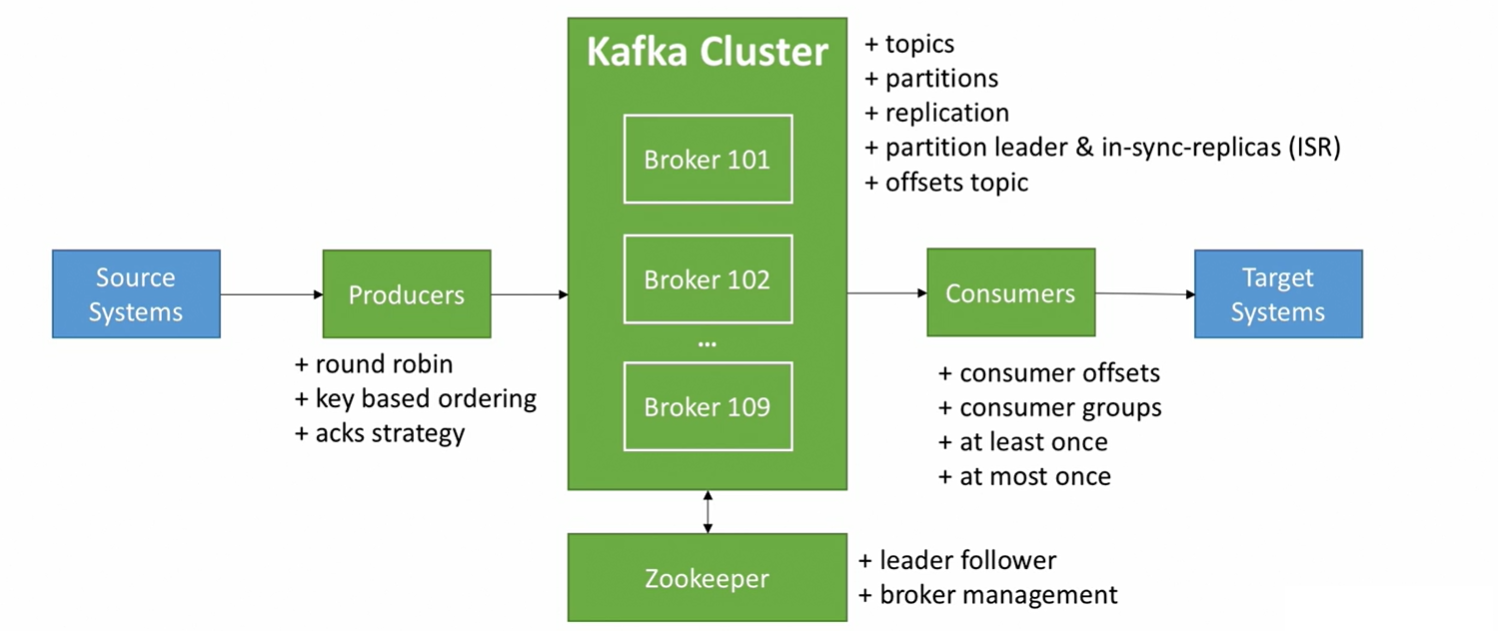
Kafka Features
- High throughput : Provides support for hundreds of thousands of messages with modest hardware.
- Scalability : Highly scalable distributed systems with no downtime.
- Data loss : Kafka ensures no data loss once configured properly.
- Stream Processing : Kafka can be used along with real time streaming applications like Spark and Storm.
- Durability : Provides support for persisting messages to disk.
- Replication : Messages can be replicated across clusters, which supports multiple subscribers.
Kafka components
Topic
A topic is a category or feed or named stream to which records are published. Kafka stores topic in logs file.
- It is simple to table in database (without all constraints).
- You can have as many as topics you want.
- A topic is identified by its name.
Partitions
Topics are broken up into ordered commit logs called partitions. Kafka spreads those log's partitions across multiple servers or disks.
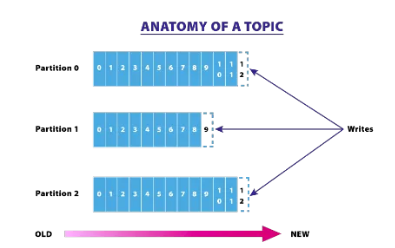
The partition maintains the order in which data was inserted and once the record is published to the topic, it remains there depending on the retention period (which is configurable). The records are always appended at the end of the partitions. It maintains a flag called 'offsets,' which uniquely identifies each record within the partition.
The offset is controlled by the consuming applications. Using offset, consumers might backtrace to older offsets and reprocess the records if needed.
- Topics are split into partitions. a) Each partition is ordered. b) Each message in partition gets an incremental id called offset.
Offset
- Offset only have a meaning for a specific partition. for example, offset 3 in partition 0 doesn't represent the same data as offset 3 in partition 1.
- Order is guaranteed only with a partition (not across partitions).
- Data is kept only for a limited time(default is one week).
- Once the data is written to a partition, it can't be changed (immutability).
For topic example, truck_gps
- Say you have a fleet of trucks, each truck reports its GPS position to kafka.
- You can topic
truck_gpsthe contains position of all trucks. - Each truck will send a message to Kafka every 20 seconds, each message will contain the truck ID and the truck position (latitude and longitude).
- We choose to create that topic with 10 partitions (arbitrary number).
- Data is assigned randomly to a partition unless a key is provided.
Broker
- Kafka cluster typically consists of multiple brokers (servers) to maintain load balance.
- Each broker is identified with its ID (integer).
- Each broker contains certain topic partitions.
- After connecting to any broker (called a bootstrap broker), you will be connected to the entire cluster.
- A good number to get started is 3 brokers, but some big clusters have over 100 brokers.
- Kafka brokers are stateless, so they use ZooKeeper for maintaining their cluster state.
- One Kafka broker instance can handle hundreds of thousands of reads and writes per second and each broker can handle TB of messages without performance impact.
- Kafka broker leader election can be done by ZooKeeper.
Topic replication factor
- Topics should have a replication factor > 1 (usually between 2 and 3).
- This way if the broker is down, another broker can serve the data.
Producers
- Producers write data to topics (which is made of partition).
- Producers automatically know to which broker and partition to write to.
- In case of Broker failures, Producers will automatically recover.
- Producers can choose to receive acknowledgement of data writes:
- acks=0, Producer wont wait for acknowledgement(possible data loss).
- acks=1, Producer will wait for leader acknowledgement(minimal data loss).
- acks=all, Leader + replicas acknowledgement(no data loss).
Producers: Message keys
- Producers can choose to send a key with the message (string, number etc).
- If key=null, data is send round robin (broker 101 then 102 then 103 etc).
- If key is sent, then all the messages for that key will always go to the same partition.
- A key is basically sent if you need message ordering for a specific field (ex: truck_id).
Consumers
- Consumers read data from a topic (identified by a name).
- Consumers know which broker to read from.
- In case of broker failures, consumers know how to recover.
- Data is read in order within each partitions.
Consumer Groups
- Consumer read data in consumer groups.
- Each Consumer with in a group reads from exclusive paritions.
- If you have more consumers then partitions, some consumers will be inactive.
Consumer Offsets
- Kafka stores the offsets at which a consumer group has been reading.
- The offsets committed live in a Kafka topic named _consumer_offsets.
- When a consumer in a group has processed data received from Kafkam it should be committing the offsets.
- If a consumer dies, it will be able to read back from where it let off thanks to the committed consumer offsets.
Delivery semantics for Consumers
- Consumers choose when to commit offsets.
- There are 3 delivery semantics
-
At most once
- offsets are committed as soon as message is received.
- If the processing goes wrong, the message will be lost(it won't be read again).
-
At least once (usually preferred)
- offsets are committed after the message is processed.
- If the process goes wrong, the message will be read again.
- This can result in duplicate processing of messages. Make sure your processing is idempotent (i.e.. processing again the messages won't impact your systems).
-
Exactly once
- Can be achieved for Kafka => Kafka workflows using Kafka Streams API.
- For Kafka => External System workflows, use an idempotent consumer.
Kafka Broker Discovery
- Every Kafka broker is also called as
bootstrap server. - That means that
you only need to connect to one broker, and you will be connected to the entire cluster. - Each broker knows about all brokers, topics, partitions (metadata).
Zookeeper
- Zookeeper manages brokers (keep a list of them).
- Zookeeper helps in performing leader election for partitions.
- Zookeeper sends notifications to Kafka in case of changes (ex: new topic, broker dies, broker comes up, delete topics, etc...).
Kafka can't work without Zookeeper- Zookeeper by design operates with an odd number of servers (3, 5, 7).
- Zookeeper has a leader (handle writes), the rest of the servers are followers (handle reads).
- Zookeeper does NOT store consumer offsets with Kafka > v0.10.
Kafka Guarantees
- Messages are appended to a topic-partition in the order they are sent.
- Consumers read messages in the order sorted in a topic-partition.
- With a replication factor of N, producers and consumers can tolerate upto N-1 brokers being down.
- This is why a replication factor of 3 is a good idea:
- Allows for one broker to be taken down for maintenance.
- Allows for another broker to be taken down unexpectedly.
- As long as the number of partitions remains constant for a topic (no new partitions), the same key will always go to the same partition.
What problem does Kafka resolve?
Without any messaging queue implementation, what the communication between client nodes and server nodes look alike is shown below:
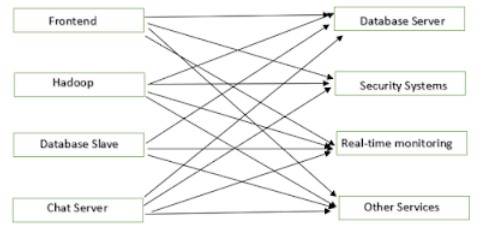
There is a large numbers of data pipelines which are used for communication. It is very difficult to update this system or add another node.
If we use Kafka, then the entire system will look like something
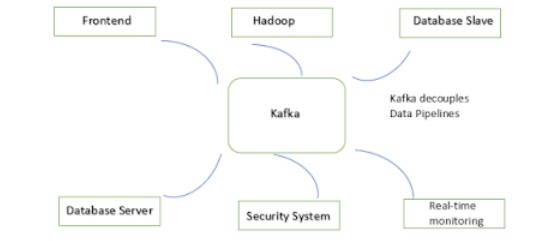
So, all the client servers will send messages to topics in Kafka and all backend servers will consume messages from kafka topics.
Install Docker Version of Kafka
- Docker Compose file for Windows to configure the Kafka broker, schema registry, and control center.
version: '3.8'
services:

  broker:
    image: confluentinc/cp-server:7.8.0
    hostname: broker
    container_name: broker
    ports:
      - "9092:9092"
      - "9101:9101"
    environment:
      KAFKA_NODE_ID: 1
      KAFKA_LISTENER_SECURITY_PROTOCOL_MAP: 'CONTROLLER:PLAINTEXT,PLAINTEXT:PLAINTEXT,PLAINTEXT_HOST:PLAINTEXT'
      KAFKA_ADVERTISED_LISTENERS: 'PLAINTEXT://broker:29092,PLAINTEXT_HOST://localhost:9092'
      KAFKA_OFFSETS_TOPIC_REPLICATION_FACTOR: 1
      KAFKA_GROUP_INITIAL_REBALANCE_DELAY_MS: 0
      KAFKA_CONFLUENT_LICENSE_TOPIC_REPLICATION_FACTOR: 1
      KAFKA_CONFLUENT_BALANCER_TOPIC_REPLICATION_FACTOR: 1
      KAFKA_TRANSACTION_STATE_LOG_MIN_ISR: 1
      KAFKA_TRANSACTION_STATE_LOG_REPLICATION_FACTOR: 1
      KAFKA_JMX_PORT: 9101
      KAFKA_JMX_HOSTNAME: localhost
      KAFKA_CONFLUENT_SCHEMA_REGISTRY_URL: http://schema-registry:8081
      KAFKA_METRIC_REPORTERS: io.confluent.metrics.reporter.ConfluentMetricsReporter
      CONFLUENT_METRICS_REPORTER_BOOTSTRAP_SERVERS: broker:29092
      CONFLUENT_METRICS_REPORTER_TOPIC_REPLICAS: 1
      KAFKA_PROCESS_ROLES: 'broker,controller'
      KAFKA_CONTROLLER_QUORUM_VOTERS: '1@broker:29093'
      KAFKA_LISTENERS: 'PLAINTEXT://broker:29092,CONTROLLER://broker:29093,PLAINTEXT_HOST://0.0.0.0:9092'
      KAFKA_INTER_BROKER_LISTENER_NAME: 'PLAINTEXT'
      KAFKA_CONTROLLER_LISTENER_NAMES: 'CONTROLLER'
      KAFKA_LOG_DIRS: 'D:\\praveenoruganti\\gitworkspace\\springboot\\kafka\\kafka-logs'
      CONFLUENT_METRICS_ENABLE: 'true'
      CONFLUENT_SUPPORT_CUSTOMER_ID: 'anonymous'
      CLUSTER_ID: 'MkU3OEVBNTcwNTJENDM2Qk'

  schema-registry:
    image: confluentinc/cp-schema-registry:7.8.0
    hostname: schema-registry
    container_name: schema-registry
    depends_on:
      - broker
    ports:
      - "8081:8081"
    environment:
      SCHEMA_REGISTRY_HOST_NAME: schema-registry
      SCHEMA_REGISTRY_KAFKASTORE_BOOTSTRAP_SERVERS: 'broker:29092'
      SCHEMA_REGISTRY_LISTENERS: http://0.0.0.0:8081

  connect:
    image: cnfldemos/cp-server-connect-datagen:0.6.4-7.6.0
    hostname: connect
    container_name: connect
    depends_on:
      - broker
      - schema-registry
    ports:
      - "8083:8083"
    environment:
      CONNECT_BOOTSTRAP_SERVERS: 'broker:29092'
      CONNECT_REST_ADVERTISED_HOST_NAME: connect
      CONNECT_GROUP_ID: compose-connect-group
      CONNECT_CONFIG_STORAGE_TOPIC: docker-connect-configs
      CONNECT_CONFIG_STORAGE_REPLICATION_FACTOR: 1
      CONNECT_OFFSET_FLUSH_INTERVAL_MS: 10000
      CONNECT_OFFSET_STORAGE_TOPIC: docker-connect-offsets
      CONNECT_OFFSET_STORAGE_REPLICATION_FACTOR: 1
      CONNECT_STATUS_STORAGE_TOPIC: docker-connect-status
      CONNECT_STATUS_STORAGE_REPLICATION_FACTOR: 1
      CONNECT_KEY_CONVERTER: org.apache.kafka.connect.storage.StringConverter
      CONNECT_VALUE_CONVERTER: io.confluent.connect.avro.AvroConverter
      CONNECT_VALUE_CONVERTER_SCHEMA_REGISTRY_URL: http://schema-registry:8081
      CLASSPATH: /usr/share/java/monitoring-interceptors/monitoring-interceptors-7.8.0.jar
      CONNECT_PRODUCER_INTERCEPTOR_CLASSES: "io.confluent.monitoring.clients.interceptor.MonitoringProducerInterceptor"
      CONNECT_CONSUMER_INTERCEPTOR_CLASSES: "io.confluent.monitoring.clients.interceptor.MonitoringConsumerInterceptor"
      CONNECT_PLUGIN_PATH: "/usr/share/java,/usr/share/confluent-hub-components"

  control-center:
    image: confluentinc/cp-enterprise-control-center:7.8.0
    hostname: control-center
    container_name: control-center
    depends_on:
      - broker
      - schema-registry
      - connect
    ports:
      - "9021:9021"
    environment:
      CONTROL_CENTER_BOOTSTRAP_SERVERS: 'broker:29092'
      CONTROL_CENTER_SCHEMA_REGISTRY_URL: "http://schema-registry:8081"
      CONTROL_CENTER_CONNECT_CONNECT-DEFAULT_CLUSTER: 'connect:8083'
      CONTROL_CENTER_INTERNAL_TOPICS_PARTITIONS: 1
      CONTROL_CENTER_REPLICATION_FACTOR: 1
      CONFLUENT_METRICS_TOPIC_REPLICATION: 1
      PORT: 9021
- Execute the below command
docker compose up -d
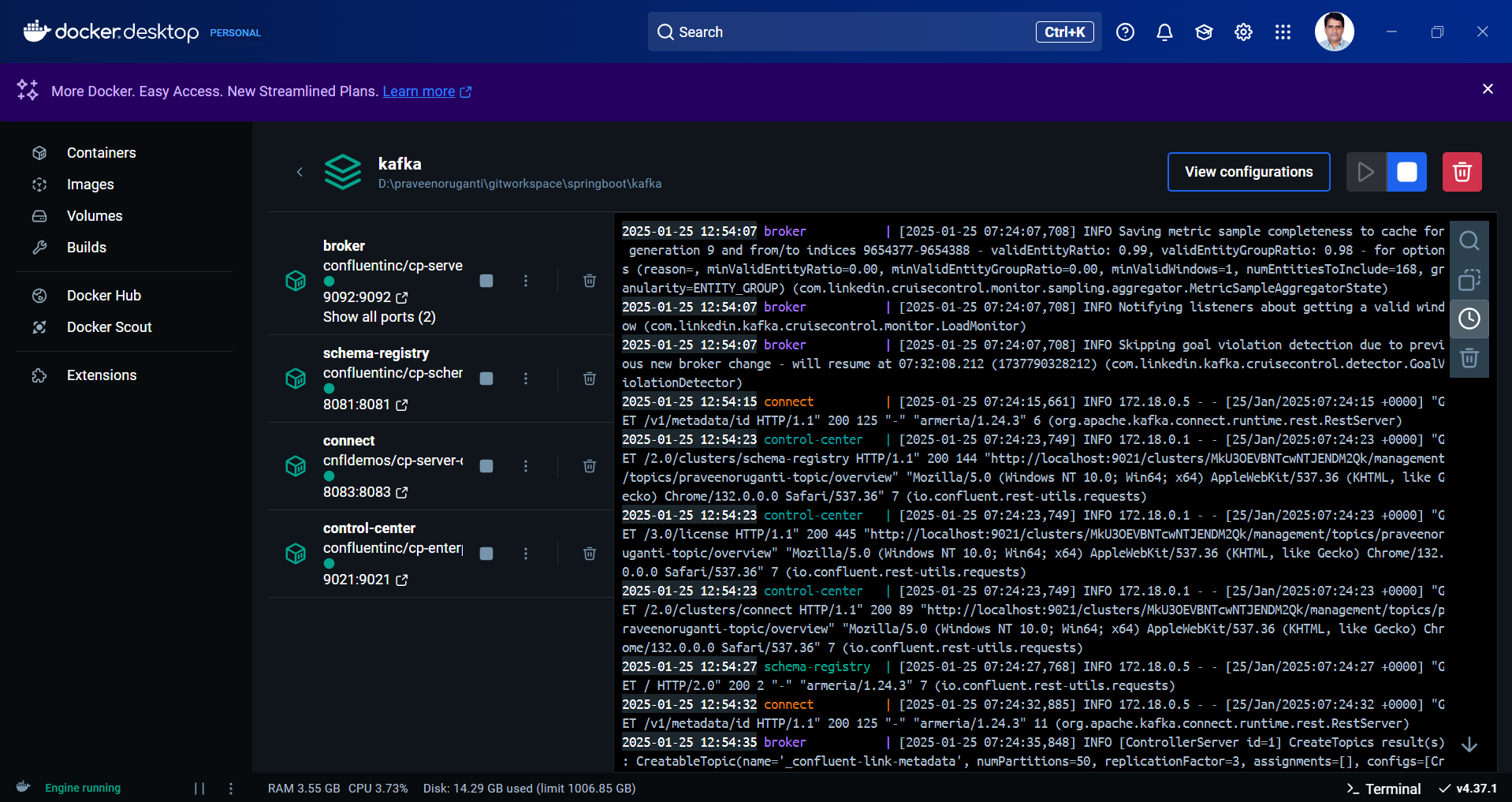
Now, let's go to Docker Desktop and check whether the Kafka broker is running or not.
Spring Boot Support for Kafka
Spring Boot provides good support for Kafka and provides the abstraction layers to work with over the native Kafka Java clients.
Let's add the below dependencies in pom.xml
<dependency>
	<groupId>org.springframework.kafka</groupId>
	<artifactId>spring-kafka</artifactId>
</dependency>
<dependency>
	<groupId>com.fasterxml.jackson.core</groupId>
	<artifactId>jackson-databind</artifactId>
</dependency>
Let's develop both the Kafka producer and consumer logic in Spring Boot.
Producer
package com.praveen.kafka.service;


import com.fasterxml.jackson.core.JsonProcessingException;
import com.fasterxml.jackson.databind.ObjectMapper;
import com.praveen.kafka.model.Event;
import org.springframework.beans.factory.annotation.Value;
import org.springframework.kafka.core.KafkaTemplate;
import org.springframework.stereotype.Service;

@Service
public class KafkaProducerService {

    private final String topic;
    private final ObjectMapper objectMapper;
    private final KafkaTemplate<String, String> kafkaTemplate;

    public KafkaProducerService(@Value("${app.kafka.topic}") String topic,
                                ObjectMapper objectMapper,
                                KafkaTemplate<String, String> kafkaTemplate) {
        this.topic = topic;
        this.objectMapper = objectMapper;
        this.kafkaTemplate = kafkaTemplate;
    }

    public void sendMessage(Event event) throws JsonProcessingException {
        String eventAsJson = objectMapper.writeValueAsString(event);
        kafkaTemplate.send(topic, eventAsJson);
        System.out.println("Message sent: " + eventAsJson);
    }
}
package com.praveen.kafka.controller;

import com.fasterxml.jackson.core.JsonProcessingException;
import com.praveen.kafka.model.Event;
import com.praveen.kafka.service.KafkaProducerService;
import org.springframework.web.bind.annotation.PostMapping;
import org.springframework.web.bind.annotation.RequestBody;
import org.springframework.web.bind.annotation.RequestMapping;
import org.springframework.web.bind.annotation.RestController;

@RestController
@RequestMapping("/kafka")
public class KafkaController {

    private final KafkaProducerService producerService;

    public KafkaController(KafkaProducerService producerService) {
        this.producerService = producerService;
    }

    @PostMapping("/publish")
    public String publishMessage(@RequestBody Event event) throws JsonProcessingException {
        producerService.sendMessage(event);
        return "Message published: " + event;
    }
}
Consumer
package com.praveen.kafka.service;

import com.fasterxml.jackson.core.JsonProcessingException;
import com.fasterxml.jackson.databind.ObjectMapper;
import com.praveen.kafka.model.Event;
import org.springframework.kafka.annotation.KafkaListener;
import org.springframework.stereotype.Service;

@Service
public class KafkaConsumerService {

    private final ObjectMapper objectMapper;

    public KafkaConsumerService(ObjectMapper objectMapper) {
        this.objectMapper = objectMapper;
    }

    @KafkaListener(topics = "${app.kafka.topic}", groupId = "${spring.kafka.consumer.group-id}")
    public void consume(String message) throws JsonProcessingException {
        Event event = objectMapper.readValue(message, Event.class);
        System.out.println("Received event: " + event);
    }
}
application.yml
spring:
  kafka:
    bootstrap-servers: localhost:9092
    consumer:
      group-id: praveenoruganti-group-id
      key-deserializer: org.apache.kafka.common.serialization.StringDeserializer
      value-deserializer: org.apache.kafka.common.serialization.StringDeserializer
      auto-offset-reset: earliest

app:
  kafka:
    topic: praveenoruganti-topic
Lets start the application and see the console logs now.
2025-01-25T13:57:22.272+05:30  INFO 22176 --- [           main] com.praveen.kafka.KafkaApplication       : Starting KafkaApplication using Java 17.0.12 with PID 22176 (D:\praveenoruganti\gitworkspace\springboot\kafka\praveenoruganti-kafka\target\classes started by praveenoruganti in D:\praveenoruganti\gitworkspace\springboot\kafka\praveenoruganti-kafka)
2025-01-25T13:57:22.277+05:30  INFO 22176 --- [           main] com.praveen.kafka.KafkaApplication       : No active profile set, falling back to 1 default profile: "default"
2025-01-25T13:57:23.942+05:30  INFO 22176 --- [           main] o.s.b.w.embedded.tomcat.TomcatWebServer  : Tomcat initialized with port 8080 (http)
2025-01-25T13:57:23.964+05:30  INFO 22176 --- [           main] o.apache.catalina.core.StandardService   : Starting service [Tomcat]
2025-01-25T13:57:23.966+05:30  INFO 22176 --- [           main] o.apache.catalina.core.StandardEngine    : Starting Servlet engine: [Apache Tomcat/10.1.34]
2025-01-25T13:57:24.063+05:30  INFO 22176 --- [           main] o.a.c.c.C.[Tomcat].[localhost].[/]       : Initializing Spring embedded WebApplicationContext
2025-01-25T13:57:24.065+05:30  INFO 22176 --- [           main] w.s.c.ServletWebServerApplicationContext : Root WebApplicationContext: initialization completed in 1714 ms
2025-01-25T13:57:24.784+05:30  INFO 22176 --- [           main] o.s.b.w.embedded.tomcat.TomcatWebServer  : Tomcat started on port 8080 (http) with context path '/'
2025-01-25T13:57:24.841+05:30  INFO 22176 --- [           main] o.a.k.clients.consumer.ConsumerConfig    : ConsumerConfig values:
	allow.auto.create.topics = true
	auto.commit.interval.ms = 5000
	auto.include.jmx.reporter = true
	auto.offset.reset = latest
	bootstrap.servers = [localhost:9092]
	check.crcs = true
	client.dns.lookup = use_all_dns_ips
	client.id = consumer-praveenoruganti-group-id-1
	client.rack =
	connections.max.idle.ms = 540000
	default.api.timeout.ms = 60000
	enable.auto.commit = false
	enable.metrics.push = true
	exclude.internal.topics = true
	fetch.max.bytes = 52428800
	fetch.max.wait.ms = 500
	fetch.min.bytes = 1
	group.id = praveenoruganti-group-id
	group.instance.id = null
	group.protocol = classic
	group.remote.assignor = null
	heartbeat.interval.ms = 3000
	interceptor.classes = []
	internal.leave.group.on.close = true
	internal.throw.on.fetch.stable.offset.unsupported = false
	isolation.level = read_uncommitted
	key.deserializer = class org.apache.kafka.common.serialization.StringDeserializer
	max.partition.fetch.bytes = 1048576
	max.poll.interval.ms = 300000
	max.poll.records = 500
	metadata.max.age.ms = 300000
	metadata.recovery.strategy = none
	metric.reporters = []
	metrics.num.samples = 2
	metrics.recording.level = INFO
	metrics.sample.window.ms = 30000
	partition.assignment.strategy = [class org.apache.kafka.clients.consumer.RangeAssignor, class org.apache.kafka.clients.consumer.CooperativeStickyAssignor]
	receive.buffer.bytes = 65536
	reconnect.backoff.max.ms = 1000
	reconnect.backoff.ms = 50
	request.timeout.ms = 30000
	retry.backoff.max.ms = 1000
	retry.backoff.ms = 100
	sasl.client.callback.handler.class = null
	sasl.jaas.config = null
	sasl.kerberos.kinit.cmd = /usr/bin/kinit
	sasl.kerberos.min.time.before.relogin = 60000
	sasl.kerberos.service.name = null
	sasl.kerberos.ticket.renew.jitter = 0.05
	sasl.kerberos.ticket.renew.window.factor = 0.8
	sasl.login.callback.handler.class = null
	sasl.login.class = null
	sasl.login.connect.timeout.ms = null
	sasl.login.read.timeout.ms = null
	sasl.login.refresh.buffer.seconds = 300
	sasl.login.refresh.min.period.seconds = 60
	sasl.login.refresh.window.factor = 0.8
	sasl.login.refresh.window.jitter = 0.05
	sasl.login.retry.backoff.max.ms = 10000
	sasl.login.retry.backoff.ms = 100
	sasl.mechanism = GSSAPI
	sasl.oauthbearer.clock.skew.seconds = 30
	sasl.oauthbearer.expected.audience = null
	sasl.oauthbearer.expected.issuer = null
	sasl.oauthbearer.jwks.endpoint.refresh.ms = 3600000
	sasl.oauthbearer.jwks.endpoint.retry.backoff.max.ms = 10000
	sasl.oauthbearer.jwks.endpoint.retry.backoff.ms = 100
	sasl.oauthbearer.jwks.endpoint.url = null
	sasl.oauthbearer.scope.claim.name = scope
	sasl.oauthbearer.sub.claim.name = sub
	sasl.oauthbearer.token.endpoint.url = null
	security.protocol = PLAINTEXT
	security.providers = null
	send.buffer.bytes = 131072
	session.timeout.ms = 45000
	socket.connection.setup.timeout.max.ms = 30000
	socket.connection.setup.timeout.ms = 10000
	ssl.cipher.suites = null
	ssl.enabled.protocols = [TLSv1.2, TLSv1.3]
	ssl.endpoint.identification.algorithm = https
	ssl.engine.factory.class = null
	ssl.key.password = null
	ssl.keymanager.algorithm = SunX509
	ssl.keystore.certificate.chain = null
	ssl.keystore.key = null
	ssl.keystore.location = null
	ssl.keystore.password = null
	ssl.keystore.type = JKS
	ssl.protocol = TLSv1.3
	ssl.provider = null
	ssl.secure.random.implementation = null
	ssl.trustmanager.algorithm = PKIX
	ssl.truststore.certificates = null
	ssl.truststore.location = null
	ssl.truststore.password = null
	ssl.truststore.type = JKS
	value.deserializer = class org.apache.kafka.common.serialization.StringDeserializer

2025-01-25T13:57:24.917+05:30  INFO 22176 --- [           main] o.a.k.c.t.i.KafkaMetricsCollector        : initializing Kafka metrics collector
2025-01-25T13:57:25.157+05:30  INFO 22176 --- [           main] o.a.kafka.common.utils.AppInfoParser     : Kafka version: 3.8.1
2025-01-25T13:57:25.159+05:30  INFO 22176 --- [           main] o.a.kafka.common.utils.AppInfoParser     : Kafka commitId: 70d6ff42debf7e17
2025-01-25T13:57:25.159+05:30  INFO 22176 --- [           main] o.a.kafka.common.utils.AppInfoParser     : Kafka startTimeMs: 1737793645155
2025-01-25T13:57:25.165+05:30  INFO 22176 --- [           main] o.a.k.c.c.internals.LegacyKafkaConsumer  : [Consumer clientId=consumer-praveenoruganti-group-id-1, groupId=praveenoruganti-group-id] Subscribed to topic(s): praveenoruganti-topic
2025-01-25T13:57:25.186+05:30  INFO 22176 --- [           main] com.praveen.kafka.KafkaApplication       : Started KafkaApplication in 3.627 seconds (process running for 4.152)
2025-01-25T13:57:25.669+05:30  INFO 22176 --- [ntainer#0-0-C-1] org.apache.kafka.clients.Metadata        : [Consumer clientId=consumer-praveenoruganti-group-id-1, groupId=praveenoruganti-group-id] Cluster ID: MkU3OEVBNTcwNTJENDM2Qk
2025-01-25T13:57:25.670+05:30  INFO 22176 --- [ntainer#0-0-C-1] o.a.k.c.c.internals.ConsumerCoordinator  : [Consumer clientId=consumer-praveenoruganti-group-id-1, groupId=praveenoruganti-group-id] Discovered group coordinator localhost:9092 (id: 2147483646 rack: null)
2025-01-25T13:57:25.673+05:30  INFO 22176 --- [ntainer#0-0-C-1] o.a.k.c.c.internals.ConsumerCoordinator  : [Consumer clientId=consumer-praveenoruganti-group-id-1, groupId=praveenoruganti-group-id] (Re-)joining group
2025-01-25T13:57:25.731+05:30  INFO 22176 --- [ntainer#0-0-C-1] o.a.k.c.c.internals.ConsumerCoordinator  : [Consumer clientId=consumer-praveenoruganti-group-id-1, groupId=praveenoruganti-group-id] Request joining group due to: need to re-join with the given member-id: consumer-praveenoruganti-group-id-1-334ce759-a6d9-43a0-8a7a-669247f92521
2025-01-25T13:57:25.732+05:30  INFO 22176 --- [ntainer#0-0-C-1] o.a.k.c.c.internals.ConsumerCoordinator  : [Consumer clientId=consumer-praveenoruganti-group-id-1, groupId=praveenoruganti-group-id] (Re-)joining group
2025-01-25T13:57:25.758+05:30  INFO 22176 --- [ntainer#0-0-C-1] o.a.k.c.c.internals.ConsumerCoordinator  : [Consumer clientId=consumer-praveenoruganti-group-id-1, groupId=praveenoruganti-group-id] Successfully joined group with generation Generation{generationId=27, memberId='consumer-praveenoruganti-group-id-1-334ce759-a6d9-43a0-8a7a-669247f92521', protocol='range'}
2025-01-25T13:57:25.769+05:30  INFO 22176 --- [ntainer#0-0-C-1] o.a.k.c.c.internals.ConsumerCoordinator  : [Consumer clientId=consumer-praveenoruganti-group-id-1, groupId=praveenoruganti-group-id] Finished assignment for group at generation 27: {consumer-praveenoruganti-group-id-1-334ce759-a6d9-43a0-8a7a-669247f92521=Assignment(partitions=[praveenoruganti-topic-0])}
2025-01-25T13:57:25.795+05:30  INFO 22176 --- [ntainer#0-0-C-1] o.a.k.c.c.internals.ConsumerCoordinator  : [Consumer clientId=consumer-praveenoruganti-group-id-1, groupId=praveenoruganti-group-id] Successfully synced group in generation Generation{generationId=27, memberId='consumer-praveenoruganti-group-id-1-334ce759-a6d9-43a0-8a7a-669247f92521', protocol='range'}
2025-01-25T13:57:25.796+05:30  INFO 22176 --- [ntainer#0-0-C-1] o.a.k.c.c.internals.ConsumerCoordinator  : [Consumer clientId=consumer-praveenoruganti-group-id-1, groupId=praveenoruganti-group-id] Notifying assignor about the new Assignment(partitions=[praveenoruganti-topic-0])
2025-01-25T13:57:25.798+05:30  INFO 22176 --- [ntainer#0-0-C-1] k.c.c.i.ConsumerRebalanceListenerInvoker : [Consumer clientId=consumer-praveenoruganti-group-id-1, groupId=praveenoruganti-group-id] Adding newly assigned partitions: praveenoruganti-topic-0
2025-01-25T13:57:25.819+05:30  INFO 22176 --- [ntainer#0-0-C-1] o.a.k.c.c.internals.ConsumerUtils        : Setting offset for partition praveenoruganti-topic-0 to the committed offset FetchPosition{offset=3, offsetEpoch=Optional.empty, currentLeader=LeaderAndEpoch{leader=Optional[localhost:9092 (id: 1 rack: null)], epoch=2}}
2025-01-25T13:57:25.820+05:30  INFO 22176 --- [ntainer#0-0-C-1] o.s.k.l.KafkaMessageListenerContainer    : praveenoruganti-group-id: partitions assigned: [praveenoruganti-topic-0]
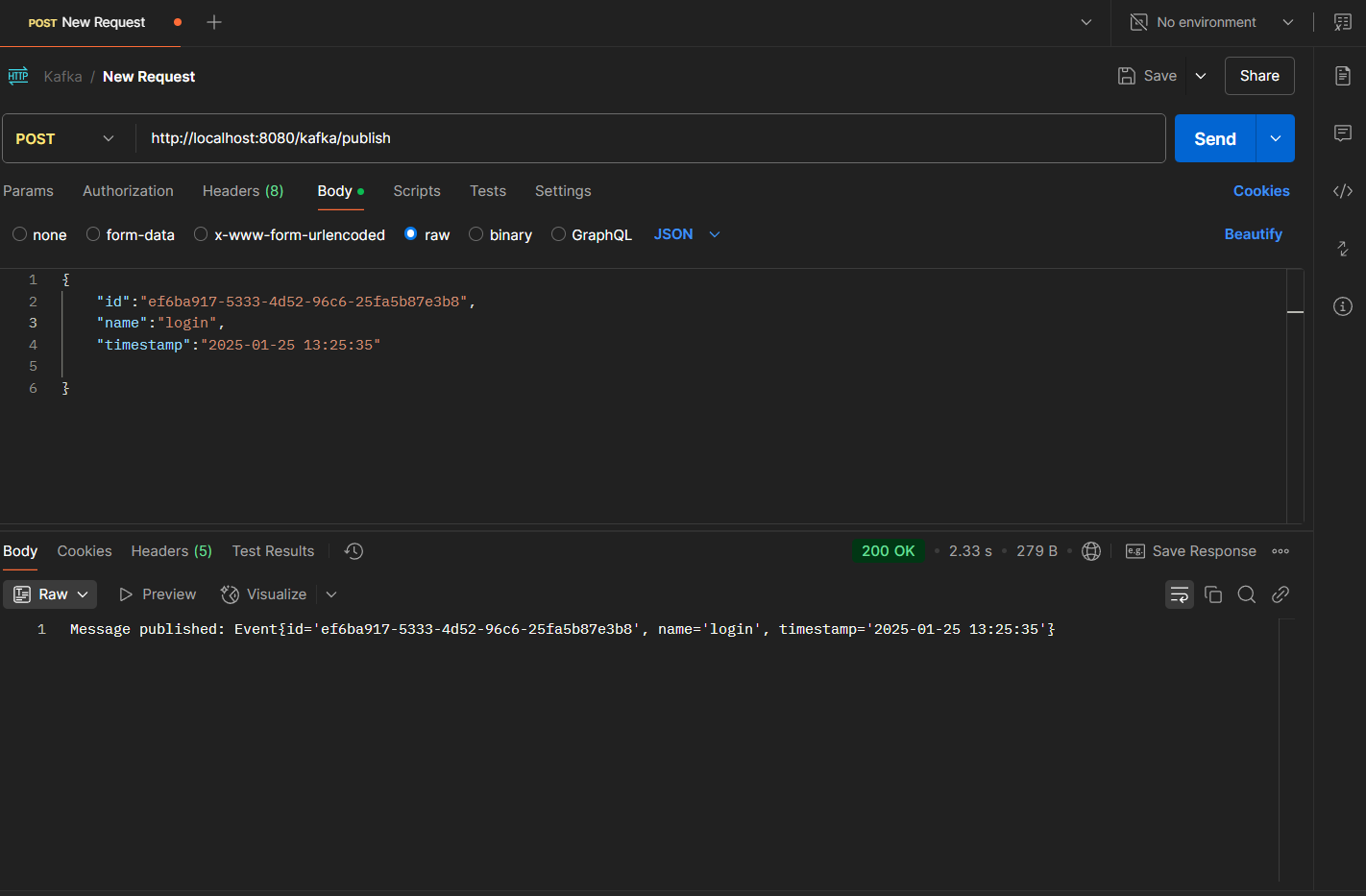
Lets publish the message and see whether its sent to the kafka topic.
2025-01-25T14:00:08.180+05:30  INFO 22176 --- [nio-8080-exec-2] o.a.k.c.t.i.KafkaMetricsCollector        : initializing Kafka metrics collector
2025-01-25T14:00:08.203+05:30  INFO 22176 --- [nio-8080-exec-2] o.a.k.clients.producer.KafkaProducer     : [Producer clientId=producer-1] Instantiated an idempotent producer.
2025-01-25T14:00:08.241+05:30  INFO 22176 --- [nio-8080-exec-2] o.a.kafka.common.utils.AppInfoParser     : Kafka version: 3.8.1
2025-01-25T14:00:08.243+05:30  INFO 22176 --- [nio-8080-exec-2] o.a.kafka.common.utils.AppInfoParser     : Kafka commitId: 70d6ff42debf7e17
2025-01-25T14:00:08.243+05:30  INFO 22176 --- [nio-8080-exec-2] o.a.kafka.common.utils.AppInfoParser     : Kafka startTimeMs: 1737793808241
2025-01-25T14:00:08.271+05:30  INFO 22176 --- [ad | producer-1] org.apache.kafka.clients.Metadata        : [Producer clientId=producer-1] Cluster ID: MkU3OEVBNTcwNTJENDM2Qk
2025-01-25T14:00:08.289+05:30  INFO 22176 --- [ad | producer-1] o.a.k.c.p.internals.TransactionManager   : [Producer clientId=producer-1] ProducerId set to 17 with epoch 0
Message sent: {"id":"ef6ba917-5333-4d52-96c6-25fa5b87e3b8","name":"login","timestamp":"2025-01-25 13:25:35"}
Lets see whether published message is consumed from kafka topic.
Received event: Event{id='ef6ba917-5333-4d52-96c6-25fa5b87e3b8', name='login', timestamp='2025-01-25 13:25:35'}