Spring Boot Course
Spring Boot provides a starter for web applications, simplifying the process of setting up and configuring a Spring MVC-based web application. This starter reduces the amount of work a developer has to do, particularly in the following areas:
- Maven project creation and setup: Spring Boot provides a streamlined approach to creating a Maven-based project.
- pom.xml dependencies and plugins: Spring Boot automatically manages the necessary dependencies and plugins for web applications.
- Common code (AppInit, AppConfig): The boilerplate configuration code like AppInit and AppConfig is automatically handled by Spring Boot.
- Runtime environment and JAR/WAR creation: Spring Boot simplifies the packaging process, enabling developers to easily create JARs or WARs for deployment.
This process is part of Spring Boot's AutoConfiguration mechanism, which automatically configures the application based on the project's dependencies and environment, reducing the need for manual configuration.
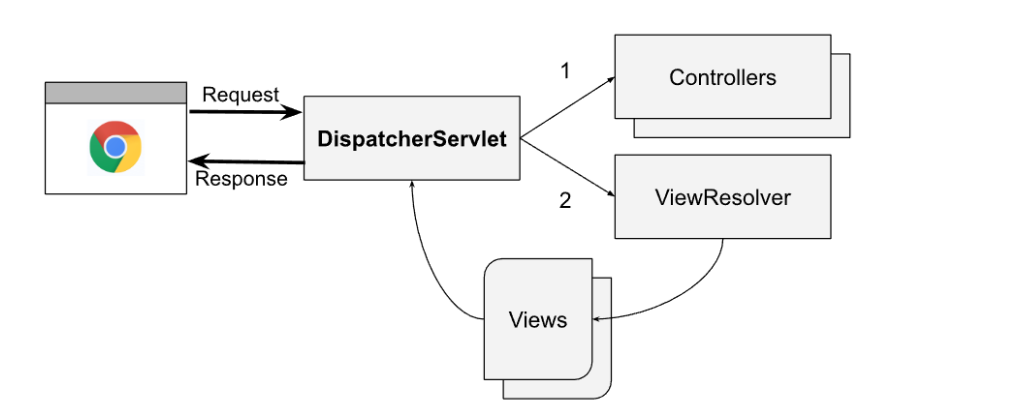
Spring MVC Request Flow
-
DispatcherServlet: The DispatcherServlet is the central component of Spring MVC. It acts as the "brain" of the framework, receiving all incoming HTTP requests and dispatching them to the appropriate controllers for processing.
-
Controllers: Controllers are beans annotated with @Controller and are responsible for handling HTTP requests. They process the request and return a model and view.
-
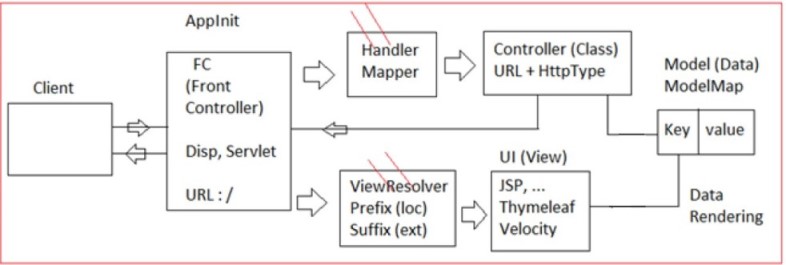
HandlerMapping: The DispatcherServlet delegates the request to the correct controller using a HandlerMapping, which determines which controller method should handle the request based on the URL.
-
ViewResolver: After the controller processes the request and returns a view name, the ViewResolver component determines how to render the view. The view can either be static (a file, such as an HTML page) or dynamic (generated using technologies like Thymeleaf or Jakarta Server Pages).
-
View Rendering: The resolved view is then returned to the client in the HTTP response.
Spring Boot's Role in MVC Configuration
-
Front Controller Configuration: Spring Boot automatically configures the DispatcherServlet as the front controller, mapping it to the root URL ('/'), which means you don’t have to manually configure this in your application.
-
ViewResolver Configuration: While Spring Boot automatically configures the ViewResolver, the developer is responsible for providing some basic settings (such as the prefix and suffix for views) via the application.properties or application.yml file. For example:
All About Thymeleaf
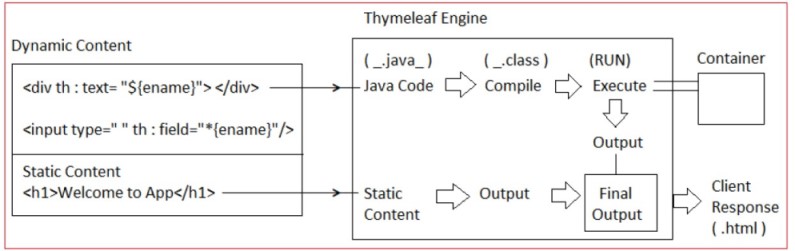
SpringBoot supports working with Thymeleaf UI engine which converts only Dynamic content into its equal java code, static content is placed as it is.
Dynamic content will be converted to java format and then compiled, finally executed and mixed with static output.
Compared to JSP its coding and memory is less and execution is faster.
JSP(JASPER) is a heavy weight engine; Thymeleaf is a light engine (less memory).
It may read data from spring container using Thymeleaf EL.
To enable Thymeleaf UI in Spring boot apps add below starter in pom.xml.
<dependency>
  <groupId>org.springframework.boot</groupId>
  <artifactId>spring-boot-starter-thymeleaf</artifactId>
</dependency>
Thymeleaf tags(code) starts with prefix th. for example, th:action, th: hreaf, th:object … etc.
Thymeleaf supports Symbols like '@', '$', and '_' for dynamic coding. For example, @{url}, EL}, _{Link}
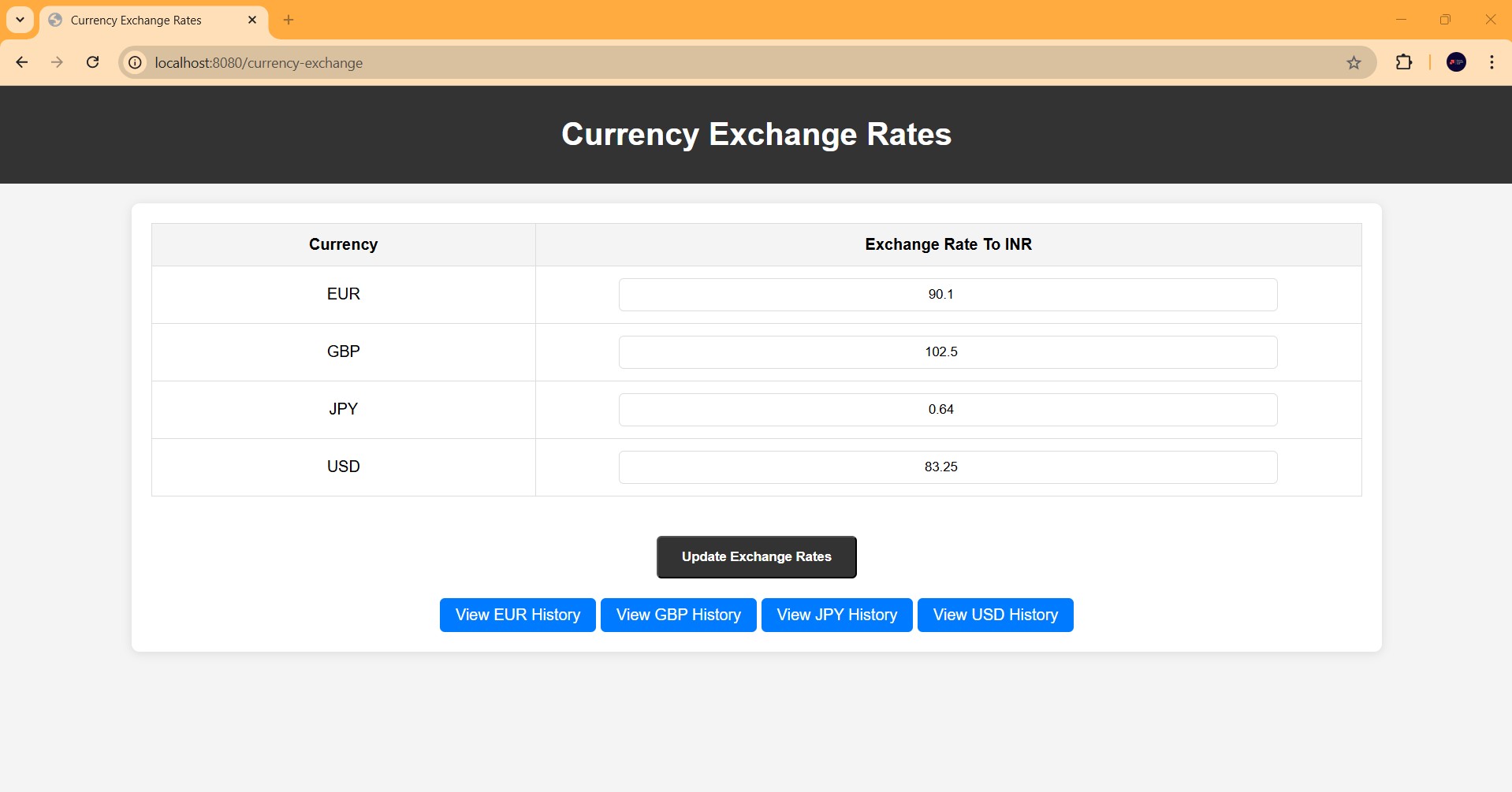
Let's develop a springboot webapp called currency exchange Rates using Thymeleaf
Add below dependencies in pom.xml.
<?xml version="1.0" encoding="UTF-8"?>
<project xmlns="http://maven.apache.org/POM/4.0.0" xmlns:xsi="http://www.w3.org/2001/XMLSchema-instance"
         xsi:schemaLocation="http://maven.apache.org/POM/4.0.0 https://maven.apache.org/xsd/maven-4.0.0.xsd">
    <modelVersion>4.0.0</modelVersion>
    <parent>
        <groupId>org.springframework.boot</groupId>
        <artifactId>spring-boot-starter-parent</artifactId>
        <version>3.4.0</version>
        <relativePath/> <!-- lookup parent from repository -->
    </parent>
    <groupId>com.praveen.currency</groupId>
    <artifactId>currency-exchange-app</artifactId>
    <version>0.0.1-SNAPSHOT</version>
    <name>Currency Exchange App</name>
    <description>Currency Exchange App</description>
    <url/>
    <licenses>
        <license/>
    </licenses>
    <developers>
        <developer/>
    </developers>
    <scm>
        <connection/>
        <developerConnection/>
        <tag/>
        <url/>
    </scm>
    <properties>
        <java.version>17</java.version>
    </properties>
    <dependencies>
        <dependency>
            <groupId>org.springframework.boot</groupId>
            <artifactId>spring-boot-starter-web</artifactId>
        </dependency>
        <dependency>
            <groupId>org.springframework.boot</groupId>
            <artifactId>spring-boot-starter-data-jpa</artifactId>
        </dependency>
        <dependency>
            <groupId>org.springframework.boot</groupId>
            <artifactId>spring-boot-starter-thymeleaf</artifactId>
        </dependency>
        <dependency>
            <groupId>com.h2database</groupId>
            <artifactId>h2</artifactId>
            <scope>runtime</scope>
        </dependency>
        <dependency>
            <groupId>org.springframework.boot</groupId>
            <artifactId>spring-boot-starter-test</artifactId>
            <scope>test</scope>
        </dependency>
    </dependencies>

    <build>
        <plugins>
            <plugin>
                <groupId>org.springframework.boot</groupId>
                <artifactId>spring-boot-maven-plugin</artifactId>
            </plugin>
        </plugins>
    </build>

</project>
Now Let's define the properties in application.yml present in resources folder
spring.application.name=Currency Exchange Service
# File-based H2 Database Configuration
spring.datasource.url=jdbc:h2:file:./data/testdb;DB_CLOSE_DELAY=-1;DB_CLOSE_ON_EXIT=FALSE
spring.datasource.driverClassName=org.h2.Driver
spring.datasource.username=sa
spring.datasource.password=password
spring.jpa.database-platform=org.hibernate.dialect.H2Dialect

# Hibernate DDL Auto (use 'update' to automatically create/update tables)
spring.jpa.hibernate.ddl-auto=update

# Enable the H2 Console (optional for debugging via browser)
spring.h2.console.enabled=true
spring.h2.console.path=/h2-console

# Thymeleaf template configuration
spring.thymeleaf.prefix=classpath:/templates/
spring.thymeleaf.suffix=.html
spring.thymeleaf.mode=HTML
spring.thymeleaf.encoding=UTF-8
spring.thymeleaf.cache=false
Here with the main class
package com.praveen.currency;

import org.springframework.boot.SpringApplication;
import org.springframework.boot.autoconfigure.SpringBootApplication;

@SpringBootApplication
public class CurrencyExchangeServiceApplication {

	public static void main(String[] args) {
		SpringApplication.run(CurrencyExchangeServiceApplication.class, args);
	}

}
Let's create the entity class
package com.praveen.currency.entity;

import jakarta.persistence.Entity;
import jakarta.persistence.GeneratedValue;
import jakarta.persistence.GenerationType;
import jakarta.persistence.Id;

import java.time.LocalDate;

@Entity
public class CurrencyExchange {
    @Id
    @GeneratedValue(strategy = GenerationType.IDENTITY)
    private Long id;

    private String currencyCode;
    private Double exchangeRateToInr;
    private Boolean isValid;
    private Integer version;
    private LocalDate createdDate;
    private String createdBy;
    private LocalDate modifiedDate;

	// constuctor, getters and setters

}
Let's create the dtos
package com.praveen.currency.dto;

public record CurrencyExchangeDTO(String currencyCode, Double exchangeRateToInr) {
}
package com.praveen.currency.dto;

import java.time.LocalDate;

public record CurrencyHistoryExchangeDTO(String currencyCode, Double exchangeRateToInr, Integer version,
                                         String createdBy, LocalDate createdDate, String modifiedBy,
                                         LocalDate modifiedDate) {
}
package com.praveen.currency.model;

import com.praveen.currency.dto.CurrencyExchangeDTO;

import java.util.List;

public record CurrencyExchangeForm(List<CurrencyExchangeDTO> exchanges) {

}
Let's create the repository class
package com.praveen.currency.repository;

import com.praveen.currency.entity.CurrencyExchange;
import org.springframework.data.jpa.repository.JpaRepository;
import org.springframework.data.jpa.repository.Query;
import org.springframework.stereotype.Repository;

import java.util.List;
import java.util.Optional;

@Repository
public interface CurrencyExchangeRepository extends JpaRepository<CurrencyExchange, Long> {

    Optional<CurrencyExchange> findByCurrencyCodeAndIsValidTrue(String currencyCode);

    List<CurrencyExchange> findByIsValidTrueOrderByCurrencyCodeAsc();

    List<CurrencyExchange> findByCurrencyCodeAndIsValidFalseOrderByVersionDesc(String currencyCode);

    @Query("SELECT MAX(c.version) FROM CurrencyExchange c WHERE c.currencyCode = :currencyCode AND c.isValid = false")
    Integer findTopVersionByCurrencyCodeAndIsValidFalseOrderByVersionDesc(String currencyCode);
}
Let's create Service class
package com.praveen.currency.service;

import com.praveen.currency.dto.CurrencyExchangeDTO;
import com.praveen.currency.dto.CurrencyHistoryExchangeDTO;

import java.util.List;

public interface CurrencyExchangeService {

    List<CurrencyExchangeDTO> fetchCurrencyExchanges();

    List<CurrencyHistoryExchangeDTO> fetchHistoryCurrencyExchangesByCurrencyCode(String currencyCode);

    void updateCurrencyExchanges(List<CurrencyExchangeDTO> currencyExchanges);


}
package com.praveen.currency.service.impl;

import com.praveen.currency.dto.CurrencyExchangeDTO;
import com.praveen.currency.dto.CurrencyHistoryExchangeDTO;
import com.praveen.currency.entity.CurrencyExchange;
import com.praveen.currency.repository.CurrencyExchangeRepository;
import com.praveen.currency.service.CurrencyExchangeService;
import org.springframework.stereotype.Service;
import org.springframework.transaction.annotation.Transactional;

import java.time.LocalDate;
import java.util.List;

@Service
public class CurrencyExchangeServiceImpl implements CurrencyExchangeService {

    private final CurrencyExchangeRepository currencyExchangeRepository;

    public CurrencyExchangeServiceImpl(CurrencyExchangeRepository currencyExchangeRepository) {
        this.currencyExchangeRepository = currencyExchangeRepository;
    }

    /**
     * Fetch all valid currency exchanges.
     */
    @Override
    @Transactional(readOnly = true)
    public List<CurrencyExchangeDTO> fetchCurrencyExchanges() {
        return currencyExchangeRepository.findByIsValidTrueOrderByCurrencyCodeAsc()
                .stream()
                .map(exchange -> new CurrencyExchangeDTO(exchange.getCurrencyCode(), exchange.getExchangeRateToInr()))
                .toList();
    }

    /**
     * Fetch the historical exchange rate for a given currency code.
     */
    @Override
    @Transactional(readOnly = true)
    public List<CurrencyHistoryExchangeDTO> fetchHistoryCurrencyExchangesByCurrencyCode(String currencyCode) {
        return currencyExchangeRepository.findByCurrencyCodeAndIsValidFalseOrderByVersionDesc(currencyCode)
                .stream()
                .map(exchange -> new CurrencyHistoryExchangeDTO(exchange.getCurrencyCode(), exchange.getExchangeRateToInr(), exchange.getVersion(), exchange.getCreatedBy(), exchange.getCreatedDate(), exchange.getModifiedBy(), exchange.getModifiedDate()))
                .toList();
    }

    /**
     * Update exchange rates using the DTO list.
     */
    @Override
    @Transactional
    public void updateCurrencyExchanges(List<CurrencyExchangeDTO> currencyExchanges) {
        for (CurrencyExchangeDTO dto : currencyExchanges) {
            CurrencyExchange currentCurrencyExchange = currencyExchangeRepository
                    .findByCurrencyCodeAndIsValidTrue(dto.currencyCode())
                    .orElseThrow(() -> new IllegalArgumentException("Currency Code " + dto.currencyCode() + " not found"));

            if (!currentCurrencyExchange.getExchangeRateToInr().equals(dto.exchangeRateToInr())) {
                currentCurrencyExchange.setValid(false);
                currencyExchangeRepository.save(currentCurrencyExchange);

                Integer latestVersion = currencyExchangeRepository
                        .findTopVersionByCurrencyCodeAndIsValidFalseOrderByVersionDesc(dto.currencyCode());
                int newVersion = (latestVersion != null ? latestVersion : 0) + 1;

                CurrencyExchange newCurrencyExchange = new CurrencyExchange();
                newCurrencyExchange.setCurrencyCode(dto.currencyCode());
                newCurrencyExchange.setExchangeRateToInr(dto.exchangeRateToInr());
                newCurrencyExchange.setVersion(newVersion);
                newCurrencyExchange.setValid(true);
                newCurrencyExchange.setModifiedBy("Praveen");
                newCurrencyExchange.setCreatedBy("Praveen");
                newCurrencyExchange.setCreatedDate(LocalDate.now());
                newCurrencyExchange.setModifiedDate(LocalDate.now());


                currencyExchangeRepository.save(newCurrencyExchange);
            }

        }
    }
}
Let's create the controller class
package com.praveen.currency.controller;

import com.praveen.currency.dto.CurrencyExchangeDTO;
import com.praveen.currency.dto.CurrencyHistoryExchangeDTO;
import com.praveen.currency.model.CurrencyExchangeForm;
import com.praveen.currency.service.CurrencyExchangeService;
import org.springframework.beans.factory.annotation.Autowired;
import org.springframework.stereotype.Controller;
import org.springframework.ui.Model;
import org.springframework.web.bind.annotation.*;
import org.springframework.web.servlet.mvc.support.RedirectAttributes;

import java.util.List;

@Controller
@RequestMapping("/currency-exchange")
public class CurrencyExchangeController {

    private final CurrencyExchangeService currencyExchangeService;

    @Autowired
    public CurrencyExchangeController(CurrencyExchangeService currencyExchangeService) {
        this.currencyExchangeService = currencyExchangeService;
    }

    @GetMapping
    public String showCurrencyExchangeForm(Model model) {
        List<CurrencyExchangeDTO> exchanges = currencyExchangeService.fetchCurrencyExchanges();
        model.addAttribute("currencyExchangeForm", new CurrencyExchangeForm(exchanges));
        return "currency-exchange";
    }

    @PostMapping("/update")
    public String updateExchangeRates(@ModelAttribute("currencyExchangeForm") CurrencyExchangeForm form, RedirectAttributes redirectAttributes) {
        currencyExchangeService.updateCurrencyExchanges(form.exchanges());
        redirectAttributes.addFlashAttribute("success", true);
        return "redirect:/currency-exchange";
    }


    @GetMapping("/history")
    public String viewCurrencyHistory(@RequestParam String currencyCode, Model model) {
        List<CurrencyHistoryExchangeDTO> history = currencyExchangeService.fetchHistoryCurrencyExchangesByCurrencyCode(currencyCode);
        model.addAttribute("currencyCode", currencyCode);
        model.addAttribute("history", history);
        return "currency-exchange-history";
    }
}
Let's create thymeleaf html files
currency-exchange.html
<!DOCTYPE html> <html xmlns:th="http://www.thymeleaf.org"> <head> <meta charset="UTF-8"> <meta name="viewport" content="width=device-width, initial-scale=1.0"> <title>Currency Exchange Rates</title> <style> body { font-family: Arial, sans-serif; margin: 0; padding: 0; background-color: #f4f4f4; } header { background-color: #333; color: white; padding: 10px 0; text-align: center; } .container { width: 80%; margin: 20px auto; background-color: white; padding: 20px; border-radius: 8px; box-shadow: 0 2px 10px rgba(0, 0, 0, 0.1); } .currency-table { width: 100%; border-collapse: collapse; margin-bottom: 20px; } .currency-table th, .currency-table td { padding: 12px; text-align: center; border: 1px solid #ddd; } .currency-table th { background-color: #f4f4f4; } .currency-table input { width: 80%; padding: 8px; text-align: center; border-radius: 5px; border: 1px solid #ddd; } .btn-submit { display: inline-block; padding: 12px 24px; background-color: #333; color: white; text-decoration: none; border-radius: 5px; font-weight: bold; margin-top: 20px; text-align: center; } .btn-submit:hover { background-color: #444; } .history-link { display: inline-block; margin-top: 20px; padding: 8px 16px; background-color: #007bff; color: white; text-decoration: none; border-radius: 5px; } .history-link:hover { background-color: #0056b3; } .modal { display: none; position: fixed; top: 20px; right: 20px; z-index: 1000; padding: 10px; border-radius: 8px; } .modal-content { background-color: #fefefe; padding: 20px; border: 1px solid #888; width: 300px; text-align: center; border-radius: 8px; } .close { color: #aaa; float: right; font-size: 28px; font-weight: bold; } .close:hover, .close:focus { color: black; text-decoration: none; cursor: pointer; } </style> </head> <body> <header> <h1>Currency Exchange Rates</h1> </header> <div class="container"> <form id="currencyForm" action="/currency-exchange/update" method="POST" th:object="${currencyExchangeForm}"> <table class="currency-table"> <thead> <tr> <th>Currency</th> <th>Exchange Rate To INR</th> </tr> </thead> <tbody> <tr th:each="exchange, iterStat : ${currencyExchangeForm.exchanges}"> <td th:text="${exchange.currencyCode}">Currency</td> <td> <input type="number" step="0.01" th:name="'exchanges[' + ${iterStat.index} + '].exchangeRateToInr'" th:value="${exchange.exchangeRateToInr}" required /> <input type="hidden" th:name="'exchanges[' + ${iterStat.index} + '].currencyCode'" th:value="${exchange.currencyCode}" /> </td> </tr> </tbody> </table> <div style="text-align:center;"> <button type="submit" class="btn-submit">Update Exchange Rates</button> </div> </form> <div style="text-align:center;"> <a href="/currency-exchange/history?currencyCode=EUR" class="history-link">View EUR History</a> <a href="/currency-exchange/history?currencyCode=GBP" class="history-link">View GBP History</a> <a href="/currency-exchange/history?currencyCode=JPY" class="history-link">View JPY History</a> <a href="/currency-exchange/history?currencyCode=USD" class="history-link">View USD History</a> </div> </div> <!-- Modal for success message --> <div id="successModal" class="modal" th:if="${success}"> <div class="modal-content"> <span class="close">×</span> <p>Exchange Rates Updated Successfully!</p> </div> </div> <script> document.addEventListener("DOMContentLoaded", function() { var modal = document.getElementById("successModal"); if (modal) { modal.style.display = "block"; var closeBtn = modal.querySelector(".close"); closeBtn.onclick = function() { modal.style.display = "none"; } window.onclick = function(event) { if (event.target === modal) { modal.style.display = "none"; } } } }); </script> </body> </html>
currency-exchange-history.html
<!DOCTYPE html>
<html xmlns:th="http://www.thymeleaf.org">
<head>
    <meta charset="UTF-8">
    <meta name="viewport" content="width=device-width, initial-scale=1.0">
    <title>Currency Exchange History - [[${currencyCode}]]</title>
    <style>
        body {
            font-family: Arial, sans-serif;
            margin: 0;
            padding: 0;
            background-color: #f4f4f4;
        }

        header {
            background-color: #333;
            color: white;
            padding: 10px 0;
            text-align: center;
        }

        table {
            width: 70%;
            margin: 20px auto;
            border-collapse: collapse;
            background-color: white;
        }

        th, td {
            padding: 12px;
            text-align: center;
            border: 1px solid #ddd;
        }

        th {
            background-color: #f4f4f4;
        }

        .history-container {
            max-width: 1000px;
            margin: 0 auto;
            padding: 20px;
        }

        .back-button {
            display: inline-block;
            margin: 20px 0;
            padding: 10px 20px;
            background-color: #333;
            color: white;
            text-decoration: none;
            border-radius: 5px;
            text-align: center;
        }

        .back-button:hover {
            background-color: #444;
        }
    </style>
</head>
<body>

<header>
    <h1>Currency Exchange History - <span th:text="${currencyCode}"></span></h1>
</header>

<div class="history-container">
    <a href="/currency-exchange" class="back-button">Back to Current Exchange Rates</a>

    <table>
        <thead>
        <tr>
            <th>Version</th>
            <th>Exchange Rate To INR</th>
            <th>Created By</th>
            <th>Created Date</th>
            <th>Modified By</th>
            <th>Modified Date</th>

        </tr>
        </thead>
        <tbody>
        <tr th:each="history : ${history}">
            <td th:text="${history.version}"></td>
            <td th:text="${history.exchangeRateToInr}"></td>
            <td th:text="${history.createdBy}"></td>
            <td th:text="${history.createdDate}"></td>
            <td th:text="${history.modifiedBy}"></td>
            <td th:text="${history.modifiedDate}"></td>

        </tr>
        <tr th:if="${#lists.isEmpty(history)}">
            <td colspan="6" style="text-align:center;">No History Available</td>
        </tr>
        </tbody>
    </table>
</div>

</body>
</html>
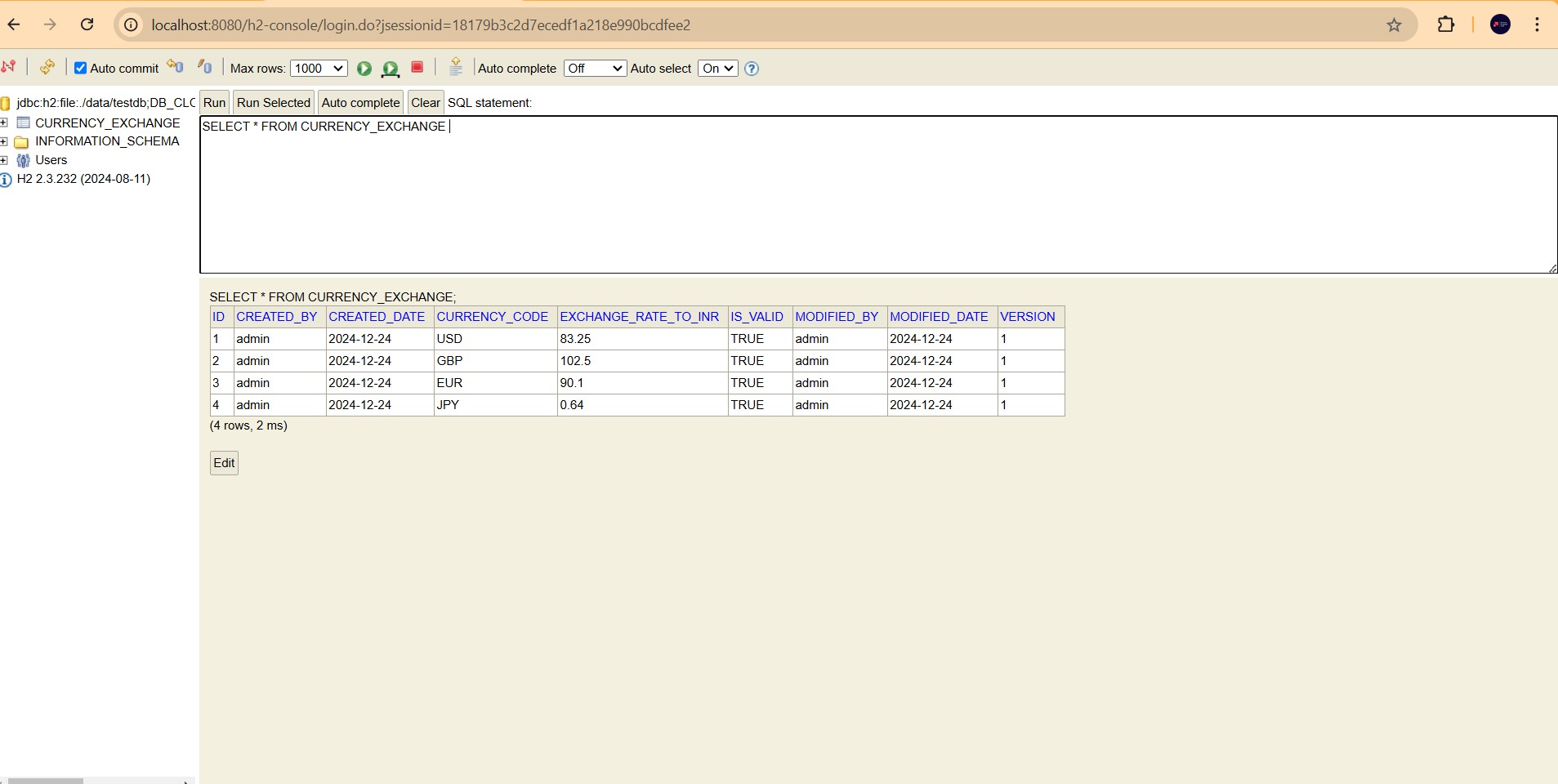
After starting the app, open the h2 console http://localhost:8080/h2-console.
Execute the below insert queries.
INSERT INTO CURRENCY_EXCHANGE
(currency_code, exchange_rate_to_inr, is_valid, version, created_date, created_by, modified_date, modified_by)
VALUES
('USD', 83.25, true, 1, '2024-12-24', 'admin', '2024-12-24', 'admin'),
('GBP', 102.50, true, 1, '2024-12-24', 'admin', '2024-12-24', 'admin'),
('EUR', 90.10, true, 1, '2024-12-24', 'admin', '2024-12-24', 'admin'),
('JPY', 0.64, true, 1, '2024-12-24', 'admin', '2024-12-24', 'admin');
Let's open the currency exchange URL http://localhost:8080/currency-exchange