Spring Boot Course
RabbitMQ is a message broker. In essence, it accepts messages from producers, and delivers them to consumers. In-between, it can route, buffer, and persist the messages according to rules you give it.
The way RabbitMQ routes messages depends upon the messaging protocol it implements. RabbitMQ supports multiple messaging protocols. However, the one we are interested in is AMQP. It is an acronym for Advanced Message Queuing Protocol.
Advanced Message Queuing Protocol
The conceptual model of AMQP is quite simple and straightforward. It has three entities:
- Queue
- Binding
- Exchange
When a publisher pushes a message to RabbitMQ, it first arrives at an exchange. The exchange then distributes copies of these messages to variously connected queues. Finally, consumers receive these messages.
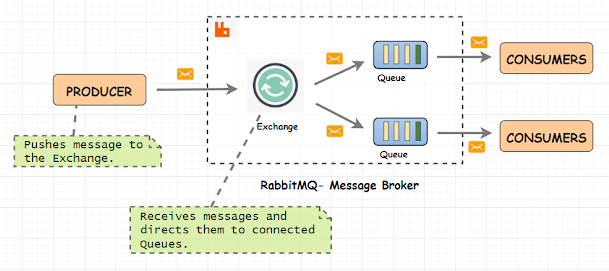
Producer
Producer will send messages to RabbitMQ Exchanges with a routingKey(queuename). RabbitMQ uses routingKey(queuename) to determine which queues for routing messages.
Queue
Here, our message will be stored. Once consumed by consumers, message will be removed from queue.
RabbitMQ queues also follow FIFO — First-In-First-Out methodology.
Consumer
Consumer listens on a RabbitMQ Queue to receive messages.
Bindings
Bindings are the rules that a queue defines while establishing a connection with an exchange. You can have a queue connected to multiple exchanges. Every queue is also connected to a default exchange. An exchange will use these bindings to route messages to queues.
Exchange
An Exchange is a gateway to RabbitMQ for your messages. The distance the message has to travel inside RabbitMQ depends on the type of exchange.
Primarily there are four types of exchanges
- Direct Exchange It routes messages to a queue by matching routing key equal to binding key. Routing key == Binding key
- Fanout Exchange It ignores the routing key and sends message to all the available queues.
- Topic Exchange It routes messages to multiple queues by a partial matching of a routing key. It uses patterns to match the routing and binding key. Routing key == Pattern in binding key.
- Headers Exchange It uses message header instead of routing key.
- Default(Nameless) Exchange It routes the message to queue name that exactly matches with the routing key.
Local Environment Configuration
How to install RabbitMQ in your local?
- Download supporting ERLANG component from here and install.
- Download Rabbit MQ from here and install
- Enable management plugin using below command
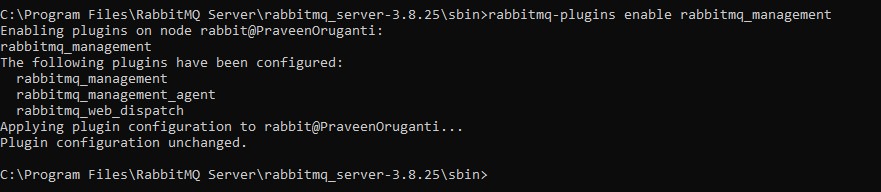
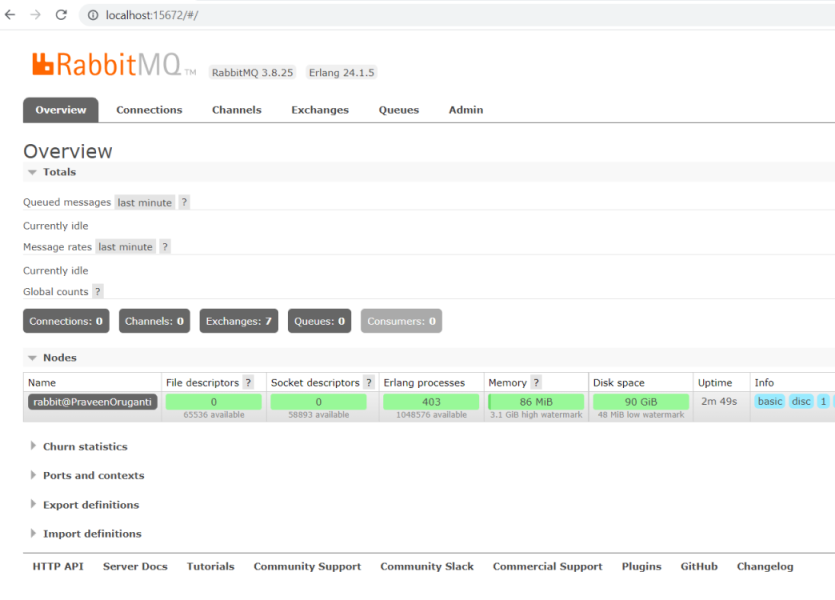
- Login into Rabbit MQ browser using URL http://localhost:15672 using userid: guest and password: guest.
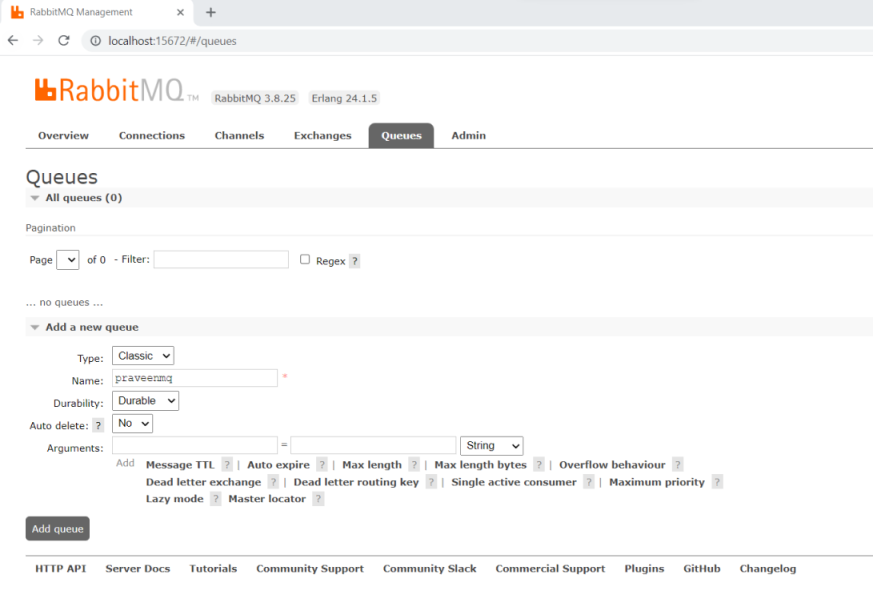
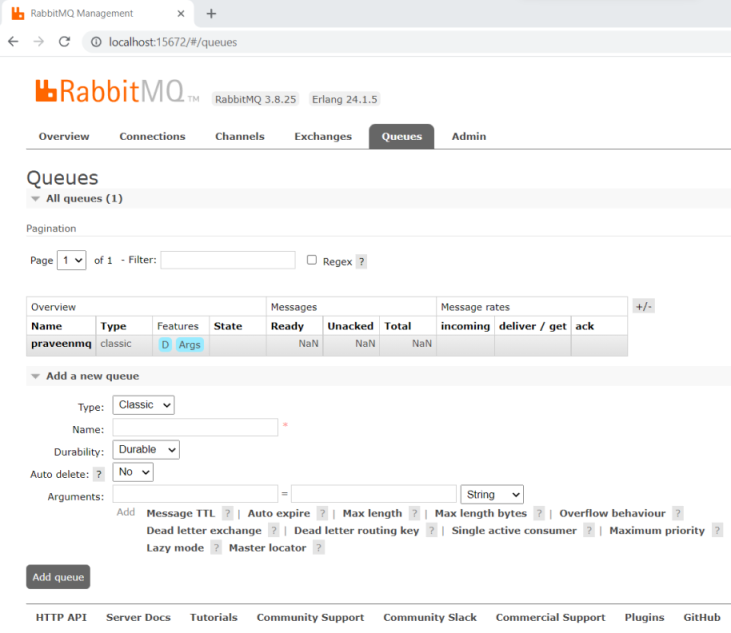
- Now click on Queues Tab and create queue named praveenmq
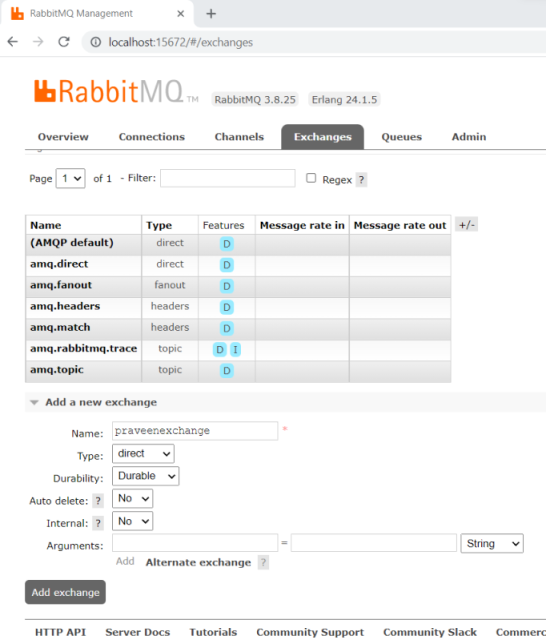
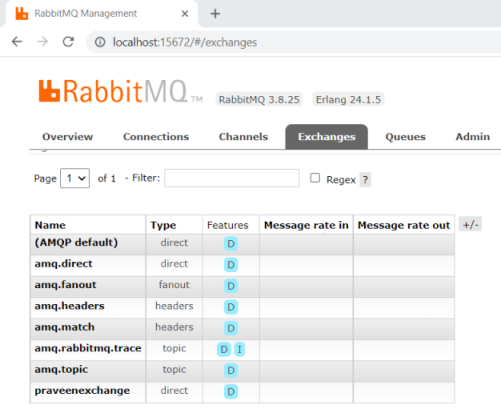
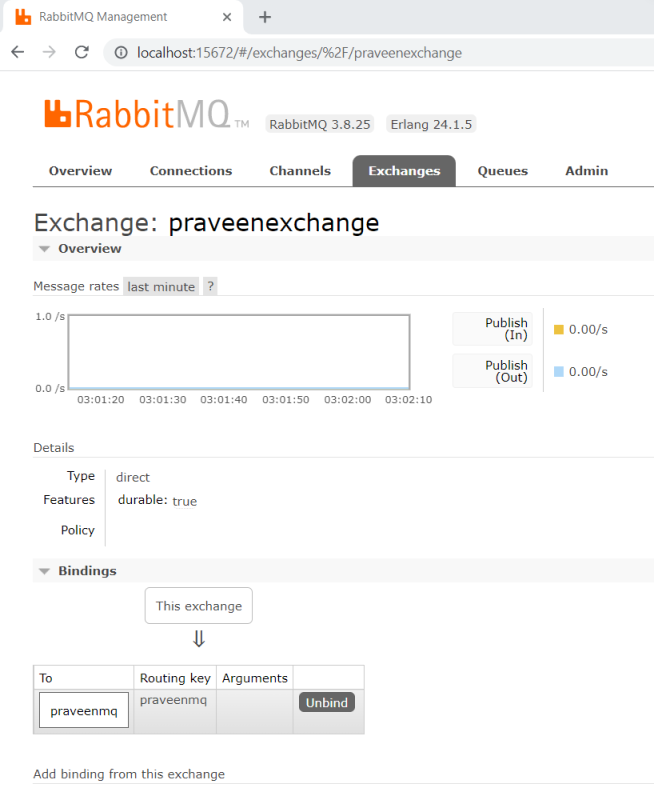
- Now click on Exchanges Tab and create exchange named praveenexchange and bind it to praveenmq.
Now let's develop a SpringBoot Application called Audit Listener which is used to send a message to RabbitMQ, listens a message from RabbitMQ and store the message in database.
Add below dependency in pom.xml
<dependency>
  <groupId>org.springframework.boot</groupId>
  <artifactId>spring-boot-starter-amqp</artifactId>
</dependency>
Lets configure the local RabbitMQ details
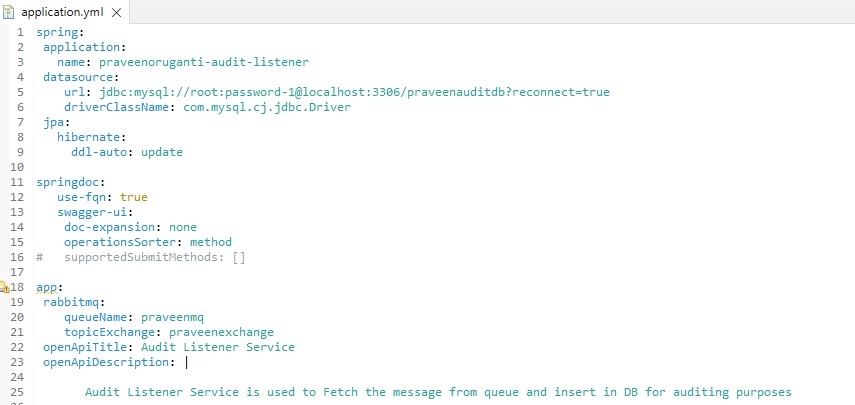
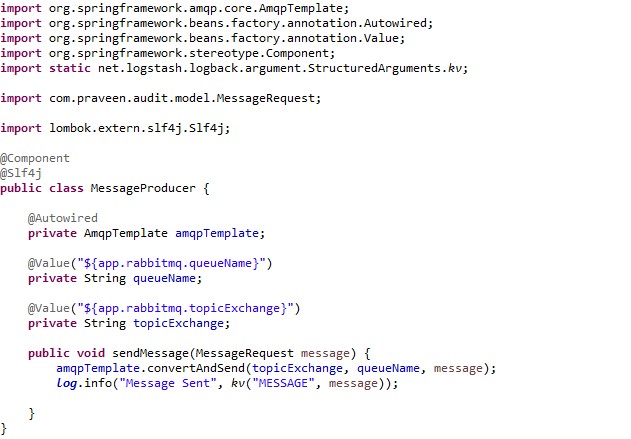
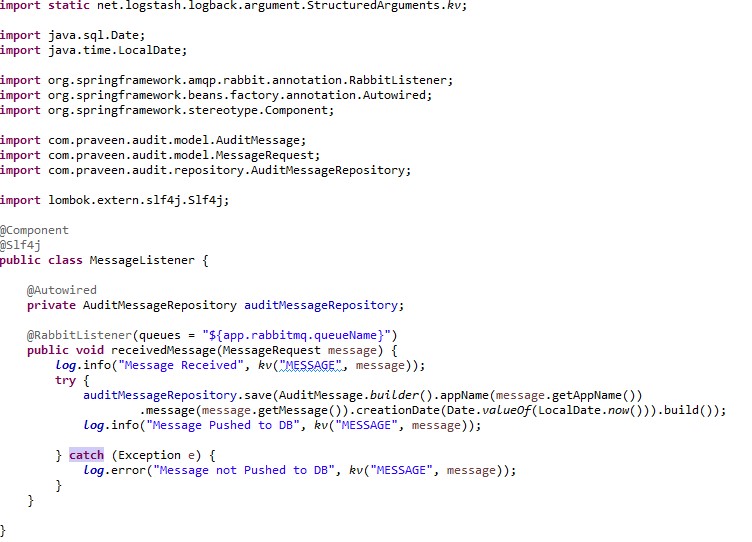
**Let's create the producer and consumer components for RabbitMQ **
Producer
Consumer
Now open URL http://localhost:8080/swagger-ui/index.html.
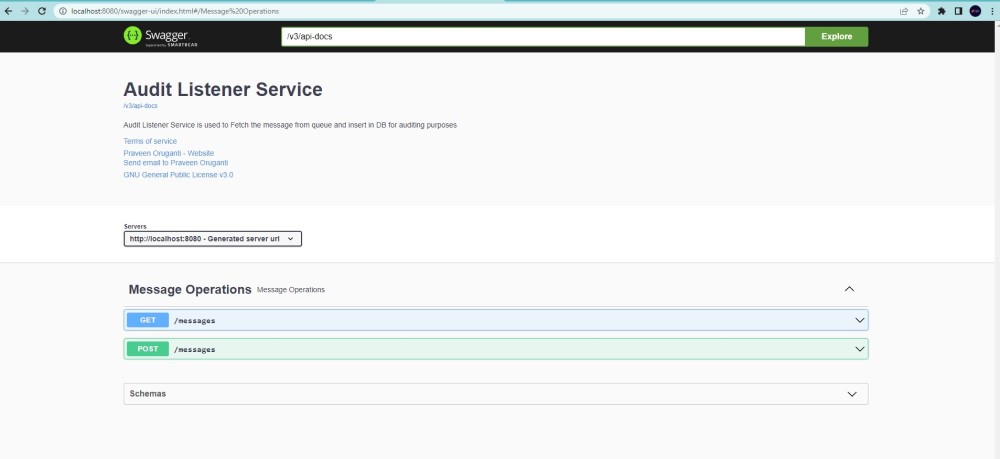
Now post a message to queue using endpoint POST /messages
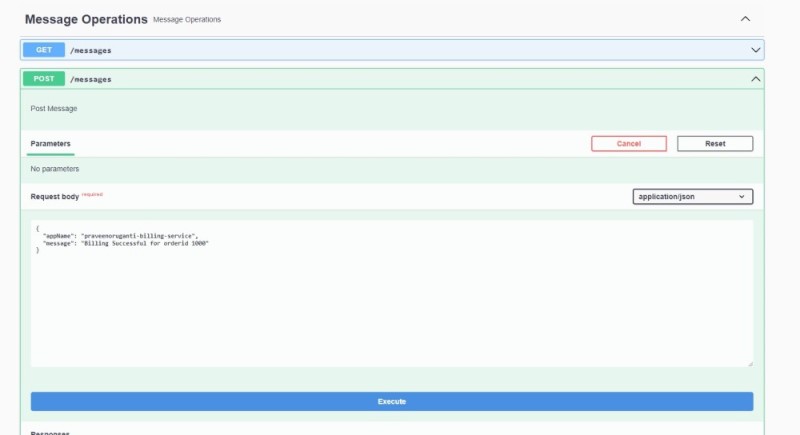
Log information of Message Producer component and it was successfully pushed to praveenmq Queue.
{"@timestamp":"2019-09-14T01:56:43.871+05:30","severity":"INFO","service":"praveenoruganti-audit-listener","thread":"http-nio-8080-exec-3","class":"c.praveen.audit.producer.MessageProducer","methodName":"sendMessage","lineNo":"28","message":"Message Sent","stacktrace":"","MESSAGE":{"appName":"praveenoruganti-billing-service","message":"Billing Successful for orderid 1000"}}
I see Message Listener fetched the message from praveenmq Queue and pushed to mysql db for tracking purpose.
{"@timestamp":"2019-09-14T01:56:43.900+05:30","severity":"INFO","service":"praveenoruganti-audit-listener","thread":"org.springframework.amqp.rabbit.RabbitListenerEndpointContainer#0-1","class":"c.praveen.audit.listener.MessageListener","methodName":"receivedMessage","lineNo":"27","message":"Message Received","stacktrace":"","MESSAGE":{"appName":"praveenoruganti-billing-service","message":"Billing Successful for orderid 1000"}}
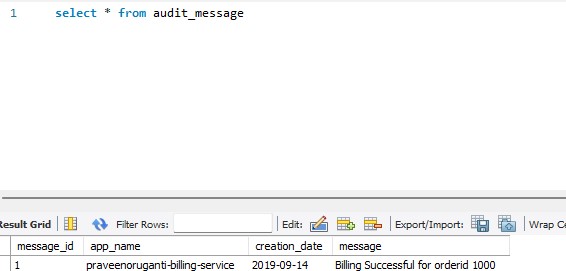
I am able to see the message pushed by Message Listener to DB.
{"@timestamp":"2019-09-14T01:56:44.059+05:30","severity":"INFO","service":"praveenoruganti-audit-listener","thread":"org.springframework.amqp.rabbit.RabbitListenerEndpointContainer#0-1","class":"c.praveen.audit.listener.MessageListener","methodName":"receivedMessage","lineNo":"31","message":"Message Pushed to DB","stacktrace":"","MESSAGE":{"appName":"praveenoruganti-billing-service","message":"Billing Successful for orderid 1000"}}
Let's see the message in DB.
You can also download the code and try out in your local machine.