Spring Boot Course
When publishing an API to consumers, you need to provide an API specification. The industry standard today is the OpenAPI Specification (OAS) — commonly version 3.x. Swagger UI is a tool that renders an OpenAPI spec as an interactive, browser-based documentation UI. The terms "Swagger" and "OpenAPI" are often used interchangeably, but technically: OpenAPI is the specification standard (maintained by the OpenAPI Initiative), and Swagger is the toolset (Swagger UI, Swagger Editor, etc.) originally created by SmartBear that works with that spec.
The original Springfox library (io.springfox) that was popular for Spring Boot 2.x is no longer actively maintained and does not support Spring Boot 3.x / Spring Framework 6.x. The recommended library today is springdoc-openapi, which supports both Spring Boot 2.x and 3.x, Spring WebMVC, Spring WebFlux, and Spring Data REST.
Steps to Integrate Swagger UI in a Spring Boot Application
1. Add the springdoc-openapi dependency
For Spring Boot 3.x (Jakarta EE):
<dependency>
    <groupId>org.springdoc</groupId>
    <artifactId>springdoc-openapi-starter-webmvc-ui</artifactId>
    <version>2.7.0</version>
</dependency>
For Spring Boot 2.x (still on javax):
<dependency>
    <groupId>org.springdoc</groupId>
    <artifactId>springdoc-openapi-ui</artifactId>
    <version>1.8.0</version>
</dependency>
No further configuration is required for basic usage — springdoc auto-generates the OpenAPI spec by scanning your controllers. The Swagger UI is available at http://localhost:8080/swagger-ui/index.html and the raw OpenAPI JSON/YAML at http://localhost:8080/v3/api-docs.
2. Customize the OpenAPI Metadata (optional but recommended)
@Configuration
public class OpenAPIConfig {

    private final AppConfig appConfig;

    public OpenAPIConfig(AppConfig appConfig) {
        this.appConfig = appConfig;
    }

    @Bean
    OpenAPI customOpenAPI() {
        return new OpenAPI()
            .components(new Components())
            .info(new Info()
                .title(appConfig.getOpenApiTitle())
                .description(appConfig.getOpenApiDescription())
                .version("1.0.0")
                .contact(new Contact()
                    .name("Praveen Oruganti")
                    .email("praveenoruganti@gmail.com")
                    .url("https://www.praveenoruganti.in"))
                .license(new License()
                    .name("GNU General Public License v3.0")
                    .url("https://www.gnu.org/licenses")));
    }
}
3. Configure springdoc properties in application.yml
springdoc:
  use-fqn: true               # use fully qualified class names in schema names (avoids collisions)
  swagger-ui:
    doc-expansion: none       # collapse all sections by default (cleaner UI)
    operationsSorter: method  # sort endpoints by HTTP method
  api-docs:
    path: /v3/api-docs        # default; customize if needed

app:
  openApiTitle: Employee Management Service
  openApiDescription: |
    Employee Management Service is used to manage employees.
4. Annotate Controllers with @Tag and @Operation
@RestController
@Validated
@RequestMapping("/api/v1")
@Tag(name = "Employee Management", description = "APIs for managing employees")
public class EmployeeManagementController {

    private final EmployeeManagementService employeeManagementService;

    public EmployeeManagementController(EmployeeManagementService employeeManagementService) {
        this.employeeManagementService = employeeManagementService;
    }

    @GetMapping(value = "/employees", produces = MediaType.APPLICATION_JSON_VALUE)
    @Operation(summary = "Fetch All Employees", description = "Returns a list of all employees")
    public List<Employee> fetchAllEmployees() {
        return employeeManagementService.fetchAllEmployees();
    }

    @GetMapping(value = "/employees/{id}", produces = MediaType.APPLICATION_JSON_VALUE)
    @Operation(
        summary = "Fetch Employee by ID",
        description = "Returns a single employee by their numeric ID",
        responses = {
            @ApiResponse(responseCode = "200", description = "Employee found"),
            @ApiResponse(responseCode = "400", description = "Invalid ID format"),
            @ApiResponse(responseCode = "404", description = "Employee not found")
        }
    )
    public EmployeeResponse getEmployeeById(@PathVariable @Min(1) Long id) throws EmployeeNotFoundException {
        return employeeManagementService.getEmployeeById(id);
    }

    @PostMapping(value = "/employees",
        produces = MediaType.APPLICATION_JSON_VALUE,
        consumes = MediaType.APPLICATION_JSON_VALUE)
    @Operation(summary = "Create Employee", description = "Creates a new employee record")
    public EmployeeResponse createEmployee(@RequestBody @Valid EmployeeRequest emp) {
        return employeeManagementService.createEmployee(emp);
    }

    @PutMapping(value = "/employees/{id}",
        produces = MediaType.APPLICATION_JSON_VALUE,
        consumes = MediaType.APPLICATION_JSON_VALUE)
    @Operation(summary = "Update Employee by ID")
    public EmployeeResponse updateEmployeeById(
        @RequestBody @Valid EmployeeRequest emp,
        @PathVariable @Min(1) Long id) throws EmployeeNotFoundException {
        return employeeManagementService.updateEmployeeById(emp, id);
    }

    @DeleteMapping(value = "/employees/{id}", produces = MediaType.APPLICATION_JSON_VALUE)
    @Operation(summary = "Delete Employee by ID")
    public EmployeeResponse deleteEmployeeById(@PathVariable @Min(1) Long id) {
        return employeeManagementService.deleteEmployeeById(id);
    }
}
5. Annotate Model/DTO classes with @Schema
@Schema(name = "ErrorMessage", description = "Error details for client, business, and system errors")
public record ErrorMessage(
    @Schema(description = "Error category code: 4000=client, 5000=server, 6000=business", example = "4000")
    String code,

    @Schema(description = "Human-readable error category description", example = "Input Validation Failure")
    String description,

    @Schema(description = "Map of specific error codes to messages",
            example = "{\"400001\":\"Request JSON is malformed or invalid\"}")
    Map<String, String> errors
) {}
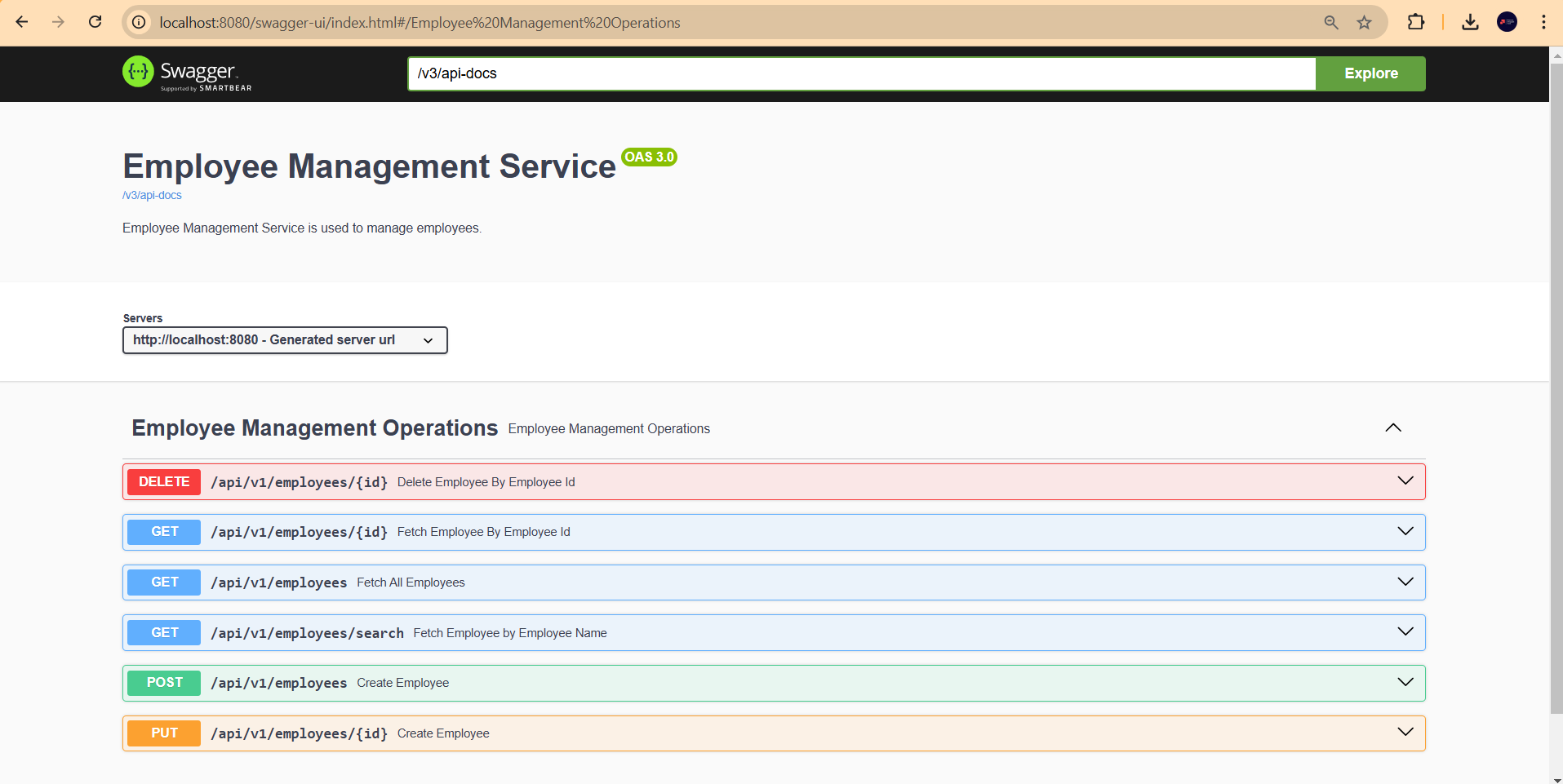
6. Access Swagger UI
http://localhost:8080/swagger-ui/index.html
Disabling Swagger UI in Production
Swagger UI should typically be disabled or secured in production environments to avoid exposing internal API structure. Two options:
# Option 1: Disable entirely in production profile
springdoc:
  swagger-ui:
    enabled: false
  api-docs:
    enabled: false
Or conditionally expose it only in non-production profiles using Spring Profile configuration, or protect it behind Spring Security requiring an ADMIN role.
Adding Security Schemes to Swagger UI
If your API uses JWT Bearer tokens, add a security scheme so testers can authenticate directly in the UI:
@Bean
OpenAPI customOpenAPI() {
    return new OpenAPI()
        .addSecurityItem(new SecurityRequirement().addList("bearerAuth"))
        .components(new Components()
            .addSecuritySchemes("bearerAuth",
                new SecurityScheme()
                    .type(SecurityScheme.Type.HTTP)
                    .scheme("bearer")
                    .bearerFormat("JWT")))
        .info(new Info().title("My API").version("1.0.0"));
}