Spring Boot Course
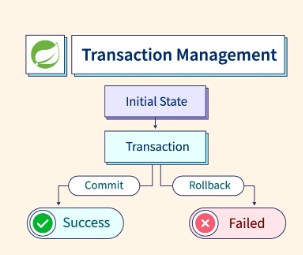
Transaction management is a key part of any enterprise application to ensure data consistency and integrity. In Spring Boot, transaction management is handled declaratively, allowing developers to easily manage transactions without needing to write complex code for commit and rollback operations.
Understanding Transactions
A transaction is a sequence of operations that are treated as a single unit of work. The goal of transaction management is to ensure that either all operations in a transaction are successfully completed (committed), or none are completed (rolled back) in case of failure. This ensures data consistency and integrity.
ACID Properties of Transactions
Transactions in Spring Boot follow the ACID properties to maintain consistency:
- Atomicity: A transaction is an "all-or-nothing" operation. If one part of the transaction fails, the entire transaction fails and is rolled back.
- Consistency: The database must transition from one consistent state to another, ensuring all constraints and rules are maintained.
- Isolation: Transactions must be isolated from each other to avoid data corruption.
- Durability: Once a transaction is committed, it is permanent, even in the case of power failure or crashes.
Transactional Annotation in Spring Boot
Spring Boot provides an easy-to-use declarative approach to transaction management through the @Transactional annotation. This allows developers to define the scope of a transaction without explicitly writing code for commit or rollback operations.
Write Operations (Using @Transactional) For write operations (such as create, update, and delete), we use the @Transactional annotation. This annotation ensures that all database modifications are executed within a single transaction, providing automatic commit or rollback behavior.
For example,
/**
 * Update exchange rates using the DTO list.
 */
@Override
@Transactional
public void updateCurrencyExchanges(List<CurrencyExchangeDTO> currencyExchanges) {
    for (CurrencyExchangeDTO dto : currencyExchanges) {
        CurrencyExchange currentCurrencyExchange = currencyExchangeRepository
                .findByCurrencyCodeAndIsValidTrue(dto.currencyCode())
                .orElseThrow(() -> new IllegalArgumentException("Currency Code " + dto.currencyCode() + " not found"));

        if (!currentCurrencyExchange.getExchangeRateToInr().equals(dto.exchangeRateToInr())) {
            currentCurrencyExchange.setValid(false);
            currencyExchangeRepository.save(currentCurrencyExchange);

            Integer latestVersion = currencyExchangeRepository
                    .findTopVersionByCurrencyCodeAndIsValidFalseOrderByVersionDesc(dto.currencyCode());
            int newVersion = (latestVersion != null ? latestVersion : 0) + 1;

            CurrencyExchange newCurrencyExchange = new CurrencyExchange();
            newCurrencyExchange.setCurrencyCode(dto.currencyCode());
            newCurrencyExchange.setExchangeRateToInr(dto.exchangeRateToInr());
            newCurrencyExchange.setVersion(newVersion);
            newCurrencyExchange.setValid(true);
            newCurrencyExchange.setModifiedBy("Praveen");
            newCurrencyExchange.setCreatedBy("Praveen");
            newCurrencyExchange.setCreatedDate(LocalDate.now());
            newCurrencyExchange.setModifiedDate(LocalDate.now());


            currencyExchangeRepository.save(newCurrencyExchange);
        }

    }
}
Default Behavior: By default, @Transactional ensures that if a runtime exception (RuntimeException) occurs, the transaction is rolled back. If no exceptions occur, the transaction is committed.
Read-Only Operations (Using @Transactional(readOnly = true))
For read-only operations (such as fetching data), use @Transactional(readOnly = true). This informs Spring that the method will only read from the database, which can help optimize performance (e.g., by avoiding unnecessary database locking mechanisms).
For example,
/**
 * Fetch all valid currency exchanges.
 */
@Override
@Transactional(readOnly = true)
public List<CurrencyExchangeDTO> fetchCurrencyExchanges() {
    return currencyExchangeRepository.findByIsValidTrueOrderByCurrencyCodeAsc()
            .stream()
            .map(exchange -> new CurrencyExchangeDTO(exchange.getCurrencyCode(), exchange.getExchangeRateToInr()))
            .toList();
}

/**
 * Fetch the historical exchange rate for a given currency code.
 */
@Override
@Transactional(readOnly = true)
public List<CurrencyHistoryExchangeDTO> fetchHistoryCurrencyExchangesByCurrencyCode(String currencyCode) {
    return currencyExchangeRepository.findByCurrencyCodeAndIsValidFalseOrderByVersionDesc(currencyCode)
            .stream()
            .map(exchange -> new CurrencyHistoryExchangeDTO(exchange.getCurrencyCode(), exchange.getExchangeRateToInr(), exchange.getVersion(), exchange.getCreatedBy(), exchange.getCreatedDate(), exchange.getModifiedBy(), exchange.getModifiedDate()))
            .toList();
}
Optimization: Setting readOnly = true allows the underlying database or transaction manager to optimize the transaction for read operations, which could be more efficient in terms of locking and resource usage.
Benefits of Using @Transactional
- Simplicity: With
@Transactional, you don’t need to manually begin, commit, or roll back transactions. Spring Boot handles it automatically, reducing boilerplate code. - Automatic Rollbacks: Spring automatically rolls back the transaction in case of runtime exceptions, ensuring the integrity of the data.
- Performance Optimization: Using
@Transactional(readOnly = true)for read operations can optimize the performance of the transaction by preventing unnecessary write operations and locks.