System Design Course
Message Queues are typically used to provide asynchronous communication between components in a system.
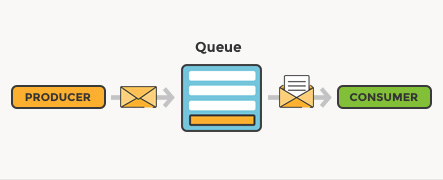
- Message queuing makes it possible for applications to communicate asynchronously, by sending messages to each other via a queue. A message queue provides temporary storage between the sender and the receiver so that the sender can keep operating without interruption when the destination program is busy or not connected. Asynchronous processing allows a task to call a service, and move on to the next task while the service processes the request at its own pace.
- A queue is a line of things waiting to be handled — in sequential order starting at the beginning of the line. A message queue is a queue of messages sent between applications. It includes a sequence of work objects that are waiting to be processed.
- A message is the data transported between the sender and the receiver application; it's essentially a byte array with some headers on top. An example of a message could be an event. One application tells another application to start processing a specific task via the queue.
- The basic architecture of a message queue is simple: there are client applications called producers that create messages and deliver them to the message queue. Another application, called a consumer, connects to the queue and gets the messages to be processed. Messages placed onto the queue are stored until the consumer retrieves them.
- The queue can provide protection from service outages and failures.
- Examples of queues: Kafka, Heron, real-time streaming, Amazon SQS, and RabbitMQ.
Pros
- Buffering
- Request spikes smoothing
- Message durability
Cons
- Increases system complexity
- Increases latency
Design user interface when MQ is involved
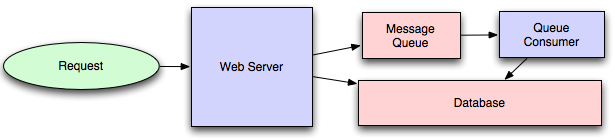
- Dividing work between off-line work handled by a consumer and in-line work done by the web application depends entirely on the interface you are exposing to your users. Generally, you'll either: perform almost no work in the consumer (merely scheduling a task) and inform your user that the task will occur offline, usually with a polling mechanism to update the interface once the task is complete (for example, provisioning a new VM on Slicehost follows this pattern), or
- perform enough work in-line to make it appear to the user that the task has completed, and tie up hanging ends afterward (posting a message on Twitter or Facebook likely follow this pattern by updating the tweet/message in your timeline but updating your followers' timelines out of the band; it's simple isn't feasible to update all the followers for a Scobleizer in real-time).
The role of message queuing in a microservice architecture
- In a microservice architecture, there are different functionalities divided across different services, that offer various functionalities. These services are coupled together to form a complete software application.
- Typically, in a microservice architecture, there are cross-dependencies, which entail that no single service can perform its functionalities without getting help from other services. This is where it's crucial for your system to have a mechanism in place which allows services to keep in touch with each other without getting blocked by responses.
- Message queuing fulfills this purpose by providing a means for services to push messages to a queue asynchronously and ensure that they get delivered to the correct destination. To implement a message queue between services, you need a message broker, think of it as a mailman, who takes mail from a sender and delivers it to the correct destination.
Message Broker — RabbitMQ
RabbitMQ is a message broker. In essence, it accepts messages from producers, and delivers them to consumers. In-between, it can route, buffer, and persist the messages according to rules you give it.
The way RabbitMQ routes messages depends upon the messaging protocol it implements. RabbitMQ supports multiple messaging protocols. However, the one we are interested in is AMQP. It is an acronym for Advanced Message Queuing Protocol.
Advanced Message Queuing Protocol The conceptual model of AMQP is quite simple and straightforward. It has three entities: 1.Queue 2.Binding 3.Exchange
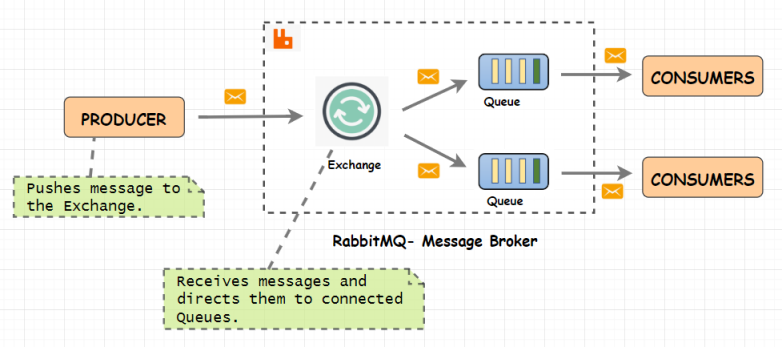
When a publisher pushes a message to RabbitMQ, it first arrives at an exchange. The exchange then distributes copies of these messages to variously connected queues. Finally, consumers receive these messages.
Producer
Producer will send messages to RabbitMQ Exchanges with a routingKey(queuename). RabbitMQ uses routingKey(queuename) to determine which queues for routing messages.
Queue
Here, our message will be stored. Once consumed by consumers, message will be removed from queue.
RabbitMQ queues also follow FIFO — First-In-First-Out methodology.
Consumer
Consumer listens on a RabbitMQ Queue to receive messages.
Bindings
Bindings are the rules that a queue defines while establishing a connection with an exchange. You can have a queue connected to multiple exchanges. Every queue is also connected to a default exchange. An exchange will use these bindings to route messages to queues.
Exchange
An Exchange is a gateway to RabbitMQ for your messages. The distance the message has to travel inside RabbitMQ depends on the type of exchange.
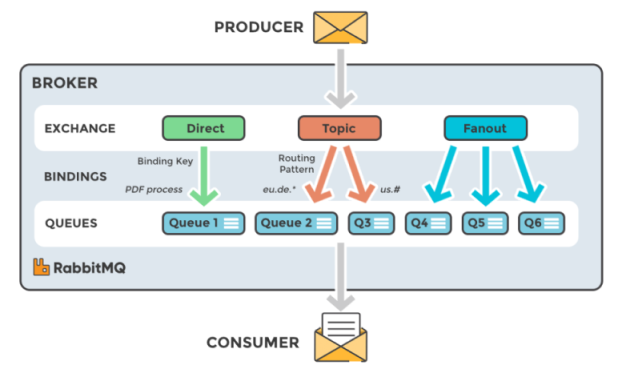
Primarily there are four types of exchanges
- Direct Exchange - It routes messages to a queue by matching routing key equal to binding key. Routing key == Binding key
- Fanout Exchange - It ignores the routing key and sends message to all the available queues.
- Topic Exchange – It routes messages to multiple queues by a partial matching of a routing key. It uses patterns to match the routing and binding key. Routing key == Pattern in binding key.
- Headers Exchange – It uses message header instead of routing key.
- Default(Nameless) Exchange - It routes the message to queue name that exactly matches with the routing key.
Another benefit of using RabbitMQ:
- Highly Available Queue
- Multi-Protocol
- Many Client
- Clustering
- Management UI
- Tracing (Using dashboard can trace support)
- Plugin System (Extend core broker functionality in a variety of ways)
Apache Kafka
Apache Kafka is a distributed publish-subscribe messaging system and a robust queue that can handle a high volume of data and enables you to pass messages from one end-point to another. Kafka is suitable for both offline and online message consumption. Kafka messages are persisted on the disk and replicated within the cluster to prevent data loss. Kafka is built on top of the ZooKeeper synchronization service. It integrates very well with Apache Storm and Spark for real-time streaming data analysis.
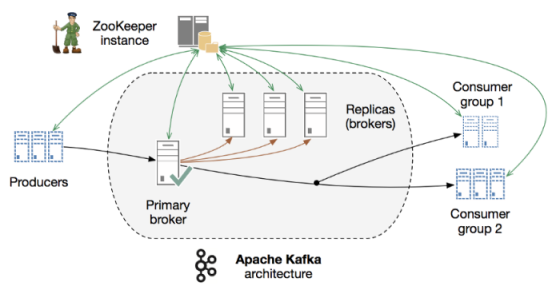
Benefits of Kafka
- Reliability − Kafka is distributed, partitioned, replicated and fault tolerance.
- Scalability − Kafka messaging system scales easily without down time..
- Durability − Kafka uses Distributed commit log which means messages persists on disk as fast as possible, hence it is durable..
- Performance − Kafka has high throughput for both publishing and subscribing messages. It maintains stable performance even many TB of messages are stored.
What is the difference between Kafka and RabbitMQ
Kafka is a distributed event streaming platform that facilitates raw throughput, focused on a distributed append-only log that can be clustered across multiple servers for a higher degree of availability. This differs from RabbitMQ, an open source distributed message broker that efficiently facilitates the delivery of messages in complex routing scenarios. RabbitMQ capabilities can be expanded through the use of plug-ins enabled on the server. They can also be distributed and configured to be reliable in the case of server or network failure.